🚀 Upgrade Your Home Network to Future-Proof Speed & Coverage
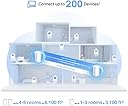
The TP-Link Deco AX7800 Tri-Band Mesh WiFi 6 System (Deco X95) delivers ultra-fast Wi-Fi speeds up to 7800 Mbps with tri-band technology and AI-driven smart antennas. Covering up to 6100 sq.ft, it supports over 200 devices simultaneously, making it ideal for busy, connected households. Equipped with multi-gig Ethernet ports and advanced security features including WPA3 and HomeShield, this 2-pack mesh system replaces traditional routers and extenders to provide seamless, reliable whole-home Wi-Fi with easy app management.


| ASIN | B0BMWLGBRB |
| Antenna Location | Home |
| Antenna Type | Internal |
| Best Sellers Rank | #31,043 in Computers & Accessories ( See Top 100 in Computers & Accessories ) #397 in Whole Home & Mesh Wi-Fi Systems |
| Brand | TP-Link |
| Built-In Media | 1 x RJ45 Ethernet cable, 2 x Deco X95 units, 2 x Power adapters, Quick Installation Guide |
| Color | White |
| Compatible Devices | Gaming Console |
| Connectivity Protocol | Wi-Fi, Ethernet |
| Connectivity Range | 6100 Square Feet |
| Connectivity Technology | Ethernet, Wi-Fi |
| Control Method | App |
| Controller Type | App Control |
| Coverage | 6100 sq.ft. |
| Customer Reviews | 3.9 out of 5 stars 146 Reviews |
| Data Transfer Rate | 7800 Megabits Per Second |
| Frequency | 5 GHz |
| Frequency Band Class | Tri-Band |
| Global Trade Identification Number | 00840030705045 |
| Has Internet Connectivity | Yes |
| Has Security Updates | Yes |
| Is Electric | Yes |
| Is Modem Compatible | Yes |
| Item Dimensions L x W x H | 5.12"L x 4.84"W x 8.2"H |
| Item Type Name | Mesh WiFi |
| Item Weight | 3.13 Pounds |
| LAN Port Bandwidth | 10/100/1000 Mbps |
| Manufacturer | TP-Link |
| Maximum Upstream Data Transfer Rate | 2500 Megabits Per Second |
| Mfr Part Number | Deco X95(2-pack) |
| Model Name | Deco X95(2-pack) |
| Model Number | Deco X95(2-pack) |
| Number of Antennas | 6 |
| Number of Ports | 6 |
| Operating System | Openwrt |
| Other Special Features of the Product | Access Point Mode, QoS |
| RAM Memory Installed | 1 GB |
| Security Protocol | WPA, WPA2, WPA3 |
| Smart Home Compatibility | Smart Home Compatible |
| Special Feature | Access Point Mode, QoS |
| UPC | 840030705045 |
| Unit Count | 2.0 Count |
| Warranty Description | 2 year manufacturer |
| Wi-Fi Generation | Wi-Fi 6 |
| Wireless Communication Standard | 802.11ac, 802.11ax, 802.11b, 802.11g, 802.11n |
| Wireless Compability | 802.11ac, 802.11ax, 802.11b, 802.11g, 802.11n |
M**P
Deco X95 - after 1 week I'm happy
Got the Deco X95 (AX7800) to replace an Amplifi Alien mesh setup that had started frequently rebooting. So far, Im really happy. Im not a home networking expert, but Im also not a novice - somewhere inbetween. Ive set up many of these in the past (from Orbi to Eero and Amplifi), and use some of the customization features. Setup was simple. Took me less than 5 minutes to have the entire mesh network set up. Every device connected (except one, Sonos), and I have about 60 devices in the house including all the IoT stuff. The app was easy to use and pointed me in the right direction, step by step. After a full week, I have had zero devices drop or have connection issue in a 4k sqft house. Stability is probably the #1 requirement for me, both my wife and I work from home. As mentioned, Sonos didnt work within the 1st hour I had set up the Deco. Sonos is notoriously bad with mesh networks, which is unfortunate because I love their products otherwise. I fiddled with some security settings (set it to WPA2/WPA3), rebooted my sonos devices...and decided to work on it the next day. Im not sure if it was the security setting or the reboot - but miraculously the next day all of my sonos devices appeared on the network map and were working (I have 8 of them). So, I know it can be frustrating, but I at least wanted to share one experience of sonos working with Deco, since I saw a few comments about it in other reviews. Edit 2/15/23: Just wanted to share that this has been 100% rock solid and stable for a month now. Very happy with performance, range, stability. Even though the unit is not as fancy as my Amplifi Alien, it was an upgrade in performance and range which matters more than the cool on screen display the Alien had.
N**M
Great system, great price/value and high performance
Very happy with the quality and performance of this DECO Wi-fi 6 system with a main and satellite unit. It has great ethernet and wireless connectivity throughout my 2000sq ft home, in the back patio area and throughout my entire lot (9K sq ft) . Rarely do I have devices disconnecting. The app allows me to do weekly security and performance scans on the Wi-fi system which is a great help, especially if your having interference. The system will autoscan for best performing channels for 2.4 and 5GHz. And I can schedule monthly reboots to ensure the unit is connecting to all my devices. Only once did a reboot cause connectivity issue but on the second reboot all was fine. The DECO system also sends (to the app) weekly performance reports. For many years, I used another brand of Wi-fi, but based on my needs I found them to be overpriced. I was skeptical at first of purchasing such a low cost system but it's turned out to be a great performing system for a great price. Would definitely buy this brand again when I upgrade this system in the future. BTW, DECOs allow you to turn off the bright LEDs per a schedule or permanently especially if the LEDs are too bright for room. My internet is 1G and many of my devices are performing at 650Mbs+ speed. So far have not experienced buffering issues especially with my wireless tv's and cable boxes, surround sound system, solar power monitors or outdoor cameras/tv. This DECO system has definitely exceeded my expectations
L**G
Major upgrade over older wifi mesh network. Very fast.
UPDATE: 6/28/24: (1 star) I'm officially giving this product a 1 star. It stopped working and I contacted technical support. Got boiler plate troubleshooting tips. I did all and still having issues. Was told to do a replacement online. I did that process almost a week ago and have not heard back from TPLINK customer support even though it clearly states "they'll get back with you within 2 business days". Contacted customer support again and was told I'd get an email and I need to respond to it to get a replacement process started. Never got an email. Now trying to contact TPLINK again. UPDATE: 6/17/2024 (3 stars) 3 months after setting up this Wifi mesh network, I'm running into terrible internet connectivity issues. The routers show they are green and I can connect to the wifi perfectly, but I get no internet service. This started occasionally and now are constantly happening. I've called my ISP who said they show no issues on their end and now I'm in talks with TP-LINK. I've sent over pictures to customer service showing the issue. I don't know how this product can suddenly just stop working after 3 months. My old routers are still kicking and it's been 5 years. There's definitely some quality control issues happening. Hopefully, they can send me a new pair because it's definitely still under warranty. The hassle though to call, go through hours of troubleshooting, and to hopefully get a replacement is not what I signed up for. ------- March 30, 2024 Review (5 stars) I changed over from Xfinity to fiber and wanted a new wifi mesh solution that could keep up with the gigabit up/down streams. I was really wary about this product because amongst the high reviews were a plethora of bad reviews. However, when I received the product, I was pleasantly surprised how easy it was to setup and get online. Step 1: download app. Step 2: plug ethernet cable into AX7800 and power on Step 3: detect and setup AX7800 Step 4: once set up, go place the other router in the area you want Step 5: plug in router, turn on and let app detect. That was it. The results are super impressive. The internet speeds in the house went from an avg of 200mbp/s to over 500mbp/s with this network. House size is 3700 sqft and two stories. Router is in the middle entertainment area surrounded by an enclave and a large tv. Second router is on the stair landing about 15 ft away behind a thick wooden wall. Tested signal was in the master bedroom 40 ft away on the second floor. I'm super impressed and very happy with the product.
G**I
Powerful, Capable, With a Hitch
I'm 3 months in with these, and my opinion of them is slightly mixed. I'm using 2 of these as a sort of bridge to a PC on LAN, as well as for their ability to be wireless access points. The Good: * They really do have fantastic bandwidth for things like local network file transfer, and when you *don't* use QoS (priorties), they distribute your internet bandwidth pretty well too. * Setup and general management is excellent, and I'll even venture to say that the folks complaining here about loss of network management functions are nitpicking about the smallest things. You can still hide networks, filter access, assign IP addresses, and make port forwarding rules. The ability to add or change your network from a touch on your phone is also a very clutch feature. The Bad: * The first bad is the worst bad. If you use these as routers, they are absolutely TERRIBLE at recovering from power loss, disconnect, or even just turning one off to move it somewhere else. I struggled for hours when I first moved one to get my entire network to work, and ended up factory resetting the main unit and rebuilding the network. There is a careful, patient, and deliberate reset process to getting it back online, but it's so specific and time consuming that it's fairly ridiculous. Apparently this only happens if you use them in router mode, so if you want them just as access points, these may be ideal. But man...if you lose power a lot, these would be a nightmare. * QoS and prioritizing devices seems to cause a general apportionment of your download capacity, such that even the most priority device will still only get a "slice" of total download bandwidth rather than the whole thing. This is on a 1000mbps connection though, so a 300-400mbps slice of the internet bandwidth may not matter for most users. But be awa that it does seem to cap your total bandwidth no matter what. Overall, I'm keeping them, and like their features. If they're reading this though, they really, really need to fix how these things recov from power loss or disconnects!
C**N
Fantastic Speeds Around the House!
I got this Deco X95 to replace an Asus XT9 WiFi-6 mesh system, which in turn was used to rep[lace a Netgear Orbi RBK852 WiFi-6 mesh system. The Netgear Orbi was an amazing first step to replace a stand alone WiFi-6 router but, after we moved into a new home with lots of floor space, it became obvious that a mesh system was necessary to cover all the IoT gear and Zoom meetings the were becoming the norm. The Orbi required a paid subscription for the cybersecurity benefit to work and it became awkward to setup and maintain. I switched to the Asus XT9 to get the Tri-Band format and that seemed to work out well. It did seem that the Asus was slow to respond to network changes and it has way too many user-involved settings to tune in order to get a reasonable level of performance. I decided to tray the Deco X95 and it is a hit! Fast, snappy performance and easy setup, even though I have a background in military and commercial electronics, I’m not really looking to go through a bevy of menus during setup to get the system up and running. The Deco X95 is a pleasure to use and own. The coverage is great and I had our new home pre-wired for Ethernet CAT-6 so I can feed my UHD 4K Blu-Ray player stored Hi-Resolution music files from an NAS, feed two TVs 4K streaming services from Amazon and work remotely from home. Coverage is great in our backyard and in front of the house and inside the garage.
B**E
Deco X95 - Excellent Performance and Range
Running a 2-unit Deco X95 in my 4000sqft home to upgrade to Wifi 6 and replace a previous 3-unit Linksys Velop AC (WiFi 5) mesh wifi system. The primary node (connected to the cable modem using Xfinity Gigabit+ service with 1.2 Gbps down; 35 Mbps up) gets wifi speeds at the over-provisioned 1.4 Gbps down, 41 Mbps up. Satellite node, connected to main node via wireless backhaul, is located one floor below the main node and clocks in at up to 700 - 800 Mbps down and 38 Mbps up. Range is seriously impressive and covers my backyard and front driveway right up through the court. At its minimum at the furthest range away from the nodes, I'm still clocking in at about 200Mbps down, 35 Mbps up. I find the network options in the TP-Link Deco app sufficient for the vast majority of users who will not have any need to tinker with advanced network settings. The only lacking aspect in the app functionality is a speed test between cable modem and Deco main node. However, I later discovered TP Link has a Wi-Fi Toolkit app that has that functionality. Otherwise, no other complaints with the product.
T**E
Bereft of configuration options, poor signal integrity
I was hopeful that this would at least perform better than the rental unit I got with my ISP, and in some ways it was. Some devices connect well, and hold a steady connection. Others will drop periodically, or reduce their throughput to a fraction of intended speed. This will happen regardless of distance, and after optimization. Setup was easy enough, but I've been in technology for decades, I don't need my hand held, I need configuration and options based on my infrastructure. I'd like to segregate my IoT devices from my faster items, but nope. Can't do that with this. Device enumeration? Nope. Everything shows up as "network device". Should have went with ubiquiti.
C**.
We replaced a Google mesh system to move to WiFi6
We're quite impressed with the range and signal quality of this mesh system. We replaced a three puck Google Wifi system in order to go to WiFi6. We couldn't use the new Google system because the pucks double as Google speakers/assistants and we can't have any device with a microphone in a couple of rooms (work from home rules). This two router system has far better coverage in our 3000sq' solid brick home. We really don't have any low reception areas. Also the IOT (an additional wireless network specifically for WiFi enabled smart devices) has resolved a major issue by creating a stable, independent, 2.4ghz SSID that is compatible with almost all IOT devices. The app also allows for very granular network settings so you can setup your network as you prefer, or just use the automatic settings if you're a novice. I very happy that our cable installer and a network engineer told us to stay away from the Eero system (it really is junk), and to go with TP-Link.
N**Z
My bueno y con excelente protección
Las 3 bandas son una maravilla
C**C
Great stability and range
First time using TP-Link mesh Wi-Fi and so far I am happy and surprised it work so well. I researched alot before purchasing and decided to go with this. The setup was easy and you can get it running in 10-15 min if there are any firmware update. I have the master on the first floor where my internet modem is located and the second one on the 2nd floor. Signal is good all around the house and the speed are not far apart from each other. I am getting around 590 Mbps download with 500 Mbps from provider. All my 70+ devices / smarts and cameras doesn't have any issue connecting. Yes I would recommend this but it's a bit pricy though for Wifi 6E.
K**L
This works
I was +++ struggling to do Zoom calls before this was installed. Easy peasy set up- just follow the instructions on the app. Works extremely well. Love how the wi-fi is seamless throughout the zones. Most importantly there are No more dead zones in our basement-Just super speeds!
C**O
Excellent performance and stability
Just added a 1.5 GB link to our house for internet. Previously had a wifi 5 system which operated well, but had a few dead spots. Upgrading to a wifi 6e system allowed us to take full advantage of the 1.5GB download / upload capabilities of our internet connection and vastly improved coverage in our house. Regular download wifi connected speeds of 1.4 gbps and higher. Very pleased with the performance. Only hiccup was when I ordered initially, one of the units was "bricked" - wouldn't start up properly. Connected to Tp-link and they advised that indeed it was a faulty unit, but I had to return it to the vendor (Amazon). So had to order a second set, and am returning the first. Second set worked immediately out of the box.
A**R
Very disappointed ☹️
Started to hate it after a week of using it. The signal is very uneven, same room on a distance o 1-2 m signal can be from 300Mb to 3 Mb. The fall back between the APs are horrible, need to switch it manually to get a better speed. Very disappointed ☹️
Trustpilot
3 weeks ago
1 month ago