๐ป Elevate Your Workspace with Xenta's Compact Power!
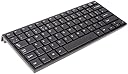
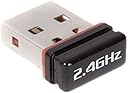
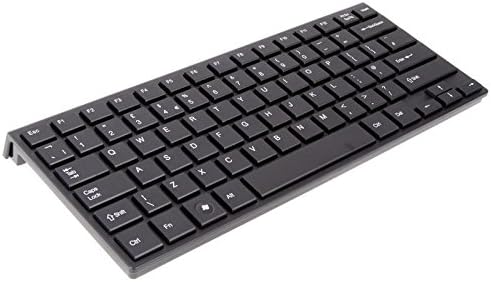
The Xenta Super Compact Wireless UK Keyboard features a sleek design with slim keys and a reliable 2.4GHz wireless connection. Measuring just 283x122x21mm, itโs perfect for on-the-go professionals who value both style and functionality. The keyboard includes a tiny USB receiver and is compatible with Windows, making it an ideal choice for modern workspaces.
| ASIN | B004GAGM1Q |
| Best Sellers Rank | 430,094 in Computers & Accessories ( See Top 100 in Computers & Accessories ) 2,807 in Computer Keyboard & Mouse Combos 7,123 in Keyboards (Computers & Accessories) |
| Brand | Xenta |
| Brand Name | Xenta |
| Button Quantity | 78 |
| Compatible Devices | Laptop |
| Compatible Operating System Family | Windows |
| Compatible devices | Laptop |
| Connectivity Technology | Wireless USB |
| Connectivity technology | Wireless USB |
| Customer Reviews | 3.9 out of 5 stars 129 Reviews |
| Hand Orientation | Ambidextrous |
| Hand orientation | Ambidextrous |
| Keyboard Description | Wireless |
| Keyboard description | Wireless |
| Manufacturer Part Number | SK-094AG |
| Style | Modern |
| Style Name | Modern |
R**N
The best typing experience on a compact keyboard
This is my third compact keyboard - for use with my laptop when at my desk. I have limited space so a full size keyboard just gets in the way. My keyboard gets quite a lot of use so I need something that is OK to type on. I previously tried the sub ยฃ10 items that use a USB cable to connect, these had the hassle of a cable connection and were also inferior to type on - needing hard presses to work. In contrast the Xenta Super Compact is a pleasure to use needing only a light touch. Well-worth the little extra, the wireless USB dongle is also small enough to leave permanantly in my laptop. Having wasted money on the sub-ten pound keyboards in the past I'm glad I spent a little more on this item to get something that actually works well. Fantastic to use and doesn't hog my whole desk like a full-size keyboard does.
D**D
Great, good looking, neat and works
This is a lovely minimalist keyboard that works great with my smart TV. Being in the living room, I wanted something that is small, neat and, above all, wireless. The receiver is very small and plugs into a USB port on the TV meaning it appears no different to a wired keyboard as far as the TV is concerned so it just works.
T**E
You could do better *much better
*In contrast to my initial four stars i'm now reducing it to two since the resistance of the keys has become too strenuous. It's not like each keystroke is a task but it's largely hindering my typing flow and consequently i'm now looking for a new keyboard: Waste of money. Also, if you go logitech the unifying receiver means you only need one USB for a mouse and keyboard AND you can program the fn keys... In summary: It's not bad... I've had this keyboard now for 9 months and it's still working, but I have picked up on a few nuiances and things that should have been included to make this keyboard better. Pros: Easy to install: It just worked really, plug in the usb and you're away Low battery consumption: Have never needed to change them and have used this every day Compact and light: Easy to move about on the desk and takes up little room Cons: The Keys: Unlike to begin with some of the keys now take a little more effort to push than before, it's only minor but it can be quite annoying and shouldn't be happening. As others have mentioned the Fn key is pointless and therefore annoying. No On/Off switch: This is also annoying since it affects the transportability of the keyboard. If this keyboard is in your bag and linked up to your laptop still then you'll find it conflicting with your inbuilt keyboard. You could take out the Usb receiver but there's nowhere to store it which is present on similar devices such as computer mice that you can store the receiver in when not in use. Then again these tend to have an on/off switch too. For the same amount of money I'd strongly recommend the Logitech K360. It has a larger footprint but is overall a much better wireless keyboard. Logitech K360 Wireless Keyboard - Black
C**N
Good quality, but seems a little cramped
It is not certain this is a standard sized keyboard, as I find it somewhat cramped. Nevertheless, the key actions while a little stiff is an enjoyable typing experience and I find myself typing well with this keyboard. The quality of the product is definitely good and it looks good. The arrow keys are a little small. The delete key has been moved to the bottom and there is no end key.
W**E
Brilliant
First of all i would just say how good this keyboard is its compact so it fits on my desk easily, it also has a lovely design and therefore looks lovely. It also have a lovely solid feeling when you type and the build quality is exellent. All in all this is the best keyboard is the best I've used although it doesn't come a caps lock light and num lock etc.... but they don't matter to me.
F**.
The good: compact size - The bad: keys are not comfortable
Most comments are based on the size of the keyboard. So, I'm not going into detail, I'd only say that the size is perfect for environments where there's not enough space or even to use the keyboard on your lap regardless the space. After using this keyboard as my "main keyboard" I'm gonna comment about my personal experience. Usage (the good): + really good reception. I've used the keyboard from unusual distances just to press "next" when I'm away from the screen and it has done the job very well despite the walls and doors in between. Mind you, not to extreme distances, maybe around 10 mts. + the wireless USB receiver is small enough to leave it plugged at all times. + the keys have a normal size and not small as some other keyboards Usage (the bad): - As some other people said before there are no indicators that the keyboard has "caps lock" on, or even that the keyboard itself is "on". - There are important keys missing (No home, no end, no pg dwn, no pw up...) - it is almost impossible to type fast. The keys must be pressed exactly "in the middle" for them to work. Pressing the corner of a key will result in a missing character when you type. This is particularly a problem when you use the "space bar" because, although it is a bit more responsive than the other keys, it is still not responsive enough for me. (Personal experience: I've noticed that after 2 weeks using the keyboard either I got used to the lack of responsiveness of the space bar or it became more responsive. However, the other keys are still not very responsive unless they're properly pressed) Usage (workarounds): * If you are using the keyboard as a secondary keyboard you can use the LEDs in your main keyboard as guidance to know whether your keyboard is on or the "caps lock" is on. If this is your main keyboard you're gonna have a hard time trying to know this only by looking at the keyboard. Additionally, if you switch off the keyboard you can check this by pressing,for instance, "caps lock" and see whether the main keyboard reacts. * I use a lot "home" and "end" to go to the beginning or end of a line. With this keyboard you can use Ctrl+left arrow or Ctrl+right arrow. It doesn't exactly does the same but kind of simulates this functionality. PgDwn or PgUp remains a mystery to me though. * It is possible to switch off the keyboard by pressing "fn"+ F11, as some other reviewer said, other than that I couldn't find any other functionality of the key "Fn". I think they should have replaced "Fn" by "Power" or "On/off". Switching off the keyboard will save battery but I usually remove the battery after usage. If you leave the keyboard switched on (not pressing Fn+F11 or not removing the battery) the next day you might not have enough battery. Usage (opinion): I think the lack of important keys and the responsiveness of most of the keys are a fail in this product. I really want to use the keyboard because it has a comfortable size, but sometimes it is really uncomfortable to have to press almost "the centre of the keys" to see them working properly. The layout is a bit nonsense because a lot of space has been invested in certain unimportant keys and some other keys seem to have a single functionality and must be pressed in combination with another key (the case of the infamous key "Fn"). After using this product I feel that I'm using a "beta version" of the keyboard, an unfinished product that can be excellent in the future but needs some improvements at the moment. I would compare they keys like playing the piano after being playing only keyboards (the keys must be pressed harder). By the time of writing this review I haven't seen any other keyboard similar to this (wireless and compact size) for the price, or even at all, if someone knows a similar product, please, let me know. If you can wait until someone release a similar product (even paying more) I would do it but if you want to have a sleek looking keyboard for occasional typing I think you can give it a go to this one. Hope this helps! UPDATE (03/02/2012) VIDEO: After two months of everyday use I decided to record a short video to show one of the reasons I think the keys are not very comfortable. Mind you, this video shows my opinion about how some of the keys must be pressed properly for them to work. Most keys (in other keyboards) respond softly even when pressed in the corner, well, this keyboard doesn't work exactly in that way. I also realised that if I switch off the keyboard (Fn+F11) the batteries can last as much as they do with other more expensive keyboards (that have some sort of "auto-switch off"). Once again, hope it helps
J**.
Good enough for light use- but frustratingly buggy
Edit: On second use, the batteries are gone. So much for conserving them by having a device sleep. Save yourself some hassle and get a better one. If it worked like a usual device would give 3 stars. I wasn't expecting a great quality keyboard for the price, and it does feel a little cheap. The keys have an okay feel to them, but having experience with other mini keyboards, the quality of the pressing is noticeably poorer. That being said, the only problems I've had so far are a little key sticking which seems to have cleared up relatively fast after a few presses. I can't comment on the range as I'm very close to the reciever, I plugged it in and worked within a few moments. I would reccommend it for anyone using it for light use, but for heavier working application I think a higher priced keyboard would be worth it.
V**N
excellent keyboard
i purchased this keyboard xenta slim wireless micro keyboard and let me tell you that it surpass all my expectations slim it is you could make a keyboard slimmer unless its usb cable it is only wide were you place the batteries which how ever part of the sleek design is really the legs for angel which all keyboards usually have i have 4 computers and now i need to purchase another 3 as all the family say it is the best keyboard they have ever used i did walk outside to the end of my drive that's through a living room,hall and front door and length of my drive and car and it still operates no sticky keys very nice feel
Trustpilot
2 days ago
1 week ago