🆒 Stay cool, stay sharp — the ultimate laptop cooler for pros on the move!
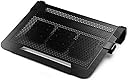
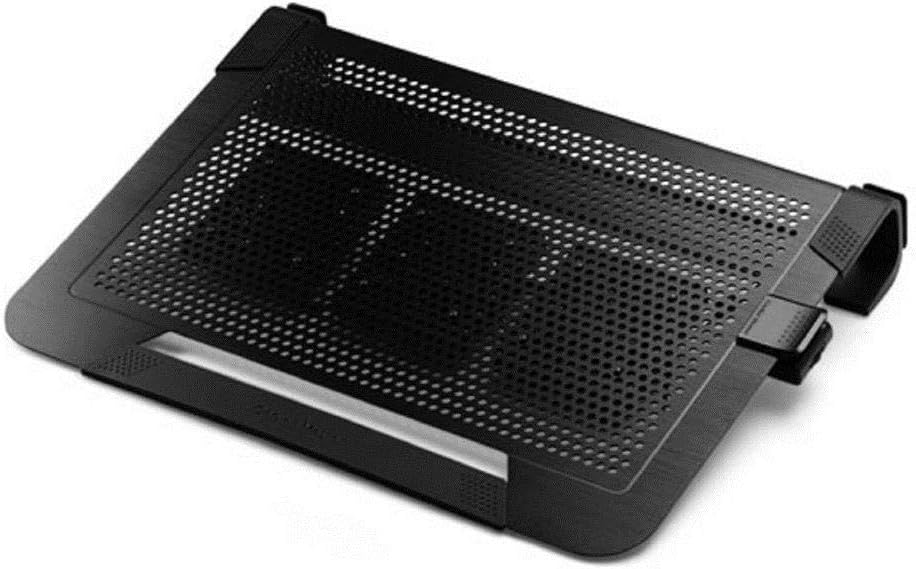
The Cooler Master NotePal U3 PLUS is a versatile laptop cooling pad featuring three adjustable 80mm fans delivering targeted airflow to reduce CPU temperatures by up to 8°C. Its lightweight aluminum frame ensures durability and high-volume airflow, while the innovative design doubles as a protective carry case for laptops up to 19 inches. With ergonomic typing angles and built-in cable management, it’s engineered for professionals seeking efficient cooling, portability, and a clutter-free workspace.


| ASIN | B00ED3WMTC |
| Are Batteries Included | No |
| Best Sellers Rank | 84,206 in Computers & Accessories ( See Top 100 in Computers & Accessories ) 151 in Laptop Cooling Pads |
| Brand | Cooler Master |
| Colour | Black |
| Customer Reviews | 4.1 4.1 out of 5 stars (4,053) |
| Date First Available | 12 Jan. 2013 |
| Guaranteed software updates until | unknown |
| Item Weight | 1.09 kg |
| Item model number | R9-NBC-U3PK-GP |
| Lithium Battery Weight | 0.8 Grams |
| Manufacturer | Cooler Master |
| Number of USB 2.0 Ports | 1 |
| Operating System | MAC OS |
| Product Dimensions | 43.43 x 7.62 x 33.27 cm; 1.09 kg |
| Series | PODSTAWKA POD LAPTOP COOLER MASTER NOTEPAL U3 PLUS BLACK(ALUMINIOWA, DO 19", 3 WENTYLATORY) |
| Standing screen display size | 19 Inches |
| Voltage | 5 Volts |
| Wattage | 300 |
A**R
Good quality cooling laptop pad
Having decided to use a Dell Latitude with i7 processor, I discovered that these babies burn hot, very hot. This coolmaster pad contains two easily adjustable pads which can be moved to match the intake area on the bottom of your laptop. Having the laptop off the desk also allows for some increased airflow. The two fans are not very strong, but they definitely DO move some air. I find that with the fans operating my laptop's CPU temperature is reduced by about 5 to 8 degrees C. Given that there is an enclosed dual exhaust within the laptop I wouldn't have expected it to have that much effect. Other components may benefit more. That will hopefully be good for it long-term. The pad looks attractive. A bit of 'bounce' exists if one is typing hard, but I personally do not find this to be a problem. An advantage is that there are no LED lights etc which many of the pads seem to have to attract the gamer market. That is fine, but I use my laptop primarily for business. The pad is suitable for laptops up to 15" max. My Dell is 14" and I think it is the ideal size for this cooling pad. Anything with a screen greater than 15" is likely to have excessive overhang and the fans may not reach where they are supposed to. The fans are not silent but I do not think they are so loud as to be distracting. Each to her own where noise is concerned. It would be straightforward to fix quieter or more powerful fans if you wished. My son has pointed out that I could fix some spare powerful fans taken from his gaming desktop case which can be converted with a £1 socket (from amazon) to be inserted into a USB. The fans do not have to be used at all if you need quiet - just take out the usb. Hope that helps!
D**G
Quality laptop cooling pad
Great laptop stand. Easily fits my Asus ROG 17" laptop. In fact is has a little room to spare. The fans that come with the stand are not that great I dissembled them and tried some Loctite super lube (from the little 7g pen as lighter grade oil than bigger bottles). There was an improvement but still nothing to write home about. I decided to upgrade the fans and today I received the bits I ordered to create a fan rig. Unfortunately I followed the specs of a Youtube guy who also did a fan build. He used the Noctua NF-F12 iPPC 3000 PWM, Heavy Duty Cooling Fan. They do deliver loads of air but sound so loud, like the old Dover to Calais hovercraft. I sent them back in substitute for the Noctua quite fans, not as much air but so much quieter. The rig is really easy to make and the parts are all available on Amazon. Especially with the speed controller I found, with a cheap 12V adaptor (power source) it is just a case of cutting the ends of stripping some of the jacket off to give you a little flex/wire, poke the ends in to the appropriate controller hole and tighten the screws (= & - diagram is on bottom of the controller). Links for them are below. I did go with the cheapest power source/adaptor. I will upgrade but just wanted to go cheap to see if it all worked ok. If you buy the Noctua quite fans they come with rubber mount clips and splitter cables. The industrial ones do not. The industrial fans will likely cool even the hottest laptop, as they deliver serious air but even headphones do nothing to dampen the noise. The Noctua quite fans are much more powerful than the standard fans. https://www.amazon.co.uk/gp/product/B084QB29TG/ref=ppx_yo_dt_b_asin_title_o04_s00?ie=UTF8&psc=1 https://www.amazon.co.uk/gp/product/B08J3W6M9G/ref=ppx_yo_dt_b_asin_title_o04_s01?ie=UTF8&psc=1 https://www.amazon.co.uk/Noctua-NF-F12-PWM-Premium-Quiet/dp/B00650P2ZC/ref=pd_sbs_3?pd_rd_w=2E8OY&pf_rd_p=2304238d-df78-4b25-a9a0-b27dc7bd722e&pf_rd_r=HY6FN3PS6ZRM1P96G29H&pd_rd_r=64ee0f96-d78d-4fce-9005-f98e1ffd7f9f&pd_rd_wg=tobnP&pd_rd_i=B00650P2ZC&psc=1
J**A
Excellent, but with an odd power-on quirk
Excellent laptop cooler. The adjustable fan positioning means you can get the airflow exactly where your laptop gets warm, or where the airvents are. It has a big range of fan speeds on a smooth speed dial (not position 1,2 etc - the dial rolls around to exactly where you want) and it's pretty quiet on the slowest one, quieter than if the laptop fan comes on. On high it does sound like a desk fan going! I've not tried gaming with it yet, but for regular use the laptop fan never comes on with the cooler on the slowest setting. For size, it's a perfect fit for my 15.6" Lenovo Thinkpad P50. The laptop fits just within the metal grille, with the frame around it. A bigger laptop would seem balanced on top of the cooler. If the airvents were on the edges the main airflow zone wouldn't be in the right place to do much good. It would also be really awkward if the rubber feet were off the grille for a bigger laptop - you want that height for the airflow, and it wants to slide around a bit as it is. I'm not an expert, but it makes sense to me that the laptop isn't sticking out off the edge of the cooler. So I'd say perfect for 15.6", fully within the airflow grille. 17" should sit with the feet nicely on the frame around the grille, but I don't see how it would work for a 19" machine. There is one really odd feature, which is why I knocked off a star from 5*. If I leave it plugged in and switch the computer on, it doesn't come on when the laptop is switched on, then when I switch the laptop off the cooler fan starts working! (If laptop mains power lead is plugged in.) It starts up immediately if it's unplugged and I put the USB lead in. The way round this is that every time I switch the laptop on, I turn the cooler fan speed dial up and the fan comes on, then I can turn it down to minimum speed again. It's a bit of a nuisance, having to remember to switch it on in that way each time. But I don't mind too much, it's still decent equipment and I like it.
L**C
fits laptop perfectly, can adjust the fans to the right position rally easily
D**G
My laptop: MacBook pro 15 in. I have searched far and wide for a good quality cooling mat that would look great on my desk without having to break the bank. After reading a lot of reviews on many different products, I chose the U3 and, let me tell you my friends, I am not disapointed at all! The movable fans are perfect for any type of laptops and you can also target any area/component that might get hot depending on what you do with your device. It is very easy to move and lock them with the simple push of a button. I use my laptop do a lot of multitasking on different monitors and after some time if I had to many programs running, my CPU would get really hot and the computer would shutdown until I let it cool a bit. Haven't had any problem since I got the the cooling mat. The product's quality is phenomenal... you can't really go wrong with Cooler Master. The mat is sturdy, nothing slips and it's also very ggod looking on the desk next to the monitor. Also the price is more than affordable for what you get. If you are looking for a good cooling mat that you can keep for a long time and customize to your needs, look no further this is for you. I totally recommend this product and would by it again as a gift anytime.
S**S
Dépasse, de chaque côté latéral du PC, de 1 cm... Paraît costaud, les matériaux semblent de bonne qualité, SOBRE (rare de nos jours), les 3 ventilateurs se clippent aisément et rapidement sous la grille, sont absolument silencieux . La "puissance" du pouvoir de rafraichissement n'est peut-être pas hyper puissante mais la trilogie des ventilateurs fixables sous les endroits "chauds" (à déterminer soi-même) laissent une grande mobilité d'action quant à ce "rafraichissement" de la machine et le métal du PC (sous celui-ci) reste FROID !!! Donc, cela fonctionne correctement. N.B. 1 : Ni le surpoids de ce socle ni l'encombrement éventuel ne sont gênants (également bien conçu pour le transport)... N.B. 2 : La "sangle" (vulgaire bande élastique -en tissu élastique mal cousu-, de 3 ou 4 cm de largeur) est très efficace pour éviter tout glissement de la machine hors de son socle lors de son utilisation. En résumé : IMPECCABLE & TRES BON RAPPORT QUALITE / PRIX ; -bien plus efficace, robuste (qualité matériaux) et esthétique (sobriété oblige) que les KLIM acquis auparavant !-
E**E
Es grande, de calidad, aguanta un portátil grande y el caudal de aire es generoso. Lo he probado en tres equipos, dos que tienen entre 7 y 8 años y un notepad de unos 5 años. Los dos primeros, de 15,4 y 17 siempre he sido muy escrupuloso con ellos, usando aire comprimido para limpiar bien de polvo, desmontando y aplicando pasta antitérmica y demás cuidados. El de 17 lleva un micro AMD que suelen calentarse bastante. Tal y como lo tengo es raro que suba más allá de 65, pero los he visto ponerse a 70 nada más comenzar a trabajar. Con la base Cooler Master las temperaturas máximas que vi ayer eran de 53, manteniéndose de media en los 40-42, que para ese AMD es un buen número. El de 15,4, un HP con i3 estuvo de media entre 33-34 grados. El pequeño no tiene ventilador, si no disipadores, se mantuvo 3n unos 50 grados, suele irse casi 20 grados más sin ventilación. Así que la base cumple en ese sentido. Por otro lado la calidad es buena, de aluminio, los ventiladores son fáciles de colocar donde más falta hacen, el ordenador se agarra perfectamente y no se mueve y encima no pierdes el usb. Es grande pero no aparatoso. Espero que dure, tengo otra base thermaltake que dejó de funcionar al año de tenerla. Ojo, una base no es la panacea, hace su trabajo muy bien, pero si tienes los disipadores llenos de pelusa y el micro con la pasta reseca va a ser difícil que notes una gran diferencia, si no es así sí que puedes notar más de 10 grados de temperatura, aparte de que discos y equipo en general se mantiene fresco, alargando su vida.
F**.
Excelente producto. Ya había comprado una de estos hace unos meses. Es muy eficiente y silencioso, los ventiladores se pueden acomodar muy fácilmente en la rejilla para que enfríen donde es necesario. El anterior lo usé en una lap de 17" que se apagaba cuando se calentaba mucho y ahora aún jugando videojuegos o viendo videos por largo tiempo no se apaga. La rejilla además se ve de muy buen material. Hasta ahora me ha funcionado muy bien.
Trustpilot
1 month ago
2 days ago