Buy anything from 5,000+ international stores. One checkout price. No surprise fees. Join 2M+ shoppers on Desertcart.
Desertcart purchases this item on your behalf and handles shipping, customs, and support to Spain.
๐บ Elevate your screen gameโwireless freedom meets professional polish!
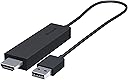
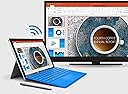
The Microsoft Wireless Display Adapter leverages Miracast and WiDi technology to wirelessly stream audio and video from compatible Android and Windows devices to any HDMI-enabled screen. USB-powered and easy to set up, it offers seamless screen mirroring with minimal lag and perfect AV synchronization. Ideal for professional presentations or immersive home entertainment, it includes security features like PIN protection and boasts a sleek, minimalist design. Note: Requires compatible hardware and Windows 8/10 or Android devices; not compatible with Apple AirPlay.


| ASIN | B00J9C2JDG |
| Best Sellers Rank | 29,586 in Computers & Accessories ( See Top 100 in Computers & Accessories ) 1,100 in Adapters |
| Brand | Microsoft |
| Brand Name | Microsoft |
| Colour | Black |
| Compatible Devices | Monitor |
| Compatible devices | Monitor |
| Connector Type | HDMI, usb |
| Connector type | HDMI , usb |
| Current Rating | 1 Amps |
| Customer Reviews | 3.9 out of 5 stars 1,553 Reviews |
| External Testing Certification | ACMA, EIP, CE, WEEE, VCCI, KCC, EAC, SRRC, UL/cUL, CB |
| Global Trade Identification Number | 00885370874938 |
| Item Dimensions | 20.3 x 6.4 x 3.2 centimetres |
| Item Part Number | CG400003 |
| Item Weight | 0.24 Pounds |
| Item dimensions L x W x H | 20.3 x 6.4 x 3.2 centimetres |
| Manufacturer | Microsoft |
| Manufacturer Part Number | CG4-00003 |
| Model Number | CG4-00003 |
| Number of Items | 1 |
| Package Quantity | 1 |
| Power Plug Type | No Plug |
| Product Finish Type | Matte |
| Specific Uses For Product | Laptop, Tablets |
| Specific uses for product | Laptop, Tablets |
| UPC | 885370874938 723856366112 |
| Unit Count | 1.0 count |
| Warranty Type | Limited |
H**N
Great tech if you have compatible devices to use with it.
This may come in handy when wanting to share content with friends and family on a large (HDMI-enabled) screen or when presenting or sharing content in professional environments. As the device supports the Miracast standard you should find it works with many Android and Windows Phone (including Windows Mobile 10) devices that support it (the devices need to have hardware to support this). Many modern computers will also have the Intel Wireless display standard which operates similarly to Miracast, allowing you to use your TV / external screen as a primary or secondary monitor. The technology does not only push visual content out onto your TV / HDMI screen but will also push audio out as well. What is particularly impressive is how the audio and video is synchronised perfectly (this is often a problem with digital content, particularly when using wireless standards such as Bluetooth). The technology is very simple to use (from Windows 8 / 10 to Windows Phone and Android). Do note that portable smart phones using Miracast will typically mirror what's on the mobile device screen, so you will need need to keep the device and the screen on. Don't attempt to use this for fast-paced games, though, as there is a slight delay (less than a second, but enough to get you "killed" in a fast action game on a smart phone or tablet). Your portable device can get warm and you will find the battery drains much quicker than usual when wirelessly "casting" your content, so do be aware of this. The wireless display technology used in Windows 8 and above (typically requiring an Intel WiDi supporting hardware as well) can, however, display content wirelessly with your computer screen off (using the TV as your primary screen, thus disabling the notebook computer screen). Use the Windows key + P to display and select the most relevant option for you. The Microsoft wireless display adapter does require a USB power source. Many television sets do have a USB port that can provide the necessary power draw for this small device and so becomes a non-issue. I have found that some portable mobile chargers can work well to power the device as well (the mobile battery charger needs to provide power immediately and not attempt to detect the type of device for this to work). Another nice feature in the Microsoft Wireless Display Adapter is the ability to set a PIN code ensuring that people outside your meeting room / living room / bedroom can't mess around with your TV! However, this is not on by default. A bit of a downside to this device is that in order to configure it or update the firmware you will require a Microsoft-based device to do so (an app needs to be downloaded from the Microsoft Store and is only supported on Windows 8 / 10 and Windows 10 Mobile). Windows 7 does not support wireless display technology (even if the hardware in your computer supports it). If you are an Apple device user you are probably out of luck as this device does not support Airplay (the system used by Apple to wirelessly display content from iOS and OS X devices). Just to be clear, this device supports WiDi (Wireless Display standard) and Miracast, it is not a replacement for Chromecast or Airplay devices (which work differently). I've got this to work flawlessly with several Android and Windows smart phones and my Dell notebook computer on my LG TV as well as my Acer computer display monitor. I have an older Android tablet (B&N HD+ and the first generation of Microsoft Surface RT tablet that don't work with this as neither have Miracast compatible hardware built into them.
N**L
The design is nice and minimalist
The product works moderately well. The design is nice and minimalist. One one laptop it took a little bit of software/firmware updating to get it up and running but my other laptop got it working immediately. The product does tend to heat up quite a bit and will disconnect every few hours, which can be a bit annoying. The video stream does not lag too noticeably in most cases. Watching movies through it is generally fine, though some flash players will show a bit of difficulty. The quality of the image will depend on the power of your device you're streaming from so bear this in mind if you're using an older laptop or desktop. It has become a staple in my life and largely replaced my Chromecast. I doubt that the disconnects could be fixed by a firmware update and I hope that it is not due to overheating which may lessen the lifespan of the device. I'd recommend - if you're looking to by this product - to buy the latest version.
S**E
Disappointing & flawed. Microsoft could have done so much better.
This is an update to the review below. I do not know what has changed, maybe a firmware or software update from microsoft, but I recently tried out the display adapter for video playback again recently (having been using it only as a convenient way to connect an extra display for work when visiting customer sites) and I can now watch video playback smoothly a reliably. I have upgraded my Surface Pro 3 from Windows 8 to Windows 10 since writing my initial review. I purchased this to accompany my i5 Surface Pro 3, with the intention to primarily use it to stream media content to my TV. Its secondary purpose was to provide connectivity to external displays when available while visiting client sites (This section no longer applies *With regards to media streaming, it performs badly. Audio is out of synch with the video, making films and TV almost unwatchable. This is regardless of the media player used, from Media Player Classic to YouTube. Music videos are OK since the lip synch is less critical.* - possible due to Windows 10 update, video playback is now fine) Physical design is also flawed. It is powered from a USB port. However, no USB power supply was included. In addition to this, the USB power cable is moulded on to the display adapter and is very short. This means that for use with displays without a USB power port, it can be very awkward to get power to the display adapter. The Chromecast scores much better in this regard, as it can be powered by any standard micro-usb cable, including the very long ones often supplied with phones and things. On the plus side, it does provide a very easy way to connect wirelessly to a HDMI display from a Windows 8 or Windows 10 computer,
J**T
read it all so it makes sense.
Finally works. I purchased this, at full retail price, the day it was released in the UK and it sucked, I could not get a smooth connection anywhere nor could I get the correct screen resolution to work. Now I have used this on Windows 8.1 and 10 technical preview on a Surface Pro 3 and with a Lumina 1520 running both WP8.1 and WP10. First the connection speed is excellent on every device used and with both a HD NEC projector together and a Sony HDTV, device gets a little warm in use so I unplug it when I know its going to be a while until its next use. The range of connection is good, have been fully across my classroom which is 30ft and have it working. YouTube plays without any errors or delay with good audio. The screen resolution from the Lumina was easily matched by both the projector and the TV with brilliant colour and sound reproduction, YouTube played full screen both, being 15ft across on the projector! The resolution of the SP3 on WIndows 8.1 proved tricky, the App and Share options were hopeless BUT going into the Display option (right hand click on desktop) proved more useful. I could select the correct resolution for each screen, the SP3s and the TV/Projector for optimal use. Settings seemed to have saved. After the upgrade to Windows 10 I had no issues using the quick connect option in the desktop and tablet modes, resolution was perfect without any issues or need to change things manually. Very good product, can now do PowerPoint from my Lumina 1520 to my class without the need for the SP3 or desktop, great seeing as I use two different classrooms and use it at home!
A**1
Great once working; getting it working is another matter
When it's connected and working, it's great. However, this product comes at a premium price, for what is, in essence, simply a 'wireless HDMI cable'. And as such there are 2 very big issues which stop me giving this 5 stars. Issues which I would hope, but have given up expecting, Microsoft to fix via windows update and/or device driver updates.... 1. The initial setup on a Surface Pro 3 required quite in depth manipulation of display device drivers. Microsoft provide a long (believe me it truly is LONG) troubleshooting page to help people get this thing initially working. For the price that is simply not good enough. For the premium price tag, you would expect this adaptor used with a Microsoft flagship tablet computer, running microsoft's flag ship Windows 10 operating system, to work seamlessly out of the box. You do not expect to have to be delving into your computers display drivers, uninstalling them, etc, like a techno-geek. 2. On windows 10, if you put your computer into hibernate, that's it. You won't connect again until you select Connect->"Find other devices" where you will see the device but be told it isn't available, even though your TV shows the device eagerly waiting for a connection. From where your only option now is to remove it. You then remove it. Several seconds later, you then attempt to re-add it. This seems to hang for another several seconds, after which it may connect. Though this may not be the end of it. Roughly 50% of the time, after several seconds connected, it will disconnect itself again for no apparent reason. You then reconnect again, and *this* time, once you're connected, you should now have a good, reliable connection..... until you hibernate your computer and have to go through this rigmarole again. (And if you're unlucky - it's happened to me 3 or 4 times now - the second reconnect attempt will fail, and that's it. You have to reboot your computer; power cycling the display adaptor makes no difference) Once you're reliably connected it's good. You can watch BBC iplayer, YouTube, etc full screen on your TV while getting on with other work on your computer. It's probably stating the obvious, but the quality of the image very much depends on the quality of your TV; if your TV is a cheap one, then it'll probably be fine for watching movies, etc, but perhaps not so good as a second monitor for productive work. But for the premium price, it is incredibly disappointing how much hassle it is to get this adaptor reliably connected. If you're planning to use it to give a business presentation, you better make sure you're there at least 5 minutes before you're due to present to get the damn thing connected, or it could be embarrassing! Update: It's getting worse, not better. Windows now says "disconnecting" after just couple of seconds attempting to connect to this flipping thing. Have been trying to connect for the past 30 minutes with no luck. Windows just says "disconnecting" after 2 seconds of trying to connect; the device still seems to think windows is trying to connect though. Seems pretty consistently unable to connect now. The unit itself seems happy - saying "ready to connect" as always, so nothing to suggest the unit itself is faulty, but I guess a windows 'update' instead of improving things has probably made things worse. I really cannot recommend this product; it certainly is not worth a premium price, at all.
A**R
More frustrating stuff
For a while this worked reasonably well with my android phone and particularly with Windows 10 laptop although when casting a movie from the laptop there was a discernible lip-sync problem that made some films unwatchable. Recently though the Laptop has failed to connect to the adapter despite following all the recommended procedures for restarting the adapter. It's not the TV as the adapter is still recognised by the Android phone and yes I am aware that it will only connect to one device at a time. Checking online it appears that Microsoft have automatically installed updates which are uninstallable and it's been suggested in online forums that therein may lay the problem. I therefore can't recommend buying products produced by Microsoft when the same company issue updates that stop it from working. One shouldn't have to keep hacking into MS systems to keep them working. Another sign of the times that Security processes only serve to deny the users access whilst appear to be no problem to the hackers / car thieves / scammers etc., Update 6 May 2017- resolved the issue after some searching and trial and error by enabling display adapters shown in the Device Manager list which had somehow become disabled. I assume the Windows updates were the culprit but it shouldn't be necessary for users to have to repair settings. There is still, on occasions, a noticeable lag in the lip Synch but of course that could be just my setup/ service rather than the device itself.
J**G
Frustration
I found it easy to connect to my Surface Pro 4 and worked a treat with PowerPoint (my main need). However on the 18th Dec it suddenly stopped working. It tries to connect & then disconnects. I have tried everything suggested on there support website. I have been in contact with MS Support and they have concluded it is likely to be due to a firmware update to my SP4 that came with a Windows update on the 17th. There is no time-scale or promise of a solution.
C**E
At work, on Holiday your screen where you want
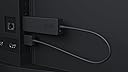
The Microsoft Wireless Display Adaptor is broadly similar in concept to the Google Chromecast; though unlike the limited google device the Wireless Display adaptor works with support laptops and allows you to transmit everything windows with very little lag. Plug it into a spare HDMI socket on a TV and feed it some power over the USB cable, wait for the adaptor to the boot and the screen shows a Microsoft logo. Once that is being shown; from Windows 8 Mirracast supporting laptop (e.g a Surface Pro 3) swipe in the charms menus and select project from the devices and you are away. The video is streamed over a wireless network (you can still use your main network at the same time on the surface) in near real time - windows allows you to mirror or use the adaptor as a second screen. The quality is upto 1080p and when connected you can comfortably stream full HD Prime Video to the device along with iTunes and youtube - as well as powerpoint or anything else you need to show with high quality sound as well as video. Without losing your wifi data connection. There is an optional supporting app on the Windows Store that allows you to rename the device as well as set a passcode; as well as optimise it to fit onto screens better; the passcode bit may come in handy to stop people hijacking your presentation. The Microsoft wireless display isn't as cheap as the Chromecast but it isn't as limited if you are regularly doing presentations for work; or like me want to watch your own films in a hotel room, it is super handy to have in your bag as it makes connections so much simpler than finding the right monitor adaptor.
Trustpilot
2 months ago
2 weeks ago