We remain fully operational. Our teams are working around the clock to ensure your deliveries continue safely.

DOWNLOAD THE APP


Customer Services
Copyright © 2025 Desertcart Holdings Limited
DOWNLOAD THE APP
Buy anything from 5,000+ international stores. One checkout price. No surprise fees. Join 2M+ shoppers on Desertcart.
Desertcart purchases this item on your behalf and handles shipping, customs, and support to Spain.
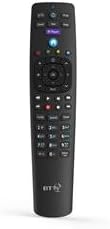
🎯 Master your media with the ultimate YouView remote—control, comfort, and style in one sleek device!
The BT YouView Remote Control is a sleek, ergonomically designed device compatible with all BT and Humax YouView set top boxes. Featuring a dedicated BT Player button for quick access to streaming content and customizable controls for TV standby, AV input, and volume, it offers a seamless, plug-and-play experience. This black version weighs 100g and measures 23.01 x 5 x 2.01 cm, making it a stylish and practical addition to any modern entertainment setup.
| ASIN | B00DOWPQP0 |
| Best Sellers Rank | 2,577 in Electronics & Photo ( See Top 100 in Electronics & Photo ) 188 in Remote Controls (Electronics & Photo) |
| Guaranteed software updates until | unknown |
| Item model number | bt |
| Manufacturer | British Telecom PLC |
| Product Dimensions | 23.01 x 5 x 2.01 cm; 100 g |
S**L
Great price, great remote.
Extremely quick delivery. Remote works perfectly,just popped in the batteries and started using. Excellent price and condition. Would recommend the seller.
N**A
Excellent replacement
Genuine BT Youview remote. I just put batteries in and it was ready for use without any configuration. Works a treat.
O**E
Good replacement
Like other reviewers my 12 yr+BT youview remote started to fail - the skip and fast forward stopped working completely. This replacement is a fair price and worked immediately I put batteries in. It's exactly the same layout as the old remote except for the centre buttons not having the metal coating. I found this a bit difficult to get used to and had to keep putting a lamp on to see what I was pressing, it's not as intuitive as the old style. I haven't been able to pair this with my Hisense TV but this doesn't bother me as it wasn't paired previously. All in all I'm very happy with this product and the ease of skipping ads and fast forwarding being restored. I wish I'd bought it months ago!
C**X
Recommend
Works as expected if you need a replacement
P**R
Good remote to replace broken ones to use with the Youview box
My old remote broke and still would not work when I replaced the batteries so I had to get a new one. It was new as described and it was easy to setup even for someone with limited technical knowledge it's of the same quality as the original from BT themselves. Buttons are as responsive as the previous remote. Batteries provided worked for a reasonable amount of time too without needing replacing.
C**H
Perfect
Excellent buy. Batteries in and away, didn't need any setting up. Up there with the best £6.99 ever spent.
P**Y
Easy to set up
Speedy delivery which was good as my old remote control wouldn’t have worked for much longer. Looks much the same. Set up was ok, pretty simple really, just a couple of glitches but that was probably down to me! I don’t know why I put off getting a new remote controller for so long.
A**R
Great updated version of the original remote!
Even better than the remote that came with my BT Vision+ recorder, and a genuine BT item I think I am writing this just after receiving the remote control. I bought my BT Vision YouView+ 500GB box back in mid 2014 (a DTR-T2100 or DTR-T2210 - I forget which as they look the same, but not purchased for a BT Vision package, just for YouView+), and since then it has had very heavy use. It came with the remote with the silver OK/arrow array, and for the past year or more my most frequently-used buttons have required more and more pressure to work, eventually needing pressing with a pen as my finger isn't strong enough(!), and then refusing to work at all. I think this is quite common from the reviews I read. First to go was the forward skip button (for jumping over adverts!), then fast forward, then the TV/AV button (our TV is set not to automatically jump between inputs as I find that irritating at times). The original remote was set to operate my recent-model Samsung TV's TV/AV button, the TV power button, mute and volume controls. Having received the new remote, I noted that it had a black OK/arrow array (now in velvety rubber like the other keys, rather than the hard plastic of the original version). It has a purple BT Player button rather than black on the original, but otherwise looks the same. The new remote is noticeably lighter in weight (not a problem!) and the button action feels a little more "normal" as the original always had very "ker-plunky" buttons - I am hopeful that this means it won't suffer the same deterioration if it is designed differently inside. It is just as well finished and the labels inside the battery compartment show that these ARE the same remote control - but the black-button new one is version 05, versus version 01 that I originally had. Some reviewers here have said that the new-style remote won't work their TV. Mine certainly does. Because I couldn't remember where I had put the instruction book that came with my recorder, I easily found it online. This tells you how to set up the remote to control the TV: on the BT YouView remote, hold down the TV power (top left) and TV AV buttons (top right) together for 3 seconds, until the blue light between them blinks 3 times. When it has stopped, enter a 4 digit code for your make of TV. The blue light will flash 3 more times. Try out the TV power button on your new remote. If it works, try it again if you need to, to turn the TV on (depending on whether you turned it on or off the first time!). Then try the mute and volume buttons. If they all work, press your OK button on the previously-silver but now black array on the top half of your new remote to end the setting up mode. Try the whole process again if you need to have another go. The 4-digit codes for common TV brands are: Samsung 4483, Panasonic 3846, Sony 4985, LG 2992, Philips 3951, Sharp 4848, Hitachi 2424, JVC 2788, Toshiba 5523, Goodmans 2037. Hope this helps someone!
Trustpilot
1 month ago
1 day ago