Buy anything from 5,000+ international stores. One checkout price. No surprise fees. Join 2M+ shoppers on Desertcart.
Desertcart purchases this item on your behalf and handles shipping, customs, and support to Spain.
⚡ Power up your play, showcase your style!
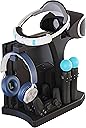
The Skywin VR Charging Stand is a sleek, tabletop USB charging station designed to simultaneously charge up to four PlayStation 4 and PSVR controllers. Featuring individual LED charge indicators, universal compatibility with PS4 DualShock, PS Move, and PSVR controllers, and a durable design that organizes and displays your gear, it’s the perfect accessory to keep your gaming setup tidy and always ready for action.


| ASIN | B075X47CG7 |
| Additional Features | Charging Indicator |
| Best Sellers Rank | #10,500 in Video Games ( See Top 100 in Video Games ) #201 in PlayStation Games, Consoles & Accessories |
| Brand | Skywin |
| Built-In Media | 1 charging stand, 1 PS VR stand, LED charge indicators for each individual Move and Dualshock controller |
| Color | PlayStation 4 |
| Compatible Devices | Game Consoles |
| Connectivity Technology | USB |
| Connector Type | USB |
| Customer Reviews | 4.3 out of 5 stars 8,025 Reviews |
| Enclosure Material | Plastic |
| External Testing Certification | Não Aplicável |
| Included Components | 1 charging stand, 1 PS VR stand, LED charge indicators for each individual Move and Dualshock controller Included Components 1 charging stand, 1 PS VR stand, LED charge indicators for each individual Move and Dualshock controller See more |
| Item Weight | 2.2 Pounds |
| Manufacturer | Skywin |
| Mfr Part Number | SW-PSVR-CDS |
| Model Number | SW-PSVR-CDS |
| Mounting Type | Tabletop Mount |
| Number of Items | 1 |
| Output Voltage | 5 Volts (DC) |
| Portable | No |
| Power Plug | Type A - 2 pin (North American) |
| Power Source | AC (Alternating Current) |
| Special Feature | Charging Indicator |
| Total USB 2.0 Ports | 4 |
| Total USB 3.0 Ports | 4 |
| Total Usb Ports | 4 |
| UPC | 612520478414 |
| Unit Count | 4.0 Count |
R**R
Really cool and neat concept, just needs a few fixes.
Absolutely loving this charging/stand/storage for my ps4. Keeps it organized and simple for the most part. There is a few things i wish was diffrent. 1. More space for the back controller spot. If you have a vr box the cables well keep from being able to charge that one controller. 2. Better hiding of the wires if possible, maybe have a power being pulled from behind were the power cabel is for the ps4 (maybe a tap in like how Christmas lights can stack on top of eachother into a wall). Ive also seen this technique used on the xbox one hardrive extension you guys sell, same concept. Also with doing that, that would fix this issue and my thrid issue. 3. This one is my biggest issue. I really wish the usb to the power supply for the mult usb came with a wall plus instead or atleast a longer cable to plug into a wall. It might just be me but id like to be able to pull less power from the console if I can. If the seller could comment back to atleast what kind of voltage/amperage this can take so i could possibly get a cable to run to the wall that would make my day. Aslo one other problem is i could not get my vr to work while the usb was plugged into the mult usb outlets on this stand and same thing with my external harddrive, this might be due to a not enough power coming from the dock. Update: Had the idea to try using a male to female usb/usb cable to a usb plug and it is working perfectly. I fount somewhere that it can take 3.0 usb so i went on and ordered a wall jack that is 2.0 and 3.0 and both work. I would suggest using the 3.0 if you plan to load down the dock with all the charging docks and running the fan.
R**T
Great efficient charging station
excellent charging station, very easy to assemble although the cradle for the psvr isn't as secure it holds up well, you want to set this up where there will be ZERO tip overs, the fans are extremely quiet and the trays fit the PS4 pro great, it's second tray is for the vr processor which comes with a very nicely snug adapter for which ever version of psvr you own, performance on the USB hub is great, I can easily connect USB devices including wireless and thumb drives directly thru the hub, the led charger indicator and overall power switch are easily understood. Charging the controllers makes this station's value go way up, easy sit and go you can't ever misplace the chargers due to the docks. PS4 pro owners can run 3 usb ports, connect it using those with your wires hiding nicely away in the back, always set ps to rest mode( it will NOT degrade performance) it also has an easy Killswitch to simply press on/off as well. The PS4 pro loves this thing no more harsh crashes or even "wheezing" the box stays cool..just avoid ANY or All falls, tip overs cause when that happens..it's TIMBER!!!
J**R
My review of the Skywin PSVR Charging Display Stand
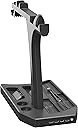
I just got mine in the mail today and for the most part I am really happy about this stand for just about everything, minus one thing which I will say about in lower part of my review. I have made this a 4 Star rating because of the negative points in the review although if it was up to me it would have been 4.5 of 5 The Positives: 1. The stand is really easy to assemble with just 3 pieces to place together. The Base of the stand, the Vertical Support beam for the PSVR headset, and the piece with the Headphone hanger which is also the part that holds the back of the VR headset up. 2. The PS4 vertical stand works great, and since it has a slider part that helps hold the system in place, the system doesn't feel at risk of falling over. The stand can also support any of the PS4 models too. 3. There are two cooling fans underneath the console part of the stand which will help to keep it cooler. 4. The Charging ports for the controllers work, and there are 4 USB ports in the front of the stand in case you need them. 5. There is a slot to keep the VR control box vertically, and in the middle between the console and the VR headset. 6. Being able to keep everything (The PS4, controllers, the VR control box, and the headset) in one place is great to make it so other areas stay less cluttered. Negative: First off I do want to point out that if the stand is placed in an area where the headset doesn't have the risk of being bumped into then everything should be fine. 1.The part that I can't help but feel slightly unhappy with for me, is that the stand part for the PS VR head set is too thin to support the headset since the support beam for the headset to rest on itself, is only about 1.5 inches thick. This means that in order for the headset to stay on it, it needs to be balanced onto the stand. What I think is bad about this is that when the stand is placed in an area that gets a good amount of movement from a person, or even a pet, it raises the potential for it to fall off the stand since its not also being held onto the stand from the left/right sides of either the headband or the viewport. 2. The wiring from the VR control box go right into the area for the second controller. This makes it harder to get the contoller in and out of the slot since the wires are right above it. My Other thoughts: For the most part I am pretty happy with this purchase. While I'm not keen on how the VR headset sits on the stand, the problem is only dependent on where I put the stand at. For the rest of the features of the stand I think its great. I've been needing something to put all 4 of my controllers either in or on and with this I can keep things more organized.
R**B
Does the job well
This Display Stand works great, and is well made. Will help cool the box as well. It definitely cleans up the cables and reduces the storage space required. The only issue is that if you have the VR device the cables are in the way to position the 2nd controller in the spot to charge it. You can store it there but in order for it to plug in and charge you either have to unlpug 2 cables from the VR interface box or slide it forward as you can see in the pictures. For us it is not a problem but if it is going to be your only controller charger you it adds an extra step to charge both at the same time. Overall it is great and worth the price in our opinion.
T**Z
Skywin is a Win!
Let's just say, that with all the components and wires that make up my PSVR unit, things were getting pretty cluttered and disorganized. Well have no fear! Skywin has produced a nifty stand that holds all your PSVR items, including your main console (PS4 Pro pictured) and controllers. This stand even charges the controllers too. I like that there is a USB hub on the front panel for easy access with these really cool blue LED indicators. Now I just have two small "cons." First, my package came with no instructions. Sure, I used the picture on the box cover as a guide for assembly purposes which greatly helped, but second, I was initially unsure as what to do with the supplied USB power cord which operates the external fans in the stand. The box reads "It has a DC input plug, can be connected with 2A or 3A, 5V power adapter," which I later found here: https://www.amazon.com/Certified-Charger-FONKEN-universal-Compatible/dp/B07DCR29GN Well, I attached the USB power cord from the DC input on the stand into the power adaptor and plugged it into an available outlet. Viola! Success! The external fans are working now. Yay! It was a small hiccup really - and let me just say that I'm not a super-smart tech when it comes to electronic devices - so, further instruction was required initially, for me at least :) Overall, I am incredibly happy with the Skywin PSVR stand! It looks cool. It keeps things cool. The addition of a USB hub is a major bonus. This Skywin stand is a must have for any PSVR devotee.
R**.
Just OK but poorly designed
If you have the PS VR you know it's a bird's nest of wires, components and controllers, you realize very quickly that you need a place to put everything. This looked like a good idea but looks can be deceiving and in this case downright misleading. 1.I received this unit with ZERO INSTRUCTIONS, no paper, quick start guide nothing. I literally had to refer to the picture on the box as a reference which made me believe this unit was a return. After reading other reviews, this is just the way it comes. 2.The unit does NOT come with an AC Adapter. Why is this important? Because if you're like me, I added an external 1 TB drive for extra storage. Which leaves only one USB port which is then used by the tower to charge your controllers. You then lose the ability to play via usb cable when your controller dies without unplugging the tower which stops your other devices from charging while you play. There is a port for an AC adapter, why the unit does not include it makes no sense. 3.The pictures shows a neat clean presentation but once you get everything mounted on the tower, you're back to a bundle of wires again and because the unit uses your PlayStation power, there is no way to really hide the wires because they're all sticking out of the front of the PS4. If you think you can plug your VR module into one of the USB ports in the front forget about it, the VR module needs to be plugged directly into the PS4 to work. So what good is this thing? What problem does it solve? It's basically a stand to fit everything into, it's not clean, it's not neat. 4.Another thing to mention is this thing is HUGE. It takes up an enormous amount of space and if you have small entertainment center or console expect to have to rearrange a few things. The reason it's so large is because the base includes a fan that supposed to cool your PS4, because setting it on it's side (at least for the slimline 1TB version) obstructs an entire side vent for cooling. So about that. The button on the front isn't a power button, it's the button that turns the fan on. This is where you'll really miss those much needed instructions. At first, I thought my PS4 was malfunctioning, it' was making this loud grinding noise I hadn't heard before. Then upon closer inspection, I realized that loud grinding noise was actually the fan inside the base. Turning it off, no more annoying loud noise. The next thing that start to happen in very short order after a little time was my PS4 start to take on dust, enough to make the disc drive start to fail and stop reading discs. I researched the issue on YouTube and discovered this was caused by dust build up on the rotor for the disc drive which would prevent it from spinning. A few hits of compressed air seem to fix it. I took my PS4 off it's side and out of this tower. I officially hate this thing now. 5.It's too late for me to return this, if I could I would. Instead, I'm going to toss it in the closet. I took a look at the Collective Minds PSVR Display stand and it's a much better design. Comes with an AC charger so everything isn't dependent on the PS4 for power, it ONLY charges your controllers and holds your headset and has a holder for your headphones and a USB in the BACK so you can charge your wireless headset. Collective Minds...you get me In conclusion, this tower is OK, some might even like it. For me, the cheap build quality that feels like something from Five Below, no instructions, lack of an AC charger, its oversized bulky design and the noisy annoying base that was on its way to destroying my PS4 made the entire experience extremely unpleasant for me.
M**E
great space saver
This stand keeps all the PS4 and PSVR controllers and accessories (as well as the PS4 itself) nice and neat. It only takes up maybe 2 sq ft of space and it serves as a charging station for controllers too. It has held up for 4 years. I would recommend this to anyone looking for an affordable solution to video game clutter.
M**A
Great but still needs improvements!
It fit my ps4 pro and my PSVR processor v.2 pretty well. Although not snug and it could fall over I have it set so it can not move easily so not much of a problem. I would say that the until only charges the controllers when the PS4 is either on or in sleep mode. However, despite that being the case, it still charges and displays my controllers efficiently. The best part of it is how the front display actually shows what is being charged and what is disconnected. I have had problems where it senses something being charged but nothing is there but that's not really a concern. The fan is not very loud but a little noticable which is against the reason I got a PS4 pro since the first PS4 sounds loud. Despite that, it's not too loud to bother me throughout gameplay. Overall this stand is nice and serves it's purpose well.
R**O
FÁCIL DE ORGANIZAR Y RESISTENTE.
YA LLEVAMOS CASI 2 AÑOS CON EL PRODUCTO Y ES MUY FÁCIL PARA TENER TODO EN UN SÓLO LUGAR ORDENADO Y ES MUY RESISTENTE.
D**S
Buena calidad
Funciona muy bien y es firme, no se cae el vr tiene firmeza, carga bien al mismo tiempo todos los mandos y los ventiladores y los usb extras funcionan bien
A**A
Excelente producto
Esta padrisimo y además de cargar los controles ahí (siempre tienen carga) sirve para organizar y que no se maltrate el casco.
D**U
Funcional
Muy practico espero dure mucho
A**.
Tal cual como se ve en la foto
Funciona perfectamente para PS4 y VR
Trustpilot
1 week ago
2 weeks ago