
Desertcart purchases this item on your behalf and handles shipping, customs, and support to Spain.
โก Unlock pro-level control with every keystroke!
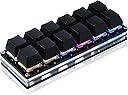
The BTXETUEL Sayodevice OSU Keypad is a compact 12-key mechanical keypad featuring Otuemu Red speed switches, plug-and-play USB-C connectivity, and broad OS compatibility. Designed for gamers and professionals alike, it offers fully customizable keys with multi-function macros and RGB backlighting, all housed in a foldable, portable chassis.
| ASIN | B0BBS3D3JV |
| Additional Features | Foldable |
| Antenna Location | Gaming |
| Best Sellers Rank | #5,310 in Video Games ( See Top 100 in Video Games ) #447 in PC Gaming Keyboards #740 in Computer Keyboards |
| Brand | BTXETUEL |
| Built-In Media | USB Cable |
| Button Quantity | 12 |
| Color | black |
| Compatible Devices | PC |
| Compatible Operating System Family | Linux, MacOS, Windows |
| Connectivity Technology | USB-C |
| Customer Reviews | 3.9 out of 5 stars 584 Reviews |
| Enclosure Material | Acrylonitrile Butadiene Styrene |
| Hand Orientation | Ambidextrous |
| Item Dimensions L x W x H | 4.6"L x 1.7"W x 1.1"H |
| Item Weight | 4 ounces |
| Keyboard Backlighting Color Support | RGB |
| Keyboard Description | Multi Functional |
| Keyboard Layout | QWERTY |
| Manufacturer | N\\C |
| Mechanical Keyboard Switch Model | Otuemu Red |
| Model Name | Black 12-Key Keyboard |
| Model Number | Black 12-Key Keyboard |
| Number of Items | 1 |
| Number of Keys | 12 |
| Number of Packs | 1 |
| Recommended Uses For Product | Gaming |
| Special Feature | Foldable |
| Style Name | Contemporary |
| Switch Type | Mechanical Red Switches |
| Theme | gaming |
| Unit Count | 1 Count |
| Warranty Description | 2 |
| Water Resistance Level | Not Water Resistant |
T**D
DJโs little helper
amazing! great documentation, super flexible customization, easy to connect, does exactly what i need it to doโwork with Farrago on a Mac. wish there was a three row version. wish it came with (or had the option to come with) clear key capsโthe colors come through much better. wish the colors were more accurate, had to compensate for the difference in LEDs performance in some keys. but i still give it five stars because it does what no other device in its price range can.
R**G
I like it very much
Great for the price. Good build and a nice feel to the keys. I tried to swap out the switches. The factor switches were in very tightly. Once I got them removed, none of my Kailh switches would fit. The pin connectors were so tight that they ended up bending the leads on my switches. Looks like the factory red switches have thinner leads. I probably could sand the leads down a bit to fit but I didn't want to go through the trouble. As such, I just reinstalled the factor red switches back in. The pad itself has some good weight to it which keeps it in place on my desk. Configuration software offers a strange user experience. It is going to take most users some patience and time to figure out. There are two versions; v2 and v3. The v3 of the software is much better and more refined. However, v3 only supports Windows. So I run the configuration within a VirtualBox Windows 11 instance. There are plenty of RGB lighting options and several overlays. I am using two different overlays with one key to switch between the two. I configured the key to change color depending on the overlay that is currently active. It is pretty configurable. Supports one key password, scripts, macros, key mapping, and mouse mappings. I purchased a set of transparent keycaps that hold labels from X-keys and printed some labels for my main overlay. Looks and works great.
G**K
Does the trick!
Got this little keyboard for entering usernames and passwords for work using the One Button Password. We use Windows machines and I'm constantly remoting into servers all day and need to be able to quickly enter very long passwords and this device does the trick. It works great even in elevated applications and in almost all remote access programs, with the exception of one laggy remote access program because the program itself is laggy and I think the shift button doesn't get pressed/released correctly. There are a few gripes I have about it. One Button Text mode does not work and gives garbled, random text and misses letters too regardless which of the two encoding protocols I pick. But that's okay, I primarily use One Button Password for entering both usernames and passwords. Also, you can't insert a tab between a username and a password. The best you can do is put a username as one button in One Button Password, it has a dropdown where you can have hit a key after typing in the username, I pick Tab for that. Then you set the password on a different button and use the dropdown to pick ENTER for it to press after entering the password. So to enter a username and a password, you're using two separate keys to do that. Another issue is that it comes with opaque black keys so you can't see the LED effects, but that's okay, I stole the function keys from my old RGB keyboard and they fit on there fine and look great. Also, it can send mouse button clicks, but there's no way to send a double-click, which would help me out with some tedious data input I need to do. The LED effects are fun to play with. The program used to program the deivce uses a web browser that connects directly to the device. You just visit sayodevice.com, connect to it and you're ready to program. I have no idea how to use the scripting engine, but there's a lot in there. The device is pretty and well built and has replaced my clunky old keyboard that I kept around only for its macro keys. Pretty sure it shows up as a standard HID device in Windows. You can paste in a password and assign it to a key and it'll type it as fast as you want and has a dropdown that lets you specify how many milliseconds to wait between presses, from 0 to 255ms, so you're not going to get to use to do any kind of automation, but for usernames, passwords, and most repetitive actions and keyboard combinations, it works great.
A**R
Software is so absolutely abysmal i want to cry
As much as i love its physical profile its software is absolutely abysmal. Its slow, laggy, clunky, and browser based. Constantly keeps erasing the settings and when i try to restore from a back up it gives me an error like half the time and have to go through and painfully set it up again. The other day it just stopped working with chrome and just shows a black page with "running..." In small print... Im so fed up with it. Don't waste your time, money, or hair...
B**B
works great
I am glad I purchased this. The online Chrome-based programmer was definitely better than using an installed program. (I had to use it on a Windows laptop with Chrome. Chromebook and Linux would recognize the device but didn't seem to work well enough to program it. Perhaps some settings would fix that, but I couldn't easily see how. Notice I use Linux - so I am pretty good with computers. I have a Mac but didn't try that one). I was able to replace keys with ones I have from some gaming keyboards which was awesome (otherwise they wouldn't be easy to label and with 12 keys, this matters). They are Red keys, if you know what that means (so not loud and clicky like the Blue ones but still have a good tactile feel without the noise). This thing does what it says and that is what I needed. Super-fast shipping too.
M**N
AWesome purchase, very customizable, happy with purchase! Will be buying more in future
Worked AWESOME with the customization offered , look for "" old <dot> sayodevice <dot> com/device "" Tested it using beamNG racing game, and the game recognized and used it seperately from my other keyboard perfectly. I like the lighting variety and the pattern changes. Seems to be a re-used old keyboard part from an Asus setup or similar, so I was a bit sketched out. Used a virtual OS setup to talk to this, and found zero "filthy" handshakes of data, though that doesn't mean they don't exist. LOVE this!
J**L
A very handy productivity tool! But, you'll need to take some time to program it
I've been on the hunt for a less expensive alternative to the X-Keys XK-24 macropad, which is an outstanding product but costs $150+. Based on the generally favorable reviews, I decided to give this one a try. The 6x2 key layout is a bit odd; I would think a 4x3 key layout would be more ergonomic and easier to use on-the-fly, considering that most of us have four fingers and a thumb on each hand. The build quality and materials used are decent, albeit a bit lightweight with the frame mostly made of acrylic and plastic. The flat rubberized feet on the bottom help ensure it doesn't slide across my desk. I wish they had put flippy feet or some other way for this keypad to rest at an angle. It came pre-installed with unbranded linear mechanical switches, which are quiet and generally inoffensive, but I swapped in some EPOMAKER Crystal Tactile Silent switches to better suit my preferences for a tactile bump. The plain black keycaps that come with this keypad are functional but a bit disappointing, considering that BTXETUEL sells two-piece relegendable keycaps separately (the base is a standard looking Cherry MX keycap, the top is a snap-on clear acrylic cap between which you can place labels). They could have included a couple of these relegendable keycaps with this keypad, along with a QR code to purchase a full set. Missed marketing opportunity for a better user experience. The "Sayo Device" web-based software for programming macros and assigning key combinations is decent. It isn't as intuitive as VIA or as feature-complete as the X-Keys proprietary software, but it works. I was especially impressed to discover you can program a total of five layers of key bindings. I'm going to try explaining how I configured mine, but this probably calls for a video (that I'll post later). For the sake of easy visual identification, I set the LEDs to a static color that corresponds to the active layer selected. Blue for layer 0, red for layer 1, green for layer 2, purple for layer 3, and white for layer 4. I chose to assign the lower-right key as "Set Fn Layer: 1", which effectively serves as a "Shift" key to quickly access the 2nd layer of bindings; I use my left thumb to hold this key down and press the desired key with my left index finger. To access the 3rd, 4th, and 5th layers, I chose to assign the upper-rightmost key to switch between layers in sequence. It's very straightforward to apply keyboard shortcuts to specific keys and modify the LED color scheme for each layer and key. The Text and Scripts functions aren't intuitive, but I also haven't dug into the instructions yet. For $29 (purchased in April 2026), this keypad scratches the X-Keys itch nicely for a fraction of the price.
S**.
Ordered both colors, one came DOA - NOT hot swappable like advertised
Just got two of these macropads today. I ordered both the black and white versions. The black one arrived DOA. It would connect to my PC and light up for around ten seconds and then make the disconnect noise, and the lights and switches stop working until you pull the cable and reconnect. Hopefully the replacement works better. The white one works though so I'll focus on that. There is another con. Despite the listing title stating "hot swappable" (12 Key Mechanical Gaming Keyboard One Handed Keypad USB-C Wired OSU Keypad Programmable and Hot Swappable Keyboard) this macropad is NOT hot swappable. The switches are soldered reds that are not my thing. I had planned to use tactile switches so finding this is disappointing. They'll likely become gifts after I make sure they can take a little use. The software is a little frustrating. I visit a dozen links regularly for work and bought this specifically to keep them easily accessible. After a little googling I was able to figure out how to get everything loaded. Will update as I put some time in with these. Aside from that, I'll be back looking into RGB settings. I needed a break. I'm sure I'll figure it out and be able to accomplish what I want. While this frustration is a big con, it's not the worst software I've used, and it's hopefully a "set it and forget it" situation so it's forgivable. Not everything can be as polished as VIA. If you're still reading, the pad itself feels really nice. It's lightweight but feels nice overall. The transparent middle is a nice touch, and the RGBs get bright. The pads on the bottom are really grippy! It gives me enough confidence that it's not going to move around under general use. I am not a gamer so I can't compare it in that regard, but I imagine it would handle a fair amount of abuse. As I get some time in with these I'll update my review to better reflect the product as a working item than an unfortunate failure. -----------------UPDATE----------------- After some time with the pads, I can give an update. The configuration software works if you use it how it's designed, but it's not at all intuitive, and there's zero help available without youtube. My new biggest pet peeve comes with the strings section of the app. You have 128 strings (where you save the output from a button press) available, but with five layers and twelve keys, there are only 60 possible keys that can be assigned total. This wouldn't be a negative if not for the fact that you have 68 pointless strings (if you'd even use 60), and each string is limited to 59 characters. I bought these to save URLs to common paths, and I've had several I couldn't set because of the length restriction. It would be smarter to limit the string count to 60 and allow more characters per string.
D**I
Funktioniert
Erwartungen wurden erfรผllt. Mann muss allerdings nicht den Software download benutzen, sondern den normalen Homepage link. Darรผber kan man die Tastatur nach eigenen Wรผnschen einstellen
S**A
ใทใงใผใใซใใใฎ่คๅใญใผใๆผใใ ใใชใใ็ฐกๅ
ใญใผใใผใใฎใญใผใฎ็ตใฟๅใใใ็ป้ฒใใใ ใใชใใ็ฐกๅใซใงใใพใใ ๆๅญๅใฎๅ ฅๅใฏใๆๅญใณใผใใฎ้ใใชใฎใใNumpadใฎๅคใๅ ฅๅใใใฆใใพใๆญๅฟตใ ใใใใใชใใฎใงใ1ใญใผใใคใใฎๆๅญๅใๅ ฅๅใใใใฏใญใไฝๆใใฆใชใใจใใใพใใใ ไธญๅฝ่ชใฏใฐใผใฐใซ็ฟป่จณใงใขใใฟใใซใกใฉ่ถใใซ่ฆใชใใ่ฑ่ช่จณใ่ฆใฆไฝฟ็จใ ๅฎใใฎใงๆๅฅใฏใใใพใใใ
M**S
Fantastic device that works great in Linux Mint 22 under WINE
I got this device to be an alternative to my logitech g600 since they've been discontinued, and because in Linux (Mint), the custom buttons can only store a single key press and not a macro, since the macros are logictech G hub specific. I was surprised to find that Sayo offered not only a web configuration app but a download as well. I'm sure i'm not the only one that ins't comfortable with a website being the only way to configure my device. because sites are notorious for going down without warning. So i initially downloaded the Linux application and found that it doesn't work very well, as the connection it establishes with the device is a really janky pseudo network connection to the usb device and then provides you with a local ip address to connect to in a browser. The main problem is the connection is spotty to the device and doesn't stay connected long enough to make any kind of usable changes. It also has a bad habbit of seg faulting so its nigh unusable. what did work to my surprise is the windows application, as it ran flawlessly under WINE. I was able to make macros and set button colours without issue. I set the 6 buttons on the left side to be SW Fn buttons to switch function layers. On all other layers i set the lower left most button to be a SW Fn0 button to return to the main layer. the macros are easy to make, only took a minute to understand how to set a key press then release, each a different command. otherwise the key is never un-pressed. I tested the macros in the respective Steam games i made them for and they work flawlessly. I even connected the board to another system and they continued to work as everything is stored on the device itself. all in all i'm very happy with this purchase and would recommend if you're looking for a low cost macropad solution that isn't hard to get working in Linux, provided you're fine with using WINE.
C**O
Exactly what I needed
This hotkey board is absolutely fantastic. It is well built and comes with a set of decent cherry switched and nice caps. The best thing about it though is the complete freedom to remap it how you see fit, The website that handles this is really easy to use and well thought out, it also has a large amount of features that can be programmed into the board from changing what keys it uses, changing the RGB colours and how they react to allowing you to run scripts with a single key press. I would 100% recommend this to anyone who need some hotkeys to do anything or even people who want to run macros in certain programs, I can see this board coming in handy in any of these situations.
P**O
Consiglio l'acquisto
Consiglio vivamente questo tastierino sia per lavoro che per giocare (nel mio caso con Mfs2024)
Trustpilot
4 days ago
1 month ago