Buy anything from 5,000+ international stores. One checkout price. No surprise fees. Join 2M+ shoppers on Desertcart.
Desertcart purchases this item on your behalf and handles shipping, customs, and support to Spain.
๐ฎ Level Up Your Gaming Experience!
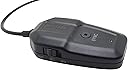
The NXL-95195 Game Genie Controller Adapter is a versatile gaming accessory that allows seamless connectivity for various controllers across multiple platforms, including Nintendo Switch, Windows, and Mac. With a 3.28 feet USB cable, it ensures easy access without blocking other ports, making it a must-have for any serious gamer.
| ASIN | B0757BD919 |
| Best Sellers Rank | #72,439 in Video Games ( See Top 100 in Video Games ) #1,360 in Mac Accessories #10,456 in PC Accessories #13,460 in Nintendo Legacy Systems |
| Brand | NEXiLUX |
| Color | black |
| Compatible Devices | Mac, Nintendo Switch, Playstation 3, Raspberry Pi, Steam, Windows |
| Connector Type | Micro USB or USB Type B or USB Type A |
| Current Rating | 1 Milliamps |
| Customer Reviews | 3.8 out of 5 stars 101 Reviews |
| Global Trade Identification Number | 00037171951954 |
| Item Dimensions | 2.71 x 1.57 x 0.75 inches |
| Item Weight | 0.11 Pounds |
| Item dimensions L x W x H | 2.71 x 1.57 x 0.75 inches |
| Manufacturer | NEXiLUX |
| Mfr Part Number | NXL-95195 |
| Model Number | NXL-95195 |
| Number of Items | 1 |
| Number of Ports | 1 |
| Package Quantity | 1 |
| Power Plug Type | No Plug |
| Smart Home Compatibility | Not Smart Home Compatible |
| UPC | 037171951954 |
| Unit Count | 1.0 Count |
| Warranty Description | Amazon & Manufacturer |
J**O
Perfect for PS3 owners looking for a good controller
For the longest time I have been holding out on finding a good OEM PS3 controller that isn't $40+ or finding a good quality aftermarket controller. Neither of these things exist at the moment. So I took a chance on this little device that would make my XBOX One S controller work with my PS3. I held off doing any kind of a review on this thing for about 2 months to make sure that it was of good quality and reliable. I couldn't be happier to report back that this thing is incredible! So let's get to what you'll want to know about this thing. First is this device turns your XBOX One S or PS4 controller into a FULLY FUNCTIONAL controller for your PS3. This means that the home button works as it should as well as the rumble function. The only two things that this device can understandably not support is turning the console on via the controller and Sixaxis. However that is it. The only notable games that require the use of Sixaxis are Uncharted 1 and Killzone 2. So save your OEM controller to play those games. Since the XBOX One S and PS4 controllers are good quality you will not be suffering with things like analog deadzones, crappy D-pads, lack of features like no home button and no rumble feature. It's a fact that the PS4 controller does sync up to the PS3 and can be used without this converter but has limited functionality like no rumble and no home button support. As far as input latency there is some. You'd be very hard pressed to notice it since it costs only a single frame. Even on games like Sonic's Ultimate Genesis Collection it cannot be felt, nevermind that those games suffer from around 5 frames of inherent input latency due to rather poor emulation anyway. The input latency is one frame no matter if you're using your controller wirelessly or wired. Other great features that don't have to do with the PS3 is that this device is compatible with the PC and Nintendo Switch. However on Switch the rumble feature does not work. On PC the device is fully functional. Now you would not need this device if you're trying to use a XBOX One S controller on a Windows 10 machine. Also you do not need this device to use a XBOX One S controller connected wired on Windows 7 or 8.1. However if you want to use a XBOX One S controller wirelessly you do need this device. Also without a hitch you can use a PS3 and PS4 controller on any PC with any OS wirelessly. Lastly, syncing is the only small weak point when it comes to the XBOX One S controller as syncing up the controller to the device takes about 20 to 25 seconds. Additionally when the connection is severed by unplugging the device or the PC/console it's plugged into, or you shut off the XBONE One S controller itself you must re-sync the XBOX One S controller to the device every time. Syncing up a PS3 controller is the same as with a PS3 which is plug the USB cable into the device and it will sync. You then can disconnect the USB cable and it will become wireless. Also the device WILL retain sync with the PS3 controller if the connection is severed by shutting of the controller unlike if you shut down the XBOX One S controller. One last thing you need to know is that this device will sever the connection to whatever controller is synced up to after 10 minutes of no activity. So if you walk away for 10 minutes or you will need to sync your controller back up to the device if you're using a XBOX One S controller. If you're playing a game that has long cut-scenes you will need to just fidget with a button or stick every once in a while to make sure the controller isn't shutoff. I see what they were trying to do here but 10 minutes is a little too short. It should have been atleast 30 minutes or have an option to turn off the feature completely. Overall given its very minor shortcomings I still cannot recommend this product enough. I am able to play my PS3 games with a way more comfortable controller and play my PC games wirelessly on my Windows 7 gaming computer. I couldn't care less about the Switch features because I don't own a Switch and never will.
J**F
Not so perfect when using the Wii U Pro Controller on the Switch
The adapter works as expected, but it has a Drawback with the Wii U Pro Controller, kinda of on certain games, that's why I'm giving it a 4/5. Disclaimer: the score isn't related to the lack of Gyro or all the stuff related to the Switch Pro Controller/Joy-Con functionalities. This is something I wasn't expecting to be supported by the adapter. The adapter came in a tiny box with a manual which I found not customer friendly. Also, there's no explanation about how to upgrade the Firmware. Basically, what wasn't all clear (At least for me) is that you update the firmware by switching the adapter to the "Switch" option (So, don't make my mistake and switch to PC). I tried the adapter with 4 controllers: A DS4, two Wii U Pro Controllers and a XBox One Controller (Not the Xbox One S) in BOTW, Mario Oddyssey and Stardew Valley. - The DS4 works perfect. Also, it can be used wireless. Just connect the DS4 to the adapter using a cable, this will sync the controller with the adapter. - The XBox One Controller also works perfectly. This one, though, cannot be used wireless (I read the Bluetooth one does, but cannot confirm since I lack that controller). Leaving the wiring aside, it works perfectly. - The Wii U Pro Controller, on the other hand, has issues with the analogs deadzone. This is particulary noticeable in BOTW, where one of my controllers always makes Link walk while the left analog is still and the other one slightly moves the camera while the right analog is still and moves Link if I use the analog. In Oddissey, the behavior was the same as in BOTW, but the camera issue only happened when capturing a binocular. No issue happened while playing Stardew Valley. To clarify, both controllers work perfect on my Wii U. Also they didn't seem to have any issue on PC.
S**E
Didn't Work - Even After Updating
Had high hopes for this based on all of the other reviews I've read. First off, nowhere on the product page itself does it say it needs to be updated from v1.0 to 1.02. Luckily, I'd read other reviews, so knew this would need to happen. Also unfortunately, there's no way to do this if you have a Mac, it has to be updated via PC. I found a PC got the Game Genie updated to the latest version, followed the instructions to a T - wouldn't connect. Both the Game Genie and my Wii U Pro controller just kept flashing blue without syncing. I tried over a dozen times on two different Wii U Pro controllers - no luck. Not sure if it's a defective unit, but disappointed considering the other positive reviews I've seen.
T**A
Keeps your PS3 running!
We have a lot of great PS3 games and our PS3s are running well - but the Dual Shock 3s have been failing... one after the other. This little adapter allows us to use our Dual Shock 4s with the PS3. Note: PS3s technically can connect DS4s as generic bluetooth controllers, but they are unable to perform some basic D-Pad tasks like pressing up & left at the same time (necessary for games like Warhawk)... with this adapter, you are good to go!
C**S
I normally don't write reviews, but only when I ...
I normally don't write reviews, but only when I think it is necessary. I will start by saying this device works well with both my Wii U and PS4 controller. Very responsive and fluid playing Zelda on my Switch. However be aware you will need to go to the nexilux website and download the firmware update for the device. Part of the process is to use a PC to install the drivers then use the firmware update to make it respond to the Nintendo. After the update everything works perfectly.
S**C
If you ever wanted to play Gta 4, San adreas or Gta5 with a Nintendo controller then this is for you
This controller is so cool. I'm so happy i can play Gta Games with a Wii U pro controller using this on my Ps3. It rocks, though unforgently it only takes Offical Nintendo brand Wii U pro controllers. To make i test i tried some Ps2 games on my Ps3 but it doesn't work. This is denfently going to get used a lot by me for sure. If you want to play Ps3 games using a Wii U pro controller then this adapter is a musthave
A**R
Verify controllers it is compatible with
this device works well for connecting a PlayStation wireless controller with the Switch, so kids can have a full size controller. But it says it works with the Xbox controllers, be careful since it is only certain models that work, which we didn't know when we bought it and discovered it didn't work with our Xbox controllers we had, so had to buy the PlayStation controller.
M**R
XBOX ONE TO PS3 WORKS GREAT
The main and pretty much only reason I got this was to be able to play on my PS3 with my Xbox One controller, and be rest assured it works great. I used an Xbox One S controller. Hope this helps anyone else looking to do the same. No reason to go wired anymore, there's a device to make nearly everything wireless, sometimes it just takes some patience and research. GLHF!
A**W
Perfect
Amazing! Works perfect. I can play with my Xbox elite controller on my Nintendo switch faultless.
J**U
Si finciona en Nintendo Switch
El producto funciona muy bien si eres usuario de Nintendo Switch. Para conectar el control de Ps4 o Xbox One de manera alambrica. Pero asรญ te ahorras el gasto del control Pro. y jugar Zelda B.W. con el control de Xbox One. Pues que les puedo decir...se agradece. Lo recomiendo
S**R
Funktioniert einwandfrei
Gut
I**X
Me ha hecho ahorrar mucho dinero!!!
Me ha hecho ahorrar mas de 1100 pesos en un control pro para nintendo switch y gracias a este adaptador puedo usar mi control pro para wii u sin mencionar la reparacion siendo mas economica, aunque tengo una duda y es si las palancas con pbc para el gamepad sean compatibles con el control pro.... Antes de usarlo es necesario actualizarlo a la version 1.2 en una computadora windows de lo contrario no serivira. RECOMENDADO!!
D**N
WiiU controller to Switch
Wii-U controller works perfectly on the Switch with this neat bit of kit the only down side is I have to re-sinc the controller every time I use it, if not for that I would have given it 4 stars.
Trustpilot
2 weeks ago
1 month ago