Buy anything from 5,000+ international stores. One checkout price. No surprise fees. Join 2M+ shoppers on Desertcart.
Desertcart purchases this item on your behalf and handles shipping, customs, and support to Spain.
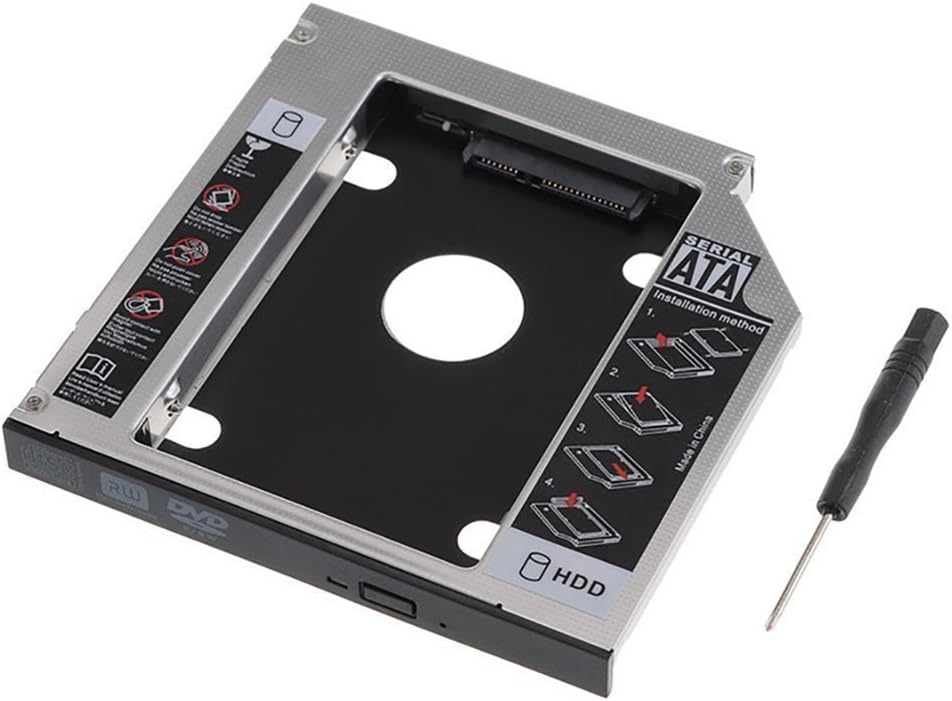
💻 Upgrade your laptop’s soul with a second drive—because one just isn’t enough!
This Universal 9.5mm SATA Hard Drive Caddy Adapter Tray lets professionals effortlessly add a second 2.5" HDD or SSD to their laptop’s optical bay. Compatible with major brands like Dell, HP, Lenovo, and more, it supports SATA 6.0 Gb/s speeds and up to 500GB storage expansion. Crafted from lightweight aluminum for durability and cooling, it installs easily without extra cables or software, enabling dual boot setups and enhanced data flexibility.
| ASIN | B075846MD2 |
| Best Sellers Rank | #101 in Enclosures |
| Brand | SZYIKUER |
| Color | 12.7mm |
| Compatible Devices | Laptop |
| Connectivity Technology | SATA |
| Customer Reviews | 4.5 out of 5 stars 1,600 Reviews |
| Enclosure Material | Aluminum |
| Hard Disk Form Factor | 2.5 Inches |
| Hardware Interface | Solid State Drive |
| Hardware Platform | Laptop |
| Item Dimensions L x W x H | 5"L x 5"W x 0.37"H |
| Manufacturer | SZYIKUER |
| Material | Aluminum |
| Memory Storage Capacity | 500 GB |
| Model Number | 12.7mm Tray |
| Product Dimensions | 5"L x 5"W x 0.37"H |
| Supported Devices Quantity | 1 |
| UPC | 665668415810 |
| Unit Count | 1.0 Count |
F**T
Fits, works, and it was easy too
I picked this up to give an old laptop an extra SSD. Normally, I would be opposed to disabling an optical drive. But, I am repurposing this laptop as a server that will sit in a rack until it dies. I tried just removing one screw from the laptop in approximately the position I thought would be holding the optical drive. It actually worked. So, that's an awesome pro tip. The size was perfect for the laptop slot. The included screws fit my new SSD perfectly. I did have some trouble getting the front bezel to attach. But, I believe that isn't the fault of this tray. I was pleasantly surprised when I added the screw hole to the back of this tray and the two holes were already present. My laptop picked up the new SSD in the DVD drive slot just fine. The BIOS also has settings to boot from it. So, connectivity is just fine.
J**R
Works great and is super fast.
From the little testing I have done this HDD holder is crazy fast when copying files from your main internal drive. It is also well made, and easy enough to set up. What you need to know. For one you will need to remove your laptops optical drive, and remove the back bracket off the back, and the front factory cover/face off of the drive if you want it to blend in and look good. My issues. (No fault of the drive holder.) I was using an old drive I had installed ubuntu onto. Why was that an issue? Well Windows doesn't talk with ubuntu, so at fires it looked like the HDD caddy didn't work, but quickly figuring out what happened I formatted the drive and boom it worked perfectly. What I am running in the drive holder. I am running an old Samsung drive from a old laptop. It is a HDD with a 750GB capacity. My system is a 2018 HP laptop with a RYZEN3 2200U processor, with a 1TB HDD, and 16GB of ram installed. All that said the drive holder works great I this laptop, and even my back up Lenovo ideapad3 I forget the specs on that laptop though. Wrapping this up I will say this I give the product a 9/10 because it is easy to use and alright to install. I would however recommend having a brand new HDD or SSD just because it would be easier for you, but you can use a old drive no problem if your willing to possibly have to format it. If you need extra storage or want to upgrade to a SSD, and have an extra HDD for more storage I say go ahead and buy it..
L**R
With some ingenuity I made it work!
This is a handy tray that I used on an HP envy-class laptop that I worked on customizing. When a modern laptop sold in the past decade only ships from a Walmart with a DVD R/W optical drive, it might as well get ripped out and replaced. Blu-ray or No Way! So I converted the optical drive bay into a hidden SSD drive bay with little to no problem. Unlike the optical drive, and this is a minor issue only, there is no way to screw this in place as the optical drive had a tab on it that allows the bottom cover to screw into it. I used 2 screws to mount the drive bay to the SSD and they also provided enough pressure to make sure the drive bay doesn’t come unmounted with normal use. I also attached a small strip of duct tape to the bottom of the bay to allow for easy removal if I ever need to change out the drive. The flat plastic cover that ships with the bay to look like a desktop PC optical tray door came off relatively easy with some careful wiggling and I was able to attach by pressing the plastic laptop optical drive bay door with no glue needed so it looks stick on the outside. I had no issue with drive recognition after formatting the drive externally with another computer. This bay seems to fit in the laptop readily due to its shape but always check before buying to make sure you are getting the correct fitting part. This bay is slip and I could only squeeze one 2.5” SSD in it at a time. For the price this works extremely well and I have had zero issues since first install.
J**S
Works perfect For an extra hard drive
Worked perfectly in my MacBook was able to put 2 TB drive in the DVD bay with no problems
J**.
works great for me
After recently upgrading to an SSD I wanted to still have access to my old HDD. I originally got an exterior HDD case but it required USB 3.0 to provide it with power and my old Vaio laptop only had 2.0 so I went looking for something else and came across this clever little invention. The install was straightforward and I didn't run into any problems during or since. I do think I broke one of the plastic pins on the faceplate to my dvd player when took it off to place on this unit but a little super glue was all I needed to make it look like a pro installed it. And if I do ever need the CD drive it looks like replacing it will be a breeze. The enclosure's metal feels a little cheap and flimsy but it works great for me so far and it was the cheapest HDD holder I could find. Plus I really like being able to use the old HDD for backup and storage instead of just throwing it in some drawer to be forgotten. It's a clever little gadget.
D**L
Easy installation with a pleasant surprise!
I just finished installing this in my HP 15da0073 laptop, and I couldn't be happier. Mounting the HDD into the caddy couldn't be simpler. Slide the drive into place and install the four provided screws with the provided screwdriver. I thought I was going to have to completely disassemble my laptop, but I discovered that you only need to remove one screw to extract the optical drive. See the attached photo, it's the screw closest to the model number on the back of the laptop. After I pulled out the optical drive, I removed the little mounting tab from the back of the drive and transferred it to the caddy. Now, here's the part that was the pleasant surprise. The caddy comes with a simple black faceplate. I pulled that off to see what would be involved in mounting the trim from the original drive. I discovered that the caddy actually had mounting holes in all the right places to simply snap the HP trim into place. There are a few other mounting holes on the caddy, so hopefully it will be as easy for some other laptop makes as well. As shown in the attached photo, I was able to install the original trim onto the caddy, so the laptop looks just like it did before the upgrade. Slid the caddy into place, reinstalled the screw, and set up the new drive in Windows. Couldn't be happier with the installation, and it's nice to have the extra disk space on my laptop.
T**T
Note the height of your drive bay before you buy. This is a 12.5mm height caddy.
I bought the caddy on a whim, and found it was too large to fit my notebook. Rather than returning it, I modified the caddy to fit. The maker would probably say this is impossible and I'd agree, unless you are Technoid Mutant (I am), buy a 9.5mm caddy if that is what you need. That said, the thing works perfectly and gets killer throughput with both my new SSD and with my old 1TB internal hard disk (which is now removable via the caddy). If I'd bought the right size, I'd give this thing an A+ all round. As it is, I give it an A+++ for taking the abuse it took to get to fit (removed 3.5mm of material from entire unit).... Kudos to Mr. Manufacturer! P.S. Yes, while I was at it, I plugged the faceplate from my original HP cdrom onto the face of the caddy. So the installation is seamless. I DO wish it had a screwhole to secure the caddy, but I doubt they could make that work 'universally'. Best, Jeff
J**N
Fit like a glove
Exact fit, works as described.
F**X
Utile et parfait
Fonctionne parfaitement pour de qu’il devait accomplir. Le moins cher que j’ai trouver. Cependant, bien vérifier que le disque dur a un volume car il serait possible de penser qu’il n’est pas détecté alors que oui.
S**E
Fits perfect
Fits the slot perfectly. Tip: Remove the old beauty cover from your original CD drive and attach it to the new caddy. It fills the gap and makes the installation look factory.
G**F
Nicely done.
Perfect upgrade for my wife's low profile PC with useless DVD. I managed to make the old DVD face plate for the DVD sit properly with a little cement to fasten it solidly.
B**E
Didn’t Fit My Laptop
I purchased the SATA Hard Drive Tray, but unfortunately, it wasn’t compatible with my laptop. While the product itself seemed well-constructed and easy to install, the size didn’t match what I needed, so I had to return it. It’s a shame because it looked like it could have been a good solution for adding extra storage. I would recommend double-checking compatibility with your device before purchasing.
G**E
Does what it was meant to be
This aluminium made carriage can accommodate a 2.5" hard drive in replacement of the CD/DVD bay. Easy install (see youtube videos if necessary) and works perfectly.
Trustpilot
1 week ago
2 weeks ago