Buy anything from 5,000+ international stores. One checkout price. No surprise fees. Join 2M+ shoppers on Desertcart.
Desertcart purchases this item on your behalf and handles shipping, customs, and support to Spain.
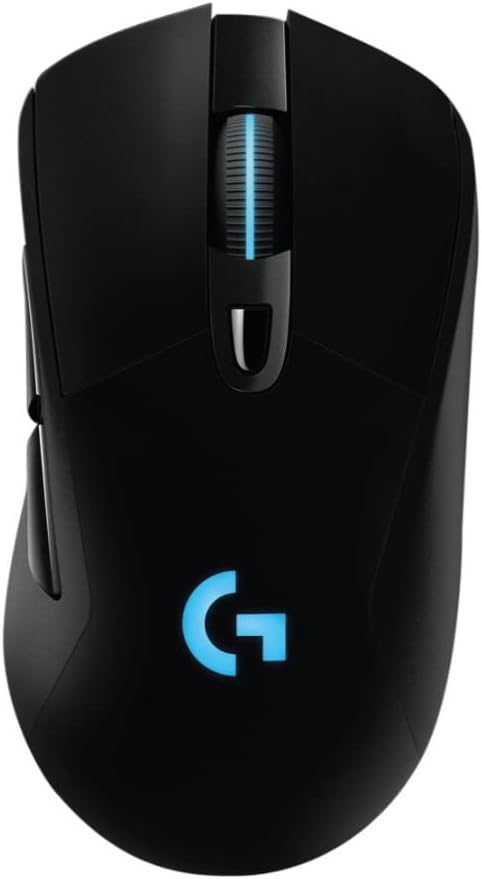
🎮 Power your play with precision and freedom — the G703 is wireless gaming, redefined.
The Logitech G703 Lightspeed Gaming Mouse combines pro-level 1ms wireless LIGHTSPEED technology with the industry-leading PMW3366 optical sensor for pinpoint accuracy. Its ergonomic 107g design with rubber grips ensures comfort during extended sessions, while compatibility with the POWERPLAY wireless charging system keeps you powered without pause. Featuring customizable RGB lighting and 6 programmable buttons, the G703 offers seamless wired/wireless switching and a 2-year warranty, making it a top-tier choice for serious gamers seeking performance and style.
| ASIN | B071S8M8TB |
| Additional Features | Alcohol-Free |
| Antenna Location | Gaming |
| Are Batteries Included | Yes |
| Are Batteries Required | Yes |
| Best Sellers Rank | #20,516 in Video Games ( See Top 100 in Video Games ) #192 in Mac Gaming Mice #736 in PC Gaming Mice |
| Brand | Logitech G |
| Built-In Media | mouse, user guide |
| Button Quantity | 6 |
| Color | White |
| Compatible Devices | Gaming Console, Personal Computer |
| Connectivity Technology | LIGHTSPEED Wireless |
| Customer Reviews | 4.2 out of 5 stars 1,729 Reviews |
| Enclosure Material | Metal,Rubber |
| Global Trade Identification Number | 00097855130983 |
| Hand Orientation | Ambidextrous, Right |
| Hardware Platform | PC |
| Item Dimensions L x W | 4.88"L x 2.68"W |
| Item Type Name | Logitech 910-005091 G703 LIGHTSPEED Gaming Mouse with POWERPLAY Wireless Charging Compatibility |
| Item Weight | 3.8 Ounces |
| Manufacturer | Logitech |
| Mfr Part Number | 910-005091 |
| Minimum Required Operating System Version | Windows 7 |
| Model Name | G703 LightSpeed Wireless Gaming Mouse |
| Model Number | 910-005091 |
| Mouse Maximum Sensitivity | 12000 Dots per Inch |
| Movement Detection | Optical |
| Movement Detection Technology | Optical |
| Number of Batteries | 1 Lithium Polymer batteries required. (included) |
| Number of Buttons | 6 |
| Operating System | Windows 7 |
| Power Source | Battery Powered |
| Range | 5.0 meters |
| Special Feature | Alcohol-Free |
| Style Name | G703 |
| UPC | 097855130983 |
| Unit Count | 38.4 Ounce |
| Warranty Description | 2 - year limited warranty |
A**.
Phenomenal mouse for average sized hand. Incredible upgrade from traditional wireless mouse.
This mouse was a replacement for the mouse that came with the Logitech MK710 wireless keyboard/mouse combo (Marathon M705). I was hesitant to spend $80-$90 on a mouse, but it went on sale for $64.99 around the holidays. Pulled the trigger and I do NOT regret this purchase in the slightest. The difference in accuracy and smoothness between this mouse and my previous mouse were night and day. Additionally, this mouse really fit my hand much better than the MK705 mouse did. The MK705 is about half the length, so I had to use that mouse in more of a claw grip. I can now rest my entire hand on the mouse, so I don't get pain/cramping I used to get. I also upgraded to a nicer mouse pad that extends under my keyboard. This really helped with the smoothness of moving the mouse without the pad moving or my hand sticking to the desk. Now for the pros/cons list: PROS: - Highly configurable. I have various profiles for different games / activities. Syncs nicely with other Logitech devices via software. - Incredibly smooth movement, both on screen and on the desk. - Great battery life and very easy to switch to the cable with minimal interruption. Also alerts you at 30% remaining. - Software will "learn" the surface of your mouse pad to optimize the accuracy of this mouse. - I've noticed absolutely no lag or wireless blips since using this mouse. - Buttons have a nice click / tactile feedback to it. It's very apparently when you click anything and I have not had any mis-clicks (please see exception below under CONS). - Includes a 10g removable weight. Started out by using it, but found I like the mouse better without the weight. This is all personal preference though. CONS: - The DPI button doesn't have the greatest tactile feedback. When I have my headphones on and I click this button, I'm not always positive if I pressed it down all the way. I can't hear the click, nor can I feel it. I have to verify if I clicked this button by moving my mouse around to and seeing how quickly the cursor moves on screen. For me, this is not a big deal because I have found I actually don't want my DPI changing. I'm happy with one consistent DPI/sensitivity combo for the games I play. Also, I've never accidentally clicked this button either. I don't ever feel like it is in the way. You have to make a distinct effort to click this button fully. For me, this is not a true "CON", just wanted to make people aware of this. NOTES: I haven't tried this with the PowerPlay wireless charging system. It's honestly not really necessary. The battery life is decent and easy to switch to wired connection. The only time I'd really consider purchasing the PowerPlay system is when the battery life ultimately begins to degrade. That way I can continuously use the mouse without having to plug it in to charge. But I don't even know if I would do it then because the charging cable that comes with the mouse doesn't kink on me nor does it get caught on anything. TL;DR - I regret waiting as long as I did to buy this mouse. Has improved my accuracy way more than I expected and fits my palm much nicer than my previous mouse. Worth every penny (even at the non-discounted price).
K**R
Great mouse for fans of the G402
I've been using a G402 since 2014, but this year I decided to finally upgrade to wireless after dealing with cable drag for far too long. Note that this mouse is identical to the G403 save for the wireless connectivity. I'm very impressed with the build quality and ergonomics of this mouse, thought it is a bit shorter (front to back) than I would like. The shape is very similar to that of the G402, with a slightly higher ridge in the palm arch area and concave buttons instead of concave ones. if the G402 is comfortable to you, you'll likely find this mouse comfortable as well. The weight distribution is a bit different on the G703, with most of the weight focused at the back of the mouse near the optional added weight. One major difference between the G402 and the G703 is two fewer side buttons. Personally this is sort of a let-down, as 4 buttons and a dpi-shift button was a good balance for me. However, the two side buttons (down from 5) and one extra top button (dpi-shift) are much higher quality than the extra buttons on the G402, without the G402's sharp edges. Also notable is the lack of glossy black anywhere on the G703, when it was very prevalent in the G402's angular design. This is a pro for me, as that material collected fingerprints like mad, and the frequent divets in the G402 collected dog hair as well. The G703 is far smoother than the G402 but has some missing buttons that may be important to certain users. Let's talk about wireless. Wireless mice are tricky for gaming, and Logitech has the best wireless implementation that I've ever used. That being said, the input lag *is* noticeable, but definitely not unbearable. I don't play a lot of competitive games, so I may not have the finest-tuned eye for this sort of thing, but I got used to the feel of this mouse after about an hour of gaming with it, and I can really only detect the slight input lag (think 6ms instead of 1ms) when I'm actively looking for it. The battery life is good, but not exceptional. With the high polling rates, sensor quality, and absolutely necessary RGB lighting found on gaming mice, it's natural that the battery life would be lower than other Logitech wireless mice such as the Performance MX or MX Master. The battery lasts around 25 hours as claimed with the lighting on and in heavy use. Most people could probably go a week or so easily without charging, but I would plug it in to charge overnight at least every few days just to be on the safe side. One nice addition on the software side would be a tray indicator for the mouse's battery life, but I guess "the technology isn't there yet." (This whole paragraph is somewhat moot if you have a Powerplay, which I don't). I can't speak to the durability as I haven't had the mouse this long, but I've had a great experience with Logitech's customer service in the past with the 2-year warranty included with their product. I would recommend this mouse to anyone outside of the most hardcore latency-snobs with its comfortable design, pleasing aesthetics, and excellent wireless.
M**R
Scroll wheel failing after 7 months of use... FIVE STARS
I purchased this mouse in late November of 2017. I'm writing this review in early July of 2018 to report that my mouse wheel is failing. Despite this fact, I still feel this product has earned five stars. I feel this way because I truly do love this mouse. It's next to non-existent response time couple with the general feel of the mouse just work for me. I love have a wireless mouse that quickcharges to full battery in under an hour. The mouse is simply a mouse that works exceptionally well, at least most of the time. I've run into an issue where the scroll wheel would intermittently scroll the opposite way of whatever way I actually wanted to scroll. At first it was next to nothing so I ignored it, but it got worse. So eventually I reached out to Logitech support. I registered my product just a few days ago, not right after purchase like I probably should have, but just in late June of 2018. Despite this fact, Logitech first sent me some general troubleshooting tips to try. I had already done most of them, but went ahead and did them again just to be safe, then went ahead and tried the others they listed as well. No luck. After I told them as much they approved me for a warranty replacement. Just like that! I've already got another mouse on the way courtesy of Logitech support. There was no arguing back and forth, no playing tag through email, no need for me to explain my problem multiple times. This has been one of the smoothest interactions I've had with a support department of a company. It was really this, in addition to a great overall product that even led me to write this review. I don't normally take the time to, but I felt I should as a shout out to Logitech's customer support. Thank you so much Logitech and I hope everyone else has as good of luck with not only their products, but also their people should the need arise.
S**N
If it wasn't flawed in other areas, this would be a great wireless/wired mouse.
It's fairly light, has a nice shape, and in it's wireless mode, the delay is basically nothing. The scrollwheel is fine and clickable, the DPI changes are easy, and I leave the RGB lights off. Now for the downsides. The rubber on the sides wear down VERY quickly, leaving indents in the mouse. The battery dies quickly. I often find myself having to plug the mouse in in the middle of games. The wire very stiff, making wireless mode the only way to use the mouse. The two side buttons are too easy to accidentally press. I find myself accidentally clicking them all the time. And the biggest complaint of them all? The mouse will break and start double-clicking within a week or two. I used my warranty to get a new mouse because my original mouse started double clicking after two weeks. The replacement mouse started double-clicking as well. It's often impossible to hold the mouse down without really increasing pressure on the mouse. You can't drag things in the Windows desktop, you can't hold down full-auto fire in FPS games, terrible. Would not recommend. If they could fix the rubber durability, the battery life, the stiff wire, the sensitive side buttons, and the awful, awful double-clicking issue, I would recommend this mouse, but there's too much wrong with it at the moment.
S**N
great wireless gaming mouse
very good mouse, wanted to get the G503 lightspeed but... 150$ is just too much this one is almost as good and works really well for me battery life is very good, easily lasts several days for office work or gaming its a bit on the heavy side, but not too bad excellent build quality very nice mouse click mousewheel isnt as good as the G503, but pretty good things i dont like: there is definitely a lag... at least when i havent used the mouse for a few mins and then touch it, theres a lag by default the mouse polling rate wasnt 1000hz, no way, it said it was but clearly wasnt, after changing it in the G hub it seems to now be 1000hz though by default the RGB led turns on and cycles through colors, which wastes battery life and is annoying even after i disabled this in the G hub app, whenever i turn my PC/laptop off, the mouse switches back to default and the RGB light cycles again... clearly a bug, shocked that logitech hasnt fixed this yet... first time i tried to install the logitech app it crashed, second time it got stuck... had to install an older version which then updated to the latest one... wow... really not what i expected from logitech! even the latest app isnt that great, unintuitive interface and the app always wants to connect to the internet i wish the mouse had an option to turn off whenever i shut down my PC or laptop, i have to manually turn it off every time...
D**S
Great mouse
I got this mouse on sale to replace my G502 that was a little small for my hands, I also wanted a wireless mouse. It is very comfortable in hand. You can't tell that this is a wireless mouse there is no lag. Battery life is probably the weak point but if you remember to turn it off when you aren't using it, it lasts long enough. The RGB is bright, but I turn it off to save battery life. You can use any Micro USB cable to charge it. It comes with 2 10g weights, not sure why you would use them. The drag on this mouse at first was a little more than on my G502 was, but it seems to be getting smoother as I use it more. The sensor in this mouse is the 12K PMW3366 sensor, at least on the mouse I received, it is NOT the 16K Hero sensor, not that I ever set the DPI even close to that, I top out at like 1,200DPI even on my 4K TV, and I play games on 800DPI but mostly on my 1440p monitor. The sides have a nice rubberized coating so that you can grip the mouse. The side buttons are nice and big, so they are easy to press when you need to. My only real complaint is that G Hub is kind of confusing to use, but if you just don't set up any profiles you can just use it to change the DPI and RGB then change your keybindings in-game.
G**E
Magic? I Think Not!
I love this mouse!! The programmable buttons are really a must-have for any PC power-user. The mouse is snappy and responsive and the Logitech software (available on the Logitech website) is super super easy to use. In fact, it’s probably the easiest of any periphery software I’ve ever used. The colors are cool, and the grip feels perfect. I used to get pretty bad cramps from the Magic Mouse 2 (Apple) and the Apple trackpad, but I’ve gone hours on this mouse and felt completely fine. It’s great for gaming, browsing the web, and doing general PC things—and it’s totally worth spending a couple hours to program the buttons to specific apps on your computer so you can really get the most from it. It’s saved me so much time and effort already. The only con is the battery life, which isn’t great with the RGB on, but it’s also not terrible. It’s about what you’d expect, a solid day or two, but you really can’t go without charging it overnight, which can feel like a hassle. That said, their USB cable is amazingly well-designed. It’s durable, light, and it has a really firm connection to the mouse so it doesn’t feel like something’s dangling off it if you use it while it charges. Oh yeah. You can use it while it charges. Unlike the “magic” mouse of *some* companies I know... 👀🤨 (unrelated, though, Apple’s mice have great battery life, so Logitech might wanna look into some of *that* magic over there)
J**M
Impressive Wireless, Lackluster Longevity
I was blown away when I first got this mouse and started gaming on it wirelessly. Unfortunately, after gaming on it for over a year now, I can't recommend it after the long-term problems that I've experienced with it. That isn't to say it isn't without its merits, but let me provide a good ol' pros and cons list: Pros: - Wireless is incredibly smooth, as advertised! - Battery life feels excellent. I don't remember what it is advertised for, but I feel like I can use my computer for a solid 12 hours before having to plug it in - The Logitech Gaming Software is pretty good. To the point above, it will send you a desktop notification when the mouse is low on battery. It has solid customization options for onboard memory, a click metrics functionality, battery life monitor, and some various other features that are nice to have for the mouse. There is a game detection mouse profile mode that I haven't messed with, but that looks promising as well. - One small QOL thing, when your mouse wakes, the middle mouse button LED will color green/yellow/red based on the battery life. Neat! Cons: - There is a very common problem with this mouse that scrolling in one direction will cause it to scroll in another direction. There is a firmware fix for this, but I just recently started experiencing this again after several months of having the fix installed. There is also a DIY hardware fix (if you search the G703 scrolling problem fix on YouTube, you should be able to find it pretty easily), but I haven't tried that myself yet. It may not sound that bad, but it makes a mundane task like browsing the web extremely frustrating. - Somewhere between 6 and 9 months, my mouse started registering multiple clicks per left click. After became particularly frustrating and impactful in my gaming, I used the Logitech Gaming Software to track my clicks and found that in about 1/5 of my clicks my LMB would click more than once. This can be mitigated by changing your system double click options so that it only detects very fast double clicks. It also occurs negligibly if you have very forceful clicks, but I value my wrist so most of the time I left click pretty softly. Before it developed the above problems that I've read online are pretty common, this was an excellent mouse, but its long-term durability leaves a lot to be desired and I am honestly pretty disappointed. I had a Logitech MX518 that I had longer than my time in high school and it had no problems at all for half a decade. I wish their new mice would last that long and my next mouse probably won't be a Logitech. In all fairness, I haven't made a serious attempt to get a replacement, but I don't want to go through the hassle just to have another identical mouse develop the same problems in under a year.
İ**Ş
Şarjlı
Ürün gayet güzel programı ile makro atamsı yapılıyor, şarjı uzun gidiyor oyunlarda sıkıntısız kullanıyorum.
ع**ه
ممتاز
سرعة استجابة ممتازة، البطارية تدوم
J**C
Best mouse ever! Wireless with the input delay of a top end wired mouse. That good I'm serious!
= Battery life: Depends on your set up of the RGB whether its on or off, bright or dim, polling rate high or low. Breathing or static color, what color you use (some use more power than others like white for example uses more than red) I use a sort of pink RGB setting with polling rate set to 1000hz so its at max, brightness at max, i can get about 22 hours out of it. = Low Battery Performance: When it is low battery you wont notice unless you look at the mouse and the wheel is flashing a different color (mine goes green) Or you are running logitechs software and its like hey battery is getting low few hours left. There is no weirdness or loss of performance that is noticeable even before it dies. I've had it die on me and i was like what oh i forgot to charge it. That was like the day after... I spend all day gaming lol so battery life and performance very good considering i use it at 1000hz with bright pink change it to breathing on the rgb colors and it lasts even longer (Y) = Input delay: What input delay? I'm serious i moved over from a logitech G402 hyperion Fury If anything i feel better at aiming with this mouse (probably because its wireless and i can move freely without the cable drag or snag). I'm serious i don't notice any input delay at all its so weird. The whole wireless mice are bad and are laggy and i feel the delay days are over anybody saying that now has never felt one of these. People using 240hz monitors are saying the same thing what lag? = Tracking: Had to calibrate but then it was perfect. it was weird and did random things until i calibrated it using logitechs surface tuning. It has been Perfect since = Extra button under the scroll wheel: For a dpi selector its useless but for an alt+f4 keybind it is fantastic i can rage quit games im so used to using it now i can't not use a mouse without this bind. Its so much nice to close windows without hitting X in the top right corner every time = Charging Time: Maybe 1 or 2 hours? Its very small and lasts forever. How do they do it? Elon put this in your cars mate =Wireless Dongle: Not a problem. My keyboard has usb passthrough, so basically i can charge my mouse and have it plugged in without having to remove the dongle from the usb port to plug the mouse into that so i can use a separate cable. Its just convenient. I plug it in for charge before i go to sleep power off the pc and it will charge. I will wake up unplug it and it will be good to go. No need for worrying about loosing it though that requires 2 usbs its just convenient (i have 2 usb hubs). There is no weirdness when using the mouse on cable charging while the usb dongle for the wireless is also plugged in. (well done logitech) =Feel/Shape: Very nice takes some getting used to when moving over from a G402 Hyperion Fury. Sort of grip i use erm, Lobster like one where your like zoidberg fingers going woop woop woop, im not sure its a bit more side based than the full on top with fingers at the edge of the buttons Ergonomics: like yeah like what of it. This mouse i can use for 16hours every day in and out and my wrist does not hurt or anything. Its great. =2 Side buttons Thumb buttons: Useful browsing back and forwards on webpages and through windows file exploring etc, flicking through pictures works great nice placement =Weight: Extremely light.. Even with the included weight in, its like what weight? I had to put the weight in i felt like i was being too rough with it with my big man hands. The only time it ever felt heavy was when i broke my hand and my wrist. =Scroll Wheel: Okay not the best not the worst. A lil mushy I tend to try avoiding using it because i dont want to make it have any weird bugs after over using it. Like it works fine but the feel when scrolling not amazing. Its a bit easy to go a bit too far like there is a slight bit of movement until you feel the clicky notchy bit when you know its scrolling. Its hard to explain but you have to be moving it a tiny bit too notice it. =Left mouse button and Right mouse button Click Feeling: Fantastic not sure if bashing the mouse has made the left one feel slightly odd to the right one gotta be careful of that no real problems so far not sure if the game has a bug or if its double clicking the odd random time or not not noticed anything weird when browsing windows though. (I use tap fire in h1z1 i'm not really a hold spray and pray person) =Accuracy: Perfectly fine i'm just bad at the game, game feels weird ;) =Difference with cable plugged in: Not really no just cable drag is now a thing lol mostly feel it on the edge of the mouse mat with the cable dragging across the stitched edge. Performance doesn't seem different. =Logitech Software: Brilliant, plug it in, turn it on, wireless mouse has a switch underneath.. Works amazingly there was nothing reqiured? :S Maybe a firmware update at most. Just had to customize the middle button under scroll wheel for alt+f4 because i dont use different dpi =Powerplay support (aka logitechs charging mouse pad): This mouse and the G903 yes the G403 no. Haven't used the pad myself so i can't state the quality or feel of it but i guess performance wise it would be the same only no charging required =Value: What do you value as a gamer? If you dont need power play or are never interested in it just get the other one as this one will be pointless to you as it is just the same thing only this may be a bit more pricier because it has to support the wireless charging tech. I haven't used on e yet but as a person who games al ot pretty much every day this is good value the quality is fantastic it feels nice, weight is so light even with the weight in. I can't give a score for value it depends on the person in particular. This one for me is great but for you might be a little expensive if your not needing wireless charging tech or not going to think abotu using it in the future. I may give it a look at eventually but i still feel like its worthy of the price. This or the G403 will be just as good. It looks very nice too. No Edgy try hard im a gamer shape its very sleek and awesome. It doesn't shout gamer, it doesn't shout. Its like yeah im a good mouse use me i feel as good as i look. Just buy it don't buy razer you will never look back going logitech. Razer is just flashy and cheap feeling. Logitech hands down make the best mice which is why i always go back to using them when i get a new one. Well i don't go back i just stick with logitech I don't leave them they are my baby haha. I get a new one because over time as with anything like give it a few years it will degrade in some way thats just nature. i used a hyperion fury G402 for a good few years then it got a bit worn out now for the same with this then i will probably just buy another one of these ^.^. This is my go to mouse from now on thanks logitech it fits nice and feels nice. If you ever want to send me a mouse i'll gladly accept ;).
J**O
buen mouse generalmente aun que el scroll malo
el mouse funciona excelente y la tecnología lightspeed es excelente también, desafortunadamente a los 2 meses de uso ya me empezó a fallar el scroll de mi G703 sin explicación alguna...
T**S
Gaming Mouse Logitech G703
Die Logitech G703 ist eine schnurlose Gaming Mouse, in der ein Akku verbaut ist. Sie ist Super verarbeitet und schmeichelt einen in der Hand. Die Logitech Mouse ist super schnell in den Spielen und ich stelle derzeit keine Unterschiede zur meiner mit kabelbetriebenden Gaming Mouse. Der Preis ist natürlich beträchtlich, aber sie ist einfach nur Klasse und Gaming Mouse sind einfach nur teuer
Trustpilot
2 months ago
1 month ago