Desertcart purchases this item on your behalf and handles shipping, customs, and support to Spain.
๐ Upgrade your network, upgrade your life โ donโt get left buffering!
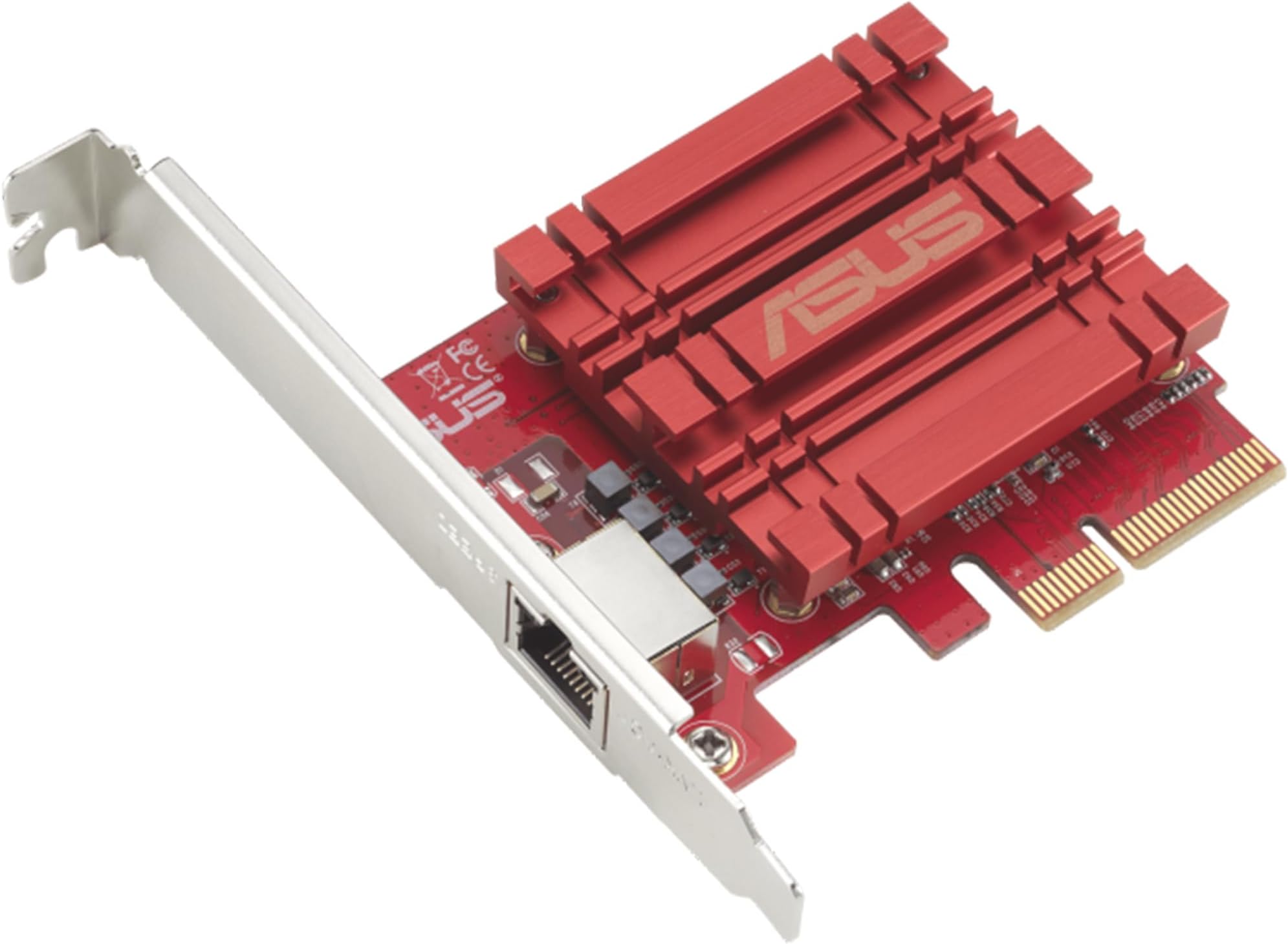
The ASUS XG-C100C is a PCI-E x4 network adapter delivering ultra-fast 10Gbps speeds with full backward compatibility across multiple Ethernet standards. Featuring a single RJ-45 port and built-in Quality of Service (QoS), it ensures prioritized, lag-free data flow. Compatible with Windows and Linux, this compact card is a plug-and-play powerhouse designed to future-proof your desktop networking for gaming, streaming, and heavy data tasks.

| ASIN | B072N84DG6 |
| Best Sellers Rank | #37 in Internal Computer Networking Cards |
| Brand | ASUS |
| Built-In Media | Quick start guide, Warranty card, XG-C100C 10G PCI_E Network Adapter, support CD (user manual and ultility) |
| Color | Clear |
| Compatible Devices | Computers |
| Compatible Operating System Family | Linux, Windows |
| Customer Reviews | 4.1 out of 5 stars 746 Reviews |
| Data Transfer Rate | 10000 megabits_per_second |
| Global Trade Identification Number | 00889349620045, 04712900620078 |
| Hardware Interface | Ethernet |
| Item Dimensions L x W x H | 4.73"L x 3.33"W x 0.81"H |
| Item Type Name | ASUS XG-C100C 10G Network Adapter PCI-E x4 Card with Single RJ-45 Port (XG-C100C) |
| Item Weight | 3.2 ounces |
| Manufacturer | ASUS Computer International Direct |
| Mfr Part Number | XG-C100C |
| Minimum Required Operating System Version | Ubuntu 16.04 Xenial Xerus, Windows 10 |
| Model Number | XG-C100C |
| Number of Items | 1 |
| Product Dimensions | 4.73"L x 3.33"W x 0.81"H |
| UPC | 889349620045 689341096318 |
| Unit Count | 1 Count |
| Warranty Description | 2 years warranty |
M**K
Unlocked Full 5Gb Speeds and Beyond, Perfect Upgrade for Gamers
Hereโs an upgraded version with gaming included and a bit more impact: โธป I recently added the ASUS XG C100C 10G Network Adapter to my setup, and it has been a huge upgrade for my home network. My motherboard only supported up to 2.5Gb speeds, which was holding me back from fully utilizing my 5Gb internet at home. After installing this adapter, I was finally able to unlock those higher speeds and even surpass the 5Gb mark, which was exactly what I was hoping for. Installation was straightforward and hassle free. It fit perfectly into my system, and the drivers were easy to install. Within minutes, everything was up and running, and I immediately noticed the performance boost. As a gamer, this upgrade has made a real difference. Downloads are significantly faster, game updates that used to take a while now finish quickly, and overall network responsiveness feels much smoother. Latency is stable, and I have not experienced any drops or interruptions during online gameplay, which is huge for competitive sessions. The connection has been extremely reliable across the board. Whether I am gaming, streaming, or downloading large files, everything feels faster and more consistent. It handles heavy network usage without breaking a sweat. Build quality is solid, and it runs reliably without any issues. If you are limited by your motherboardโs network speeds and want to fully take advantage of high speed internet, this adapter is absolutely worth it. Overall, this is a great investment for gamers and anyone looking to upgrade their network performance and future proof their setup.
S**L
So far no issues except annoying network boot
I installed 3 of these. Of course this is just day one, but some of the negative reviews I read, don't apply at all (at least to me, on 3 different computers... one AMD 2 intel). Some of the reviews that say that this card doesn't initialize and you have to wait, or that it disconnects or drivers are horrible etc... this was a very clean plug and play. I downloaded the latest drivers from ASUS... but popped the cards in 2 windows 10 machines, and 1 windows 11 machine. On the 2 windows 10 machines (which are also intel), it tries to boot from the network card. I tried to disable this in the bios but it still tries, this is annoying because it takes like 30 extra seconds to boot. You can click ESC to skip it but if you have a monitor that doesn't show you what is going on you can assume something is wrong or stop it during boot. I need to figure out how to get it to skip this, I am sure there is a way. Full disclaimer still waiting on my other 10G switches, so I haven't tested them out at full speed yet, but on my1G network they work just perfect like the internal NICs always have.
A**R
Did not work out - here is what I ended up doing
I decided to upgrade my home network, so I can access my NAS faster. Given that I had bought a new switch, this NIC card, and a new NAS, I couldn't easily troubleshoot why I wasn't getting the speed to the NAS or why the Internet was dropping. I ended up swapping out every new component, until I discovered that it was this card that was causing all the issues. Issue #1: I couldn't achieve the transfer speed using iPerf3 test. Issue #2: Internet connection was very slow, and Google Speed Test would not run. However, I was able to use the card to transfer files from my NAS to my PC at 1GB/s, which is very close to 10Gbps. If I needed this network card just for internal transfer, then I would've been ok. But, I also needed this card for my Internet access, and that's where it was a no-go for me. I switched out to Intel X550, and without changing anything else, my Internet connection is working fine. I had read some other comments stating that CAT 7 cables are causing problems, but I am only using CAT 6A cables to the Internet. I also upgraded the firmware to the latest, but it didn't help. I do wonder if the card is dropping IP addresses when the buffer is set 'incorrectly.' Either way, after having spent a lot of hours sweating over how to make this card work, I finally gave up and returned the product. Intel card is 3 times more expensive, but I am glad that it just works. I have an ASUS motherboard, which is working very well, so I am a bit disappointed by this experience.
T**P
Easy to install and is working well
I bought 3 of these to upgrade from a 1Gb network to a 10Gb network. They're connected with CAT 6a cable to a Netgear XS-505M switch. 2 of the PC's are Windows 10 with nVME drives and the 3rd is a Windows 7 with traditional hard drives (platters) in a RAID5 configuration. I didn't install the Asus drivers, but instead used the drives from the actual chip manufacturer - Aquantia. I did that after reading various reviews where people were having trouble with the Asus drivers while the Aquantia ones worked just fine. Installation was as simple as it gets. I anticipated that I may have to tweak some of the TCP/IP settings to get these cards to run at their peak performance. But I didn't. Using the default values I am getting 1.1GBs (880Gbs) between the 2 PCs that have nVME storage. I know that many reviews state they're seeing lower speeds and I wonder if it's due to a bottleneck with their storage? When I copy files to the Windows 7 PC with the RAID5 traditional drives the transfer rate hovers around 260Mbs. It's the slower rotating style hard drives that are the bottleneck. One other strange behavior I noticed was that if I plug the Asus C100C card into a 1Gb switch I don't get very good performance. As an example when using my PC's motherboard's 1GB port I get a steady 110Mbs. But when using the Asus C100C connected to that same 1Gb switch It starts out at 110Mbs and then slows down to around 30-40Mbs. I never figured out why. But, when connected to the 10Gb Netgear switch it works just fine. As for the longevity of this card, only time will tell.
M**I
awesome card, convoluted linux installation (i.e. to a linux noob)
Windows 10 installation was seamless. Linux (Ubuntu server 16.04) was a pain. Only method ended up being through "insmod atlantic.ko" see below for details. Performance so far (connected PC-to-PC without a switch), has been flawless. I am connecting over 150 feet of cable & can transfer four hard drives at full speed without any discernible bottlenecks. highly recommend the card! ---------------------------------- Ubuntu server 16.04 installation: 1) clean install of Ubuntu 16.04. 2) install the build-essential package from apt 3) download the Asus 5.0.0.5 driver for the XG-C100C to /home/USER , unzip the file to reveal the Atlantic1.5.348.0.tar.bz2 archive, and then unpack it: tar -xvjf /home/USER/Atlantic1.5.348.0.tar.bz2 4) Navigate to the new /home/USER/Atlantic directory and run: make , which should then generate an "atlantic.ko" file. 5) Once you have that file in place (check!), edit the network interfaces file: sudo nano /etc/network/interfaces , and set the static IP for your card (in this case, it occupied the enp1s0 slot, you'll need to check which slot it sits in) something like the following: - - - - - - - - - - - - - - - - - - - - - - - - - - - - - - - - - - - - - - - - - - - auto enp1s0 iface enp1s0 inet static address 10.10.10.20 netmask 255.255.255.0 - - - - - - - - - - - - - - - - - - - - - - - - - - - - - - - - - - - - - - - - - - - 5a) to do a temporary installation, run: sudo insmod /home/USER/Atlantic/atlantic.ko (this will only last till a reboot). This should bring the card to life & you can test. 6) To finalize your installation (so the driver will persist after a reboot), run: sudo nano /etc/rc.local , and edit your rc.local file to include insmod /home/USER/Atlantic/atlantic.ko , below the #!/bin/sh -e at the top of the file, and above the exit 0 at the bottom something like the following: - - - - - - - - - - - - - - - - - - - - - - - - - - - - - - - - - - - - - - - - - - - #!/bin/sh -e #etc insmod /home/USER/Atlantic/atlantic.ko exit 0 - - - - - - - - - - - - - - - - - - - - - - - - - - - - - - - - - - - - - - - - - - - Nb. In my setup, the computer this linux server connected to had a static IP set to 10.10.10.10/255.255.255.0 and it was connected directly pc-to-pc with an ordinary cat6 cable. Nb. For the above installation, if you use your home/USER directory for other items, you might want to place the Atlantic driver in a different directory than this one...
A**L
works as advertise..
Asus brand but appears to be rebranding. Need driver (not WIN 11 native).. Works well easy detected by Unify system.. color is a little off.. my rig has red LED so no that bad, wish will be black instead..
T**Z
There are no Wake-On-Lan 10GbE Cards
Like many others here I was surprised when this card came with no Wake-on-LAN functionality. Spent a fair amount of time looking around for a card with such header and what I learned is that there are no 10GbE LAN cards with WOL header -- and the ones that claim they have one are likely just fake baits. This card performs really well, supports jumbo frames and easily hits 950-980MBps (that's bytes) transfer rates, so - yes, it actually is a good purchase. It might be possible that the Aquantia technically supports WOL, but I understand there are other technical limitations at this point preventing pretty much all manufacturers from supporting this explicitly, like supplying enough power to this card. If you're wondering how to solve the issue now - one recommendation I've seen is to keep the onboard LAN still connected.
S**E
Works great in unRAID
I installed this on my unraid server to obviously get 10gbps connectivity, hooked it up to an unmanaged 10gbps switch, alongside my desktop so I could move files between it and my NAS at approx 1.25 gigabytes a second (10,000 / 8). Common misconception is that you need cat 6a or at least cat 6 to transfer at those speeds. I'm using a 50 foot cat 5e cable and it works just fine. As long as the distance isn't too much, cat 5e is able to do high speeds. I was running out of pcie slots on my server motherboard so I got an m.2 to pcie slot adapter. Aside from needing to take off the bracket of the NIC, it works perfectly since m.2 is 4 pcie lanes just like this card. Haven't had any issues with this. Only thing I would recommend considering before buying, is that RJ-45 uses more power than SFP+ so if you're just starting to build out your multi gig network, consider looking into fiber too. You can get a lot of refurb or used SFP+ gear online for cheap, and it would probably save you some on your power bill. I sort of regret buying the 5 port 10gbps rj-45 switch I have. I love the speeds, but power is so expensive where I'm at that 24/7 powered stuff makes a difference.
D**R
Problรจme de conflit au redรฉmarrage
La carte utilise son propre drivers ร l'inverse du modรจle Tx401 qui utilise directement le driver du fabriquant. JE ne sais pas si c'est cela qui est en cause mais une fois la carte installรฉ dans le pc avec le driver d'ASUS, au prochain arrรชt/Dรฉmarrage, il y a un conflit avec le CPU empรชchant le pc de dรฉmarrer. JE n'ai pas rencontrรฉ le problรจme avec la carte TX401
R**B
This is my second!
Great hardware. Performs well at 10gb. Installing on Windows10 was simple! This is a repeat purchase.
S**S
รtimo
Produto recomendo ๐!
M**L
Bom
Nada a dizer funcionamento normal
L**S
Sehr gute Netzwerkkarte
Die Netzwerkkarte kann man sehr schnell in ein bestehenden PC oder Server einbauen. Sie wird nach der Treiber Installation problemlos erkannt. Es ist jederzeit ein Einkauf wert.
Trustpilot
2 months ago
2 months ago