Buy anything from 5,000+ international stores. One checkout price. No surprise fees. Join 2M+ shoppers on Desertcart.
Desertcart purchases this item on your behalf and handles shipping, customs, and support to Spain.
🚀 Unlock your data’s full potential with speed, space, and zero fuss!
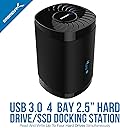
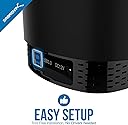
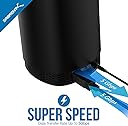
The SABRENT USB 3.0 4-Bay Docking Station is a high-capacity, tool-free solution for managing up to four 2.5” SATA SSDs or HDDs (max 16TB each). It delivers fast 5Gbps USB 3.0 transfers, features a whisper-quiet cooling fan for reliable 24/7 operation, and offers broad OS compatibility with plug-and-play convenience.


| ASIN | B0711L68MS |
| Best Sellers Rank | #3 in Hard Drive Docking Stations |
| Brand | SABRENT |
| Built-In Media | Docking Station |
| Color | Black |
| Compatible Devices | Laptops, Tablets, Desktops |
| Connectivity Technology | usb |
| Customer Reviews | 4.2 out of 5 stars 3,132 Reviews |
| Data Transfer Rate | 5000 Megabytes Per Second |
| Enclosure Material | Plastic |
| Global Trade Identification Number | 00819921013187 |
| Hard Disk Form Factor | 2.5 Inches |
| Hardware Interface | SATA 1.5 Gb/s, SATA 3.0 Gb/s, USB |
| Hardware Platform | Mac |
| Item Dimensions L x W x H | 4.4"L x 4.4"W x 6.3"H |
| Item Weight | 16.2 Ounces |
| Manufacturer | SABRENT |
| Material | Plastic |
| Memory Storage Capacity | 88 TB |
| Mfr Part Number | DS-4SSD |
| Model Number | DS-4SSD |
| Product Dimensions | 4.4"L x 4.4"W x 6.3"H |
| Supported Devices Quantity | 4 |
| UPC | 819921013187 |
| Warranty Description | 1 year limited |
M**.
Better than a NAS.......In Many Ways
I needed a better storage option than a NAS, we were hitting the road fulltime in our RV and a NAS just was not logical Looking for in purchase: -Sturdy -Value -Multiple drive bays -Power through USB (not mandatory) -SSD compatible -Compact Design: The Sabrent USB 3.0 nailed almost all the boxes. Small, compact, great price, 4 drives, had a fan (which you could turn off) and it looked good. It has a separate power cord, which was not a deal breaker (and actually I liked that after I thought about plugging it into my UPS) Issues: The fan is a bit loud, but honestly I don’t even turn it on unless I am writing a significant amount to it. Positives: ++Material ++Look ++Design ++Build Quality ++Cost ++Transfer speeds ++Fan (when needed) Negatives: --None Final Thoughts: I love this it is exactly what a person needs, if you don’t need the NAS for distributed use or a security system. The product looks great and performs perfectly, transfer speeds are not limited to the 1Gig network line anymore, they are limited by the drive space. The other advantage is you can swap out drives as you need them, it works as if it is four separate portable SSDs. This is really a great option to a NAS and I pleased to downsize while upsizing my transfer rates. Would I recommend: Absolutely I would. Buy this now
S**A
This is an EXCELLENT quality product! ..
The title doesn't even cover it! This product was beautifully and thoughtfully packaged and shipped. It is beautiful, rugged and performs as advertised and exceeded my expectations. I put 4 (2) TB drives in it, spinning seagate drives and realized when you turn the unit on, the fan doesn't automatically come on, - you will need to press the button for the fan. What I do is, turn the fan on first, then power on the drives. The fan isn't hardly noticeable or beyond what you would expect for a small desk fan and you definitely need to run the fan, - it makes a difference. Without the fan the drives were hot to the touch. After running all four drives on a several hour copy job on my Mac, the drives were cool to the touch when I detached them. I got the non-raid version which was the best version. At USB 3.0 speeds files copied quicker from the finder from Mac to drive or drive to drive then using Stellar Clone Drive or another program. So, I recommend if you don't want to run the unit with the fun, you just leave the top off. If the drives are enclosed and the top on, you gotta run the fan. The unit is solid, and not flimsy, just beautiful. Like a tiny mainframe core on your desktop, - humming away softly. I didn't test the hot-swappable feature as I've learned with Mac OS that it doesn't handle dismounting from ANY multiple drive dock with out ejecting them all, - as this is an issue with the USB BUS and the OS, not the dock so I didn't even bother attempting that in the middle of a data copy. If I could give this review 20 stars, I would. It delivered beautifully on my iMac running El Capitan. The price as well.. was an EXCELLENT investment for the quality and functionality of this product, - once you start moving data around in the Terabytes you need reliability and stability in a product to protect your information that matters most.
R**S
You have to remember to turn it on.
I had been using a spacer rack to support four SATA III SSD backup drives. They were plugged into a powered USB hub. I was concerned about how warm they were. I bought the Sabrent 4 bay docking station because it had a built in fan. It works fine. However it has separate push button switches for power and fan. They are the push on push off type. I power my system from a plug strip with a master switch. It powers the PC, monitor printer-scanner, sound bar and docking station. When I turn on the system everything except the docking station comes on. I have to remember to push the buttons to turn on the docking station. Toggle or rocker switches would be more convenient. That is my only complaint about it.
C**E
Useful and Convenient Drive Dock Keeps Things Cool
At first I didn't notice the power button and fan.button, but once I got it activated, it works great! Double the drives of my old setup, and if I need more I can put the old one in a different port. Very useful solution for my home lab boxes that are otherwise challenging to access the internals of.
L**E
Had A Lot Of Promise. Only Provided a Lot of Frustration.
I have always liked, trusted and purchased Sabrent products. Thought I could purchase this as a cheap man's attached storage to use as a DVR to my mini Win 10 HTPC. I have Synology DS409slim and DS416slim 2.5" NAS boxes and thought this could give me similar capability as a side mounted USB external drive on the cheap. Tried though I might I could not make it work. Sadly, even with it's low price, because of its limitations I can't see any functional use for this product at all. In the end I purchased another DS416slim and relegated DVR duties to my DS409slim. As advertised the drives are accessible at flash SSD speeds. The drives are easily installed and it looks as if this enclosure can accommodate even 15mm tall drives. This product had the possibility of displacing the DS4XXslim series as the only 4 bay 2.5" device on the market. Sad that it misses this mark by a large margin Fan First of its certainly nice that it has a fan, however you'll probably never want turn it on. It is very loud. If you fill this box with SSD's you don't need it. However if you use HDD's with the lid on without the fan they will surely overheat. Just one HDD in this box without the fan, ran so hot I was concerned the drive would fail prematurely. They should have given the option to set the fan speed. LED lights. The LED's are overly bright. It would be nice to dim them or turn them off entirely. Surely a minor issue but annoying when you turn off the lights and watch TV with this in the room. Not Hot Swappable This was the deal breaker. When drives are plugged in, the other installed drives rebooted. Sometimes the drives did not reinstall themselves and remained offline. I used a mix of SSD's from Samsung, Crucial and Silicon Power and a WD HDD. Although the ardvert says "Hot Swappable" I did not find it to be the case. If I formatted a drive and then unplugged and then reinstalled to the same slot, frequently the drive would not reappear in Windows Explorer. I could take that same drive and put it into a different enclosure (Sabrent EC-RDSV) and it would display with a drive letter properly in Explorer. Put it back into the DS-4SSD and the drive is still unreadable. Move a drive to any of the other slot of the DS-4SSD and you risk it being unreadable. I tried combining multiple drives into one using Disk Manager. Win 10 would not allow this. I tried doing the same thing in Storage Spaces in Win 10. Often it would fail to work though I tried many different drive combinations. Each and every time when it did allow the DS-4SSD to create a Storage Space, in a short time it would post an error saying one of the drives was not available. Often the Storage Space could not be removed and the SSD's and HDD were "bricked". I had to find a Win 7 computer and use Disk Manager and the Diskpart command to recover them. Once some of these drives had been "bricked" and recovered, the DS-4SSD would not only not recognize them, but plugging these in would sometime make the other "unbricked" drives disappear. Incidentally I was able to use two Sabrent EC-RDSV enclosures and create and remove Storage Spaces with my drives without incident. There is something wrong with the product or my copy of it. It is not easy to reach out to Sabrent to get support. No tech support phone number. This product in my opinion has a lot of promise. If it worked it could have been valued much higher. However as it is it was a waste of a week of my time and $60.00. My wife after seeing all my frustrated attempts to get this working urged me to buy another $300 DS416slim. I put all of my "bricked" and "un-"bricked" drives into it. It formatted them without incident, combined them into a RAID5 partition using SHR. I created an iSCSI share that was designated as the D drive. I configured my Silicon Dust DVR onto the iSCSI share and went to bed peacefully for the first time in a week. Sabrent, sorry. Wanted to like this. Couldn't. Regards All and Good Night
S**L
So far so good.
Easy to set up and plug in the hard drives. Working like a charm so far, but it's only been a week. So far so good.
T**S
It works, but it could be much better
After reading some posts on the Internet about this device not working reliably with Unraid, I decided to try for myself because I didn't agree with the reasoning behind the posts. Most of the negativity was from people that didn't like the idea of using USB connected hard drives, and none of them had tried this product. As I expected, the Sabrent bay works just fine with Unraid. Make sure to connect it directly to the computer and avoid using USB hubs. Here is my setup for your reference: 8th generation Intel NUC i5 with an internal 512GB nvme drive and an internal 2TB 2.5" SSD drive. I am running a VM with Home Assistant and about 10 Docker apps (Plex, PhotoPrism, AdGuard, Vaultwarden, etc.) on the NUC. I don't need the array on Unraid to be the fastest, I just need it to be reliable to run some apps and protect my data. Since I had no parity drives, my data was not protected in case of a hard drive failure. I connected the Sabrent bay with one 2.5" 2TB SSD configured it as the parity drive for the array, and reconfigured the 512GB nvme drive to be a cache drive. It took about 8 hours for the data to replicate to the parity drive and it has been working great since. No errors and no USB disconnections at all. Pros: - Price. I got it for $69, definitely not worth $99. - It works with Unraid. - Size. - Pleasant aesthetics. Cons: - No way to set the device to power on automatically after power is restored. You always need to push the power button to turn it on. - The fan: To me it is loud! It needs to be turned on manually and there is no auto fan speed control based on temperature. - No way to dim or turn off the bright blue LEDs. - Hard drive temperature reading is always 40C. It does not matter if the drive is idle, under load, fan on or fan off.
J**S
Great little unit for multiple SATA drives to USB 3.
Great little unit. Hold four SATA drives and ports through one USB 3.0 port. Works flawlessly. Well built, nice magnetic top. The cooling fan is helpful, and you can switch it on/off independently. I read complaints about fan noise -- I don't think its too bad at all. Just a slight white noise, almost like one of those white noise sleeping machines. About 55db. Makes me feel like a nap. Have dropped 5 different SATA HDs in there of different ages and sizes, current to 10+ years old, 240GB to 1 TB, all recognized and working flawlessly. Sometime a little tricky getting odd-thickness (too thick or thin) drives to seat, just be cognizant. Great value too. Clone drives, or group them to increase storage size. I'm storing old movie clips on them.
F**9
UNA COMPRA MUY ACERTADA
La unidad funciona muy bien, conectada en un Mac Mini M4 reconoce los 4 discos sin ningún problema y la velocidad de transmisión de datos es también muy buena. Recomiendo la compra por el precio que tiene y la calidad.
M**O
Works perfect so far.
I am using 2 of these since about 2 to 3 month and they just work fine.
L**M
Noisy but otherwise great piece of hardware!
Seller: Sold as used at half price. Original packaging, complete and spotless. Great bargain. Product: The 4-bay dock is used with four 8 tb Samsung QVO ssd:s and connected to USB 3.0. Read speed a satisfying 350 MB/s. No write speed data yet. When idling or reading, drive temps are under 50C with the lid taken off. Continous writing gets them up to 58C. Then the lid comes on and noisy fan activates, reducing temp to 48C. This thing is better than I expected.
K**R
Langzeittest 4,5*, Problemloser Betrieb mit HDDs und SSDs
Langzeittest ****4,5, Läuft seit >5Jahren im Dauerbetrieb (mit ausgemusterten HDD/SSD) zuerst mit 4x HDD seit ~2Jahren mit 4x SSD, verwende die Dock "nur" als Backup-Lösung täglich -ohne- Lüfter / Deckel, hatte in dieser Zeit genau 1x ein Problem mit einem HDD Ausfall, lag aber wohl eher am Alter der HDD ;-), der Betrieb ohne Lüfter (wg. etwas nervigem Geräusch, deshalb der halbe *Abzug ) führt zwar zu etwas höheren Temp., das hält sich aber wirklich in Grenzen und bringt keine Probleme -zumindest nicht mit 5400rpm, 2,5"HDD-, bei 7200er-HDDs könnte es natürlich anders aussehen und würde ich in diesem Gehäuse auch nicht empfehlen.
W**W
A fonctionné selon les attentes
Pour la réorganisation des fichiers sur d'anciens HDD.
Trustpilot
3 weeks ago
3 days ago