💼 Compact power meets sleek design — own the desk, own the game.
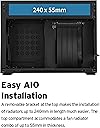
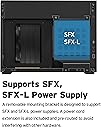
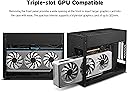
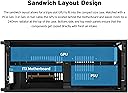
The Lian Li A4-H2O is a premium 11-liter Mini-ITX PC case featuring a triple-slot GPU mount up to 322mm, support for 240mm AIO water cooling, and a unique sandwich layout that optimizes airflow and space. Crafted with an aluminum exterior and SPCC steel interior, it supports both SFX and SFX-L power supplies and includes a removable front panel for easy GPU installation. Designed in collaboration with DAN Cases, it delivers high-end performance and minimalist aesthetics perfect for professional millennial builders seeking a compact yet powerful rig.


| ASIN | B09T73JG49 |
| Antenna Location | Gaming |
| Best Sellers Rank | #11 in Computer Cases |
| Brand | Lian Li |
| Case Type | Mini-Tower |
| Color | Black |
| Compatible Devices | Mini-ITX |
| Cooling Method | Water |
| Customer Reviews | 4.5 out of 5 stars 239 Reviews |
| Enclosure Material | Aluminum, SPCC Steel |
| Fan Size | 120 Millimeters |
| Global Trade Identification Number | 04718466011497 |
| Hard Disk Form Factor | 3.5 Inches |
| Internal Bays Quantity | 1 |
| Item Dimensions D x W x H | 12.83"D x 9.61"W x 5.51"H |
| Item Weight | 2.9 Kilograms |
| Light Color | Blue |
| Manufacturer | LIAN LI |
| Material | Aluminum , SPCC Steel |
| Mfr Part Number | A4-H2O X4 BLACK |
| Model Name | A4-H2O X4 BLACK |
| Model Number | A4-H2O X4 BLACK |
| Motherboard Compatability | Mini ITX |
| Number of Fans | 2 |
| Other Special Features of the Product | Sandwich Design Layout, AIO Water Cooling Support, DAN Collaboration Case |
| Power Supply Maximum Output | 600 Watts |
| Power Supply Mounting Type | Bottom Mount |
| Recommended Uses For Product | Gaming |
| Supported Motherboard | Mini ITX |
| Total Expansion Slots Quantity | 3 |
| Total USB 3.0 Ports | 1 |
| Total Usb Ports | 2 |
| Warranty Description | 1 year |
J**H
11-Liter SFF Hall of Famer
This case is absolutely amazing, punching well above its weight class. Let's start off with what I have inside mine -- an i7 12700K and am RTX 3090 TUF, powered by a Cooler Master V850 SFX PSU. Man, does this case make it happen. The H2O is able to handle this kind of power because the CPU is liquid-cooled, and the GPU sits on the other side of this sandwich style case. The case itself is rock solid, utilizing a near tool-less snap-together design and plenty of ventilation for its size. It is larger than the previous model (Dan A4 SFX), due to the intention of this being water-cooled. I opted for an MSI CoreLiquid 240R ARGB V2, since the water block is small and offers ARGB. It tames the temps well on my 12700K. You'll need to make sure your AIO will fit in this case, as there are many that won't -- either because the pump/water block is too tall or because the hoses are too thick. You'll also want something that has hoses on swivel elbows. Otherwise, routing the hoses and closing this case will be next to impossible. This was hands-down the hardest aspect of building in this case -- managing the AIO hoses. The A4-H2O gets a lot right. You can cool some higher end CPUs, use a full length GPU, and a semi-pleasant building experience. To top it off, it looks amazing, and the parts are high quality. Just keep your hands off the case, as the finish shows off fingerprints well. This case is an excellent competitor for the NR200, because it's 8 liters smaller, and has nearly all-metal construction. To me this one is the obvious choice. Also in this form factor I would avoid i9 CPUs entirely. They eat up too much power, and make too much heat. My experience with this case has been fantastic, but it did leave me wanting more. Having a liquid-cooled, 11.24-liter PC means it's going to be a tad heavy. It's also too big to fit into my DSLR camera bag. I also think this case's width dimension would be a tight fit in a carry on-size tough case like one from Pelican. If you need a small form factor PC for saving desk space, this is an excellent option. That's the niche this serves for me, and it delivers. Maybe you can make this a portable powerhouse for more than gaming. Its too big and heavy for me. Personally, I've found my 8.1-liter KXRORS S300 case to be a better road warrior, because it fits in my DSLR bag and weighs less. Sure, that one can't be as powerful, but it games very well, albeit a little louder.
R**S
Perfect Case
It's the perfect case for my needs: - Small even for SFF standards. - Quality materials. - Decent cooling options given the space you have. - Fits a pretty big GPU. - Supports air cooling if you pick the right size. Extra Notes: - I'm undervolting my 7700X and the fans are inaudible during day to day use, but do get a high quality fan if you go with air cooling. - Cable management is the trickiest part, as others have said. It's best if you pick a PSU that is known to work well with the stock cables it comes with or get custom cables. - It was easier to build in than my last mATX case, simply because you are more limited to parts and compatibility, but you must do research to build in this case. Do not just throw seemingly compatible parts in your Amazon cart. Validate that someone has built successfully with those parts first.
C**G
Excellent ITX case, thermals better than expected, this is an amazing ITX case.
This is now the best case I have ever owned. Super small, quiet, aesthetically pleasing, well built. Thermals (and noise - Noctua fans...) are better than you would expect with such a cramped case. This case is also surprisingly quiet. Get custom cables if you can, this will aid with cable management. Modular PSU's are a must with this case, non modular PSU's will not work as there is not enough room for spare cables. This case replaces my excellent Corsair 250D that is large for a ITX case but has excellent thermals. This machine is used for gaming on a 2K monitor. Easy to build as all of the panels are removable. CPU: Intel Core i5 13600K (not overclocked) never gets above 55-62C (better cable management or custom cables would probably improve this to drop below 60C) CPU Cooler: NZXT Kraken X52 (long hoses but they fit fine) with 2 Noctua 120mm x 25MM fans pushing out and 1 120mmx15mm slim Noctua fan on the bottom pulling air in. This fan is not mounted as there is not a mount in this spot however, it works fine and does not move at all. GPU: RTX 4070FE - (not overclocked) Stays at 70C or below. Very quiet. PSU: 850watt Cooler Master fully modular SFF 2 M.2 drives, no 2.5 SSD, don't need them anymore.
E**T
Great ITX Case With Caveats.
This case is amazing for the vast majority of use cases, with the only flaws that I have seen coming from niche usage. First off, I am running this with a Ryzen 7 7800X3D, MSI Ventus RTX 4080, Asus B650E-I MB, 2x Gen 4 SSDs, Cooler Master H100x 240 AIO and a Cooler Master V850 SFX PSU. This case is great for most users, and plenty of other reviewers have listed its more relevant pros and cons, so I will focus mainly on one particular issue I had with it. The Thermals: Are great for the most part. There is one issue that I will mention below, but for most users, this probably won't matter. For all non m.2 thermal testing I am using a default fan curve with the B650E-I, and default fan curve with the 4080. No PBO/undervolt, just DOCP for memory. Temps are great for CPU and GPU, CPU never exceeding 80C in games, and only hitting close to TJmax in Cinebench, which is normal for this CPU. GPU never exceeded 65C in any game tested/played for an extended time. Backside M.2: The one thermal issue I have with my setup is M.2 Thermals. Tested with multiple gen 4 SSDs, multiple fan curves, 100% fan speed ect. I found that on the backside m.2, every gen 4 SSD I tested thermal throttled very hard, with any decent (>5GB) size file transfer. With the way the case is setup, The PCIe riser, blocks off most of the airflow that could go to the backside m.2 (see photo). The blue square shows where the riser normally rests when the case is fully assembled. This combined with close proximity to the GPU means that there is practically zero airflow to the back m.2. Also, with the way the motherboard cutout is, (at least for the Asus B650E-I and ASRock B550 Phantom ITX). The motherboard tray cutout is too small, in that you can not use the tray as a passive heatsink with a thermal pad (barely makes any contact see photos). But the cutout is also too big, in that you cant run any M.2 heatsink because it interferes. This makes using the backside m.2 with gen 4 practically useless. This might improve with gen 3, but do not have a gen 3 drive to test with. Dec 2025 Update. NOTE: Tested with Gen 3, and still had horrendous thermal throttling. The way I fixed this is by using a m.2 gen 4 extension and moving the ssd to the front of the case. This completely fixed the issue. Front M.2: While not nearly as bad as the backside, the frontside m.2 will still thermal throttle if you are moving enough files, or large enough files. Since there are no restrictions like the backside, I have tried different pads, drives with heatsinks, and using the stock Mobo heatsink, ect. The best result was running a slower, gen 4 drive(5GB/s), with the stock Mobo heatsink. I would not advise running a m.2 with a preinstalled heatsink, like a WD Black SN850x (like I have in the photo), it runs 66C at idle, with the rest of the system sitting at around or below 48C (idle). Overall: So, if you have the niche use case of needing a ton of fast m.2 storage, you might have to either pass on this case, get a motherboard with active m.2 cooling, or figure out some DIY solution, expanding the motherboard cutout and adding a heatsink, ect. Some Compatibility Notes: Modular PSUs are basically a MUST use in this case for large GPUs. I barely had any room left, using only necessary cables and had to order a direct 3x8 pin PCIe Power to 12VHPWR cable. If you use a PSU that doesn't have one, I.e. a 3x8PSU to 3x8 PCIe to a 3x8 PCIe to 12VHPWR adapter, you may have cable fitment issues. I was able to run the system using an adapter for a while, but when I heard about the 12VHPWR issues with bent cables, I just ordered the cable. I now have a lot more room in the bottom of the case, and less bend at my 12VHPWR connector. I would not recommend the Cooler Master H100x AIO if you are running a large GPU. I got it on sale, and regret buying it for this case. The tubes have to be oriented to the front of this case and are almost to large to fit with my GPU (see photo), and have an awkward bend in them to fit at all. Also, cable management in this case is rough, and the RGB that I don't even use that came with this AIO was extremely long and horrendous to manage.
C**A
Missing parts, still great
TL;DR I really like it. It's small, and still has more space than I thought. Easy to build in, even as a first-timer. Very much recommend it. The one I received was missing the PCIe riser cable and the power switch cable, but that may have been a reseller issue, not a manufacturing one. Components I Used: AMD Ryzen 7 7700 CPU ROG Strix B650Ei Gaming Wi-Fi Motherboard Ripjaws S5 DDR5-6000 32GB RAM (x2) WD_Black SN770 1TB NVMe SSD Drives (x2) ASUS Dual Radeon RX 6600 GPU Corsair H100i Hydro-Cooling Fan Corsair SF750 Power Supply Cooler Master PCIe 4.0 x16 riser cable* The Positives I love the design and model. It's even smaller than I expected, but it still holds a lot more space. For a case that's the size of a shoebox, the internal layout makes it easy to work with if you have the right parts. I still have room left over to add SATA SSD drives, or maybe even drop in a small figurine for fun. The ventilation is exceptional. There are vents on almost every side, and the panels are easy to pop off when needed, which helps with airflow and access. I have decent cooling components, and since this is a development machine and not a gaming rig, the system has stayed cool to the touch since I started using it. The case is very straightforward to work with. This was my first PC build, and the process went smoothly. I’d recommend this to anyone who wants a clean, sleek, utilitarian setup. The Negatives My unit was missing several components that were supposed to be included. There was no screw bag, and some of the screws for the top and bottom inner panels were missing. Most importantly, the PCIe riser cable wasn’t included, even though it’s shown in both the manual and the product listing. I had to buy a replacement for $40, though I did receive a partial refund. The power switch cable for the case's power button was also missing. Only a reset switch cable was included, so I had to short the power pins on the motherboard with a screwdriver to turn the system on. That's pretty bad. I eventually repurposed the reset switch cable to act as the power switch. It works, but that’s clearly a hack and not how it was intended to be used.
R**N
One of the best SFF cases out there!
I recently built a newer system and was surprised how tiny this case is and how easy to build around. Specs: Ryzen 5600 RTX 3080 TUF OC ASRock B550 PHANTOM Gaming ITX/AX G.Skill Ripjaws 3600 16x2 1TB Samsung 970 Evo plus nvme 2TB Crucial P3 nvme Cooler Master V850 Gold SFX ID Cooling Frostbite x240 (paired w/ 2x Noctua NF-P12) Pros: -Simple and sleek design for the minimalists -Easy to build and maneuver inside -All sides are removable (except for rear of course) -Fits 240 AIO (wow for an 11L case!) -Good thermals (basically open air design because of all mesh panels) -Botton could fit a 2.5" sata drive if needed Cons: None Notes: Make sure to research AIO dimensions carefully as some of them have thick radiators that you might have to buy low profile fans which will hinder cooling effectiveness as those fans push less air than regular ones. Also, get a board with USB C front panel connection if you plan on using the front panel USB C socket. Other than that, I'm loving this case. This could actually fit some 4000 series cards as long as they are 3 slots max and 322mm long. =)
S**A
Great sandwich-style SFF case, but know what you're getting
Pros: * Standoff extensions for the riser to allow 2-slot nvidia FE cards to have room to breath (necessary since they have a fan on the top not just bottom of the card) * Great compact design that is very straightforward, didn't even need the manual. * One of the few sandwich deigns that's easily purchased, most require waiting lists, second-hand markets, or crowdfunding campaigns Cons: * Motherboard tray is slightly misaligned with rear opening no matter what I did. Not a big deal, but it won't be quite as clean looking as it should be. * Beware the CPU will likely run a bit hot since the top AIO is the only exhaust vent, and there isn't really room for any additional fans (with great effort I was able to squeeze a slim 80mm fan in the bottom but that was about it). Misc: * Requires a fair bit of disassembly to install AIO initially especially if you want to avoid remounting it with an existing motherboard. * My specs: ASrock Phantom ITX B550, Corsair h100 240mm AIO, NVidia RTX 3080 Ti, SF600 Platinum PSU.
C**W
Great case for liquid AIO on ITX
I’ve been shopping around for a good ITX case for months and have been having a serious problem finding something that can fit a large enough cooler to allow my 9700x to stay cool while encoding at 100% usage. This case finally did it with a liquid cooler master atmos 240aio. Even with overclocking im not getting CPU temps above 75°C! on other cases with air coolers they were becoming heat soaked and reaching temps upwards of 95°C. I also fit a full SF750L PSU in this thing that’s way better than the low efficiency unreliable mini itx flex PSU. Lian Li did a great job with this case. So many cards are applicable with it and it’s small enough to carry in a pelican case. It’s not what I was originally going for with my build but ended up being necessary with the amount of load I run through my PC. The hardest part was routing the AIO cooler lines. I definitely would recommend for the price!
S**A
Perfect ITX case
I cannot tell how good The case is. Looks premium and can fit large 3080ti perfectly. I have build it with low profile air cooler as I didn’t want to use AIO. The temps are really good and u am having no issues at all. Most importantly you can fit it in a backpack. Portability is awesome.
A**O
La caja perfecta, ojo con el proveedor. Amazon excepcional como siempre
La cajita una pasada, un poco cara pero se paga el premium de marca y tamaño. La tuve que devolver porque la caja necesita estar ubicada en un espacio abierto (normal, nada especial) y en mi caso particular la quería para tener un ordenador potente pero pequeño en la tele del comedor, ubicada en un espacio cerrado, con lo cual la ventilación era nula y los componentes se me calentaban al ponerme a jugar a pesar de la refrigeración líquida. La tuve que devolver la caja para comprar otra con entrada de aire/ventiladores en el frontal tras 2 semanas probando mil cosas porque no había manera de contener las temperaturas y desgraciadamente el embalaje original fue tirado por error ya que siempre me guardo todo religiosamente durante 1 mes. El vendedor (tercero) me abonó poco más de la mitad del importe sólo por esto a pesar de devolver el producto de manera impoluta, pero Amazon, como siempre, arregló la situación tras reclamar. Así da gusto.
A**T
Wonderful Case
The parts are mostly high quality and it fits a wide selection of parts in a satisfyingly snug way. My only gripes are that I had to get the flex cable replaced as it had intermittent contact issues, and the clips holding the ball studs of the side panels, which I had to print some alternatives for to tighten the fit. Otherwise the panels would rattle when moved.
D**.
Tiene unos hacks
Honestamente estaba aferrado a algo como el fractal design ridge pero como no llega a México me decidí por este y honesta mente es muy bueno considerando que puedes meterle más de 1 ssd no lo dice oficialmente pero donde montas una ssd puedes puedes poner una bahía de 2 y así tienes 1 ssd mas también donde está el orificio para hacer espacio a la grafica puedes insertarlas maximo 2 con presión de nuevo nada de esto es oficial pero es otra manera de hacer todo el espacio eficiente y en se tener más almacenamiento, espero les haya servido (no es mío oficialmente es de un yutubero ingles)
M**T
Harika ama kibar.
Hema Bilişim'e hızlı ve sorunsuz gönderim için teşekkür ederim. Kasayı TV yanına Konsol kullanım amaçlı aldım. Boyut ve işlevsellik olarak bence yeterli. DeepCool LE500 Marrs sıvı soğutma ile kullanıyorum. Biraz kibar duruyor taşımaya pek gelecek gibi değil. Tavsiye edilir.
Trustpilot
1 week ago
4 days ago