Desertcart purchases this item on your behalf and handles shipping, customs, and support to Spain.
🛫 Elevate your flight sim game—command the skies like a pro!
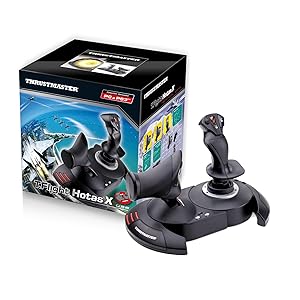
The Thrustmaster T-Flight Hotas X is a PC-compatible flight stick and throttle combo designed for immersive flight simulation. Featuring 12 fully programmable buttons, 5 axes, a detachable ergonomic throttle, and adjustable joystick resistance, it offers customizable control and comfort. Its plug-and-play setup with preset profiles and built-in memory ensures you’re always mission-ready, making it a top choice for both casual and serious flight sim enthusiasts.


| ASIN | B001CXYMFS |
| Additional Features | Ergonomic |
| Best Sellers Rank | #956 in Video Games ( See Top 100 in Video Games ) #2 in PC Game Flight Controls |
| Brand Name | Thrustmaster |
| Button Quantity | 12 |
| Color | Black |
| Compatible Devices | PC |
| Compatible Video Game Console Models | Sony PlayStation 3 CECH-4012C |
| Connectivity Technology | USB |
| Controller Type | Flight Stick |
| Customer Reviews | 4.4 4.4 out of 5 stars (8,308) |
| External Testing Certification | Não aplicável |
| Global Trade Identification Number | 03362932913535 |
| Hardware Platform | Desktop, Laptop |
| Included Components | Instructions manual & flightstick |
| Item Dimensions | 10.39 x 9.53 x 10.43 inches |
| Item Part Number | 2960703, 4160543 |
| Item Type Name | Flight Stick |
| Item Weight | 4.3 pounds |
| Manufacturer | Thrustmaster VG |
| Manufacturer Part Number | 2960703 |
| Model Name | THRUSTMASTER T-Flight Hotas X Flight Stick |
| Model Number | 2960703 |
| Package Quantity | 1 |
| Power Source | Corded Electric |
| UPC | 071030532366 088021805026 887166196026 012301871210 080000259578 151902985152 611101218685 088020767042 080000350657 021112254617 088020980311 084007483189 962327424283 071030530522 780320052803 080000327369 021111317245 086000368937 071030174641 803246208427 675904128305 079532181464 115971251358 132017947938 105221984143 644535525814 001910723973 071021143250 707003244966 021113169415 0129515960… |
| Warranty Description | One year |
S**D
A great price positioned joystick/throttle combo that won't break the bank
I have looked at Thrustmaster sticks over the years with envy, to me they represented an elite level in joysticks. While I really like flight and spaceflight simulations, I could never quite warrant spending the big bucks on Thrustmaster or Saitek joysticks. Logitech and others had reasonably priced sticks for my level of gaming. For the past several years I have been on consoles so joysticks were not a big option. Recently I stepped back into PC gaming and I purchased one of the "Elite" space combat games. Even in the video for the game, the character used a stick combo that was very similar to a Thrustmaster setup...clever subliminal marketing? Maybe so because after trying somewhat unsuccessfully to fly on just a keyboard and mouse, I was looking for a stick I thought about going with one of the Logitech sticks, like what I had before, then I saw this setup. Where it would be asy to close in on or surpass 400.00 US on Thrustmaster sticks, here was both for a very very reasonable price. Was it discontinued? An inferior model or refurb? Nope, it is just a specific model that Thrustmaster produced to solicit a niche of bargain PC gamers and PS3 gamers(Yes! The stick works on PS3!!! I find out AFTER I have moved on to the PS4( I have yet to see if it works on PS4, but even if it does there are not many games that call for a stick like this)) The T-Flight is a great stick for the price-point. It is not going to be the same quality as the 200.00 individual components, but that is not to say this is not a quality device...Au Contraire... This is a great bang for the buck. The unit arrives together in the box but not connected. You have the option of screwing the throttle and the stick together via installed screws in the base. There also is an allen wrench included in the base, complete with its own snap in nook. This is good because the screw heads are of a star type. That being said, you should put them together to see if you are comfortable with them being that close together. Maybe you have space limitations...who knows. I tried it and personally felt it was a little close together for me and how I was using it, so I opted to separate the stick and throttle. The cord that connects them is about 3 feet long and will wrap up in the base of the throttle if you choose to connect them. True to good quality sticks like Thrustmaster, there are many buttons and they are programmable. Additionally there is an tensioning adjustment under the flight stick, but it didn't make a great bit of difference to me. All in all the joystick has a good feel to it and responds well. With one exception which I have seen in several reviews, I will add in mine as well. The throttle has a middle or neutral spot if you will and I guess in lieu of making a spring based solution, they mad moving out of this spot a little hard. It's almost like it sticks, you definitely will feel it and it can affect what you are trying to do, especially thrusting forward. I believe in time, with a good amount of usage, the stick should wear sufficiently to be more smooth but for now it is almost certainly a hindrance. For many it can be lived with, others it could be the straw that breaks the camels back in deciding on this stick. If you can put your hands on one before buying, I think that would help you formulate a better decision. A joystick or gamepad can be 10$ and feel perfectly right for you or a 200.00 professional model and still not quite cut it. It really comes down to how it feels to you. In the end, I think this is a fantastic stick, especially for the price. It has many features, very programmable and feels really good with the exception of the throttle mid point. For me, I can overlook it given how I use the stick and the frequency.
K**S
I use this for Elite Dangerous: Horizons.
OMG I love this thing! It's cheap, fairly solid and has a good amount of buttons. Ergonomics and button placement is also great. Yeah it doesn't have as many buttons as a $200+ flight stick, but I purchased one of these as a gift last year for $33 USD right here on Amazon. Even at $50 USD it's a great value. Something that more hard core flight sim folks probably hate (but I love) about this little HOTAS is the throttle. In the muddle position it has a little notch. This is great for knowing where zero throttle is in Elite Dangerous. I have friends that play elite with $200 - $300+ HOTAS setups that don't have this notch. For Elite it's super important to know where zero throttle is. So, this thing DOES look like an old 15pin PC controller from 1997 but when you put your hands on it, you can really feel the ergonomics of this It feels great, but looks chinchy. I can't dock it a star for this. It's got it where it counts. It also seems well made. I have been using mine almost every single day for the last 6 months (probably 5 days a week on average) and it's perfect. It's made of plastic and does creek a little bit but it's fine. A friend of mine got one of these a couple years ago to play an A-10 sim. It's got WAY MORE "MILES" on it than mine. It seems like maybe it's a little more "creeky" than mine, but not annoyingly so and works just as good as mine does. Buttons... It could definitely use more buttons. But for a sub $50 HOTAS I think it comes with a generous supply of buttons. If you play Elite though you know how many buttons ones needs. It has plenty though for everything you need in flight and conflict. I have to use the keyboard though for things like ship lights, landing gear, switching fire groups. More minor stuff. I originally got this as a stepping stone to a much nicer HOTAS after 6 months now I have no desire to upgrade. It works perfectly for me. Oh a final note this does come apart into two parts, but the cable connecting the two parts is a hair short. If you have a gaming keyboard, it probably won't reach. I typically play with it together, it's a but more stable that way. Hope this was helpful.
C**S
Great Entry-Level HOTAS for Flight Simulators
I purchased the Thrustmaster T-Flight Hotas X primarily for use with Microsoft Flight Simulator, and overall it has been a very solid setup, especially for the price. The joystick and throttle combination makes flying feel much more immersive compared to using a keyboard or standard controller. The controls are comfortable, responsive, and easy to learn for someone getting into flight simulators. I especially liked having a separate throttle control, which added a much more realistic feel during takeoffs, landings, and longer flights. Setup was also fairly straightforward, and it worked well with MSFS without major issues. The main reason I’m giving it 4/5 instead of 5 is that it definitely feels more entry-level in terms of materials and precision compared to higher-end HOTAS systems. However, for casual sim pilots or beginners, it offers excellent value and a great overall experience. Overall, this is a great starter flight stick for anyone looking to improve immersion in flight simulators without spending a fortune.
G**9
Best Flight Stick I've Had To Date
My first flight stick (or joystick) was the Microsoft Force Feedback Pro which was a very good stick - it had some 'slop' in it which eventually got so bad that it was no longer tolerable. It was rugged and comfortable to use, but Microsoft quit making them & also quit supporting them in many flight Sims & newer games. I then had two Saitek Cyborg Evo Joysticks. The first one developed a problem after 11 months with little use, when it went out of calibration and the rudder output stuck in 50% left rudder position and couldn't be fixed by recalibration so it was replaced under 1-year warranty. Within 10 months switch #5 quit working on the second or replacement joystick so at this point I decided to look for a different manufacturers joystick because by now I had lost faith in Saitek being able to make a reliable joystick. I am seventy years old and I take good care of my equipment - I don't abuse my joysticks so if they don't last for me I doubt that they would last for anyone. I searched Amazon reading joystick reviews and came across the T-flight Hotas Stick Pc PS3. This joystick had the features I wanted and was rated very high - almost 5 stars even though at the time it had only five reviews - so I ordered it. This joystick can be used with either a PC or PlayStation 3. It has a PC-PS3 switch so you can select which one you use. It came with the throttle and joystick separated so I decided to try it this way for a while. I've had this joystick now since the first week in August 2009 and I really like this joystick. PRO: 1. It comes in two parts, the throttle & joystick, separated by an interconnecting cable approximately 18" between them - but, they can be mounted together as one assembly if desired as the necessary wrench is included and the throttle & joystick are designed to be mounted together as one unit. I like them separated as it is more realistic - with the throttle on my left and the joystick on my right. 2. Very simple to connect to your computer. You connect the joystick to the USB port on your computer via the integral USB cable & connector - that's it! No separate power supply or adapter is required because this joystick gets its power from your computer through the USB cable/connection. 3. No installation CD included or required as once you connect this joystick to your computer it is automatically recognized and calibrated - a plug & play joystick - they don't get any simpler than this! 4. The throttle & joystick are very comfortable to hold & use. Together they have twelve programmable switches which are very easy to use on both the throttle & joystick. There are four programmable switches on the joystick module and eight on the throttle module. The joystick can be twisted left-right for the rudder control - the throttle module has a slider switch which can also be used for rudder control if so desired. Also there is an eight-position hat switch located on top of the joystick - this is normally used for 'looking around' in flight simulator programs. Both modules are quite robust & heavy enough so they don't move around much unless you really give them some pushing around. 5. So far this joystick is performing excellent & a great buy for the money. CON: 1. None that I know of so far - except maybe it would be nice to have the interconnecting cable between the joystick & throttle modules be longer & have connectors that can be unplugged in case of damage they could be replaced. Also I'd like to be able to move them a little further apart. UNKNOWN: 1. How long will this last before something goes wrong? Only time will tell. T-flight Hotas Stick Pc PS3
J**Y
Wow, a fine joystick for the PC
WARNING: I stand by the previously entered review below, but having used the T-Flight for a week now I discovered a small problem. I lost my throttle control when using the Abacus Flight Deck 6 add-on to FSX, then found myself without throttle control on jets in FSX, and some problems with the hat switch. Two evenings of fussing around for an hour or so - looking for the source of the problem (calibration worked properly on most features - I did all sorts of sequences of resets to "factory"). OOOPS, there is a switch on the back of the T-Flight for PC/PS3. It is reasonably well protected from accidental contact by the main USB wire - but I put my T-F HOTAS on a shelf under my computer blindly when I'm finished. I'd banged the switch into PS3 mode, and then been trying to remap on my PC. No wonder the joystick and my FSX were confused. All is well now, and I didn't write an angry letter to Thrustmaster about their quality control <g>. I append this to my review to remind you all that one should always ensure that the switch is set for the machine you are using before getting upset. A plus for the joystick - the onboard memory brought me back immediately once I set the switch (and reset FSX to "factory"). I only had to re-establish my personal mappings. Here starts the original review: I have been "playing" flight simulators since the original Apple II FS (which was skeletal). A frustrated pilot, Naval Air changed the basic obligation for flight training to five years from three and half in 1957, so I went "surface". (No, the training wasn't five years - that included two tours with the fleet instead of one). Five hours on my PPL logbook of years ago (J-3 Cub) as whenever I had time I didn't have money, and whenever I had money I didn't have time. I went through all the reviews of recent joysticks, price was a consideration. I settled on the TM T-Flight Hotas X and the Saitek (X65?) Pro. I noted that at least two real pilots (one active, one retired medically) loved the TM (and also that a youngster of 70 with considerable experience - I'm 75 - was an advocate). My interest in the Saitek, from its reviews, had to do with the auxiliary screen - I sometimes have difficulty jumping around for the radio or in reading the instruments. I settled on the TM T-Flight, I didn't want to spend the extra $100. My previous was a Logitech 3D Pro, and I've had an M$ Force Feedback (as well as early models from the archaic days). It arrived tonight. I have not fully tested it, so this might be premature - but all I can say is "WOW". I started with the preliminary training missions of M$ FS X, just to feel it out. I quickly moved on. The resistance spring on the joystick is a god-send - I can make a full loop by touch rather than having to watch the attitude indicator (my Logitech allowed me to drift my hand too easily, putting a bank into the straight loop). The full sized throttle allows me to adjust speed accurately (it has a sticky point, but I think that will smooth out with use). The centering point on the throttle allows a reference point for cruising speed (not an exact point, just a point to work from). The buttons on both the joystick and throttle are well placed for "blind" operation - and I particularly like the pre-mapped placement of the elevator trim, never used to use it as I'd forget where I put it. Makes cruising and approaches easier. I am using the throttle and joystick in their "attached" form, due to the "cramped nature of my cockpit". The stability is wonderful. As one who likes his beer and cigarettes I had a problem with pausing, looking down at the keyboard to find the "P" with my left hand had me going off course. I'd rather thought I'd like to map "pause" on the TM, but with the stability of the unit I'll save that button for something else. As to design, and as an old computer consultant and designer I'm a lover of design, I had some problems. First, I found that they had left out the Allen wrench promised for attaching the two units - until I turned it over an looked at the bottom and found it in its designed slot. Then I had a problem with the leading of the 18" wire connecting the two, it came out of a groove that prevented the joining of the units. But when I connected them I realized that the grooves matched up and the wire could run directly between them, and that there was a space to wind the excess under the throttle unit. That may sound trivial, but anyone who is that careful about the details of the design is likely to have been just as careful on the main features. (BTW, for the gentleman who said the units pull apart when in combat, you just didn't screw them in right. The Allen head screws are threaded only into the throttle unit, but it may feel as if they are threaded into the the joystick unit as there is residual plastic grabbing the threads. Give them a good knock with a light hammer, or screw them out while pulling on them. Once they are "free to slide" in the joystick unit they will screw in positively into the metal threading on the throttle unit. I am sure the TM Warhog is better, I'd love to have the twin throttles - but I ain't going for $400 for a joystick when I could take a couple of lessons in a real plane for that price. The CH has been well reviewed, but the ones in my price range didn't have the separate and realistic throttle. That Saitek Pro with the screen sounds great, but it is $100 more than this TM. I am extremely pleased with my choice - and I think that some of my concerns will be solved by the stability of the unit. Instead of using an auxiliary screen for radio and VOR and etc., I can easily pause with my TM and move around the cockpit to set them up. I could do that with my Logitec also, but I would come back to a flight off line as my controls weren't centered. Lastly, I've never been able to play the first mission in the Abacus Flight Deck 6 - the flight with the Blue Angels (and as a retired Naval Officer you know I wanted to do that). I couldn't taxi my flight 7 to join the four plane flight on the runway - over compensation, over and under braking. First try with the TM and I was on their tails (admittedly I lost them soon - forgot the "semi-stop" on the TM throttle at approximate cruise so didn't put the "pedal to the metal" - next try I'll remember that). Best, Jon Englishtown, NJ
J**I
No regrets
It gets the job done. Plenty of buttons and a nice, responsive joystick. My only real complaint is about the throttle's middle detent. Otherwise, if you want to test the waters of flight simulation, buy this.
E**V
Perfect for getting into flight symulators
Perfect product for its price! Couldn't find other HOTAS (not only stick) with a better price. Only problem is that I Couldn't find a way to configure the "mappinh" and "preset" button, It doesn't register them on DCS and I couldn't find any app or something to configure them outside of it. I'm new to flight simulators and this product was a great way to start it, way better then using the keyboard while cheap enough to invest in without regreting it if you don't end up enjoing flight sim too much. I gouss ther are a lot of way better options for HOTS but for beginners thats perfect.
B**N
Decent, for the money, but it's cheap and you will know it every time you use it.
We've entered a simultaneously great, yet bad time in sim hardware. There is some incredible sim hardware out there, like stuff from GoFlight and the TM Warthog, but the least expensive of those options is $500, which is a lot of money unless you're really hardcore. Unfortunately, the good middle ground used to be Saitek, but pretty much everything they make is terrible now and so you have to choose between cheap and ultra-expensive. And you will notice that this thing is cheap. It works, and it's accurate, but it feels like a toy and the throttle action is terrible. There's a big notch right in the middle (which is dumb in the first place, as it should be toward the back end of travel to simulate thrust reversers while still leaving you most of the travel for normal throttle), and when I say it's big, I mean it's huge. This is like a flaps detent, and it's made worse by the fact that the rest of the travel is very loose. There's no friction drag at all on the throttle travel, so until you get used to it you tend to fling it from idle to 50%, then stop, press harder to overcome the detent, and then slam it straight to 100%. The throttle base button placements are dumb because that's where the heel of your hand hits when you take it off the throttle so that you don't accidentally move it since it's so loose, and so you end up spamming 1 to 3 commands. The stick itself is actually very comfortable - it reminds me of the old Logitech Wingman Extreme stick. You could use this thing for hours without your hand getting tired. Unfortunately, the button placements are awkward - if you're in the habit of safing your trigger finger by resting it above the trigger, you're going to hit an overly-large button. The overall theme of this stick is that buttons tend to be where you don't want them to be, and they tend to not be where you do want them. The other main problem with the stick is that while you can separate the stick and the throttle, which is good, the cable between them is entirely too short. Unless you have a very small keyboard, you won't be able to put the two on either side of it. You certainly won't be able to put the throttle where it should naturally be, which is slightly outboard of your shoulder. They need to make the cable at least a foot longer to give decent separation between the two.
M**Y
Brilliant! and smooth controls
I love it. Smooth faultless operation, comfortable to handle, strong construction and most importantly works exceptionally well. I use it primarily with Flight Sim X Gold edition on Windows 10. Tip for those having problems using FS X on Windows 10 with registration problems is: To over-come the registration problem run FS X in "Administration" mode and registration confirmation is obtained.
G**C
Flight Stick mit Gashebel und toller Präzision
Da mein alter Joystick (einfache Ausführung, ohne seperaten Gashebel) vor einer Weile den Geist aufgab, musste ein Ersatz her. Ich entschied mich für den T.Flight Hotas Stick X und bereue den Kauf bisher nicht. Nach einigen Flugstunden mit dem Microsoft Flight Simulator X (dabei "queerbeet" Jets geflogen wie A319, A320, A321, B738, B744 und A388), kann ich folgendes zu dem Stick sagen: Die "Installation" könnte nicht einfacher sein - einfach das USB-Kabel (mit über 2 m Länge mehr als ausreichend, auch wenn der PC ein Stückchen weiter wegsteht) einstecken und losfliegen. Lediglich die individuelle Belegung der einzelnen Knöpfe muss noch vorgenommen werden, ansonsten kann direkt und ohne weitere Einstellungen oder Treiberinstallation losgeflogen werden. Super! Sowohl Stick, als auch Gashebel liegen sehr gut in der Hand und wirken wenn auch aus Plastik und nicht wirklich hochwertig aussehend robust. Eine super Sache sind die vielen Knöpfe an Stick und Gashebel, die man ganz nach Wunsch belegen kann. Ich nutze sie z. B. für Klappen ein-/ausfahren, Reverser, Autopilot ein/aus, Fahrwerk ein-/ausfahren, Sicht verändern (am Gashebel) und Autobrake ein/aus, Bremsen, umsehen, sowie Kommunikationsfenster öffnen/schließen am Stick. Der Widerstand, mit dem der Stick bewegt werden kann ist an der Unterseite einstellbar. Der Stick reagiert bereits auf kleine Bewegungen und ist dadurch unglaublich präzise. In der Zeit zwischen defekt meines alten Stick und Ankunft des neuen, flog ich gezwungenermaßen mit Tastatur. Nun im direkten Vergleich Tastatur - Stick, dazwischen liegen Welten. Natürlich gab es auch vorher mit dem alten Stick schon einen riesen Unterschied zum fliegen ausschließlich mit Tastatur, doch alleine schon dass man bei diesem Gerät einen seperaten Gashebel hat, gibt noch einmal ein ganz anderes und realistischeres feeling. Dazu kommt die Präzision des Stick - einfach wunderbar. Der seperate Gashebel kann entweder mit der Basis des Stick verbunden werden, sodass aus beiden eine Einheit wird, oder beide können getrennt voneinander aufgestellt werden. Möchte man möglichst realitätsnahe fliegen, wird der Stick auf die rechte und der Gashebel auf die linke Seite gestellt, so wie es auch in Flugzeugen auf der Seite des Co-Piloten ist. Der Gashebel lässt sich von Nullstellung bis 100% flüssig bewegen. Bei 50% ist eine "Stufe", bzw ein kleiner Widerstand eingebaut, der aber mit schwachem Druck überwunden werden kann. Sehr gelungen sind wie bereits oben erwähnt die zusätzlichen Tasten, die ganz nach belieben belegt werden können. Leider kann beim Gashebel nicht eingestellt werden, wie leicht- oder schwergängig er sich bewegen lässt. Eine weitere Sache habe ich beim Gashebel zu bemängeln: In der Nullstellung wird in Microsoft FSX 1% Schubleistung angezeigt. Hier sollte logischerweise wenn der Hebel auf 0 steht auch keine Leistung vorhanden sein. Schiebt man den Hebel auf 100%, werden nur 99% Leistung angezeigt. Auch mehrfaches kalibrieren konnte daran nichts ändern. Es ist zwar schade, dennoch sehe ich das ganze nicht so eng, da es lediglich 1% Abweichung ist. Auch darf man nicht vergessen, dass es sich hier um einen Stick für knapp 40 € handelt und nicht um ein hunderte Euro teures Simulatorzubehör. Aufgefallen ist mir noch, dass das USB Kabel, bzw. der Stecker der in den Stick führt m. M nach ein wenig Spiel hat und etwas "locker" wirkt. Vielleicht soll das auch so sein und der Anschluss hat einfach ein wenig mehr "Bewegungsfreiheit", wodurch er flexibler ist. Bleibt zu hoffen, dass dies keine Schwachstelle ist und kein Defekt auftritt. Insgesamt finde ich den Stick samt abtrennbaren Gashebel sehr gelungen. Beides funktioniert nahezu perfekt in Microsoft FSX. Mit diesem Gerät macht das fliegen erst richtig Spaß - vor allem dann, wenn man wie ich übergangsweise rein mit Tastatur geflogen ist. Von mir gibt es eine klare Kaufempfehlung.
M**N
muy buen joystick a muy buen precio
El joystick se siente muy bien ,por el precio no me esperaba un producto tan completo,Prácticamente viene configurado para que la asignacion de botones funcione inmediatamente ,que por supuesto puede hacerse paso a paso dentro del simulador (p3d,rise of flight,il2) tiene muchos botones asignables y los dos mandos (joystick y potencia) responden muy bien,en resumen un joystick robusto,funcional,comodo y configurable a muy buen precio.
Q**T
Realista, barato, comodo, ocupa poco.
Ha sido mi primer kit de vuelo ya que llevaba tiempo interesado en este mundillo y me decidí iniciar con este hotas que tenia muy buena valoración, y encima estaba en ofertas de prime day y me lo pille por 50 euros. ✅ Lo bueno - Muy barato (Me valió mas el juego que el hotas) - Fácil de configurar - Fácil de usar. - Buena calidad. - Perfecto para principiantes. ❌ Lo malo - Hay unos pocos botones que son algo difíciles de alcanzar y no se ni para que son, pero eso es cosa mía principalmente. En general es un hotas perfecto para iniciarse en este mundillo de la simulación de aviación, es totalmente recomendado, y si te lo encuentras en ofertas esta casi regalado, cuesta menos que el juego en si. Aunque el juego consume mucha potencia, si tienes un ordenador barato no te va a correr, mira si tu ordenador lo soporta primero y luego ya decides, además esta a punto de salir la versión del 2024 en noviembre, así que a lo mejor espérate un poquito.
P**I
ottimo prodotto dall'imbattibile qualità/prezzo
Questo joystick-hotas da volo è da un po' in catalogo ed è stato aggiornato in versioni specifiche per console più recenti (il mio è quello per PS3) ma per PC/Mac nulla cambia per cui questo "vecchio" ha un prezzo estremamente favorevole. Qualità eccellente in generale, accuratamente costruito con buoni materiali, ha una miriade di tasti e un asse anche davanti alla manetta della potenza motore che può essere configurato come timone - molto pratico. Ricordate di fissare le due parti (base joystick e base manetta) tra loro con le viti a brugola da sotto (apposito chiavino fornito sotto la base stessa) perché all'inizio non mi era così evidente di doverlo fare e i due pezzi, pur incastrandosi reciprocamente, ogni tanto tendevano a... liberarsi. Utilizzato sia con PC (Win7) che con Mac (iMac 27'') con X-Plane 11 che ne prevede la specifica configurazione. Se sul Mac non sapete come calibrarlo (non ho trovato l'apposita utility), e quella dell'applicazione non basta, a me ha funzionato farlo sul PC (con l'apposita utility ThrustMaster) e poi una volta riallacciato al Mac lo si ritroverà... stabile (evidentemente memorizza internamente la configurazione). Ottimo, confido che duri!
Trustpilot
1 week ago
3 weeks ago