โจ๏ธ๐ฑ๏ธ Stay connected, comfortable, and in controlโwireless freedom that lasts!
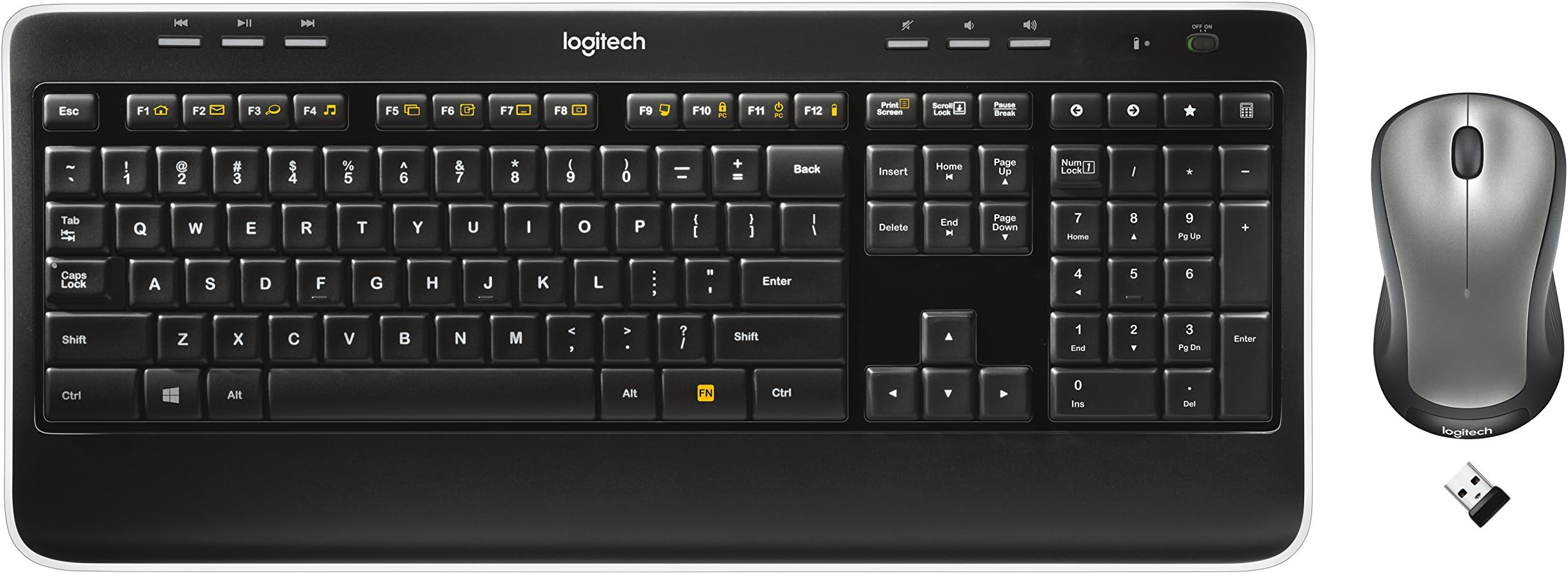
The Logitech MK520 Wireless Keyboard and Mouse Combo offers a full-size, ergonomic keyboard paired with an ambidextrous precision mouse, both powered by long-lasting batteries (up to 3 years for keyboard, 18 months for mouse). Featuring a single Unifying receiver for seamless plug-and-play setup, it delivers secure 2.4 GHz wireless connectivity with 128-bit AES encryption, compatible across multiple Windows versions and Chrome OS. Ideal for professionals seeking reliable, comfortable, and clutter-free workspace control.
| ASIN | B003VANO7C |
| Antenna Location | Office |
| Are Batteries Required | No |
| Best Sellers Rank | #1,673 in Computer Keyboard & Mouse Combos |
| Brand | Logitech |
| Built-In Media | โฆ |
| Color | black |
| Compatible Devices | Personal Computer |
| Compatible Operating System Family | Windows |
| Connectivity Technology | Wireless |
| Customer Reviews | 4.2 out of 5 stars 7,173 Reviews |
| EU Spare Part Availability Duration | 3 Years |
| Global Trade Identification Number | 00097855066718, 10097855066715 |
| Hand Orientation | both |
| Item Part Number | 920-002553 |
| Item Weight | 0.66 Pounds |
| Keyboard Description | Full-sized keyboard with additional features and adjustable ergonomics |
| Keyboard Layout | QWERTY |
| Manufacturer | Logitech |
| Mfr Part Number | 920-002606 |
| Minimum Required Operating System Version | Windows 10, Windows 11 |
| Model Number | 920-002553 |
| Movement Detection | Laser |
| Movement Detection Technology | Laser |
| Number of Batteries | 1 Lithium Metal batteries required. |
| Number of Keys | 18 |
| Operating System | Windows 7, Windows Vista, Windows XP |
| Power Source | Battery Powered |
| UPC | 803982774170 097855066947 806296570322 097855066718 |
| Unit Count | 1.00 Count |
C**R
A great option at this price point or higher
This keyboard/mouse combo have impressed me over the past couple months in terms of comfort, quailty, and performance. My review is for common computing tasks, and not so much gaming (according to my gamer roommate, wired are perfered for this anyway?). Compatability: This has been plug and play on each device I have tested it on. This includes Macbooks, Laptops and PC's running various Windows OS's (XP, 7, and Vista confirmed) and even my FireTV, RaspberryPi and a cheap laptop running Linux. In each case drivers installed automatically and quickly requiring no additional work from me. The keyboard and mouse run off of a single (small) USB hub, which is great for devices with limited USB hubs (like the FireTV). Build: I have no complaints over the quality of materials used. Seems to be on point with most other keyboard/mouse combos. Typing and clicking on the mouse are actually quite quiet. I didn't notice this until returning to work and realizing how loud my keyboard was there (now it drives me crazy). Thoughtfully, Logitech uses a small USB hub that takes up very little room when plugged in, and also includes an on/off button on both the keyboard and mouse to help conserve power (a feature I had not seen before, others just time out and go to sleep on you). I've been using this combo regularly for several months off the original, included, batteries. Finally, it has good range. Works fine, with no lag, across my family room to whatever device it's attached to (probably 15 feet). I doubt most users will need it to go much further. I have not needed to try it at a greater range so cannot comment on it's max range. In the end, I have no real complaints. It's a winner at it's price point, and I would recommend it. Just don't lose that tiny USB hub!
S**N
Great Everyday Wireless Keyboard/Mouse combo!
The Logitech MK520 wireless mouse/keyboard combination is an excellent example of a product that simply works. No super filly dials/gamer buttons - just a good wireless mouse & keyboard for everyday use. It has a good tactile feel to the keys, isn't too "chicklety" on keypresses, and is comfortable to type on though having a slightly more ergonomic design to the keyboard would be a welcome addition for those of us that sit at the keyboard for hours. I use this keyboard on my work laptop for 8-16 hours a day & it's been running a month now with no hiccups and on the same batteries it came with and all I had to do was plug in the tiny transceiver it came with (can move the laptop/put it in a case without taking out the transceiver - only way to go!) and start typing. Thank you, Logitech! I've switched the keyboard/mouse from my work laptop running Redhat 6 to my windows 7 laptop and back without any issues and like I said - this thing just plain works. Had originally purchased a larger Microsoft ergonomic keyboard/mouse combo with the huge 1 1/2" long transceiver that looks like a big usb stick. The keyboard worked great - for a while - I think I only had it a couple months & replaced the batteries multiple times & then the mouse started developing a mind of it's own - scrolling where it wanted to, etc. Replacing the batteries & trying it on different systems yielded the same results - it's now my boy's "let's see how i can take this apart" projects! Summary - need a good everyday, basic keyboard & mouse combo - get the Logitech Mk520 combo - I now own two & may get a third!
T**G
Connectivity, quality, battery.. excellent!
Distance - I bought this combo to sit in a room 25 yards away with a wall in between these and the computer. It worked flawlessly! I decided to test it and went all the way outside of the house, and it still worked! The only stipulation is that the mouse must be pointed towards wherever the computer is, and it will work. Connectivity - I have had 0 connectivity issues with neither mouse nor keyboard. The response to keys and clicks is instantaneous. Installation - There is no installation! Plug the USB device, which is the size of my thumb nail, into the computer (preferably the front of the cpu), and you're done! Make sure the batteries are in the devices, and they are turned to the on position. No discs, set up wizards, or instructions needed. Battery Life - I have been using these for 2 months now, and not even a hint of battery degradation. If 2 months is the least it can do, I'm sold. The keyboard takes 3 batteries, and they mouse takes 2. Big deal if they last longer than 2 months! Product Quality - They are spartan and utilitarian. The quality is sound with quiet keys, and the mouse has the right and left buttons with the mouse wheel. Basically you cannot find this combo cheaper in stores, and if you don't require a ton of extras to your keyboard/mouse then buy this. I use it for gaming, and it hasn't failed me yet.
D**E
Great keyboard and mouse set; Logitech stands by its products under warranty
I bought my first MK520 set a couple years ago. The mouse and keyboard both worked great until recently I noticed my left mouse button wasn't working properly. It would register single clicks as double clicks and wouldn't always register when I was performing a long press. Because I was still within the warranty period I contacted Logitech and requested a replacement. After providing proof of purchase from Amazon, Logitech sent me a brand new MK520 set. The warranty process took about a week -- all by email -- and was easy and painless. I was very pleased to see Logitech stand by its product and send me a replacement mouse and keyboard even though my keyboard was still working perfectly. Now that I have the new set, I am enjoying this product even more. The latest version of the keyboard has different keys than the set I had previously. The keys feel a little more "gritty" which allows my fingers to grasp the keys better. Not much changed about the mouse, but it was already adequate. Wireless signal strength is still great and never was an issue. Battery life is much better than the cheaper Logitech set I owned several years ago before my first MK520 set. Overall I am very pleased with this product and would recommend it for anyone looking for a decent keyboard and mouse at a reasonable price. Also and most importantly: if you run into any problems or defects with your keyboard or mouse and you're within the warranty period, contact Logitech! They will work with you to rectify the issue and will send you a free replacement if need be. (Note: one star was deducted from rating because the first mouse failed. While Logitech did a great job resolving the issue, the fact is that it still occurred.)
B**H
Works with LINUX
Very nice keyboard, good size and layout, plus I like the way it feels. It rests nicely on my lap when I'm sitting back; the palm rest is a big plus in that position, too. What really blew me away is I'm running LINUX (Mint 17.2), and the app launch hotkeys worked right out of the box! Of course a lot of the devices a keyboard needs to work with these days are just LINUX in disguise. So, I guess I shouldn't be surprised, but it gave it a big thumbs up in my book at any rate. If I could find one thing to complain about, it would be the feet to prop up the keyboard. They could use a better mechanism to hold them in place. Could be just a matter of a stronger spring. At any rate, they tend to fold down if you slide the keyboard forward. I've learned to pick it up and move it forward with both hands rather than pushing it away with one. It's just a minor annoyance to me. The mouse is comfortable and does its job. Works on every surface I've tried it on, couch, my leg, towel, pillow, and the usual places you'd expect it to. Overall excellent package. Pull the tape off the included Duracell batteries, plug it in and go, It's really that simple
N**Z
Great Product so Far
I got mine on May 18th 2013 and it works great. I have read the one and two star reviews and am kind of anxious to see what logitech has brought to the table with this keyboard and mouse combo. Many of the reviews complained of lag which I have yet to experience (possibly it was computer side issues) but I have never experienced the lag they talk about. though that isn't to say i haven't experienced lag at all. after the mouse goes to "sleep" it takes like a quarter of a second to wake up and start registering again but these reviews made it seem like this was a long time and was happening all of the time if the mouse has been moved even the slightest bit it won't got into standby mode and it takes some time for it to go into stand by from what i can tell based off of lag from waking up. the keyboard i have yet to experience any lag (keystroke laggin or lag from waking up) well that is if you don't count from the media buttons but i expect that is because i'm running Ubuntu 12.04 rather than windows and the logitech software isn't compatible with linux but they still work. i have yet to try the products extensively in windows but i imagine they will work as good as if not better than while running ubuntu.the main reason i got this was so i could play minecraft on my tv while sitting on the couch (i don't own an Xbox so don't go there) and as well as for when i go to college having a mouse with my laptop will be nice and also having a wireless keyboard to live on my desk at my house/appartment for when i get a newer computer and nice monitor to go with it so i can have a workstation that i can take with me without taking the entire work station. i feel that this was a great investment on my part because i got this for the bargain price of $22.93 because i bought refurbished and i had $10 free amazon credit
A**S
Yes! This thing!
Update: 2018 - Sometime around maybe March of this year, the mouse started fighting with me in earnest. I can still use the keyboard, but the mouse is completely unusable. I'll probably order this product or something very similar eventually, but I don't have a current need to. Overall feel like I got my money's worth out of it. Update: Six years later, I've completely worn off two letters, and partly worn off six others, but the keyboard still works, every key, and the mouse is still working. I have had a slight trouble with the mouse off and on where it'll double click when I click once, or click while I'm dragging. It's been off and on, and at one point, I got a new mouse, only for this one to start behaving again. That was almost six months ago, and the logitech mouse has been fine since. No other problems, and I'm still overall pretty happy with the purchase. I wouldn't go back to wired again if at all possible. It's just so much easier to clean, and the feel is right for me. This thing is perfect. A couple things: The keys feel fine. I am used to a laptop keyboard and wanted something with a mostly flat, slim profile. Reviews mentioning weird dimpled keys made me nervous-- for keyboard and piano, I'm really picky about what I want to be touching for hours. This thing, however, is perfect, comfortable, and non-distracting. The backspace key and all bottom-row keys, particularly the spacebar, are slightly out-jogged and convex-curved. It's subtle and cozy. Typing is a smooth and comfortable experience, and the little palm and wrist rest at the bottom is just enough for me. The wireless quality seems good. I wanted a wireless keyboard and mouse so that when I hook up my Casio piano keyboard to my computer via MIDI-to-USB, I can drag my typing keyboard over to my lap or wherever else without having to fiddle with wires. I have a -very- small, dense space. This was more than adequate. The receiver was plug-and-play, worked perfectly, and I was never left wondering how to configure anything about it. The set comes also with a wireless receiver extension cord. This is basically just a USB extension cord, so I use it for other devices. The mouse has a cute little hidey-spot for the receiver underneath, too. The battery life is more than fine. I keep forgetting to turn the keyboard and mouse off, but I've yet to replace batteries. I recommend getting Sanyo Enerloop batteries when you eventually have to replace the ones that come with the set. Since I always have them around, I'm not worried about battery annoyance or cost. What else? The packaging was great, and the products are attractive and easy to use. I haven't tried the custom-programmable function keys yet, but I'll update this review when I do. I have no complaints. I love this product.
J**T
Don't Fear the Wireless Keyboard
I purchased the Mk520 based on my working daily with the Mk320 at my office. The batteries last about six months, and that is with never turning anything off. My computer sits underneath my table at home and the USB receiver is plugged into the back. I have no issue with erratic cursor movements or missed key strokes or anything that could be related to a signal issue between the keyboard / mouse and receiver. The keyboard has a less tactile feel to it than my old Dell keyboard, but I guess I'll get used to that. It's not annoying, it's just different. The mouse is nicely styled and fits my hand perfectly. I was tempted to buy a more expensive ergonomic keyboard, but I don't regret the purchase of the Mk520 at all. Update 11-10-2013 - What a difference from my initial impression in February. The communication between the keyboard and computer is erratic at best. Many times there is severe latency keyboard does not respond or it has a significant lag before your typing appears on the screen. I have replaced batteries three times and installed a new version of the unifying software. I turn the keyboard off and on several times a day (and this is a computer at home that is primarily used in the evening) to reestablish the connection. I paid more for the Mk520 thinking it would be better than my still functioning Mk320, but that is not the case. If you are tempted to buy the 520, save your money and buy the 320 instead. Update 12-19-2013 - Not long after my previous update, I emailed Logitech technical support for help. Of course they are going to have you try a few different things to see if they can get the keyboard to work. I went through these steps and when they didn't work, Logitech said they would send me a replacement as long as I provided proof of purchase. I emailed a PDF of my Amazon order and within a week I had my replacement. I guess I just got one of the bad units out there, but Logitech stands by their products and the replacement keyboard is working quite well.
M**E
C'est pas bien
รa marche pas
N**A
Great keyboard set
Fast arrival, product as expected. Good quality. Fast arrival, product as expected. Good qualityFast arrival, product as expected. Good quality
T**N
BATTERIES ARE INCLUDED!
This keyboard and mouse are the easiest to set up that I have ever owned. Simply plug the mini-usb stick into a port on your computer, pull the tabs sticking out of the battery compartments on the keyboard and mouse (amazingly batteries ARE included), and you're off to the races. Literally 30 seconds to install. The keyboard has all of the standard function keys and is fairly comfortable to use. While any new keyboard requires some adjustment for the user, after a few days, I am totally comfortable with this one - it meets my needs perfectly, at an affordable price.
V**V
This one of the best keyboard and mouse combination which I have
This one of the best keyboard and mouse combination which I have, delivery was prompt I couldn't find in any of the retail stores in INDIA
M**S
Superb Logitech Cordless Desktop!!
! bought this Desktop to replace a failed Anker Desktop (only lasted 8months but good while it lasted!!) I have always used Logitech Keyboard and Mouse combos for the past 20 years! Most Wireless Desktops for sale on Amazon score 4 stars in their user reviews. None of them it seems are perfect, but good in parts!! I went for the MK520 as it was at the top of my price range. It installed a treat on my Windows 10 Professional Desktop PC and I also downloaded and installed the latest Logitech Set Point software. I have to say that the whole package performs faultlessly and I have absolutely no gripes about my purchase. The MK520 also has on screen notifications for Caps Lock and Num Lock functions, and the Caps Lock Key also has a green light which comes on when Caps is selected. My last Anker Desktop did not have this convenience. Most current Cordless Desktops also do not appear to have Caps Lock or Num lock Visual Indicators probably in an effort to save battery power!! I have no hesitation in recommending the Logitech MK520 as it does everything I want at a fair price! It may be a tad on the pricey side, but you get what you pay for. The Logitech is very well put together, looks great, and performs exactly as a Wireless Desktop should ( although it appears that many other makes fall far short ! ) I am so pleased with the MK520 that I am buying another one from Amazon to keep as a spare! I adhere to the old saying "Buy Cheap, Pay Twice"!
Trustpilot
3 weeks ago
2 months ago