Buy anything from 5,000+ international stores. One checkout price. No surprise fees. Join 2M+ shoppers on Desertcart.
Desertcart purchases this item on your behalf and handles shipping, customs, and support to Spain.
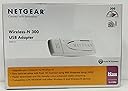
๐ Upgrade your WiFi game with NETGEARโs sleek speed booster!
The NETGEAR WN111 Wireless-N 300 USB Adapter delivers reliable 300 Mbps wireless connectivity via a simple USB plug-and-play interface. Compatible with a broad range of Windows operating systems, itโs a compact, lightweight solution designed to extend your network reach effortlessly. Trusted by thousands and backed by a 1-year warranty, itโs the smart choice for professionals seeking fast, stable internet without the hassle.
| ASIN | B000W8UIZW |
| Best Sellers Rank | #1,764 in USB Computer Network Adapters |
| Brand | NETGEAR |
| Color | white |
| Compatible Devices | Desktop |
| Compatible Operating System Family | Windows |
| Customer Reviews | 4.0 4.0 out of 5 stars (997) |
| Data Link Protocol | 300N |
| Data Transfer Rate | 11 Megabits Per Second |
| Global Trade Identification Number | 00606449053227 |
| Hardware Interface | USB |
| Item Weight | 0.05 Pounds |
| Manufacturer | Netgear |
| Mfr Part Number | WN111-100NAS |
| Minimum Required Operating System Version | Windows 2000 Professional |
| Model Number | WN111-100NAS |
| UPC | 606449053227 606449059779 |
J**A
Works Great! Fast Shipping! No Problems!
Excellent! Got very fast FREE shipping, thank you! I actually received it a day before the estimated delivery date! Once we got it we were online within like 5-10 mins no problem! I have a gateway, about 2 yrs old, w/vista-64bit...and a Netgear WNR2000 Wireless-N Router which is setup on our Mac computer a couple rooms away from where our gateway computer is. We needed an adapter so I could get the gateway online instead of running a super long cord across the family room, kitchen and into the next room where the router is. (we have over 2200 sq.ft. house) So I looked on amazon at almost every type and brand of adapter and looked through all the reviews, and it's hard when there's mixed reviews. I decided to go with netgear cuz that's the brand router we have and some reviews were really good and it was only $17 and free shipping so it's a great deal and I'm glad I went with it instead of something more expensive that would've done just the same thing. We had no trouble what so all getting it started. Just use the disc and follow the directions..it's that easy. Some people are really computer illiterate so I hate when the put bad reviews just because they don't know what they're doing and they didn't bother to call customer service first before writing their review. I do understand that some computers and operating systems will cause the setup to take longer due to having to change settings and download drivers, etc..but exhaust all options, customer service etc..before saying the product is junk or whatever.
B**N
Simply Install Driver, Plug and Play!
I have used this on four computers so far, Windows XP and Windows 7. I have tried others including the more expensive NETGEAR RangeMax WNDA3100 Dual Band Wireless-N Adapter and AirLink101 AWLL6075 Wireless N Mini USB Adapter . The NETGEAR WN111 outperforms both of them. My experience with the WNDA3100 is that is continually drops the connection. While connected it works well, but too many drops! On two side-by-side computers, on the 2nd floor of a building (router on 1st) the NETGEAR WN111 was consistently operating at 3-4 times the speed of the AirLink101. I have bought all of my NETGEAR WN111's for less than $10 a piece, refurbished. They have all worked. There are specific drivers that must be used in US, and also for XP and Win7. These are WN111v2_NA_SW2.0_setup or an older version wn111_setup_21_na (NA stands for North America) and a special Windows 7 version wn111v2_3.0_setup_win_7. These are easily found at NETGEAR and other sites. The program DriveMax recently found an update for one of these. I did not note the version of it. I am sure it can be easily found. I did notice an improvement in performance.
M**E
Not exactly Plug N PLay but still worth it
I got this because I have a 10+ old EMachine that's been sitting in my closet. I decided I wanted to drag it out to let my 4 yr & 5 yr olds use for educational video games etc. - Not exactly Plun N Play -- but I don't think that's the adpater's issue -- the older computer doesn't have wireless built in. It's running on XP. I Think the OS and the CD Rom are glitchy. The CD rom didn't recognize the installation disc. I had to burn the disc onto a flash drive from a different (newer) computer in order to get the older PC to recognise that I had software to process. Then when I attempted to use the press n play locator on my current (major DSL provider stock router) it didn't finish the locating process in time so I had to manually enter my passcode to get internet access. Overall, the item itself is functional. The problems I had were probably isolated to my individual old PC that I wanted to use with it. After I made it through my own obstacle I was able to get it to link to my generic wireless router, I didn't need a matching name brand router as I have needed in the past with other equipment.
M**E
Driver Disk did not install drivers properly. Had to Manually install drivers. Only 2.4 GHz range, not 5 GHz.
It is not compatible with 5 GHz range, only 2.4 GHz, which is the most commonly used range...But I use the faster 5 GHz range for most devices in my home, so I was hoping it would be compatible. I had problems installing the drivers. The driver disk that came with it did not install the drivers properly on my older Windows 7 machine. It kept giving me an error saying that it could not be detected, although I could clearly see that it was connected via device manager. I haven't tried installing on Windows 10 yet. The driver installation program copied drivers to a Temp folder in Users/appdata. Once I found this folder, I had to extract a .msi file manually, using 7-zip. Then extract another archive inside that archive. Once extracted, I could manually navigate to the extracted folder using Device manager in Windows and it successfully installed the drivers from there. Once I was over that hurdle, it appears to be working fine. It also came with a USB extension cord, a small sheath, and some Stick-on Velcro, which I thought was a nice addition. This enables you to stick it to the wall or the side of your computer case so it will pick up a better signal from the router, instead of being simply attached to the back of your case. I bought it for $6.99, so if you're able to get it for this cheap, and you're OK with 2.4 GHz range, and can figure out how to install the drivers, I feel like it is a great value...so far. However, given these issues, I wouldn't want to spend more than $10 on it. I do realize that it is an older device, and that could very well be why these issues exist for modern platforms.
R**D
This is the only USB wireless USB adapter I found that is compatible with old laptops that only have USB 1.1. The price is right and it works great.
M**Y
Perfect for my husband's desktop wireless network - nothing fancy but works well
P**E
excellent product
S**S
This adapter was 20 feet away from my modem and in another room. Had a moderate signal and good watch videos without any trouble. It is great for the value.
L**N
useless
Trustpilot
5 days ago
1 day ago