Desertcart purchases this item on your behalf and handles shipping, customs, and support to Spain.
🖐️ Elevate your left hand game with comfort and control — because your wrist deserves the best!
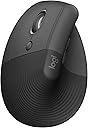
The Logitech Left Handed Lift Vertical Ergonomic Wireless Mouse is expertly engineered for small to medium left hands, featuring a 57-degree vertical angle that promotes natural wrist posture and reduces strain. With up to 24 months of battery life, multi-OS compatibility, and the ability to connect via Bluetooth or Logi Bolt USB receiver, it supports seamless multitasking across devices. Its 6 buttons, including 4 customizable ones, and SmartWheel scrolling enhance productivity, while its eco-conscious build with 70% recycled plastic and ergonomic certification ensure sustainable comfort for professional users.


| ASIN | B09J1SYX5B |
| Additional Features | Bluetooth/Radio Frequency |
| Antenna Location | Mouse |
| Battery Average Life | 24 months |
| Best Sellers Rank | #13 in Computer Mice |
| Brand | Logitech |
| Button Quantity | 6 |
| Color | Graphite |
| Compatible Devices | Personal Computer |
| Connectivity Technology | Bluetooth |
| Customer Reviews | 4.4 out of 5 stars 1,284 Reviews |
| Embellishment Feature | LED |
| Enclosure Material | Graphite,Plastic |
| Global Trade Identification Number | 00097855170897 |
| Hand Orientation | Left |
| Hardware Platform | Mac, PC |
| Included Components | 1 x AA Battery, Lift Ergo Mouse, Logi Bolt USB Receiver, Quick Start Guide |
| Item Dimensions L x W | 4.3"L x 2.7"W |
| Item Type Name | Mouse |
| Item Weight | 125 g |
| Manufacturer | Logitech |
| Mfr Part Number | 910-006467 |
| Minimum Required Operating System Version | Windows 10 |
| Model Name | Lift Ergo |
| Model Number | 910-006467 |
| Mouse Maximum Sensitivity | 4000 dots_per_inch |
| Movement Detection | Optical |
| Movement Detection Technology | Optical |
| Number of Batteries | 2 Lithium Polymer batteries required. (included) |
| Number of Buttons | 6 |
| Operating System | Chrome OS, Mac OS X 10.15 Catalina, Windows 10, Windows 11, iPadOS 14 |
| Pattern | Mouse |
| Power Source | Battery Powered |
| Range | 30.0 feet |
| Special Feature | Bluetooth/Radio Frequency |
| Style Name | Left-Handed |
| UPC | 097855170897 |
| Unit Count | 1 Count |
| Warranty Description | 1 Year Limited Hardware Warranty |
A**N
Bad auto driver install. Great mouse. Few of the left hand mfgs.
Really crappy auto driver install. Locked up my USB ports for my usb keyboard, usb mouse, all usb ports in fact. Had to reboot multiple times with an old style 5pin keyboard since the software screwed up my usb ports. All of them. Lucky I have a motherboard with an old style keyboard port. A reboot of W11 in safe mode, ripped out auto-installed software, registry keys and rebooted to regain control of my USB ports. I do not know what went wrong. Alls I know is Logitech loaded something, it locked up my USB ports and I had to rip everything Logitech out to get control again. I downloaded the software, installed it and it worked fine. I've had no problems since. I'm an old lefty and as such am ambidextrous in most areas, since there just was not left handed oriented items readily available. You had to have left handed stuff made so you learned to do things right handed. I've developed carpal tunnel in both elbows and had purchased a couple of vertical mice, one left and one right. I took the left into work and was looking for a replacement. My other two were around $30 ea. I liked the right handed vertical mouse (Anker). They do not make a left handed version. The left handed mouse is ok, not as good as the Anker. I decided to go above my spend tolerance and get the Logi after reading many reviews. It has not disappointed me. The auto-install sucked. Never letting that happen again. It is a nice smooth mouse. Fine movements that are easily adjustable. The hand position is excellent. I can use this all day without switching to the right because of elbow pain. If you have the pain, you know what I am talking about when it flares. It takes some getting used to the subtlety of the clicks when coming from lower cost mice. Soft and gently like a newborn's .... One of my big criteria for a vertical mouse is a landing area for the outer two fingers (pinky and next to pinky for finger orientation challenged). When you go to a vertical mouse, it takes some adjustment to moving the mouse since you can't really press down with your palm and inside two fingers (the ones next to the outside two fingers). It is helpful to be able to use the two outer fingers and thumb to aid in moving the mouse. You have to experience a vertical mouse to understand. The right handed only Anker goes from an inch to a half inch in the length of my pinky below the buttons on the side. This is a really nice landing area for the outside fingers to assist moving the mouse around. You can squeeze a little and the mouse glides. The Logi mouse is a wee shorter than the Anker and the area below the buttons in a mostly straight 3/4". Both mice curve quickly down to the inside below this area. I was used to a vertical mouse by the time I purchased the Logi and I have no issues with the pinky dragging the table and the finger next to pinky resting on the landing. I move the mouse with no problems. It is the subtlety of how one interacts with these style of mice. The big plus, takes a long time before mouse use causes pain flareups. And this isn't just a pain and done. Depending on how one ignores the pain, often determines how many days life sucks. The Logi mouse minimizes the flare ups. I'm thinking of taking the Anker in and getting a right handed Logi for home. I like the Anker, I'm frugal and highly recommend it for getting your feet wet. I love the Logi (auto-install sucks) and will probably ignore my frugal tendencies and get a right handed one since I don't switch hands as frequently with the Logi in the mix. Don't have to suffer auto-install either.
B**E
Very comfortable and durable
Excellent quality product. Fis the average hand perfectly. The grip is soft and comfortable. It's durability is exceptional, takes a lot of falls and keeps on working. It's worth the extra cost just for the comfort.
M**D
Great even for the right handed!
I love everything about this mouse. Quality feel, quiet clicks, and a scroll wheel that works just right. The two methods of connecting (dongle or bluetooth) make it very versatile. And boy is it rare to find a left handed vertical mouse! Even if you're not a lefty, it's easy to train your left hand to mouse. This is super helpful with office work as it frees your right hand to use the 10 key, calculator, phone, pen, etc! I went cheap on a previous purchase and regretted it. This one is solid.
W**E
Vast improvement over traditional mice
This review is primarily for the left handed version. When Logitech introduced the left handed Mouseman in 1991, it was the first and only ergonomic mouse for left handers. Merchants refused to dedicate shelf space to it, so it was short lived. The latest version is leaps and bounds above the original and is the most comfortable and natural feeling mouse that I've ever used. At first, it was awkward to use. After about 20 seconds, it felt natural, and traditional mice started feeling very awkward. This mouse lets you keep your arm and wrist in a natural position, whether you are using it as a desk mouse or a couch mouse. The primary button is the index finger button, whether you use the left or right handed version. The Logitech software doesn't have a true setting for swapping buttons, and uses the Windows setting. So if you had your buttons swapped for your old mouse, you need to unswap them. It also means that your old mouse becomes a right handed mouse on that computer. There's no way of having both set to left handed. There's a switch to change the sensitivity. The normal one lets you do work needing fine movements, such as drawing programs. The other setting makes it more sensitive to movement, which means more mouse movement with less hand movement. It's also a good feature if you have limited desk space or are using an airplane tray. This lets you avoid having to use the setup screens to change sensitivity. The scroll wheel is smooth and accurate. It also works for horizontal scrolling if used in conjunction with one of the buttons on the thumb side. It takes getting used to, and is still awkward for me. Those buttons are forward and back buttons by default, so don't use it while editing something on a web page until you are used to it, or you could end up losing everything. A problem is that their Logi software doesn't let you set the scroll increment. It can be done with the Windows mouse settings, but you shouldn't have to go two places to set what the mouse does. Pressing the middle button changes from moving the pointer up and down to scrolling the page up and down. Unfortunately, there's no speed adjustment. The round symbol that pops up should really be a longer vertical symbol that allows greater control over speed. The mouse includes a Logibolt receiver that can plug into a USB port, or you can use the mouse directly with your computer's Bluetooth if it meets the specs. If you use it with your computer's Bluetooth, you remove the tab from the mouse so the battery connects, and then use your computer's Bluetooth configuration. That will save you a USB port. If you need to use the mouse to set up Bluetooth, use the receiver, and then store it inside the mouse once you have your computer's Bluetooth set up. If you use the receiver, plug it into a USB port first, then pull the tab. If you want to be able to use both, there's a button on the bottom to let you set it for up to three different devices. So if it's set for your computer's Bluetooth, and want to set up the receiver to use on another computer, plug in the receiver, touch the button on the bottom of the mouse (the light will move from 1 to 2) and you will be paired. You can also use the third setting for another device. If you paired it to both using the same computer, you can unplug the receiver and use the button to go back to setting 1. If you have a desktop computer, you will want to have the receiver paired, and can use it if you need to change a bios setting, since Windows won't be loaded. So it's good to pair it, even if you will just store it inside the mouse. It would be good to pair it anyway with any computer, so it's ready to go if you ever need it. There's no instruction manual included, nor do they give you a link to one in the configuration software. The QR code takes you to the software download page, but doesn't give a link to the online manual. So some of this wasn't clear to me without searching online. Their original Mouseman came with a 148 page manual and a 48 page getting started guide. The new one comes with pictorial printed on the cardboard it's wrapped in. Something in between might have been nice, even if it were just a link to the manual. Update: 18 months later, it's still working well but the battery is down to 5%. I'm changing the battery.
S**N
Best mouse ever!
I am right handed but have used a mouse on the left side for years. I was using an Apple trackpad and I noticed wrist pain from the side to side motion so decided to look for an ergonomic left hand mouse. This Lift is AMAZING! I love it. Can be on the computer all day and I have no wrist, arm or hand discomfort. And the battery life is insane. I am going on 7 months and the original AA battery in the mouse is presently at 90%. The size options are super helpful as well to customize your experience. Don't hesitate - just get it - you'll love it!
L**N
The best ergonomic mouse I have ever used!
This is the best ergonomic Mouse I've ever used! I should know because I've used many different designs in my job performing ergonomic assessments for office and industrial workers. Of course the whole point of ergonomics is that everyone is different, so you have to find something that works for you. One size does NOT fit all! Here's why I like this one for me. * This mouse feels very comfortable in my hand * It allows my hand to be in a "handshake" position when using it- vertical instead of horizontal pushing a mouse across a desktop. This feels more natural, especially when scrolling with my index finger. * I use my whole forearm to move it instead of just the tiny muscles in my fingers and wrists. This is better to prevent repetitive trauma * It is made for people with small hands like me. People with medium sized hands will still find it comfortable. (Logitech makes model with similar design for those with large hands.) * Best of all, it comes in a version for left-handed people! This is exceptionally hard to find an ergonomic mice! The only Improvement I would make for this design is on the magnetic cover for the battery, located on the underside of the mouse. The magnets need to be stronger. Since this mouse is tall, I have accidentally knocked it off of my desk several times and the little magnetic cover goes flying off (usually under the desk where it is very hard to retrieve without using a stick or grab-it tool). I have now taped it onto the mouse body so that doesn't happen anymore. My advice for all ergonomic tools is to try to go someplace where you can put your hands on them to see if it is a good fit for you. They do carry these in my local office supply stores. I always try everything out whenever I see it because even if I don't need it at the time, perhaps a client will, so I know where to direct them. I really hadn't planned on replacing my mouse back then, but now my mouse and keyboard decided to stop working and I needed something immediately. That's why I ordered it from Amazon and it came quickly. I would order this again in a heartbeat without hesitation. In fact, I'm thinking about buying another one to have as a backup. Hope this information is helpful to others. .
S**I
Ergonomically great with one major software flaw
Left handed mouse user, bought this mouse because of the good reviews and so far I'm very satisfied with it. It's comfortable and works great. Connected quickly to my Windows 11 laptop through bluetooth. Minor design gripe is that it's tall, so sometimes I accidentally smack it across the desk when I'm just reaching for it. MAJOR problem though, if you find yourself working across multiple computers - the mouse switches the left and right click buttons by default in its own firmware. Meaning that if your Windows setting is "left click primary" then the mouse makes the right click primary, and if your WIndows setting is "right click primary" then the mouse makes the left click primary. I assume it's doing this because it assume lefties switch their buttons - which is fine for those who do (I don't) - but it's idiotic that the mouse wouldn't just respect the setting in Windows and let you switch it through the software. But what's WORSE is that if you download the Logitech software that lets you change the settings for the mouse - it doesn't let you turn this off. In fact, it has a "primary click button" setting in the software that just changes the Windows setting for you, but doesn't undo the button-reversing firmware. For me, the fix isn't "just use the flipped software setting" because Windows syncs my mouse setting between my work and home computer (I use this mouse for work), so every time I get on a different computer, I have to open the mouse settings and switch the button, but not before right clicking all over the desktop wondering why nothing is clicking correctly. You could argue it's a minor nuisance, but it's worth two stars off because it's an arbitrary software decision that they don't give you the option to fix, which is inexcusable.
N**H
Perfect for left handed people
It looks odd but it is exceptionally comfortable. Takes like 10 minutes to get used to. Perfect for left handed people.
G**O
Excelente!
O mouse é muito bem acabado, os cliques são silenciosos e a experiência ergonômica é muito satisfatória. Os botões de atalho são muito úteis e a tecnologia smartwheel (rolagem prolongada) é um diferencial excelente. Os único pontos negativos são: 1) os botões de atalho "internos", que destoam dos demais e fazem muito barulho e dão a impressão de que os switches utilizados especificamente nesses botões são de qualidade inferior aos demais; 2) a precisão é um pouco inferior ao do mouse convencional (mesmo ajustando a sensibilidade). Nada que tire as 5 estrelas desse mouse. Pra mim, valeu a pena.
S**E
Highly recommend
Amazing. Love using instead of the conventional mouse. My wrist doesn't hurt. Wrist sits in a more natural position. Highly recommend.
A**.
INCREÍBLE PARA TU SALUD
El envío & entrega fueron excepcionalmente rápidos, en cuanto al producto HA MEJORADO POR MUCHO mi ritmo de trabajo, no solo ahora puedo durar mucho más tiempo trabajando sino que también ya me duele menos mi mano al terminar de trabajar, su funcionamiento es extremadamente óptimo e intuitivo, ojalá en el futuro añadan más opciones de color para el modelo de Zurdos(porque sólo lo tienen en gris oscuro), pero aparte de lo estético, éste Mouse no decepciona en lo más mínimo
S**G
The best left handed mouse ever
The only and best left handed mouse made by logitech. Quality quality quality product. I would buy this again and again forever if I need to. It surely has made my wrist pain disappear.
M**U
Excelente
Por fin algo adecuado para zurdos. Aunque tuve que reacostumbrarme a usar los clics como deberían ser para zurdos. Se pueden configurar sin problemas.
Trustpilot
2 weeks ago
1 month ago