Buy anything from 5,000+ international stores. One checkout price. No surprise fees. Join 2M+ shoppers on Desertcart.
Desertcart purchases this item on your behalf and handles shipping, customs, and support to Spain.
๐ Upgrade your vintage rig โ speed meets nostalgia!
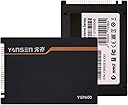
The KingSpec 64GB 2.5-inch PATA/IDE SSD is a rare, high-performance solid-state drive designed specifically for older laptops and desktops with PATA interfaces. Featuring MLC NAND flash, it delivers up to 70MB/s read and 45MB/s write speeds, significantly accelerating boot times and application loading on legacy systems. With advanced wear-leveling, garbage collection, and a robust 5-year warranty, it offers a reliable, silent, and energy-efficient upgrade path that breathes new life into vintage hardware.


| ASIN | B008RWKFYE |
| Additional Features | Native Command Queuing |
| Best Sellers Rank | #272 in Internal Solid State Drives |
| Brand | KingSpec |
| Built-In Media | 2.5 inch PATA SSD, User Manual |
| Cache Memory Installed Size | 64 |
| Color | As per images |
| Compatible Devices | Laptop |
| Connectivity Technology | ATA |
| Customer Package Type | FFP |
| Customer Reviews | 4.4 out of 5 stars 550 Reviews |
| Data Transfer Rate | 70 Megabytes Per Second |
| Digital Storage Capacity | 64 GB |
| Enclosure Material | Solid-state storage material |
| Form Factor | 2.5-inch |
| Hard Disk Description | Solid State Drive |
| Hard Disk Form Factor | 2.5 Inches |
| Hard Disk Interface | Solid State |
| Hard-Drive Size | 64 GB |
| Hardware Connectivity | IDE |
| Hardware Platform | PC |
| Installation Type | Internal Hard Drive |
| Item Weight | 0.29 Pounds |
| Manufacturer | KingSpec |
| Media Speed | 100 megabits_per_second |
| Mfr Part Number | FBA_KSD-PA25.6-064MS |
| Model Name | FBA_KSD-PA25.6-064MS |
| Model Number | FBA_KSD-PA25.6-064MS |
| Number of Items | 1 |
| Read Speed | 108 Megabytes Per Second |
| Special Feature | Native Command Queuing |
| Specific Uses For Product | Personal |
| UPC | 608729688594 |
| Warranty Description | 3 Year Warranty |
B**9
Excellent excuse for upgrading my old Acer TravelMate 3002WTCi
For most of this "review", I'm going to specifically concentrate on the installation of the KingSpec SSD to my [relatively] ancient Acer "ultra-light" laptop. But part of this review is *definitely* going to be generally useful to anyone contemplating upgrading an older PATA based machine (including, lol, probably at least one reviewer who reported performance problems with his XP install after a few months had passed). I figure that almost anyone even thinking about doing something like this is probably pretty technically adept already, so my primary purpose here is less in recommending the drive itself (and, I do recommend it) than to detail specific details of my own machine upgrade. And to include some generally useful procedures (new "tricks" whoo-hoo) for doing this sort of upgrade. ...if you weren't a relatively experienced DIY'er, you probably wouldn't be bothering with something like this. -------------------------------- SSD BRIEF REVIEW: As for the Kingspec SSD itself? - Well, it's a good price for a relatively rare beast. PATA SSD's aren't ever going to be all that common ...it was just luck of the draw that I took this over the Transcend version I was also looking at. To cut to the quick, I'd buy another Kingspec in a heartbeat, and I have no problem in recommending it. (I have five other machines with SATA SSD's btw, so I'm not exactly a noob' regarding their care and feeding.) -------------------------------- SSD DETAILS: I had no dimensional fitment issues: _1. the SSD was *exactly* the same size in every dimension as the OEM Seagate Momentus 4200.2 (Mod. No. ST960821A) I pulled out of the drive tray _2. the SSD bolted to the drive bay as expected _3. the tray assembly subsequently slid into the laptop HDD drive bay perfectly _4. the SSD pins plugged into the internal PATA connector smoothly _5. there were no clearance issues whatsoever I had no BIOS-related issues: the Kingspec was immediately picked up by the [old] Acer BIOS. (The drive jumper came set to the typical "master" setting that a boot PATA drive should be set to ...it's been awhile since I've seen one of those lol.) I have had no performance issues for the few days it's been running (and I will follow-up if I ever do) ...I've observed the performance is significantly better than the Momentus it replaced (in W7 WEI, the SSD has a 5.9 rating ...so it's easily the fastest HW component in the little Acer lol ...uh, there's no "WEI" in XP, so all I can say is that the OS boots faster, the laptop resumes from hibernation - and sleep mode - WAY faster, and applications and the like load way, way faster). Battery life seems the same (although at this point, both the batteries on the Acer are - unsurprisingly- in dire need of replacement); I just don't have a good baseline of comparison here though, so YMMV. -------------------------------- BACKGROUND: I purchased a 3002WTCi [ultra-light] as an onsite laptop in late summer 2007 ...it was a faithful and invaluable asset for onsite work (I'm a sys admin with 30 plus years experience) for over 3 years. After that, it did yeoman duty for another couple of years plus as a "bedtime companion", to catch up on the news and blogs late nights - I have minor insomnia - before I finally bought a 'droid Nexus tablet. The little Acer has pretty much sat on a shelf since then. The Acer originally came with a 64GB Seagate HDD that was partitioned into two 30GB logical drives ...one partition was still empty, and the boot partition was about 75% used with XP and MS Office and the various software utilities and files I found it useful to carry with me to onsite locations. So I was pretty sure the 64GB of the Kingspec wasn't going to pose any capacity limitation issues. I'd thought about upgrading it with an SSD for several years, but it was hard justifying the expense (especially when I started to use it less). Plus, the techie community consensus seemed to be that the performance of a PATA SSD wasn't exactly all that much of an upgrade. (And finding PATA SSD's was no piece of cake a few years back, either.) Regardless, that was then, and now is now, and I've my own SSD experiences to draw upon ...and at least as far as price (and aforementioned capacity), the Kingspec at 64GB wasn't going to be much of a budgetary hardship. -------------------------------- OS UPGRADE: I decided that even though there's absolutely no driver support for Windows 7 for the little Acer (which has an old-school Intel 915GM graphics engine, and various other ancient and non-W7-supported HW bits and pieces ...you're not going to find W7 support for the 3002WTCi no matter how good your mad googling skillz are lol), it was still worth it to me to try a fresh W7 install, just to avoid the lack of support for TRIM in XP ...especially as TRIM support is kind of vital for an SSD, for longevity and performance, making a W7 attempt was "worth a shot". I also didn't want to deal with alignment issues with XP on an SSD either (there's a thread at oczforum.com - google "How to Align OCZ SSD in XP using USB - SATA and Vista recovery disk" - that explains the procedure pretty thoroughly). Sooo ...since W7 has TRIM support built-in, I decide a fresh install "just to see" would be worth the little additional effort involved in a new W7 install, even if I eventually decided I'd have to undo it all, and go with XP (I didn't really have any vital and/or personal files to worry about - they'd long since been copied to network storage - so there wasn't even a reason to clone the original drive: I just pulled the old HDD, and set it aside). Plus, I had the luxury of a spare W7-Home Premium license that I purchased years ago that I've never used: like I said, "...worth a shot." -------------------------------- OS INSTALL: The 3002WTCi is an ultra-light (by the old definition); it didn't have an internal optical drive to boot the W7 DVD setup disc from. So I googled around a bit, and found (and followed) instructions by Steve Tyler at instructables.com - google "Install Windows 7 without USB or DVD without upgrading!" - for doing a self-booting SSD install. Basically you copy the \boot and \sources folder and the "boot" file from the W7 DVD to the root of your freshly NTFS formatted SSD using a working PC, and use the Windows 7 diskpart utility to make the SSD active ...then, install the SSD to your laptop, and at first boot the process goes right into the familiar Windows 7 setup screen. I had absolutely no issues whatsoever with the setup portion of W7 on the little Acer. After a couple of the typical W7 setup process restarts, I had a working OS. Cool. NOTE: My W7 license was an upgrade license ...and the setup wouldn't accept the [entirely legal, as the laptop came with XP Pro] upgrade key because it was a "new fresh install" which was "not supported by the upgrade license". (The help menu suggested re-installing an earlier version of Windows, and then re-installing W7: LOLOL. *That* wasn't going to happen!) So I skipped past the license key entry screen (which turns a new install into a 30-day trial), and went looking for an alternative solution. To get around that problem [error code 0xC004F061], I found instructions by Kapil Arya at thewindowsclub.com (google "FIX : Error 0xC004F061, Unable To Use Product Key For Clean Install") that detailed changing a DWORD key setting in the Registry (change the value of HKLM/Software/Microsoft/Windows/CurrentVersion/Setup/OOBE/MediaBootInstall from the default value of "1" to a "0") and then running the command "slmgr /rearm" in an elevated prompt command ...which fixed the issue. -------------------------------- POST INSTALL DRIVER ISSUES: After the Windows Setup process was finally complete, I booted into an 800x600 resolution display (heck: at least it was better than 640x480), and was able to change that to 1024x768 using the default W7 VGA driver. The trackpad worked as far as basic functionality. The keyboard worked just fine. The wired network port didn't report any errors (thank you Broadcom). The USB ports worked (good thing, too). Gratifyingly enough, the laptop was more than marginally functional at first boot. All the more specialized HW bits were down. No internal wireless (this was *not* a huge issue AFAIWC, since I had stopped using the internal wireless years ago, as it simply couldn't connect to any modern-era, n-capable routers ...it was great with the old Linksys WRT54G, but c'mon lol). No sound card (I'm not sure there is sound yet, though the error is gone ...just haven't tested it). UPDATE (06/2014): I got the internal network card to work after all (it was me, not it lol). But - more serious - the stock W7 VGA driver didn't support the 1280x768 native resolution of the little Acer (a Very Big Deal that would have killed continuing using W7 for me). To cut to the chase: most driver related issues were fixable, by the simple expedient of installing the original XP drivers, in compatibility mode. (Find the particular XP era, driver setup executable, and right click, choose Properties, click the Compatibility tab, and check-mark "Run this program in compatibility mode for:" (choose XP) and you're good. At least in the case of the little Acer, XP drivers haven't appeared to cause any deal-killer problems.) The only caveat to installing XP drivers in compatibility mode is that the older Intel graphics driver - while supporting the resolution just fine - isn't, ever, going to win any speed contests. Plus, the Intel 915GM chipset simply does *not* support W7 Aero functions at all at the hardware level (which is not the fault of the driver itself); it's old, and that's just the way it is. There's no work-around. Which leads to: I'd suggest (highly!recommend!) that you set the graphics properties to "Classic Windows" and change the Advanced Options to "Performance" ...because with those settings, the display performance is at least perfectly acceptable for mundane Internet related purposes like browsing and emails. The WEI 1.0 rating of the graphics card is the worst rating (of any piece of hardware) I've ever seen. You're not going to do any gaming beyond solitaire with this, lol. But its performance *is* fine for almost anything else. -------------------------------- MISC. OBSERVATIONS: I'd do this again in a minute. It was well worth the $70 to have a reasonably quick "spare" laptop (whose entire history I am intimately familiar with). The Acer is much, much quicker in common usage with W7 on the SSD. Much. Quicker. (This observation seems to contrast with other reviewers who stayed with XP installs, and reported lesser gains. While the little Acer is [still] not a speed demon due to the use of an SSD, it is transparently and obviously faster ...which was also the case when we updated my wife's older Lenovo X-series laptop. So if you have a Windows 7 license, you might want to try upgrading even older, non-supported hardware - using XP compatibility mode for drivers - before you stay with XP. Just sayin' - and YMMV - but W7 worked for me.) ...I will follow-up in a few months if I have any additional observations. If the SSD has any issues at all, I'll also do a follow-up. -------------------------------- UPDATE (06/2014): As stated above, the internal network card is, actually, working. (Basically, I should have been paying closer attention during the post-install setup lol.) ...and I've found the little laptop useful enough to have installed an old Office 2010 license to it (which install demonstrated that some hardware performance issues aren't mitigated by the faster SSD: the 2010 install took a couple of *hours* lol ...I've upgraded to Office 2013 subscription for the rest of my workstations, and as the little Acer has proven to be - again - useful, I decided it needed a proper email app' ...and I've long since been an Office Outlook "fanboy" lol). ...still no real issues. It's not a multi-tasking warrior (the Acer's 2GB of RAM is adequate for single-tasking), but it's proven pretty do-able for keeping a few IE tabs open. (I open Outlook "as needed", and close it afterwards.)
T**C
Great performance upgrade for a 2005 Compaq Presario M2000
My Windows XP, 2005 Compaq Presario M2000 notebook was slow and frustrating with its constantly grinding-away 40GB 5400 RPM hard drive (IDE/ATA). Even with a 1.5GHz Intel Celeron CPU and 500MB of RAM running XP, it felt almost unusable, even with anti-virus off, System Restore off, and a crazy-fast WiFi internet connection. But instead of junking the Compaq, I installed this KingSpec 32GB SSD, and the results so far after a few days have been AMAZING. I first cloned the Windows XP hard drive to the SSD using Apricorn's cloning kit which comes with cloning software (PC and Mac) and a very nice external drive enclosure. The cloning process took maybe 15 minutes over USB 2.0. Then I put the KingSpec SSD into the Compaq and booted no problem. But then I noticed the right click on trackpad didn't work, and had trouble booting, getting stuck at the "Compaq" welcome. So, recloned the HDD to the SSD after turning off System Restore, and the second clone went much faster, and everything works PERFECTLY not. For best results, I recommend you turn off your Windows XP "System Restore" feature, which erases all previous versions of XP that are indexed on your HDD, although I'm not sure if that was the initial problem. Anyway, the Apricorn cloned my NTFS file format XP over to the KingSpec SSD, and so far, I'm loving the performance improvement. Instead of booting in a minute, it boots in like 30 seconds. Internet Explorer and Firefox open in seconds instead of getting bogged down with that hourglass, and surfing the web is as effortless now as having a 2012 PC. Using the software uninstall feature in Control Panel of XP used to take a long time to populate the list of programs, but now takes less than 30 seconds. Installing TurboTax and booting it must be twice as fast now, and there's no more constantly-grinding HDD working itself to death, just silent, fast operation. I don't know how it works with anti-virus programs running in the background, as the Compaq was so slow with them running, I turned them off or uninstalled them, and am now only doing periodic scans. I also have System Restore off, like before. Overall, for $50, on a light-duty old PC, this was totally worth the expense. I really love it, and highly recommend both this KingSpec SSD and Apricorn's cloning kit. Plus, with Apricorn and this SSD installed, you can do a clone to your old HDD in the supplied internal enclosure. XP won't boot from an external USB drive, but you can save the old cloned HDD as a non-bootable backup.
F**A
Works well in Dell Latitude D610
The KingSpec 128GB IDE SSD drive is working very well after two weeks in a Dell Latitude D610 configured with maximum of 2GB RAM and Pentium M 2.26GHz CPU. The old 100GB 7,200 RPM hard disk was dual-boot with Windows XP Pro on partition 1, Windows 7 Home Premium on partition 2, a Data volume on partition 3, and an Application volume on partition 4. Acronis True Image 2014 was used to clone the installed old 100GB hard disk to the 128GB KingSpec SSD drive via the systemโs USB 2.0 ports to an external 2.5" IDE drive enclosure. After installing the 128GB SSD drive in the system, both Windows XP and 7 booted normally and much faster, and found and configured the new hardware. The CPU is at maximum usage much of the time when the system is actively used, but system performance is very responsive and satisfying. Windows 7 enters and exits Sleep Mode very quickly and without problems. System startup and shutdown are also relatively quick. (A similarly configured Dell Inspiron 6000 with a 5,400 RPM hard disk frequently bogs down severely if a background task such as antivirus or Windows update activity is processing.) The D610 is used with a notebook cooler. At idle, CPU temp is about 42 deg C, SSD temp is about 45 deg C, and CPU fan is off. At heavy CPU load (long running MalwareBytes scan), CPU temp is 80-85 deg C, SSD temp is 50-55 deg C, and CPU fan speed is 3,200-4,000 RPM. (Measured using HDTune, SpeedFan, and I8kfanGUI). 2015/11/20 Update: The Kingspec 128GB SSD and D610 continue to work very well after 5 + months. Applied Arctic Silver 5 to CPU and tweaked I8kfanGUI settings. CPU temp now at 70 deg C or less _without_ the notebook cooler even with 100% CPU usage. Installed a second Kingspec in another D610.
D**R
Can work... if you're aware of what you're doing
Right now I'm in the middle of upgrading every single machine in this house to the joys of solid state, and that includes the vintage PATA fleet. Sadly KingSpec's "Yansen" lineup of PATA SSDs is not exactly a plug and play solution. Not without some research, which you WON'T find online! First, the good points: - Build quality is surprisingly good - case is made of metal sheet instead of flimsy plastic, and the PCB is secured to the case with screws. - By far the most affordable PATA SSD, even if the price/capacity ratio is awful compared to SATA/NVMe SSDs of the same size - this is a "boutique" product after all. - Intel MLC flash - not modern low-grade QLC garbage! - Read performance is good - up to 90MB/s on a UDMA100 port, not bad for PATA at all. The "meh" points: - Controller is a SiliconMotion SM2236AC, which is meant for CF cards. Not exactly the best choice for a proper PATA SSD, but it's basically the *only* native PATA SSD controller in production in the 2020s, it looks like. - No documentation - getting the jumpers right was matter of trial and error! The drive comes jumpered by default with the jumper at the leftmost position (when viewed from the label side), which will NOT work on many systems as is, and in others it will experience severe delays with drive autodetection. The *proper* position is as shown in the photo - jumper goes on two topmost pins to signal a Master drive! - Write speeds are hardly impressive, as expected from old MLC. - Flash chips are new old stock (?) - my drive had Intel chips made in 2014 (controller itself was made in 2022, HDD was assembled in late 2023) And now, the ugly points: - No TRIM support on firmware. Believe it or not, TRIM works over PATA if the drive supports it and the host knows how to issue the command (tested on many SSDs using PATA to SATA bridgeboards). Most likely this is because of the CF card controller from SMI used on the SSD. - Other firmware features come disabled for no good reason at all. Need an HPA? (useful for preserving recovery partitions and other things like IBM's Predesktop Area) Sorry, can't do. The controller firmware SUPPORTS HPAs, but you have to get a copy of SMI's SM2236AC MPtools and reflash the drive firmware to enable the feature (and by reflashing the drive you WILL lose some capacity!). Of course doing that likely voids all and any warranty. - Drive case is marginally bigger than a standard 9.5mm 2.5" drive. This will definitely cause installation problems on many computers - on my T40 is a ridiculously tight fit, and the plastic bezel on the drive caddy warps a bit! - Kingspec/Yansen support is non-existent. No documentation AT ALL, no tech specs, and the only end user support they offer is over email and a phone/Whatsapp in China! And of course they have changed specs without prior notice (including the rebranding of their entire PATA lineup to Yansen). This hurts me especially badly since I'm in Venezuela and shipping things back to Amazon is a non-starter. Compatibility tests: - IBM ThinkPad T40: tight fit, doesn't get detected on default jumper settings, works fine after figuring out the correct jumper setting, Predesktop Area works after enabling HPA with a firmware reflash. - JMicron 2033x USB to SATA/PATA bridgechip: takes a while to get detected on the default jumper setting, after figuring out the correct jumper setting it gets detected instantly. Despite having jumped all those flaming hoops, the drive works like a charm ONCE you manage to get it going, and the upgrade is a great way to inject a new lease in life to your old metal. Getting rid of HDD-specific problems like high latency, fragile moving parts, and high power usage is worth the investment, even if the PATA interface is rather performance-limited for solid storage media. These Yansen SSDs are not bad drives, but the lack of documentation, the mystery jumper settings, disabled useful ATA features, and missing TRIM support means it won't be smooth sailing from the moment you unbox them! I would expect better from a 64GB drive worth the same as a nice 1TB Tier 1 SATA SSD! But then your other option is that Trascend PATA SSD that costs DOUBLE and it's always in short supply, so it's not like we retro hardware enthusiasts have it easy :/
P**S
So far, so good. Is working great in my Toshiba 5205-S502 Satellite LT!
So far, so good... Just got it installed in my Toshiba 5205-S503 Laptop and my backup restored and it all went flawlessly. No issues with fitting here. I know others have had issues shortly after installs, so I'm keeping my fingers crossed this doesn't go bad after some short usage. The package appeared to have been opened a number of times (bent edges, etc.), but the drive was sealed in anti-static and the cable and mounting screws were there. The drive looked new and like it had never been installed, so I proceeded. There has been conversation regarding formatting. After installing I decided to do a fresh install of WinXP Pro 32 just to see if it would fly and it went off without a hitch. The drive already had a partition on which I found to be odd on a new drive. Usually they are RAW. Here's where I think may be creating issues for themselves. If you are planning on doing a restore, you much set the drive up with a fresh install so that the reserve 8mb Windows XP creates is setup. That reserve is crucial for Windows. After testing shutdowns and startups which never were so fast, seconds actually, I started the restore and it went without incident. It rebooted and I must admit I'm impressed. It took minutes before to boot up to a usable state, now it takes seconds. The system is "snapper" then it was new and is jam packed with programs and utilities. Shutdown and startups, even loaded with utilities is very fast and without issue. If you have an older LT with ATA IDE, I recommend this drive to bring new life and usability to your LT. Still can't play HD movies, but then it's just a Pentium Mobile4 2.0Ghz processor, but working on it is not long a chore or exercise in patience...
A**G
SSD replacement
Works fine as advertised. Installed in an old Mac Mini (circa 2005) replacing the HD that had failed.
E**R
I would highly recommend against purchasing this SSD
I'm using the SSD in an older IBM POS system running Windows XP Pro. The SSD worked great for a couple months, good performance improvement (withing the confines of the PATA interface) no issues with drivers or putting an image on it. It was recognized by the BIOS right away. However about 90 days on I started getting CHKDSK errors and after a few more days the system fails to boot. I put the old HDD back in and the system works fine. I'm outside the Amazon return window and I've tried to submit a warranty claim on the KindSpec website but it keeps coming up with errors when I try and submit. My person recommendation was don't base your purchase on price, go with a company that provides some level of support and certainly do not purchase this product. I guess I'll just have to eat the cost on this one, unfortunately there aren't as many choices for SSDs with PATA interfaces.
M**L
Install to a Dell Inspiron 700 Notebook with Improvement
I have an elderly Dell Inspiron 700m that I occasionally use for Powerpoint presentations because its screen is larger than my netbooks. The 700m was very slow, taking almost 3 minutes or longer to boot. I installed the KingSpec 64 Gb to an external USB/ID interface, cloned the internal drive to the KingSpec with Casper and it seemed to copy fine. I could read and write to the KingSpec on the interface. However, when I swapped the KingSpec into the Inspiron Hard Drive location, it would not recognize the drive and would not boot. Checking F2, it was not recognized in the BIOS. I put the old Drive back in and it was recognized. I thought there might be a missing driver somewhere, so I reinstalled the KingSpec to the USB/IDE interface and selected the USB/IDE interface to boot first in the BIOS and put the original drive back in the HD slot. The Inspiron booted to the KingSpec on the USB/IDE interface. I checked it out and made sure that was it was working. Because the USB interface is slow, the performance was no better than the old Hitachi drive. I then turned the system off and swapped the KingSpec back into the Hard Drive location and put the old drive on the USB/IDE interface. I was going to boot to the USB/IDE interface, then clone the original drive from the USB/IDE interface back to the KingSpec in the Hard Drive Location thinking that Casper may help the system find and recognize the KingSpec. When I checked the F2 BIOS, I saw the KingSpec was now recognized in the BIOS in Drive Slot 0. On a lark, I changed the boot to the internal Hard Drive (KingSpec) and Windows booted normally. Checking the KingSpec with CrystalDisk Mark, the performance went from Read 29 Mb/sec to about 86 Mb/s and Write 24 Mb/s to 43 Mb/s. This does not put it at the max of its ratings probably because of shortcomings of the USB interface, but it basically tripled the read speed and doubled the write speed which is a decent upgrade for approximately $55. It speeds the boot process significantly. So, we will see how that goes. Physically, the KingSpec is larger and I had to remove the lift tray to make it work with a little bit of careful pushing and fitting. This should not matter because the drive is not going anyplace in its present location and will not slip out of the interface. So far so good. I wish that I had placed it in a regular computer to see if it would make its specs, but that would not change its operation in the Inspiron, only satisfy a curiosity on my part.
M**Y
Great upgrade when restoring old laptops
This worked perfectly in my old Compaq Presario v2000. It installed windows extremely quickly and boots up in seconds.
I**N
KingSpec2,5"
Works as expected
D**O
Bon fonctionnement
Clonage disque dur CIC BMW
D**O
la perseverancia y honestidad
buen producto
D**G
Very good replacement device for old IDE Hard drives
I had an old Toshiba Protege Pentium 3 Laptop with an IDE hard drive. It was clicking and I wanted to replace it with a flash module of some kind. I found this, and it worked perfectly! I installed Windows 2000 on it, and it ran amazingly. The speed of the old laptop nearly doubled because of this. However, I recommend using a max. 32GB drive on these old computers. GREAT VALUE! HIGHLY RECOMMENDED!
Trustpilot
3 weeks ago
2 days ago