Buy anything from 5,000+ international stores. One checkout price. No surprise fees. Join 2M+ shoppers on Desertcart.
Desertcart purchases this item on your behalf and handles shipping, customs, and support to Spain.
🔧 Unleash Your Creativity with Precision Engineering!
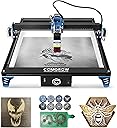
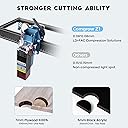
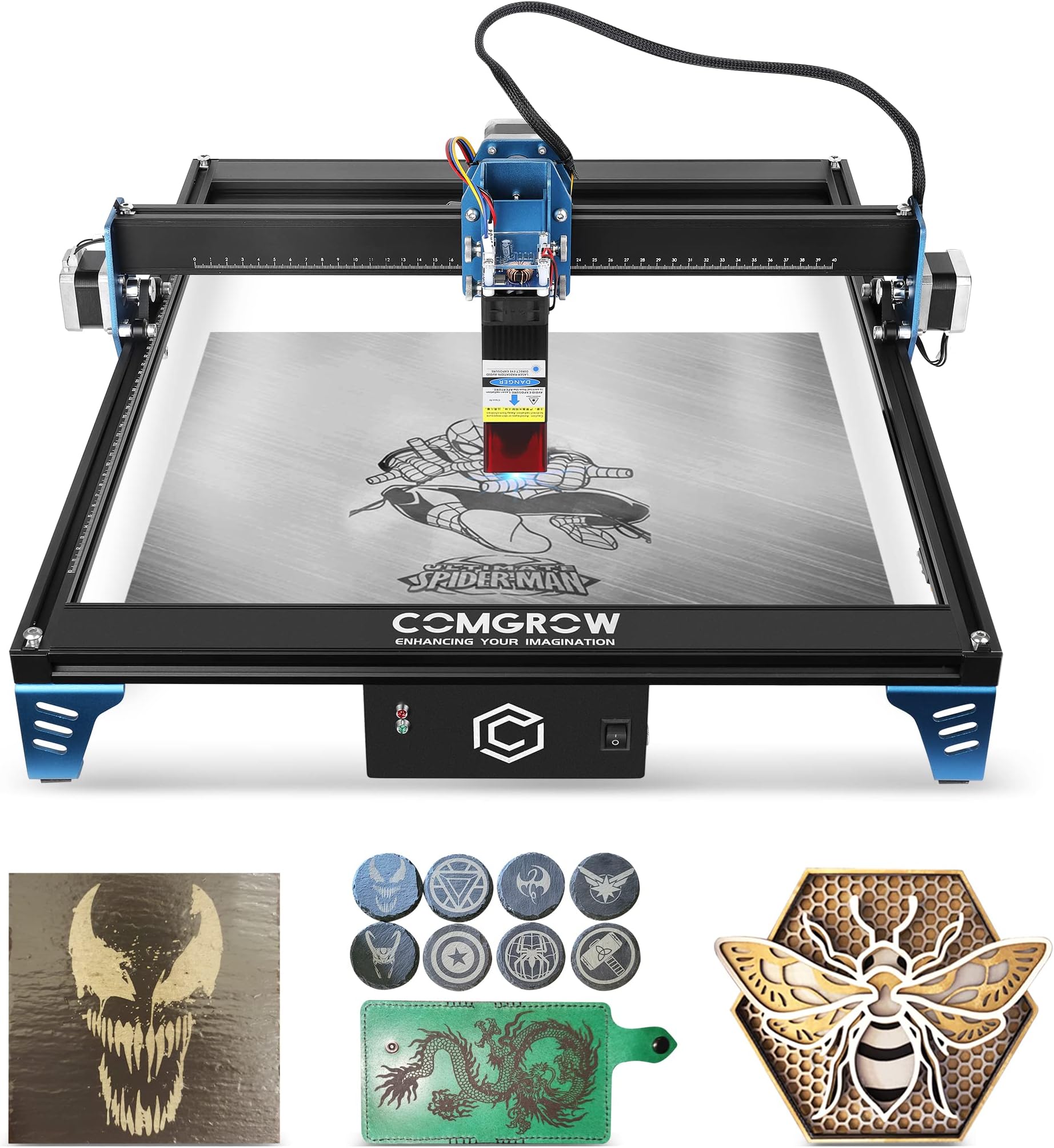
The Comgrow Z1 Laser Engraver is a powerful 10W desktop machine designed for precision cutting and engraving across various materials. With a compact design, safety features, and compatibility with popular software, it’s perfect for both hobbyists and professionals looking to elevate their crafting game.


| Best Sellers Rank | #178,514 in Arts, Crafts & Sewing ( See Top 100 in Arts, Crafts & Sewing ) #510 in Jewelry Making Engraving Machines & Tools |
| Customer Reviews | 4.1 out of 5 stars 529 Reviews |
W**7
Works Great!
These are my thoughts about the Comgrow Z1 laser engraving machine from the time it arrived, to me writing about it. I do not know why, but I was expecting a larger box, but I am glad it was not too big because there is less trash to throw away. Assembly The assembly was simply especially with the bags of screw that were clearly labeled, BUT ignore the STEP NUMBER, because it does not reflect the same steps in the manual. I am not a big fan of reading the manual, so I went directly to YouTube and followed a video instead. After assembling it, I made some minor adjustment to the eccentric nut on the laser module gantry (X axis), because there was a little bit of play on it. If you look behind the lower POM wheel you will see a hex nut, slowly turn it with the wrench that was included with the kit to either direction and the POM wheel will either get tighter or loose. These are offset nut, so you do know which direction you turn until you try it. So, turn slowly and you can see the X axis will get tighter or looser. Software I am using a Windows 10/11 Machine, so I installed all the drives as it was included on the Micro SD card. Then I installed the software Laser GRBL v4.4.1 (also included on the SD card). This software is limited to what you can do, but still works as intended and it is FREE. I did all the cutting and engraving as shown in the pictures in my review with this software. I am planning to use the free trial version of LightBurn soon. Initially I has trouble connecting because I previously used this same software with a different laser engraver but it and user error on my part. I was connecting with the wrong baud rate, make sure you select 230400 when connecting to it. Like with all software, once you figure out how to use it, Laser GRBL is simple to operate. Cutting/Engraving Near the end of the user manual v1.6 there is a page called “Engraving Parameter,” I find it a good starting point when setting up your machine. Based on the material you are working on, you will need to pick the correct speed and power. Make sure you adjust the height of your laser will the included clear/frosted plastic tool (flat plate that is 2mm thick). The laser needs to be a specific distance from the top of the material you or working on to have the optimal focus. From the very bottom of the laser (clear red plastic guard) you need a 2mm gap from the material. Once that is set, you should be able to start cutting or engraving. Make sure you use the include safety google to protect your eyes! That is it, so far the machine is working great for me. Pros: Large working area with dual Y motors. Included Riser and a large adjustability on the laser module. Why this is important? Because if you work with different size material, you do NOT need to physically prop your machine higher to accommodate it. Especially, if you plan to use a rotary roller. Compatible to other Laser modules, Rotary roller, Air assist air pump, and Honeycomb working Table. They are using parts that are universal to many other brands, so it is easy to share accessories, so you and not limited to only their brands. The laser is Compressed Spot, so it has a fine and more focused compared to other 5w lasers. Just for fun I mounted a 10w laser from a different company and it worked flawlessly. It was just plug and play. It even has Wi-Fi, so you can control it with your phone. But currently, I do not plan to use this feature. I did download the app and connected to it, but that was pretty much the extent of me using this feature. This machine is a big step up from the previous engraver that I had, so it is difficult to find any negatives. Everything so far has been positive, but if anything changes, I will post an update to my review. Cons If I had to say something bad, I will say they should update the labels on the packaging for the screws, so the “Steps #” are the same as shown on the manual. And it would be nice if the allen wrench included in the kit was a little longer. It would have made the assembly a bit quicker and easier.
A**R
Beginners
New to doing my own laser engraving, searched Amazon for one hoping to be easy to use, an learn on. This product arrived on time, in pieces inside the box, assembly required. The instructions are very well detailed and explained how to fit each piece perfectly. Currently using it with laser grbl software and with windows 11. Light burn software is only free for 30 days, Also no issues with set up. Being new to even using this machine, the hardest part for me was figuring out how to align the laser head to the material I wanted to engrave on, but with YouTube university, several hundred videos later to find my specific answer to my question (you know how YouTube video creators are) get to the point! ...found a video that was close enough to help me with that. The machine works as designed. I purchased a roller also for cylinder engraving, but will use after with more basic practice 1st. Comgrow is a very nice machine, you will not be disappointed with the purchase. This one is only the 5w laser module, but works just fine, I may upgrade to a 10w next. Very fun to use with very little frustration.
M**.
Good Hobby Laser
Dabbling in the world of 3d printing I wanted to get a laser engraver/cutter that was affordable. I remember using them during ym college days. I settled on a Comgrow based on the printer that I have and the previous interactions with Comgrow, I knew that it would be a good printer for a decent price Pros: Easy Assembly, if you look up YouTube videos you will see many saying how easy this is to set up. They are totally true! This does not contain Ikea directions. I think it took less time than setting up my Ender 5. Compatibility, you will need to use software to create and send the information to the laser engraver. Being compatible with Lightburn and laserGRBL is a plus. Comgrow also has an app you can use from your phone. Accessories, I think this is another area the printer shines, it has an air assist module to help keep wood cleaner from the burns, a hex plate to use as a backer while cutting, an enclosre to keep fumes more contained, and lastly probably the coolest one; a rotary roller for engraving mugs, cups, baseball bats, and whatever round items you can come up with. Dual Y axis stepper motors, this helps keep the printer aligned as it moves back and forth and having a stepper on both sides increases the accuracy. Cable routing, some thought was given into some of the cable routing as it is run through the extruded aluminum instead of outside it. This limits the chance of disconnect a motor. Cons: V Groove wheels, these feel cheap and will wear down. Dealing with a 3d printer you know that eventually you will have to replace them and are always dreaming of something slightly better. Connectivity, this connects directly to your computer with USB or to your phone with wifi. Unfortunately the wifi module used does not allow you to connect to your network and only to your phone. This I view as a con, I couldn't wait to get my 3d printer worked up to the network so I didn't have to sit right by it to use it. The same goes for this laser engraver, I would prefer to put it somewhere else and not have to sit right next to it. I believe there are some ways to get it to connect with other devices, but I have not tried them. SD card access, although you may not need to use this often, to use it you have to unscrew one of the motherboard box mounts and then rotate it to get access. USB connection, I'm not sure if this is prevalent in the laser engraver / cutter world but not seeing a USB-C or Micro USB on the motherboard end was a little shocking. Again in the world of 3d printing almost all newly released boards use USB-C Hex Cutting Plate, I do not know how much this would adjust the price but I feel like this should be included in the base set. Reality Check: Is this anything like what I used in college? Eh, no. There is a huge difference between CO2 laser devices and this LED type laser. Don't expect to cut through thick pieces or faster cutting or engraving times. This is a 'hobby' laser cutter, and if you step into the ring thinking about it this way then for the price and features it is a good machine to get your feet yet. I would recommend springing for the 10w version as it can cut thicker materials than the 5w.
S**R
3 units failed to talk to PC, now all dead by firmware update and returned. Don't buy
Updated 2023-07-24 - Being a glutton for punishment, and seriously wanting this thing to work, I gave it a third shot. Exact same as the first two - worked with ios app, failed to communicate with the PC. This time the memory card that came with it was broken so I dug out one of my own and followed their update instructions. Unit died during firmware update just like the previous two. I'm done. UPDATED 2023-07-07 - I really really really wanted this thing to work. I gave it a chance, tried to work with support, gave it a second chance and ended up with a worse experience after getting the second unit. Both units failed to communicate with the PC (more on that later). Both did function with the "mini laser engraver app" on both my iphone and ipad. The second laser burned marks on the board while running a preview (just drawing a virtual box around the area to burn so you can line up the thing you're engraving) and while running a test, it burned through the board even thought the power was set well below the max. It locked up during transfer of the image the second time, forcing full resets of the laser and the app. I gave up using the iPhone and switched to the iPad where I finally got it working and it did burn a second test without penetrating the board, but it still burned lines around the preview area. See the attached image for examples of the lines it burned during preview and the obvious full power of the laser even though it wasn't set that high to start. Again, I really wanted this thing to work and purchased a second unit after returning the first, but the second did exactly as the first with communications with the PC (yes, I continued with it even given the above issues just to see how far I could push my patience). Communications via USB were completely broken and neither would connect to the computer no matter what I tried. There's absolutely no helpful support available on the web site to troubleshoot or resolve issues with the device. ZERO. Support provided via email a link to a Google file with firmware refresh instructions which, when following their steps, added the only insight of it actually trying to communicate with LightBurn... in the console log I saw the reason it died (see attached image) while running the update... on step 1 it erased the existing firmware, then said the firmware it was going to write was wrong and then tried to return to executing the firmware it just erased. Who make step 1 "blindly erase everything" then step 2 "check to see if everything is correct" then step 3 "if step 2 fails, just pretend everything is fine and go back to your work running the thing we just deleted"? This is terrible, unreliable, obviously untested and completely unrecoverable. In the meantime between the two units, I was contacted by support for other people's issues and reviews. I was confused by they were asking me two weeks later about a laser power failures. They don't seem to be able to keep up with their problems and properly respond to the people reporting them. I lost time time assembling TWO of these things, then more time trying to contact the manufacturer (email the next day at the earliest), packing them up and contacting Amazon for return labels for BOTH units. At this point I'm just walking away from Comgrow. It was not a good experience in any way.
S**.
Works well out of the box
Assembly and Setup: The included diagrammed user manual made assembly a breeze, and the labeling of each screw bag by steps simplified the process. Setting up the engraver/cutter with my PC was straightforward with the provided USB cable and instructions for installing the recommended software. Engraving: The engraving went pretty well on the first engraving test. I successfully engraved a picture of a dog vector I found online and the process was fast and produced a high-quality result. Cutting: Cutting proved to be a bit more challenging initially. The provided 3mm wood board didn't cut smoothly at first, but after adjusting the focal point height as instructed for the 10W laser, I was able to cut out a snowflake easily. Air Assist: I wish this came with air assist, but they do sell a separate model. I will probably buy that in the future to reduce the char mark when attempting to cut with this product. Overall: Despite the minor hurdle with cutting, I'm pleased with the performance of this laser engraver/cutter. The potential addition of air assist promises even better results in the future as well as a fume extractor as it does produce quite a bit of smoke and smell
R**S
Nightmare with a happy ending
After I received my laser engraver and put it all together it wouldn't connect with laser grbl or light burn. I spent days trying to figure out if it was a hardware or software issue. There was no support from Comgrow and they referred me to the seller(Sovol). I reached out to them and the reply I got was that my inquiry was closed without any real feedback through the email. Finally they responded to my original thread but it was just pointing me in a direction that I had already went several times over . Back to the internet I went. The one thing I was hesitant in doing was to update the controller firmware as I had seen stories of that bricking the engraver. As you. An imagine I didn't want to end up with a pricey paperweight. I was set to send it back and decided one last ditch effort. I went straight to the Sovol firmware download sight and got the firmware update. Went through the process and finally got the thing working. I have to run it at the highest selectable baud rate to connect. I have not started a project on it yet but I am hopeful that all is right and will give no more headaches.
R**S
Requires calibration, software updates, help from a qualified AI, and probably safety training.
It is larger than I expected and uses two stepper motors on the long sides that have to be synchronized. The laser and bracket is heavier than I expected (335 grams). Don't use the rounded nuts for the feet but use the square nuts. And, use those rounded nuts to hold the ends of the timing belt. Better press and the belt keeps it in place. The wire to the limit switch was not long enough. Not sure if it can be made on work on the opposite side. All that flip over stuff ignore. Once the 4 sides are together and the cross piece slides on, sit on the floor and lean it against something to put on the feet and control box. I decided when I got it and read the instructions that using this in an apartment is not a good idea So I am going to see if I can use the xy movement for something else and set aside the laser as a safety hazard. Maybe I am just old and tired but those cheap glasses (I wear glasses) look like a disaster waiting to happen. I will see if I can get it to move around with g code. But, a micro-sd reader writer, firmware and software seems like another hill or two to climb. It does not have to be this complicated. Can a kid do it? I could probably have done it when I was a teenager long ago. But an adult helping would be a really good idea. Selling hardware kits is easy but standing behind what you sell is something else. Part of a larger plan and community, better still. Buying this kind of tool should lead somewhere.
S**N
The “Ender 3” of laser engravers.
If you come from 3D printing, you know what I mean by the title. This laser engraver is the Ender 3 of the engraving world. It’s simple, no-nonsense approach is honestly refreshing when compared to some of the more complex units I have used in the past. If you are looking for a simple machine, with minimal excess fodder and function, and you just want to flip a switch and hit "Go", this is the one for you. I will list out my pros and cons below. Pros: Excellent value Simple assembly Includes everything you need to get started, including a few sample pieces of wood to practice on Works right out of the box, without the need to fumble around with firmware updates Many parts are common off the shelf components, so maintenance and repairs should be easy down the road Cons: Instruction book, while nicely detailed, was missing a few critical "Common Sense" steps that MIGHT confuse new or inexperienced users Cutout for SD card on the main board housing, without an actual SD card slot present ON the board struck me as a bit odd and confusing Tolerances for the toolhead laser holder and thumb screws are a tad loose, meaning you really have to torque down the thumb screws to get the laser tool head level Conclusion: This is an incredible value machine. If you come in to this with an open mind and a little patience, you will be satisfied for the price-to-performance you get out of it. I know I was. Now I just have to find more time to use it in this busy age we live in!
D**P
Very happy with it
Works really good , material used is also very good. Assembly / setup fairly easy. 10W is absolutely enough for the hobbyist. Enjoy creating cool stuff with it.
M**E
Qualidade e suporte
Custo benefício excelente Suporte tecnico de alto nível
J**H
Best Value for money for a hobbyist
While the assembly required looked daunting on first unboxing, the included colour instruction book made it very clear and easy to understand. This machine has features making it comparable to machines currently selling for double the price or more. One Suggestion-save your sanity, forgo messing with Laser GRBL and use LightBurn. Again, for the features and your sanity, the cost after the trial is so very worth it.
G**.
Not impressed
It worked good for a couple months and then suddenly the laser quit firing. Have been back and forth with emails trying to resolve this. Getting very fed up with poorly translated emails telling me to check this wire and that wire and to send another video of it not working! 😡
I**N
Muito muito boa, recomendo a todes, uma excelente aquisição
Muito muito boa, recomendo uma excelente aquisição
Trustpilot
2 months ago
3 weeks ago