Buy anything from 5,000+ international stores. One checkout price. No surprise fees. Join 2M+ shoppers on Desertcart.
Desertcart purchases this item on your behalf and handles shipping, customs, and support to Spain.
🎶 Elevate your sound. Command your space. Stream like a pro.
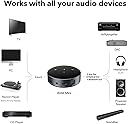
The WiiM Mini AirPlay 2 Wireless Audio Streamer transforms any stereo into a high-fidelity, multiroom audio powerhouse. Supporting uncompressed 24-bit/192kHz audio via digital and analog outputs, it delivers studio-grade sound quality. Compatible with Alexa and Siri voice assistants, it offers seamless control and integrates effortlessly with AirPlay 2 and Alexa ecosystems. Stream from top services like Spotify, TIDAL, and desertcart Music with superior Wi-Fi connectivity, all packed into a sleek, ultra-compact device designed for professional-grade audio streaming and smart home convenience.


| ASIN | B09HC5GRKY |
| Audio Output Mode | Analog, Digital |
| Audio Output Type | Aux, Optical, BT |
| Best Sellers Rank | #1,655 in Electronics ( See Top 100 in Electronics ) #1 in Audio Component Receivers |
| Brand | WiiM |
| Color | Black |
| Compatible Devices | Speaker, DAC, Amplifier, Mobile phone, Tablet, HomePod, Apple TV, Echo |
| Connectivity Technology | Wireless, Wi-Fi , Bluetooth |
| Connector Type | USB Type-C, Auxiliary, SPDIF (TOSLINK) |
| Control Method | App, Remote, Voice |
| Controller Type | Amazon Alexa, App Control |
| Customer Reviews | 4.4 out of 5 stars 5,209 Reviews |
| Format | WAV, WMA |
| Global Trade Identification Number | 00195893478101 |
| Item Dimensions D x W x H | 2.7"D x 2.7"W x 0.9"H |
| Item Weight | 1.69 Ounces |
| Manufacturer | Linkplay Technology Inc. |
| Mfr Part Number | ASR001 |
| Model Number | ASR001 |
| Number of Channels | 2 |
| Other Special Features of the Product | Spotify Connect, Works with Alexa, Siri, AirPlay 2, TIDAL Connect, NAS, DLNA, Home Media Server |
| Smart Home Compatibility | Smart Home Compatible |
| Special Feature | Spotify Connect, Works with Alexa, Siri, AirPlay 2, TIDAL Connect, NAS, DLNA, Home Media Server |
| Supported Internet Services | Amazon Music, BBC Radio, Calm Radio, Deezer, iHeartRadio, Napster, Pandora, Qobuz, Radio Paradise, SoundCloud, SoundMachine, TIDAL, TuneIn, vTuner |
| Surround Sound Channel Configuration | 2 |
| UPC | 195893478101 |
| Unit Count | 1.0 Count |
| Warranty Description | 12 months |
| Wireless Technology | AirPlay, Bluetooth, Wi-Fi |
C**G
Probably best, cheapest Amazon Music HD/HUD solution.
If you use SPDIF instead of internal Dac, this little device would let you forget about the expensive BlueSound Node, the troublesome and unstable raspberry pi runs on any OS. This is simply the easiest and best solution by far. The downside would be that it uses it's own app to log into all the music services. You won't be able to browse through the native APP UI from spotify, tidal, qobuz or even amazon music. I haven't tried gapless so I can't put down "it just works" stamp yet! However, hi-res does work as expected. There are some glitches and bugs from Amazon Music though. When comparing to Qobuz, it simply just works as bit perfect. On the Amazon Music HD/UHD I believed it's probably Amazon's fault here. There will be constrain on bitrate and sampling rate if you output from TV because it's running mostly Android OS (ye! I am looking at you Amazon FireTV 4k Stick). You will only get 48k. However, on the Wiim mini is another story. It's better to show 24bit, but sometimes it's not bit perfect. it doesn't always shows properly up to 192k. Due to the inconsistency of Amazon music. Depends on your Dac, your streamer box (a computer, an iphone, tv, or wiim mini) they all behave differently. I can't grasp which one is the "best" solution or claim to be bit perfect here. But Amazon music seems to output hi-res music for sure. Amazon still need to work on their device compatibility issues though. For qobuz, it works like a breeze. Always accurate, and always works! I've had raspberry pi ran through LMS, volumio, audirvana, and roon before. If you want me to choose what's the best solution for sound quality and simplicity, I would choose wiim mini. Although you don't have a roon or audirvana as centralized server. You can't "stream" music to every devices from a home server. You will lose "screen display" feature on your computer or tv. However, you will not bump into audirvana can't switch playback devices or roon constantly having server down issues you need to restart the server. Best of all, you don't need to deal with LMS or volumio just another update that something "doesn't work" again. For the sound quality, I compare to Qobuz, it is indeed a close match. To be easy to use and bit perfect, Qobuz is obviously the best choice. Amazon music comes in second with this wiim mini. Best of all was the Alexa integration. It's now possible to tell Alexa to play music, and on wiim mini side, it starts to play bit perfect hi-res music. That's simply the missing piece from the echo eco system that Amazon did not have on their own products unless you've gone for Echo Studio. Amazon really need to do some catch up. It will sound better than you use Amazon FireTV 4k Sticks plug into the AVR before TV. Due to "compatibility" issues, versions of FireTV OS, and FireTV hardware. Not all FireTV works right out of box. In addition, not all AVR works with FireTV stick either. So I am grateful that Wiim Mini simply skips that whole route all together. The weak link would be spotify connect (not very sure if spotify connect is ever going to support bit perfect when spotify finally release hi res audio). Tidal works okay but obviously your DAC needs to decode MQA because wiim mini can't do that from internal DAC. Best experiences comes from Qobuz and Amazon Music HD/UHD. Bluetooth was alright. When you can stream through WIFI, why bother with Bluetooth? However, the streaming service is very limited. It won't support even something like Pandora just yet! You really need to use Airplay2 to playback those type of music services.
G**N
Works better than expected!
I recently bought a Denon CEOL all in one receiver with HEOS built in. So I needed to decide which streaming service (WIIM vs HEOS) I was going to use. Denon had had problematic software control, which was significantly upgraded in January 2024. It seems to work fairly well, now. WIIM seems to receive almost (not quite, but close) universal praise for its control software. Why I went with WIIM: * Greater chance of fewer problems with software. * More flexible in that I could use inexpensive speakers, and my existing legacy gear with it. * As one who uses hearing aids, I am unlikely to get to the point where HEOS's promised higher fidelity (and higher subsequent costs) will make a significant difference to me. * WIIM supports one of my favorite 2nd tier streaming services, Calm Radio), and HEOS does not. WHAT I LIKE ABOUT the WIIM mini: * VERY tiny! it sits on top of my elderly Technics SA GX190 with the vent holes on top in the area with no vent holes with room to spare in the spot with NO vent holes. * It came with all the cables I needed to connect my device to my Technics, and even included stuff I couldn't use. * It connected to the aux in RCA ports of my Technics reliever quite well. And the legacy Technics can control bass, treble, & volume quite readily. * Setup was EASY an straight forward. I believe literally ANYONE can do it. * Sound is VERY good, With or without my Hearing aids. My wife who doesn't uses HAs also thinks the streaming sound is very good. Maybe not as good as the new Denon HEOS streaming, but that could be the quality of speakers on the Denon as opposed to the Technics. * The WIIM software is easy to use after set up. I like using my Android device as a remote control for the mini. WHAT I DON'T Like about the WIIM Mini: * Only one thing really. The cord that connected the miniplug out of the mini to the RCA connectors, was all black (both RCA pins), so I couldn't tell which cord was 'left' and which was "Right'. I must have guessed correctly because it worked OK. I upgraded to a third party cable. IN CONCLUSION: I am pleased with my purchase. It seems well made, and the performance is better than I expected. The sound is quite good, particularly for a casual listener, even those who aren't hearing impaired. Could you do better? Yes, but I doubt you could do better for less than $100 US. Connectivity is good, Set up is easy, and the software is easy to use. I will likely expand my whole house audio system with WIIM products, even one for my Denon CEOL receiver.
S**.
Just bought my second WiiM Mini
Here's what I said in my first review.... (look below to see why I bought a second, or just get one already). It does what it says, it does it well, and at a reasonable price. Now for the audio nerds out there... So, I can stream directly to my receiver using its built-in AirPlay2. It sounds fine, And I know that it's better to get lossless data directly into my external DAC, which sounds way better than the DACs built-in to my receiver. But for convenience, nothing beats AirPlay streaming to the WiiM Mini, which connects to my external DAC via Optical. Does it sound as good as a direct connection to the DAC (no AirPlay AAC shenanigans involved)? No, it does not. But it definitely sounds WAY better than streaming AirPlay to my receiver's DACs, and so much more convenient than direct-connecting to the DAC. When I want to do attentive listening, I use an iPad connected via USB-C to the USB input of the Denafrips. When I just want to hear the Denafrips as part of my whole-house sound, the WiiM mini is my first choice. Looks like the internal DACs on my receiver are now relegated to Home Theater. The Mini is super easy to set up, it inhabits my AirPlay whole-house sound system beautifully, and the app even has some nice music discovery features of its own. This morning my "alarm clock" automation went off. It played SomaFM in my bedroom, and in the Home Theater through the Mini and into my external DAC. I made coffee, and spent a little time in from of the home theater/Denafrips system and thought... "yep, that sounds nice". That's all I was after, and that's exactly what I got. Nice job WiiM. I may get a couple more Minis before they introduce a new model that doesn't have AirPlay2 (I know, they're only rumors). == UPDATE == So yes, I just bought my second WiiM Mini, and this time it's to run a second zone in my house as part of an AirPlay setup. My AVR has two zones, and I was using the AVR for that, but it's nowhere near as convenient as having another AirPlay device. However, I want better sound than I can get from a HomePod, and I have in-wall speakers that I want to use. In-wall speakers sound better than a HomePod? Well, if they're decent and driven by a decent zone amp (I'm looking at you Parasound ZAmp), and you use the WiiM Room Correction feature, then YES, it's not even close. The Room Correction feature worked so well in my setup that my in-wall speakers in the dining room actually sound very good now. Like not just good, but very good (not mindblowing either, but I'll take very good for this application). So yeah, the Mini has shown itself to be a great little swiss army knife and that's just using the AirPlay capability. WiiM Mini with Room Correction is killer.
8**N
Almost perfect, but some stability issues
This is an almost perfect product for me. I want music distributed throughout my house, in several different rooms, all controlled by my phone, with independent volume control for each room. And I want to do this through the multiple high-quality speakers I already have. And this does that great. These things are small, inexpensive, and deliver very high quality sound. My only complaint is wifi connection stability and reliability. I have excellent wifi through my house, and the WiiM Home app says all of the Minis have "Very Good" signal. My phone and laptop show full wifi signal with high speed and low latency next to all of my WiiM Minis. But these WiiM Minis lose connection about once an hour. I'll have music playing in multiple rooms for an hour, I'll be sitting motionless on my couch, and all of a sudden the music will cut out in all rooms simultaneously. This is a regular occurrence. When I open up my music source and tell it to reconnect, it reconnects in just a few seconds, but it's weird to have to do that so often.
A**.
Stream 24 bit/192 kHz digital via TOSLINK to your DAC
Forget the built-in DAC on this device. The star of the show is competent, no-fuss streaming with or without the company's app at a good enough resolution for anyone for under $100. Use the included TOSLINK optical cable to feed that steamed digital data to a DAC or an amp/preamp/receiver with a built-in DAC, and voila, your streaming service music or music stored on a local network device has full access to your sound system. And if you really dig the freedom that comes with this kind of setup, ditch your proprietary streaming service apps too and use DLNA/UPnP (via apps like BubbleUPnP) to feed your system its digital audio. Whatever you do, do NOT convince yourself that you need a more expensive streamer. You don't. This is all you'll ever need to get streaming service music to your sound system. Also, do not convince yourself you need a more expensive TOSLINK cable than the one included with this device. Gold plating and electronic shielding aren't going to help with a fiber optic signal! My personal system? WiiM Mini -> desktop DAC -> electrostatic headphone amplifier -> electrostatic headphones. It's wonderful. One nice touch is that because the Mini requires so little power, I can save an outlet and just plug it into the USB accessory port on my DAC (Cambridge Audio DACmagic Plus) and it turns on and off with the DAC. No real problems setting up the device, or maintaining a Wi-Fi connection to my consumer mesh home Wi-Fi system. Wi-Fi connects almost instantaneously. The WiiM Mini supports parametric EQ! I use a PEQ profile for my headphones from AutoEQ (which is a free website). It sounds great. The WiiM Mini Highly recommended!
M**R
Great for Music Streaming and Gateway to other WiiM Products
Caution! The WiiM Mini is a gateway to owning additional WiiM products. WiiM Mini (the internal DAC provides very decent audio. The WiiM Mini is great for music streaming, i.e. Spotify Connect. The WiiM Bluetooth (BT) remote control can be purchased separately and also as a bundle with the WiiM Mini.) [Update 7/3/24: Some of the WiiM music streaming products, i.e. The WiiM Amplifier, WiiM Pro Plus and the soon to be released WiiM Ultra Preamplifier now support WiiM's room correction. Note: The WiiM Mini does not support WiiM room correction at this time. I do not know if the WiiM Pro (non-Plus) music streaming device supports the WiiM room correction. I only own WiiM Amplifier(s), WiiM Pro Plus and WiiM Mini music streaming devices that I purchased on Amazon. The WiiM room correction works with the WiiM Home app and the microphone in your iOS iPhone (not sure about Android phones.) In less than a minute the WiiM Home app and supported WiiM streaming device will analyze the in-room frequency response of your speakers. The WiiM room correction creates a custom 10 band parametric equalizer response curve that you can name and save or just use the default name "Auto". I also used the WiiM room correction with a subwoofer in a 2 channel system with the WiiM Amplifier with bass management and achieved good results. The results of using the WiiM room correction with my system(s) have been impressive. Room correction resulted in cleaner bass, better bass and drum definition, and improved midrange. LPT: You can temporarily connect a WiiM Pro Plus to any 2 channel or 2.1 channel audio system where you normally have a WiiM Mini. Then perform the WiiM room correction and save the room EQ settings. You can later write down or screenshot the WiiM room correction EQ values and manually apply the room correction EQ settings to the WiiM Mini at a later time. Unless you rearrange your room, change the speakers or your preferred listening position you should not need to re-run the room correction.] The WiiM Mini has led me to purchase the WiiM Pro Plus (features a better DAC than the WiiM Mini, a BT remote control and support for Chromecast (I don't use this feature) and the WiiM Amp. I could have saved a bunch of $ if I had started with the WiiM Amp, skipped purchasing separate integrated amplifiers and the WiiM Mini and WiiM Pro Plus. Although this is my review of the excellent WiiM Mini, do yourself a favor and consider getting the WiiM Amp instead. *) The WiiM Home phone app to Spotify Connect integration is very good, easy to use. The sound quality when using the WiiM Mini (and other WiiM music devices) when streaming Spotify Connect is very good. (The WiiM Mini's sound quality when streaming Spotify is currently Ogg Vorbis format compressed audio (320kbps, 16 bits, 44.1kHz) **. The sound is so close to uncompressed CD quality (at least to my ears) that I no longer bother playing my CDs. I have disconnected my CD player and have hauled my remaining CDs to the basement because it is just too easy to call up playlists, artists, albums and songs at will using the WiiM Home app. * Note: As an integrated Class D amplifier/music streaming device the WiiM Amp has some limitations. The WiiM Amp does not have a built-in phono stage or a built in headphone jack (you can however pair BT earbuds or headphones with the WiiM Amp). The WiiM Amp only has a single RCA stereo line input connection (in addition to one optical digital input.) The WiiM Amp supports USB playback. The WiiM Amp provides connections for one pair of wired passive stereo speakers (4 Ohm or greater.) There is also an RCA subwoofer output with bass management via the WiiM Home app.) ** Note: The WiiM Mini and other WiiM music streamers are capable of streaming higher quality (uncompressed, lossless) audio including Amazon HD Music, Tidal and Deezer. (I do not currently use these music services.) [Update 6/3/24] I purchased another WiiM Mini to solve an issue I was having with the WiiM Amplifier. The WiiM Amp is a brilliant product in almost every respect. One notable exception is Wi-Fi connectivity. In my home the WiiM Amp only has acceptable Wi-Fi connectivity when the WiiM Amp is placed close, i.e. within the same room as my wireless router. To solve this issue, I use the WiiM Mini as a Wi-Fi music streamer. I connect the WiiM Mini to the WiiM Amp via the optical cable and this gets around my WiiM Amp Wi-Fi performance issues. (The optical connection is 24 bit, 192 kbps.) I stream Spotify Premium exclusively, I can't hear any difference when using the WiiM Amp with Wi-FI (placed close to the W-Fi router) or when using the WiiM Mini and the optical output from the WiiM Mini to the optical input of the WiiM Amp. Now I can locate WiiM Amps in different rooms in my home and not have Wi-Fi connectivity issues. This works for me. Maybe this solution will work for you if you are having WiiM Amp Wi-Fi issues.
M**N
One of the best bang for your buck devices
Great entry streaming device! Sound quality is very good for just a puck, ease of use, WiiM is one of the few companies that includes almost if not “EVERY” streaming service out there - all the free apps and services to the top tier services. Great app & software/firmware ecosystem, with constant updates, improvements and features! Very intuitive and easy to use! You might/will achieve better fidelity with higher priced products with higher quality DAC chips, audio grade components and circuit designs, power supplies, ect. But, it is almost impossible to beat the features, functions, and amount of streaming services this device offers you for the price of admission! And that goes for most of the WiiM ecosystem devices! Thank you!!!
A**N
Perfect Expansion for a WiiM Ultra Whole-Home Setup
I originally bought the WiiM Ultra for my living room setup and was impressed enough that I started expanding into other rooms with the WiiM Minis. They have been an excellent addition to the system and make whole-home audio surprisingly easy and affordable. The Minis are small, reliable, and very flexible. Setup was quick, AirPlay 2 works well, and the app experience has been smooth overall. I like that I could keep using my existing speakers and equipment instead of replacing everything with a closed ecosystem. In my setup, the WiiM Ultra acts as the main controller in the living room while the Minis handle audio in the other rooms. Grouped music playback works great throughout the house. One thing worth noting: if you group multiple WiiM devices together while using a live video source, there can be slight audio sync delay between rooms. For TV or video playback I simply output audio only to the local WiiM device, which completely solves the issue. Overall, these are easily some of the best value streamers I’ve used and they pair perfectly with the WiiM Ultra ecosystem.
J**0
Buen sonido
Antes de adquirir el dispositivo, evalué varias opciones. Principalmente, consideré los siguientes modelos: Wiim Mini, Wiim Pro y Wiim Pro Plus. El Mini y el Pro son prácticamente idénticos en cuanto a calidad de sonido pero difieren en la forma y en las salidas y entradas de señal. El Pro dispone de una salida analógica y dos digitales, óptica y coaxial. El Mini, salida analógica y digital óptica. No tiene salida digital coaxial. Aunque el Pro Plus ofrece una calidad de sonido superior gracias a su DAC mejorado, opté por descartarlo debido a su precio más elevado, ya que ya dispongo de un DAC Marantz con una calidad similar y como no necesitaba la salida digital coaxial, me decanté por el modelo Mini. Sonido: Como ya he dicho, tengo un DAC de Marantz de alta calidad y he podido hacer comparaciones. Si conecto el Mini (con salida digital) al Marantz suena muy detallado, limpio, equilibrado, con buena precisión tímbrica y una buena escena musical. Si utilizo su salida analógica (lo cual implica que trabaja su DAC interno), el sonido cambia. Se vuelve más cálido y pierde definición y transparencia, pero conserva la escena musical. En resumen, ¿cuál de los dos te quedarías? Si tienes un oído acostumbrado a distinguir detalles sutiles entre un buen sonido y uno excelente, un buen equipo sin DAC, y no te importa pagar más, coge el Pro Plus. Si ya tienes un DAC de alta calidad te vale el Mini. Si no eres un experto en sonido y lo único que quieres es que suene bien, es más que suficiente el Mini. Lo puedes conectar a cualquier amplificador y no te va a defraudar. Repito por si no lo he explicado bien. Si vas a utilizar la salida digital, cualquiera de los tres te sirve porque el resultado dependerá del DAC que le conectes. Si utilizas la salida analógica, el Mini y el Pro suenan bien (llevan el DAC TI PCM 5121). El Pro Plus mejor (lleva el DAC AKM 4493SEQ).
Z**E
Integrates seemless with my Bose 3-2-1
Very easy to install and versatile usable
ケ**ん
USB DACyより良かった
思っていたよりちいさかったです。音はやっぱりWiiMでした。良かったです。前に使っていたUSB DACより上でした。
G**Z
Eccellente dispositivo di streaming
Davvero ottimo questo WiiM mini. Partiamo dalla confezione: 1. Nella scatola, compatta, c'è tutto quello che serve. Alimentatore, cavo usb C, cavetti di collegamento analogici e persino il cavo ottico per un DAC esterno. 2. Il dispositivo è piccolissimo, può trovare posto ovunque. Ha i controlli fisici del volume e un tasto play/pausa. Molto comodo. 3. App WiiM Home, scaricata dal Play Store. Di immediato utilizzo, con una procedura guidata consente la connessione alla rete WiFi e in due minuti il dispositivo è pronto per essere utilizzato. Dall'app si possono gestire molti settaggi, compresa l'equalizzazione; sono direttamente accessibili tutti i servizi di streaming (quando dico tutti intendo tutti, sono supportati veramente una moltitudine). Si può configurare l'uscita in maniera tale che sia bit perfect, si può abilitare il Bluetooth, si hanno le informazioni della qualità dello streaming in tempo reale. Notevole. 4. Compatibilità software. Il WiiM è abilitato Spotify connect, quindi è gestibile direttamente dall'app di Spotify. Alexa lo riconosce facilmente, per cui è molto semplice inserirlo in gruppi di altoparlanti anche insieme ai vari Echo Dot e simili, da cui si può comandarlo con controllo vocale. Interessante il fatto che l'app Amazon Music lo veda come altoparlante e consenta direttamente lo streaming. Con Airplay qualsiasi dispositivo Apple può inviare l'audio al WiiM, funzione che purtroppo non esiste su Android (l'unica alternativa è Google cast che però sul mini non c'è, bisogna andare sul WiiM pro). Non ho Tidal o Quobuz, ma dalle altre recensioni direi che funzionino bene. Ho provato dei brani ad alta risoluzione dal cellulare e sono andati perfettamente. 5. Suono ed esperienza d'uso. Ho connesso il WiiM solo con l'uscita ottica, sia al mio ampli (un buon Marantz), sia a un DAC Topping che utilizzo per l'ascolto in cuffia insieme a un ampli Atom. Tutto perfetto, connessione sempre stabilissima. Comodo il fatto che il volume sia controllabile dalle App, ma per chi vuole essere sicuro di avere un segnale bit perfect, ossia senza alcuna modifica rispetto all'originale, è possibile impostare l'uscita a volume fisso (ovviamente è anche necessario disabilitare l'equalizzatore). Il suono dipende quindi da tutta la catena, non tanto dal WiiM: il consiglio è quello di usare un DAC esterno e godersi la musica digitale. Da recensioni specializzate il DAC interno è discreto ma niente di più, quindi meglio evitare. 6. Conclusioni. Il WiiM è uno streamer ottimo, economico soprattutto se preso in offerta, molto flessibile, ben supportato (App e firmware sono in costante sviluppo), con qualità audio altissima se collegato a un buon DAC, e soprattutto divertente da utilizzare. Gli manca solo il protocollo Google cast, ma se dovesse servire i dispositivi WiiM più costosi ne sono dotati. Consiglio l'acquisto senza riserve. AGGIORNAMENTO Purtroppo, dopo l'entusiasmo iniziale, capita molto di frequente che il dispositivo non venga più rilevato, né dall'app WiiM né da Spotify. A questo punto è necessario resettare tutto, riconfigurare, e normalmente l'operazione va fatta più di una volta. Al momento non riesce più e connettersi alla rete a 5 GHz, chissà perché. La cosa è faticosa e ho voglia di restituire il dispositivo, che ha grandi potenzialità ma è inaffidabile (ho il sospetto che dipenda da qualche aggiornamento firmware, mi era capitato una volta, poi a un certo punto sembrava risolto, e adesso va ancora peggio). Peccato. Non consiglio più l'acquisto. SECONDO AGGIORNAMENTO Problema risolto, i malfunzionamenti erano dovuti all'alimentatore. Dopo averlo sostituito è magicamente tornato tutto a funzionare. Attenzione a cavo e alimentazione, il dispositivo è piuttosto sensibile, potrebbe dare problemi o riavviarsi. E sono di nuovo 5 stelle! TERZO AGGIORNAMENTO Con i continui aggiornamenti di firmware, adesso il WiiM consente anche l'ascolto di Spotify lossless. Sempre super consigliato l'acquisto.
M**A
Muy buen streamer de música
Se instaló muy fácilmente y se actualizó de manera muy rápida, lo conecté a unos parlantes de un minicomponente Panasonic ya viejito y lo conecte directo al Wiim con la salida Auxiliar y Rca al minicomponente, trabaja muy bien con Amazon Music Unlimited desde la aplicación de Wiim dando 24/192 en musica UHD (En la aplicación nativa de Amazon no se muestra la calidad del audio cuando lo reproduces de ahí directamente usando el Wiim como dispositivo de salida), en Tidal como los masters casi todos solo están en MQA, la aplicación te hace el primer unfold y sólo sale a 24/96, pero al paracer habrá una actualización del Wiim que te podrá hacer el siguiente unfold, con Roon pude transmitir desde la oficina vía Air Play 2 pero el programa hace el downsampling y le llega con calidad CD al Wiim, sin embargo habrá una actualización a fin de año para qué el Wiim sea Roon Ready y así poderdisfrutar hasta 24/192 en el streamer y cómo siempre lo qué mas me sorprendió fue con Neutron Music Player qué transmite sobre DLNA con todo el poder tengo música en 24/192 y los reprodujo sin problemas. En fin bueno, bonito y barato.
Trustpilot
3 days ago
2 months ago