Buy anything from 5,000+ international stores. One checkout price. No surprise fees. Join 2M+ shoppers on Desertcart.
Desertcart purchases this item on your behalf and handles shipping, customs, and support to Spain.
🚀 Elevate your home network to pro-level speed & coverage — don’t get left buffering!
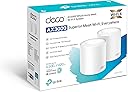
The TP-Link Deco X50 (2-pack) is a WiFi 6 mesh system delivering AX3000 speeds with dual-band coverage up to 4,500 sq ft. Featuring AI-driven mesh technology, it intelligently optimizes your network for up to 150 connected devices. Each unit includes 3 Gigabit Ethernet ports for wired stability, while HomeShield security safeguards your smart home. Easy app setup and premium design make it the ultimate upgrade for seamless, high-speed home WiFi.


| ASIN | B09QMN7PRZ |
| Antenna Location | Home |
| Antenna Type | Fixed |
| Best Sellers Rank | 183 in Computers & Accessories ( See Top 100 in Computers & Accessories ) 1 in Whole Home & Mesh Wi-Fi Systems |
| Box Contents | Deco X50(2-pack) |
| Brand Name | TP-Link |
| Colour | White |
| Compatible Devices | Laptop, Personal Computer, Smart Television, Tablet |
| Connectivity Protocol | Wi-Fi |
| Connectivity Range | 4500 Square Feet |
| Connectivity Technology | Wi-Fi |
| Control Method | App |
| Country of Origin | China |
| Coverage | up to 4500 ft2 |
| Customer Reviews | 4.4 4.4 out of 5 stars (1,099) |
| Data Transfer Rate | 3000 Megabits Per Second |
| EU Spare Part Availability Duration | 3 Years |
| Frequency | 5 GHz |
| Frequency Band Class | Dual-Band |
| Global Trade Identification Number | 04897098681664 |
| Is Modem Compatible | No |
| Item Dimensions L x W x H | 11L x 11W x 11.4H centimetres |
| Item Weight | 0.38 Kilograms |
| LAN Port Bandwidth | 1000 Mbps |
| Manufacturer | TP-Link |
| Manufacturer Part Number | Deco X50(2-pack) |
| Maximum Upstream Data Transfer Rate | 1201 Megabits Per Second |
| Model Name | Deco X50(2-pack) |
| Model Number | Deco X50(2-pack) |
| Number of Antennas | 3 |
| Number of Ports | 3 |
| Operating System | Linux |
| Other Special Features of the Product | Beamforming,QoS,Parental Control |
| Security Protocol | WPA3 |
| Wi-Fi Generation | Wi-Fi 6 |
| Wireless Compability | 802.11ax |
A**9
Easy it is to set up and manage
I recently set up the TP-Link Deco X55 (3-pack) AX3000 Mesh WiFi 6 system across two properties sharing the same connection, and it’s been incredibly effective. The coverage is excellent, providing a strong, stable signal in both buildings without any dead zones. Even at a distance, the connection remains reliable, making it ideal for extending WiFi beyond a single home. Performance has been consistently impressive, with fast WiFi 6 speeds handling streaming, work, and multiple devices with ease. Setup was quick through the Deco app, and once running, the system manages everything seamlessly in the background. It’s a great solution if you need dependable, wide-reaching WiFi across larger or separate spaces.
J**.
Powerful, reliable Wi‑Fi that finally covers the whole house
I’ve tried a few Wi‑Fi setups over the years — from a single router to old extenders — and struggled with rooms where the signal was weak or just didn’t reach. The TP-Link Deco X55 (3‑pack) mesh WiFi system has, quite frankly, solved those problems — it’s robust, fast, and has transformed internet coverage across my whole home. I first got the 3‑pack because we have multiple devices — phones, laptops, tablets, smart‑home gadgets — and needed coverage across different floors and rooms. Setting it up was surprisingly simple, even for someone not particularly tech‑savvy: plug in the main unit, use the Deco app to follow the prompts, and before I knew it the mesh network was live. The coverage is impressive — rooms that previously had weak or patchy signal are now solid and stable. Whether upstairs, in the kitchen, or tucked away in a corner room, I get strong, consistent Wi‑Fi. Even outdoors on the patio I noticed a usable signal, which has been great for music and streaming devices. Performance has been top‑notch. Streaming videos, video calls, gaming, working from home — everything feels smooth, with minimal buffering or connection drops. The WiFi 6 boost makes a difference, especially when multiple devices are connected: there’s no noticeable slowdown even during peak usage. I also like the extras: the three gigabit ports on each unit give flexibility if I want to connect wired devices, and the system’s ability to handle up to ~150 devices gives plenty of breathing room for current and future gadgets. The built‑in HomeShield security gives extra peace of mind, which feels important with so many smart devices around. Overall, the TP-Link Deco X55 (3‑pack) has been a real upgrade — it turned our home network from a weak, patchy system into a stable, high‑speed mesh that covers the entire house. For anyone struggling with poor Wi‑Fi range or juggling many devices at once, this mesh system is a strong recommendation.
M**K
Finally getting the speeds I pay for - Well worth the investment
Pros: - Dramatic improvement in speed test results and reliability. - Great coverage: my WiFi now feels fast and I’m finally getting close to the advertised speeds I pay for. - The app lets you choose a preferred mesh for devices to connect to, shows signal strength to each device, and download/upload speeds in kbps. - Fairly easy to set up. It may take a while depending on how awkward your WiFi provider/router is, how much you want to test for optimal positions, and the time taken to familiarise yourself with the detail-heavy app and its settings. For some, it will be almost plug and play. - Lots of settings so you can make personalised choices. There’s a huge amount of functionality, right down to being able to turn the light off on the mesh. - Lovely, premium design. - Lots of Ethernet ports. Cons: - I wish there were clearer guidance during setup on testing for optimal placement, or even a mode to help find the best signal. I spent around an hour deciding whether to put the router in a room with important WiFi-heavy devices (showing a medium 2-bar signal strength) or in the hallway outside (showing a strong 3-bar signal but further away from those devices). For me, the stronger hallway position won. - The light colours can initially be confusing in terms of what they mean or indicate during setup. Worth noting: - If you try to name the new network the same SSID as your existing one during setup, it asks you to rename the mesh to something different, which feels counterintuitive if you want devices to switch over smoothly. It doesn’t explain that you can rename it back later after you’ve turned 2.4 GHz and 5 GHz WiFi off on the original router. Overall: - Yes, it’s an expensive investment, but in my view it’s better than paying more every month for “faster” WiFi that you might never get the true benefit of once you’re a bit further away from the router.
M**S
Riktigt bra!
E**I
Très bon achat avec un résultat exceptionnel
J**Y
Pratique, simple à mettre en place Très bonne portance
M**K
Unfortunately I made a huge mistake by getting this product from the UK The power adapters are not suitable for the Australian market and I would need to buy converters. Also I am unable to get Australian power adapters anywhere They are not sold as a separate item
P**A
Easy to setup, no more dead zones and consistent speeds all over. Definitely recommend
Trustpilot
1 month ago
1 day ago