Desertcart purchases this item on your behalf and handles shipping, customs, and support to Spain.
🖱️ Elevate your workflow with silent precision and all-day comfort!
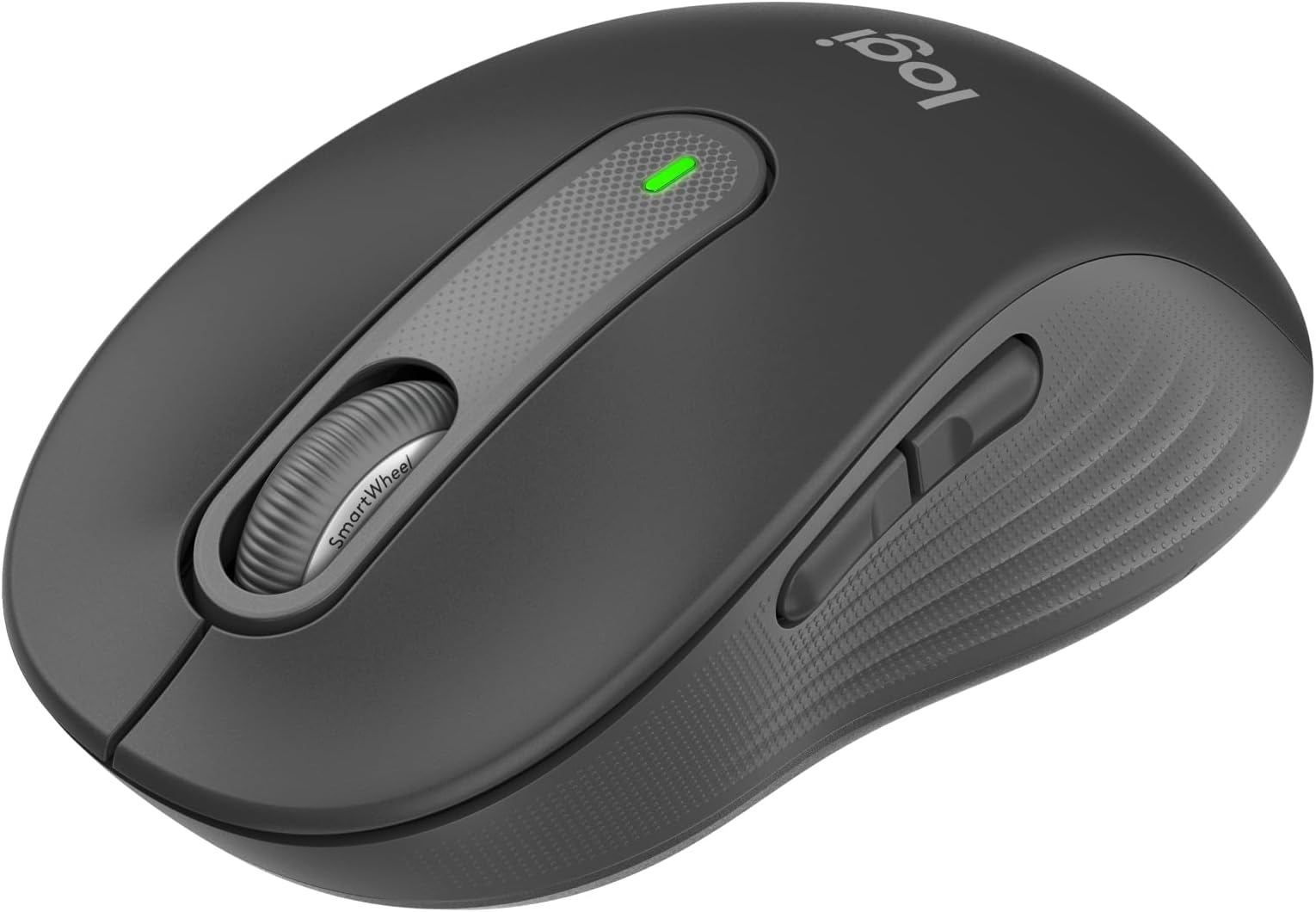
The Logitech Signature M650 Wireless Mouse is designed for small to medium hands, featuring a 2-year battery life, 3000 DPI laser precision, and SilentTouch technology that reduces click noise by 90%. It offers versatile connectivity via Bluetooth or Logi Bolt USB receiver, customizable side buttons for enhanced productivity, and an ergonomic design with rubber grips for extended comfort. Compatible across multiple platforms including Windows, macOS, Linux, and more, it’s a premium yet affordable accessory for professionals seeking quiet efficiency and seamless multi-device use.


| ASIN | B07W6G822T |
| Antenna Location | Office |
| Are Batteries Included? | Yes |
| Are Batteries Required | Yes |
| Battery Average Life | 2 years |
| Best Sellers Rank | 364 in Computers & Accessories ( See Top 100 in Computers & Accessories ) 16 in Mice |
| Box Contents | Single AA battery, Logi Bolt USB receiver (if connected via Bolt) |
| Brand | Logitech |
| Brand Name | Logitech |
| Button Quantity | 3 |
| Colour | Grey |
| Compatible Devices | Android devices, Chromebook, Mac, Personal Computer, iPad |
| Connectivity technology | USB |
| Country of Origin | China |
| Customer Reviews | 4.4 out of 5 stars 12,142 Reviews |
| EU Spare Part Availability Duration | 24 Months |
| Enclosure Material | Graphite, Rubber |
| Global Trade Identification Number | 05099206097223 |
| Hand Orientation | Ambidextrous |
| Hardware Platform | Chromebook, Mac, PC |
| Item Dimensions L x W | 10.7L x 6.1W centimetres |
| Item Type Name | Wireless Mouse |
| Item Weight | 101.2 Grams |
| Manufacturer | Logitech |
| Manufacturer Part Number | 910-006253 |
| Minimum Required Operating System Version | Windows 10 |
| Model Name | Signature M650 Wireless Mouse |
| Model Number | 910-006253 |
| Mouse Maximum Sensitivity | 3000 Dots per Inch |
| Movement Detection | Laser |
| Movement detection technology | Laser |
| Network Connectivity Technology | USB |
| Number of Batteries | 1 AAA batteries required. (included) |
| Number of buttons | 3 |
| Operating System | Android™ 8.0 or later, Chrome OS, Linux, Windows® 10, 11 or later, iPadOS 13.4 or later, macOS® 10.10 or later |
| Pattern | Small-Medium Hands |
| Power Source | Battery Powered |
| Product Features | Soundless, Wireless |
| Product Finish Type | Matte |
| Product Warranty | 2 year manufacturer |
| Range | 3000 dots_per_inch |
| Special feature | Soundless, Wireless |
| Style Name | Right Handed |
| Theme | Panda |
| Unit Count | 1.0 count |
T**A
Well built, great size for small hands, very quiet, great quality
This tiny white rodent landed on my doorstep this morning! I spent some time weighing this up with the others in the logitech stable: the mx anywhere and the logitech mx vertical. I dismissed the vertical after considering that it might probably feel too odd (it needs adjustment, and I am at the age where it gets increasingly more difficult to adjust to new tech). So it as a toss up between this mouse and the logitech mx anywhere. Now I have a logitech mx mini keyboard which is superb. Great quality keys which is made of a premium feel plastic - very solid and matt to the touch, and a metal body - basically solid. So I was tempted by the logitech mx mouse too. But read good things about the signature. Also it's half the price of the mx, so I plumped for that in colours not dissimilar to that of my mx keyboard. It feels satisfyingly weighty and solid in the hand. Great size for small hands like mind. Very smooth fast scrolling and yes, they didn't lie - very very quiet clicks and scrolls. (I was fed up with my last non-logitech mouse which squeaked like real mice). If you want a really quiet mouse, this does the trick. Set up was instantaneous - no messing about. I like how you can store that little connector thingy (I am not techie) within the casing of the mouse so if I need to take it into the office, I know I can store it away with little fear of losing it. But what I like best is actually how it feels - premium matt plastic casing and textured rubberised sides to make it easier to grip, plus just the solidity and weight of the feel of the mouse. I work almost all day at my computer, and I have been very careful trying to buy the best versions of accessories recently. This mouse fits the bill - if you are someone like me: someone who works all day at the computer, someone who is not a techie/graphic designer/gamer type user but a heavy user nonetheless, someone who isn't techie and just wants a good quality accessory because you appreciate good work tools (so I have a top of the range premium business laptop, buy moleskine notebooks, use premium fountain pens, anglepoise desk lamps - that sort of quality). This mouse is perfect for my needs.
B**L
Silence is bliss, this mouse delivers!
As a developer, this mouse has a few extra bells and whistles than what I needed. However, that being said, it's incredibly easy to use and I find the fast-scroll wheel and silent buttons are very pleasant - the clicky clicky of office mice is very annoying to me. The extra features allow you to customise the mouse further than just the default options and I like that they are customisable per app, meaning you're not locked into the same configuration "globally" on your system. I recently bought another for my partner as she was experiencing hand cramps with her old mouse and since using this one, has commented that those cramps have basically vanished! It's a solid mouse that has survived the journey to and from my London based office on public transport with basically no protection other than being chucked in my bag! Overall, a solid investment in my opinion.
A**R
Great midrange productivity mouse
A lovely mid-range priced mouse from Logitech. I was debating about getting the Logitech Pebble or the POP mouse before this was released, but as soon as I saw that this had customisable buttons and came in a pink colourway (which matches nicely with my Logitech K380 pink keyboard), I knew this was the mouse for me! My mouse in the pictures has a skin on, but the top is a light matte pink that matches the buttons. Compatibility with iPad: - I’ve been using it with my iPad Pro for a few months without any problems so far, just make sure to go to into Settings to make sure the mouse is optimised. I found that the default scrolling on the iPad was far too slow/laggy/short a distance, so I turned scrolling sensitivity to the highest in order to achieve smooth scrolling on webpages. - Its sensitivity is good for casual gaming too. - You can also scroll sideways through your home pages by holding one of the side buttons while simultaneously scrolling (although I’ve found its a bit clunky and sometimes it scrolls you all the way to the end so that you see the app library, so it’s more reliable to just click and drag if you want to swipe through your home pages) Pros: - 3 extra customisable buttons to map actions to (the scroll wheel click, and the 2 thumb buttons on the side). Especially useful with an iPad because you can map them to open up multitasking or go to the home screen. - Silent left and right clicks that still feel very tactile. The scroll action of the scroll wheel is also quite quiet, with no loud clicks as the wheel turns (although it still gives you a clicky tactile feedback). Excellent if you’re using it in a quiet place or in the public. - Has a space to store the USB dongle so you don’t lose it (since I only use Bluetooth to connect anyway this is especially nice) - Has built in horizontal scrolling in the form of pressing a side button and scrolling on the scroll wheel at the same time. - Very nice streamlined shaped, ergonomic without being bulky, and is comfortable when using for a long time. Has curved, taller profile, just right for my palm to rest naturally on it (which is why I chose this over the Pebble mouse, which is much flatter). Its taller shape also means your thumb/pinky isn’t dragging on the table as you’re using the mouse. - The sides are made of a soft grippy material, which is really comfortable when you’re using the mouse for long periods of times. The scroll wheel is also notched and made of a grippy material too. - Has a left handed option and also comes in 2 different sizes so you can choose the one that fits your hands the best. Cons: - The scroll wheel click and the thumb buttons aren’t silent, they sound like normal clicks. (Although they’re still more muted than, for example, the Apple Magic Mouse’s clicks). - It can only store 1 bluetooth profile, so if you want to connect another device via bluetooth, you would have to get your old device to forget its connection first. (Although this wouldn’t be the case if you connect the new device with the USB dongle). However, if you’re looking to jump between multiple devices with your mouse I would suggest looking at the Logitech POP or MX Anywhere 3 mice instead, as they can store 3 bluetooth devices. - Might be less portable than smaller/flatter mice. - Uses a single AA battery instead of being rechargeable. Although its battery life with the AA battery is much longer than what you’d get on a single charge of a chargeable battery. Summary: This is a very nice option for anyone looking for a reasonably priced, wireless, daily-driver mouse from a reputable tech accessory brand. It can be comfortably used for extended periods and is great for office/productivity work. Its key features are its silent clicks, dual connection options (bluetooth/USB) and its 3 extra customisable buttons (not counting the left/right clicks).
N**E
The M650 mouse is a good 'daily driver'
I have used this mouse on a daily basis, mostly for a full working day, for about the last 15 months. Tasks are mostly general office productivity-type. I am left-handed, but my hands are small, so the smaller version was preferred to the larger version which comes in both left- and right-handed variants. As a result the two small extra function buttons, being placed on the left, are not usable by me. But that's OK - I can just ignore them. The mouse has been connected via the logi bolt receiver and also via bluetooth with several laptops and also an ipad. Over the years I have purchased a number of mice, mostly from Logitech, both cheaper and more expensive, and the M650 is one of two that I retain. I am quite selective, and I would buy the M650 again. Pros: - good size, and comfort. - reasonable weight (~95g) in the hand: not too heavy, not too light. - reliable connectivity in both bolt and BT modes. - battery life seems excellent. I think that I have replaced the battery once in 15 months. Cons: - switching connectivity modes is less convenient than others eg the MX Anywhere 2. - not cheap (£30 at time of purchase), but still good value IMO, given the positives esp comfort.
B**I
A clever mouse
Pros: Good for larger hands, like mine. Good weight for work and casual gaming Very responsive and silent buttons Nice touch High quality scroll wheel with 2x speed function Enough functions for most Can be further configured from Logitech Software Easy connection with Bluetooth or dedicated wireless dongle. (can be connected to 2 different devices this way and can be switched between the 2 with a button) Very good price, especially with the current discount Cons: Mechanicall nothing so far Software - Logitech wants me to install yet another software (Logitech Options +) to control this device, thought the other Logitech devices (RGB keyboard, gaming mouse, microphone, headset) use another software (Logitech G). I am sure it makes sense for the developers, but none of these softwares are flawless and I do not like to increase the number of otherwise unnecessary apps. Luckily the mouse works well without the control app.
T**L
The essence of a well made mouse
A truely well made and solid mouse. There are others which cost more, but this one is a great model for the price point, features, silent yet noticeable clicks, versatility and ease of setup. I've been through a fair few mouse offerings from Logitech: basic & gamer. But this one has been by far the most well received that I've even bought one for the home desktop and another for the office. There are two offerings a large and this a small. The large have been employed for the desktops, and the small as a more travel size to accompany the laptop. There are sufficient buttons to ease web navigation, and a smart wheel that really does help when trying to scroll down that endless thread of an email! When coupled with a Logibolt, and an MX keyboard they are a highly portable, comfortable & consistent pair.
D**W
It's exactly what I wanted - a straight forward mouse to replace another straight forward mouse
I'm not a gamer and I retired from work a while ago so all this DPI, fast scrolling, ergonomics, left hand/right hand malarky is lost on me - all I wanted was an ordinary mouse, symetrical in shape and large enough for my average sized hand to replace a faithful old Lenovo I've been using for years. Taking the overall shape into account and the fact I wanted to go wireless to ease the desk clutter, I ended up looking at the Logitech M650 model as Logitech are a make I have used before and the quality appears quite good from the reviews I've read and checking video's on YouTube. After using the mouse for a while now I must admit I'm very impressed with my purchase as it feels really good to use, easy soft clicks and pleasing rubber surround on the sides to compliment the grip. Setting up was immediate using the supplied dongle (plug and play) although I understand I can also enable Bluetooth if the number of free USB ports becomes an issue. There are two sizes for this mouse - a smaller version for small to medium hands and a M650 L version for larger hands. On reading what other customers had highlighted in their reviews I opted for the L (Larger version) although I have what I would consider average sized hands and the mouse is perfect for me suggesting the large may be more like traditional "standard size" as it looks a similar size to a typical wired mouse. The good news for me also is that I don't seem to suffer cramp in my hand anymore whereas the cheaper Lenovo would sometimes prove a problem with prolonged use surfing the internet (or perhaps it's just old age?).
W**5
A joy to use. Silent click buttons are really impressive.
It’s rare for me to leave a product review but I’m really impressed with this Logitech Mouse. I have medium sized hands, or possibly medium to large sized, so I purchased the large size. The size and shape is perfect, feels great in the hand, and is a real pleasure to use. I’m particularly impressed by the soft / silent click buttons, it really feels smooth and high quality. Much much better than my old clunky Tecknet mouse which was supposedly a quality product, but it’s nowhere near as good as this Logitech.
S**U
Mała i cicha
Uwielbiam ten cichy klik. Wziąłem mniejszą choć mam duże dłonie, ale pasuje idealnie. Bardzo fajne że można wybrać połączenie po BT lub przez port radiowy.
T**O
Un ratón para repetir sin sentirte culpable
Al grano: es el segundo ratón M650 L que compro, por algo será. Al detalle: era muy reacio a repetir porque a pesar de que ya tengo este modelo en casa de mis padres, con el cual estoy muy contento, quería esta vez probar algo distinto. Probé varios modelos ergonómicos, verticales, de los que tienen la rueda arriba para darle con el dedo... Al final acabé devolviendo todos esos experimentos y volví a esta maravilla económica. El ratón da muy buena experiencia: el bluetooth va genial, se desliza bien por las superficies, tiene buen tacto, duración de la batería espectacular, tiene una rueda que funciona muy bien y con buen tacto (hay modelos de Logi más caros con ruedas muchísimo peores, como el MX Anywhere 2S). También tengo un MX Master 3 y me siento casi igual de cómodo. De hecho, a favor del M650 diré que este tiene 2 cosas mucho mejores que el MX Master 3 y son: - El acabado (es menos suave pero el material es más duradero) - El gesto de scroll horizontal con ATRÁS + RUEDA me parece más cómoda que la rueda dedicada
B**B
Souris parfaite pour PC portable, silencieuse et bluetooth nickel
Utilisée en bluetooth, la connexion est instantanée avec mon PC portable. Une fois appairée, on l'allume, et ça fonctionne tout de suite. Moi qui suis sensible à la latence, elle ne me dérange pas ici en bluetooth, cela n'altère pas la précision, et même pour se faire un petit League Of Legends de temps en temps en déplacement, aucun souci. En termes d'autonomie, on verra, mais la durée de vie de la pile semble pouvoir atteindre les 1 an sans trop de souci. Je préfère amplement cela à devoir la charger 1x/semaine par rapport à certaines batteries. En blanc elle s'assorti parfaitement à mon ecosystème portable (PC portable blanc, smartphone blanc), et ça a l'avantage en été de moins prendre la chaleur au soleil (et les batteries disent "merci"). Par ailleurs elle est incroyablement silencieuse au niveau des clics, qui sont très (voir peut être un peu trop) sensibles. A tel point qu'il m'est arrivé de cliquer involontairement au début le temps de m'y habituer. De quoi pouvoir cliquer sans déranger personne dans les transports ou autres. L'ergonomie est correcte pour mes grandes mains en grande taille, vraiment aucune surprise. Le grip est bon aussi. La molette semi infinie est également très bien pensée : Vous l'utilisez lentement, vous avez des crans classiques, mais si vous donnez un coup rapide, elle passe en roulement libre. De quoi scroller rapidement et efficacement. Vraiment très très confort pour un PC portable, et pourrait justifier son utilisation également sur un PC fixe pour lequel vous chercheriez une souris très silencieuse. Ce sera difficile de supporter moins bien ensuite. Si vous êtes OK avec tous les points listés, n'hésitez pas, c'est celle qu'il vous faut !
J**S
Logitech Signature M650 L: cómodo, silencioso y perfecto para oficina
Uso este ratón principalmente para la oficina y la verdad es que me ha sorprendido para bien. Lo primero que destaco es que los clics son silenciosos, algo que se agradece muchísimo cuando trabajas en un entorno tranquilo o compartido, ya que no molesta nada. Los botones laterales también son un punto fuerte. Se pueden configurar con diferentes funciones a través de la aplicación de Logitech para PC, lo que permite adaptarlo exactamente a lo que necesitas. Otro detalle que me encanta es la rueda de desplazamiento. Tiene dos maneras de usarla: El scroll normal, como cualquier ratón. Y una opción donde, si haces un movimiento rápido, avanza muchas más líneas de golpe, algo muy útil cuando trabajas con documentos largos o textos extensos. En cuanto al funcionamiento, el sensor y la conectividad por el receptor USB 2,4 GHz van de lujo, muy fluidos y sin cortes. Sí es verdad que, si lo conectas por Bluetooth, se nota un ligero retraso en el movimiento, por lo que prefiero usarlo con el pincho. Funciona con pilas, pero duran bastante y cambiarlas es extremadamente sencillo: en unos 20 segundos ya tienes el ratón listo para seguir trabajando. En definitiva, me ha gustado muchísimo. Es cómodo, silencioso y muy práctico para el día a día. Lo recomiendo especialmente para tareas de oficina y ofimática.
O***
F/P
Büyük mouse diye geçiyor ama benim elime yine küçük geliyor. Sessiz çalışıyor. Özellikleri çok arada bir kendi kendine güncelleme alıyor. İster bt ile kullan ister usb alıcısıyla. Keyfine kalmış.
Trustpilot
2 months ago
2 weeks ago