Desertcart purchases this item on your behalf and handles shipping, customs, and support to Spain.
🎯 Master precision and productivity with the DEFT PRO trackball mouse — your ultimate control hub.
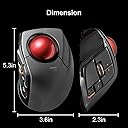
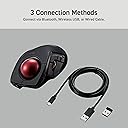
The ELECOM DEFT PRO M-DPT1MRXBK is a versatile, high-performance trackball mouse featuring advanced optical tracking technology, 8 programmable buttons, and a durable artificial ruby ball for smooth, precise cursor control. It supports wired, wireless, and Bluetooth connectivity, offers adjustable DPI settings, and boasts an ergonomic design with a 24-month battery life, making it ideal for professionals and gamers seeking efficiency and comfort.


| ASIN | B07C9T4TTW |
| Antenna Location | Gaming |
| Are Batteries Included? | Yes |
| Are Batteries Required | Yes |
| Battery Average Life | 24 Months |
| Best Sellers Rank | #125,745 in Computers & Accessories ( See Top 100 in Computers & Accessories ) #22 in Trackballs |
| Brand | エレコム(ELECOM) |
| Brand Name | エレコム(ELECOM) |
| Button Quantity | 8 |
| Colour | Black/Red Ball |
| Compatible Devices | Personal Computer |
| Connectivity Technology | Bluetooth |
| Customer Reviews | 4.1 out of 5 stars 2,056 Reviews |
| Embellishment Feature | Logo |
| Enclosure Material | Plastic |
| Global Trade Identification Number | 04953103349100 |
| Hand Orientation | Left |
| Hardware Platform | Laptop, Personal Computer |
| Included Components | 1 x user manual (English language not guaranteed)., AA battery, User Manual, cable, mouse |
| Item Dimensions L x W | 13.3L x 9.1W Centimeters |
| Item Type Name | ELECOM - Wired Bluetooth wireless mouse with finger control ball (8 buttons with smooth tracking, precision optical sensor (M-DPT1MRXBK) |
| Item Weight Unit of Measure | 0.36 Pounds |
| Manufacturer | ELECOM |
| Manufacturer Part Number | M-DPT1MRXBK |
| Minimum Required Operating System Version | Mac OS 10.13 High Sierra, Windows 7 |
| Model Name | DEFT PRO |
| Model Number | M-DPT1MRXBK |
| Mouse Maximum Sensitivity | 1500 Dots per Inch |
| Movement Detection | Trackball |
| Movement Detection Technology | Trackball |
| Network Connectivity Technology | Bluetooth |
| Number of Batteries | 1 AA batteries required. (included) |
| Number of Buttons | 8 |
| Operating System | Linux, Windows 7, Windows XP |
| Power Source | Battery Powered |
| Product Features | Wireless |
| Product Finish Type | Smooth |
| Range | 10.0 meters |
| Special Feature | Wireless |
| Style Name | Modern |
| Theme | Video Game |
| Unit Count | 1.0 Count |
S**T
Best for medium or small hands
I love trackballs, they make use of my fingers rather than my whole arm. I can just rest my wrist on the trackball case and do all the work with my fingertips. No carpal tunnel or other wrist/arm problems. This one is a great size for my hands (medium/large for a woman), and my fingers naturally rest on the curves in the case that they're designed for. The thumb handling the scroll wheel works out surprisingly well. The extra buttons on this device easily map to extra functions in games or to shortcuts in office apps or browsers. The manual that comes with it is in Japanese, but Elecom has beautifully translated manuals online. Another positive is that the one I bought can be used wirelessly or wired: I prefer wired, and the USB cord that comes with it is easily long enough for me. Unlike many wired devices, the cord attaches to a port. I like this because it will make it easy to replace the cord if it ever gets damaged. Downsides: it's not a good size for very large hands, but Elecom has a larger option with a similar layout. If it's your first trackball, be aware that learning to use a trackball will take time. Be patient with yourself.
R**O
Awesome!
Great comfort, very easy to use. Took me a week or two to completely adapt. I would love if the scroll wheel was infinite like the Logitech MX mouse
S**M
Fast delivery
User friendly
C**T
Great Connectivity
Build quality, battery life and connectivity are excellent. You can control multiple computers by using red/blue button to switch between Bluetooth and the WiFi Dongle. The only downside to this trackball is the software. It works and you can configure buttons, but it’s super awkward to switch between different ELECOM trackballs. The software feels dated and could use with a redesign with support for more hot keys.
A**P
deft pro top!!
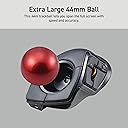
In sintesi, dopo l'huge ho deciso di passare alla tracball anche su portatile, optando per il compagno "deft pro" (l'huge wi-fi era troppo grande) primo impatto: Top! E cosa importante! non ho neanche dovuto modificarlo sostituendo le sfere originali perchè precise( a quando pare su questa versione pro ci stanno attenti a mettere le sfere precise)! Tempi di adattamento: gli stessi per l'huge! cioè per chi proviene da una trackball simile quasi zero per chi lo sua la prima volta ...ci vuole da prenderci la mano(anche con qualche videogioco) un po' scomodo è il pulsante selezione per i dpi che si trova sotto la base! avrei preferito il pulsante dpi al posto dell pulsante di selezione frequenza bluethooth(che sarebbe stato benissimo sotto) utilizzabile con bluethoot- wifi- cavo lungo 1,5 m.(nella foto vedrete una mia fissazione che di è proteggere le decalcomanie stampate... non fateci caso!) pro: -Platiche ok non danno la sensazione di essere cheap ,la parte superiore è tramata con un bell effetto dove poggia tutta la mano(circa 18 cm dall' medio fino all inizio del polso). -Posizione della mano risulta rilassata anche se più vincolata rispetto all' huge (e anche per questo modello su internet si possono trovare supporti da stampare in 3d per aumentare l'inclinazione è la comodità). -Buona la disposizione dei tasti principali; che sono ben disposti e facilmente raggiungibili. Anche se come tasto destro mi trovo meglio ad usare l'ultimo(fn3) con l'aulare mentre indice e medio controllano la sfera! -La sfera è 44 mm facilmente manovrabile (vola) è sopratutto le sfere che sono precisie (pare che siano apposta selezionate)! - utilizzabile con bluethoot- wifi- cavo lungo 1,5 m contro (ma lo considero proprio inerzia) -il pulante di selezione dei dpi è posizionato sotto la base e ogni volta per cambiarli si deve alzare il mouse, (con led visibile ma discreto che si illumina dagli spazi aperti dalla rotella, - rotella che risulta essere un po'rumorosa rispetto all' huge). - Avrei preferito il pulsante dpi al posto dell pulsante di selezione frequenza bluethooth ! software: software decente con possibilità di personalizzare il mouse con diversi profili. Essendo il mouse senza memoria interna, si deve avere in funzione il software in background per averlo personalizzato. e qui mi sembra che sia da migliorare! nel fatto che essendo "vincolato a tenerlo attivo) sarebbe bello che il software riconoscesse i programmi in uso, è in automatico caricasse il profilo in automatico (altri software lo fanno) invece ogni volta prima di utilizzare un profilo per un determinato programma lo si deve selezionare. pps per la elecom.... sarebbe bello se potete mettere sul mercato almeno la sfera trakball di ricambio, visto che è la parte che con l'uso può rovinarsi di piu !
Trustpilot
1 month ago
3 weeks ago