Desertcart purchases this item on your behalf and handles shipping, customs, and support to Spain.
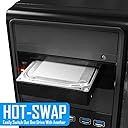
๐ Hot swap like a proโspeed, flexibility, and durability in one sleek rack!
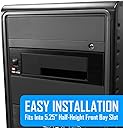
The Kingwin Universal Hot Swap Mobile Rack is a tray-less SATA backplane enclosure supporting 2.5โ and 3.5โ SSD/HDD drives with SATA I/II/III compatibility. Designed for professional and enterprise use, it delivers up to 6Gbps transfer speeds, supports over 50,000 hot swap cycles, and features a durable ABS open-air design for optimal cooling and drive longevity.


| ASIN | B00M3WNWB2 |
| Best Sellers Rank | #139 in Enclosures |
| Brand | Kingwin |
| Color | black |
| Compatible Devices | Single Bay Mobile Rack For 2.5" or 3.5" SSD & HDD |
| Connectivity Technology | SATA |
| Customer Reviews | 3.9 out of 5 stars 599 Reviews |
| Data Transfer Rate | 6000 megabytes_per_second |
| Enclosure Material | Acrylonitrile Butadiene Styrene (ABS) |
| Global Trade Identification Number | 00812348012344 |
| Hard Disk Form Factor | 2.5 inches |
| Hardware Interface | SATA 1.5 Gb/s, SATA 3.0 Gb/s, SATA 6.0 Gb/s |
| Hardware Platform | PC |
| Item Dimensions L x W x H | 5.75"L x 4.31"W x 1.58"H |
| Item Weight | 6.4 ounces |
| Manufacturer | KingWin |
| Material | Acrylonitrile Butadiene Styrene (ABS) |
| Mfr Part Number | KF-255-BK |
| Model Number | KF-255-BK |
| Number of Items | 1 |
| Product Dimensions | 5.75"L x 4.31"W x 1.58"H |
| Supported Devices Quantity | 1 |
| UPC | 808111668627 806293518594 809186250984 863189859537 812348012344 846829563322 804066550208 809385645727 851975725166 |
| Warranty Description | 1 year |
D**R
Fairly price external SATA bay for easy access
Good product. Reasonably priced. Easy to install and works well for the purpose. Sturdy plastic body with metal frame mount. Fits well. Recommended for permenant and hot swappable drives.
L**W
Kingwin Mobile Rack hotswap bay
This review refers to the "Kingwin Universal Hot Swap Mobile Rack" (KF-255-BK) product. Some years ago, bays like these were easier to find and more manufacturers (of repute) made them. Now, it's harder to find these but I consider them important pieces of hardware. This is a simple, but effective hotswap bay that fits both regular HDDs as well as smaller drives such as SSDs. It takes up the same space as a DVD-ROM drive in your case, except that it is shorter internally. The latter does mean that any drives you insert into it will stick out/hang over the front edge (which is totally fine with me), but it also means that it takes up less spaces inside your PC case which can come in handy. It is true that the materials are a bit "light" or flimsy, but then this is a simple bay with just a data and power throughput. Unless you're rough with it, it should be fine. It is great for simple file transfers/drive backups. It has a power button on the left side, which means you can insert drives (or keep drives inserted) without them being recognized or loaded by your OS. Once you turn the button on, the drives will load. Just make sure you have hotswap enabled in your BIOS/UEFI. Under the power button it has a red power led indicator, next to which is the green data transfer led indicator, so you can see when it's reading/writing files. Overall, I'd say this is a good hotswap bay. It is very simple but that's kind of what I like about it. I think it could be improved by a little better/firmer materials so that there is less flex in some of the components. I attached a photo of it installed with a SSD inserted, for reference.
R**E
Love 'em
Thsi review is for the Kingwin KF-255-BK. I've used several of these for a long time now. i also used the model of these things that Kingwin made and sold BEFORE they came out with the 255 model. FREE HINT: DO NOT get the older model, which has a lower model number, I think. (They probably aren't even available anymore anyway.) The older model had just one push-button in front and was way worse than the 255 model in several ways, e.g. didn't fully support SATA III (6Gb/s), had only a power light and no separate access/activity light, and the one on/off switch didn't even work properly. This newer (255) model fixed all of those problems and works well for a wide variety of drives, both 3.5" and 2.5" and also spinning media and/or SSD. The one and only small annoyance that remains for the 255 model is that the SATA connectors on the back are not the kind that give you that nice satisfying "click" sound when you use the latching type of SATA data cables to connect these racks. You can use any kind of SATA data cables with these racks, but you just won't get that nice comforting click sound when you plug in your latching type SATA cables. (You WILL get that nice click sound when you wire up most other kinds of SATA devices, such as hard drives and optical drives, with the latching type SATA cables, so it is fair to say that these racks are deficient in this respect, relative to most other SATA devices.) Just one other thing: DO NOT do as I have done. Do not learn the hard way that old fashioned 3.5" rotating media hard drives can and do easily produce enough heat to cook themselves alive, in just a short time, if they do not have a constant stream of air blowing over them. if/when you use these racks with any 3.5" spinning media hard drive, DO NOT do that for more than a few minutes UNLESS you point some external fan at the hard drive. Otherwise you will fry the hard drive. This is NOT generally an issue for any kind of 2.5" drives, either spinning media or SSD. (Those just don't ever get very hot, even if not well ventilated.) The little 4" USB-powered fans are good for use with these racks when the racks themselves have a 3.5" drives in them. Point the fan right at the part of the drive that stick out of the rack and you'll be fine, even if the fan is a foot away.
C**T
Could have been great, but is just a cheap short-term hot-swap solution instead.
It does do exactly what it says it will do, but it has some major flaws when it comes to device quality and mounting design. Unfortunately, the stupidity of designing it with two fully independent half-length mounting rails that are each attached by a pair of rubber plugs turns this otherwise great device into a low quality short-term solution. Don't get me wrong, half length rails are fine if done properly, but that was not the case with this device. The mounting rail design used with this device is neither sturdy nor appropriate for properly securing a hot swap device for use with mechanical and solid state drives to a computer case. The mounting rail design used on this device reuires it to be secured with screws on only the front (business) end as the rails are not long enough to get anywhere near the rear mounting holes in the drive bay of any computer case at all, and that wouldn't be horrible if that was the only issue with the mounting hardware, but that isn't the case here. This design is made even more frustrating by designing the mounting rails so that they are only attached to the device using rubber plugs, which I understand the reasoning for this as it is a great (and absolutely necessary) thing for vibration dampening, but since the mounting rails are not linked together in any way (no plate, no support bars, just two completely separate rails with two rubber plugs holding each of them to the plastic device body) the device sits limply in the drive bay sagging down in the middle and the rails do not remain in proper alignment with the sides of the drive bay in the case so you have to support it while mounting it in your case (which is a pain). This mounting rail design also makes the device completely incompatible with every one of the toolless cases I own including the newest one that this device was actually purchased for. This was an absolutely stupidly designed set of mounting hardware that was likely used simply to save a few pennies of manufacturing costs. This design choice makes it more difficult to properly align with the front of a case and/or other drives mounted to it and compromises the stability of the unit as it is a poorly thought out and overall flimy design. While the device does work, it can only be described as cheap. Not inexpensive, but cheap (read low quality). There are definitely some major design flaws that could have been solved by at least using an aluminum mounting plate (even if it was just a couple of connecting support bars between the rails) preferably with full size mounting rails, this would increase the stability and quality of the device as well as solve the issues with mounting it properly and use with toolless cases while not increasing the manufacture costs more than a few cents. Saving the pennies was apparently a much higher priority with this device than its quality or longevity though. I will definitely be searching for a replacement soon as I do not expect this to hold up for long. As a cheap device for very limited use I can say it will do the job, but do not expect this to be a more robust or long-term solution for SATA hot-swap capabilities, for that you will want to look elsewhere.
B**E
Extremely High Failure Rate. Do Not Buy.
I bought (3) of these for use in an IT shop. After 2 years all (3) have failed, they suddenly show a steady red light and will not power drives on. In addition, one of the PCs it was installed in had developed an annoying habit of requiring refresh of disk management to detect inserted drives. The PC has a SAS card so I thought maybe the card was causing it and just worked around it. Today, when the final Kingston rack failed and I removed it, the problem went away -- the Kingston rack was causing the detection failure. These are awful don't buy them. I replaced them with Startech docks, what a difference! Drives insert and eject easily and no more problems. Good riddance.
R**M
They work, first time.
Prompt delivery, units slid right in and just worked. Will use again soon.
D**W
Very convenient utility
I love this thing. This is not for adding drives to your system; it's a utility and meant for temporary use. Anyone who works with lots of drives will love this. So far mine are working great. As for the "fake fan", well it is cheesy to make the shroud look like a fan itself in an obvious attempt to mislead, but it is actually a shroud and the case is designed to fit a 30mm X 30mm X 7mm fan. Who knows what the reasoning was in the beginning, but with the drive hanging half way out, a fan really isn't necessary. I however like to modify everything, so knowing this, I went ahead and added fans to mine. My only complaint (and this is the same for most all 5" bay devices other than optical drives) is that the sides don't go back far enough to have rear holes as well as the front. Some computer cases have tool-less drive bays, and sometimes they don't work without a full-sized device in them. If anyone wants to add a fan to theirs, all they need to do is get a 30mm X 30mm X 7mm fan, and the right sized screws. I found mine on Amazon. I have attached a picture showing how to hook it up also.
T**3
read befor you buy (this is the plastic one)
It get only 4 stars from me because its cheap its realy cheap it made cheap and its got realy wierd dimentions and theres no fan it could have easly held a small fan were the vent is and it even has a mount and screw holes for it and an internal conecter but no fan it is chaply made inside and out it has a 3mm gap on to if mounted properly in a 5.25in front panel drive bay it is compleatly unesesery to have both a molex and a sata power connectoer as it is literly on the same power conections on the pcb and will probebly mess something up if sombody dosnt read the very small prited tiny panthlet that comes with it ( I would recomend only using the molex as I have looked at the insides and it apears as thow thay bypased thepower with a switch on the molex side but the sata is a clean pas threw and the sata power conector simply has added smd splices to alow every thu ng else to conect so the power switch will work if u use molex but may not if u use sata I can't realy tell because the solder points inside are so porly done on the sata power conectoer that it is not even funny so to play it safe I am only gona use the molex as it apears that this pcb is originaly intended for that also the plastic door is so cheaply put together that it dosnt line up properly but it dose function but might as well be removed because it dosnt realy protect anything when the dock is not being used and it may even becounter produnctive as you might get somthing stuck in there considering this is a shalo drive dock there allready is an asumtion that the drive will not be secure when inserted so there realy is no point in the door and I would like to clerify as I did perches this for what it is a TEPM external drive dock this should NEVER be used as a perment drive bay as it is intended to be used for temporay drive assces for copying and cloneing and so on that is why it still gets 4 stars from me because for all intents and perposes it dose what it is intended for and NOTHING more and is in my profecional opinion worth the few dollars I payed for it as thay say in every culture YOU GET WHAT YOU PAY FOR
P**C
All good
Item as described. Seems well made and works well.
A**R
Great addition to my PC.
For the price, this internal tray rack is perfect. It fits well in my tower and works perfectly for both 2.5 and 3.5 inch drives. I have not tested speeds yet but it seems to perform well for my needs. Very satisfied.
J**H
Avoid at all cost.
Just another cheap piece of plastic which mislead from the pictures show. Not useful and the feel of the product is cheapo.
J**H
Buen producto, buen precio
R**)
Works but there are caveats.
I received this after a few days - apparently had been despatched from California, even though the product was made in China - can't be very eco-friendly with all that shipping. I wish I'd just have bought something else straight from the Middle Kingdom itself. A few notes: Plus: 1. Worked first time out of the box - tried with both smaller SSD and larger spinning rust. 2. Power sockets for both SATA and Molex 3. Nice-looking front in black to match my desktop machine. 4. On-off switch so you can insert hot-swap drive with the power off and save losing data. 5. Instructions in English and not another dozen languages as well, so the booklet is not a small brick. Also, the translation is good, so I don't have to try to guess. 6. Very lightweight - says 180 grams, which really is light! 7. A good price and free shipping, which meant I didn't have to make the order up to ยฃ35 with stuff I didn't really need. Minus: 1. There are no proper guides inside to make sure you get the drive aligns exactly 2. The drives stick out of the assembly, so can't be left in position, and you have to be careful not to knock them once inserted as this might damage the connections. 3. The assembly is a bit flimsy, although it says it's stainless steel. It comes with four fixing screws. Use them as directed to prevent the frame twisting as you insert the drives. 4. No cables provided. 5. The front is protected from dust by a weakly sprung flap. Warnings: 1. The bag with the screws and the silica gel is inside the unit. Make sure you get these out before fitting. 2. Make sure you use all the screws provided as recommended. 3. Be very careful when inserting the drives not to misalign and damage the connectors.
Trustpilot
2 days ago
3 weeks ago