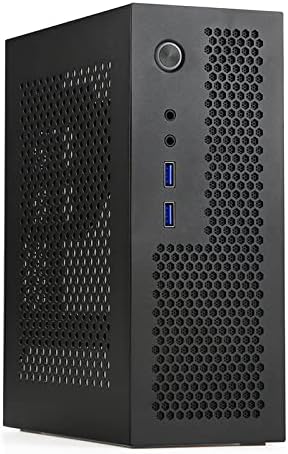
🖤 Compact power, limitless potential.
The A09 Black MINI-ITX desktop case by Goodisory is engineered for professionals demanding a compact, portable PC solution. Measuring just 9 x 7.4 x 3.5 inches and weighing 2.6 pounds, it supports Mini-ITX motherboards and Flex PSUs while offering advanced cooling through abundant ventilation. With versatile expansion options including PCIe, WiFi antenna slots, USB 3.0 ports, and HD audio, it balances performance and portability for the modern manager on the move.
| ASIN | B09KZVNZ49 |
| Best Sellers Rank | #511 in Computer Cases |
| Brand | Goodisory |
| Color | Black |
| Customer Reviews | 4.1 4.1 out of 5 stars (75) |
| Date First Available | November 4, 2021 |
| Item Dimensions LxWxH | 7.4 x 3.5 x 9 inches |
| Item Weight | 2.6 pounds |
| Manufacturer | SKTC |
| Number of USB 2.0 Ports | 2 |
| Number of USB 3.0 Ports | 2 |
| Product Dimensions | 7.4 x 3.5 x 9 inches |
| Series | A09 |
R**A
Goodisory A09 Black Mini-ITX Case: Economical case where Size is Key Objective
I used the A09 for my first Mini-ITX build after a number of AMD Micro-ATX builds over the years. * AMD Ryzen 8600 * Gigabyte B650I AORUS Ultra Mini-ITX * T.F.SKYWINDINTL 400W Power Supply Flex ATX Fully Modular PSU (very tight!) * G.SKILL Ripjaws S5 Series (Intel XMP 3.0) DDR5 RAM 64GB (2x32GB) 6000MT/s CL30-40-40-96 1.40V Desktop Computer Memory UDIMM * Crucial P3 Plus 1TB PCIe Gen4 3D NAND NVMe M.2 SSD * SAMSUNG MZ-V9P4T0B/AM 990 PRO PCIe 4.0 NVMe M.2 SSD 4TB The Goodisory A09 is one of the smallest ITX cases out there. It accommodates the above hardware with a few caveats: * The Ryzen 8600 with stock Cooler fits, but precludes the optional mounting of a video card w riser across the side of the case * The PSU listed is a VERY tight fit.. to be fair, it is longer than what the A09 specifies as usable. It had to be maneuvered past non-removable mounting posts. * There is no spare room. The main motherboard power is right against the front panel * The front buttons needed to be temporarily removed to permit installation of the motherboard (picture) * The fact that the Gigabyte board has sub-board to attach case power and reset is helpful (picture) While the A09 is well made. Its design sacrifices everything for small size. I think it's a nice solution for a Ryzen APU and M.2 storage with no extraneous devices in the case: no GPU card, no SATA drives, no add-on cards. Even there, assembly will take some trial and error to find the correct order of operations. What could make the A09 better? The basic case is riveted together and risers are not removable so it is quite sturdy. The side panel is the only removable panel. If the risers and other panels were removable, it would be easier to mount the PSU, and access the motherboard connections. My goal was a lunch-box sized host with ample memory and storage for data projects. The A09 can literally be carried in a child's soft lunch bag (pictured)
E**C
Mostly good. Small flaws.
This case is a breeze to work in, is perfectly compact, and has one single flaw. That flaw is that the front I/O daughter board is in the way of the GPU. Your GPU *WILL* hang too far and hit that little PCB and its wires... So I suggest you only buy this if you don't intend on closing the side panel, or if you don't need even a small dedicated GPU. Needing a riser cable could have been avoided if the manufacturer had put a low-profile brace elsewhere, instead of a regular sized GPU brace where it is... But that's a nitpick. The only real concern is the placement of the Front I/O ports. For the price, it's a decent case.
R**J
Pretty decent/sturdy mini case...
I've been using these cases with Minisforum BD795i motherboards and these are my notes.... -The USB3 and audio connection work great because that's all that motherboard has. -Larger power supplies will fit, but not much room. -Stick with the FSP flexGURU 300w unit. Little more room and pulls air from side panel -Take the front panel off to make the build easy -Use a tiny stubby Phillips (or bit with ratchet) to put that front panel back on once build is together -Slap a magnetic dust filter to side panel -Fans with high pressure really help, but you're going to hear that fan even if it's a Noctua My biggest tip is switching the HDD and power leds. The white power led is really bright and you can barely see the activity light. When the computer is asleep, that light is BRIGHT when it flashes. Swapping them gives a red glow and an activity light you CAN see. You're not saving much compared to buying a pre-built mini PC nor any of the mini towers by the same brands. However, this case is in between those sizes and you get to build it yourself AND choose the parts...
A**R
Great for a super cheap build
Nice and simple little case with great air flow. I put a ASRock N100DC-ITX board in it which has a embedded processor that is passively cooled. No fans, no sound at all coming from the machine. This computer is a fun project to run Casa OS on Debian. This is my new home for Home Assistant where I can control lighting, security cameras etc. One thing I like about the case is it is made to fit a power supply inside, but since I can run this motherboard off of a laptop power supply, I have all that room for some extra hard drives. The case is not too large, but it is easy to work inside of it, just a open box essentially, unlike a lot of ITX cases that are very tight. The construction is solid steel sheetmetal painted black. It's not too fancy which is fine for this use case and it keeps the cost down. This whole computer including the case was around $200.
Trustpilot
2 weeks ago
1 month ago