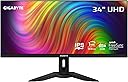
๐ Elevate your workspace and game with ultrawide precision and speed!
The GIGABYTE M34WQ is a 34-inch ultrawide gaming monitor featuring a 3440x1440 IPS display with a 144Hz refresh rate and 1ms response time. It offers vibrant HDR400 visuals with 91% DCI-P3 color gamut, ergonomic adjustments, and versatile connectivity including USB-C and KVM support, designed to enhance both professional multitasking and immersive gaming experiences.


| ASIN | B09GL7HQ6S |
| Adaptive Sync | FreeSync Premium Pro |
| Additional Features | Built-In Speakers |
| Aspect Ratio | 21:9 |
| Best Sellers Rank | #140,603 in Electronics ( See Top 100 in Electronics ) #2,965 in Computer Monitors |
| Brand | GIGABYTE |
| Brightness | 400 cd/m2 |
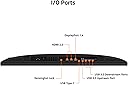
| Built-In Media | 2x 3W Speakers 1x Display Port 1.4, 2x HDMI 2.0, 2x USB 3.0, 1x USB Type-C |
| Color | M Series |
| Color Gamut | 117 |
| Compatible Devices | Desktop, Gaming Console, Laptop |
| Connectivity Technology | wired |
| Contrast Ratio | 1000:1 |
| Customer Reviews | 4.5 out of 5 stars 192 Reviews |
| Display Resolution Maximum | 3440 x 1440 Pixels |
| Display Technology | IPS |
| Display Type | IPS |
| Hardware Connectivity | DisplayPort, HDMI, USB 3.0, USB 3.0 Type C |
| Has Color Screen | Yes |
| Image Contrast Ratio | 1000:1 |
| Item Dimensions D x W x H | 41.7"D x 20.7"W x 7.72"H |
| Item Weight | 13.4 Kilograms |
| Manufacturer | GIGABYTE |
| Model Name | M34WQ-SA |
| Model Number | M34WQ-SA |
| Mounting Type | Wall Mount |
| Native Resolution | 3440x1440 |
| Number of Component Outputs | 2 |
| Number of Height Positions | 34 |
| Picture Quality Enhancement Technology | HDR, Wide Color Gamut, Freesync Premium Pro |
| Pixel Pitch | 0.42 |
| Power Consumption | 3 Watts |
| Processor Count | 1 |
| Refresh Rate | 144 Hz |
| Resolution | WQHD 1440p |
| Response Time | 1 Milliseconds |
| Screen Finish | Glossy |
| Screen Size | 34 Inches |
| Screen Surface Description | Glossy |
| Shape | Rectangular |
| Specific Uses For Product | Gaming |
| Total Number of HDMI Ports | 2 |
| Total USB 2.0 Ports | 1 |
| Total USB 3.0 Ports | 2 |
| Total Usb Ports | 3 |
| UPC | 889523026878 |
| Viewing Angle | 178 Degrees |
| Voltage | 240 Volts |
| Warranty Description | 3 |
| Warranty Type | 3 Years Manufacturer Warranty |
H**E
Solid Ultrawide for Work and Gaming
I've been using this 34" ultrawide for about 2 years and it's been great for my mixed workflow. The 3440x1440 resolution gives plenty of screen real estate for coding with multiple windows open, and the IPS panel has excellent color accuracy. Gaming feels immersive, though 144Hz isn't cutting-edge anymore, it's still smooth for most titles. The KVM feature is genuinely useful - I can switch between my work laptop and gaming PC seamlessly. Build quality feels solid, minimal backlight bleed on my unit. The USB-C connection is convenient for laptops. At this price point, it's a reliable choice that handles both productivity and gaming well without breaking the bank.
P**P
Finally a non-curved monitor that's great for gaming
This is the holy grail of monitors for me. A non-curved 3440x1440 with FreeSync and a 144hz refresh rate, and with a great one-touch KVM as a bonus! The screen is gorgeous and bright, with great contrast and nice wide viewing angles. The on-screen controls give you plenty of adjustments, including a SRGB mode and game optimizations. There is some IPS glow and some black unevenness, but that's only noticeable on a completely black screen in a dark room. It's just the nature of IPS screens, and it's better in that regard than my old LG 34UM65 was. The FreeSync is just fantastic. It works flawlessly with the two cards I've tried it with - a Nvidia 2080 Super and the card I replaced it with, a Nvidia 3080TI. It's so nice to finally be able to turn off vsync and just play without any screen tearing. The KVM feature is brilliant. I plugged my keyboard and mouse into the monitor's two USB ports, then connected the USB-C to my PC. Everything works as expected. When I need to work on my laptop, I connect it to the monitor via HDMI and the USB Upstream port, press the KVM button, and my mouse and keyboard switches to the laptop along with the display. One button press and I'm back to my PC.
P**K
Fantastic Monitor for Great Value
Switched from an LG 27" to this as my first ultrawide monitor. Wanted the KVM functionality and the price was hard to beat. Was a bit worried given reviews mentioning quality issues but figured for the price it was worth risking a few returns. Got a perfectly functioning monitor on the first go around. No dead pixels and works exactly as intended. Picture quality is great, directly comparable to my LG. This monitor is an absolute steal. Also just a note: I initially had some brutal stuttering. Turned out it was my cable. I originally had a display port without the clips, and it stuttered constantly and it was hard to get a good connection. I switched to a DP with clips and it worked perfectly. Also tried an HDMI that worked perfectly as well. So if you're having flickering issues make sure you check the cord before you assume its the monitor!
M**S
Great quality
This is my first Ultra wide monitor and the performance is beyond what i expected. It is very important to use a Display port instead of an HDMI because the difference is very noticeable. The build of the monitor itself is super heavy however, the features make up for it. You can adjust the height of the monitor, which is a very nice feature. I was originally looking for a monitor that had a higher refresh rate and the 144 Hz does the job. It also performs fairly well with direct sunlight shining on my screen since I have large windows. I can honestly say this monitor doesnโt really have any cars especially for the price point that I got it at. again the only true con I could make an argument for is the very heavy base. If you donโt have a table that can support the weight this monitor its not for you. This monitor is spectacular all in all.
J**R
Bright and Beautiful, but needed to be curved.
This is a sweet monitor that I bought for stock trading. You need a lot of pixels to see multiple charts and widgets without shuffling windows constantly, getting lost in the process. My only complaint is the edges are hard to see, and I need to see them at a glance. I got exactly what was described, so I can't blame Gigabyte. This one has a perfect panel. They make pretty good products, in my extensive experience. And CR rated it quite good, topping many competitors costing far more. You need to shop smart for monitors, just like stereo speakers. Speaking of speakers, the ones on this monitor are no shining stars, the sound through AirPlay is muddy, but acceptable. Forget music. Not important to me, and the USB hub makes up for so-so sound. The KVM is a sweet bonus, especially is you have a laptop and a desktop workstation. Ergonomics and build quality are both excellent. Easy to swivel and raise/lower with one finger. Sweet. Certainly a reasonable choice on a budget. Many of the monitors I researched are overpriced, IMO. A $2100 stunner isn't worth 6X this monitor. Not even close. But the image doesn't earn 5 stars. I haven't gamed on this unit, but it should be good to very good. The blacks are really dark and the response time is fast. Pro reviewers saw some smearing, but gave it quite good marks, especially way under $400. I will likely replace it with a BIG curved display in a few years. Definitely recommended. Cant be beat at the $350 I paid.
B**A
Gigabyte
The GIGABYTE M34WQ is a sweet 34-inch ultrawide monitor thatโs great for gaming and getting stuff done. The 144Hz refresh rate keeps games smooth, and the built-in KVM lets you switch between PCs easily with one keyboard and mouse โ super handy. Colors look nice, but HDR isnโt mind-blowing. Itโs flat, not curved, so itโs not quite as immersive, and some folks notice a bit of backlight bleed. For the price, itโs a solid all-around monitor that handles both work and play pretty well.
G**R
Looks great, when it works.
I've experienced issues that, at first, I wasn't sure I could attribute to the monitor. At times, the monitor would suddenly go black for a second, before the image came back. I thought it could be a Linux/AMD GPU driver issue, so I didn't want to complain about the monitor. But today I woke up to find that my monitor would not display anything. Not even its own built in menu. I had to unplug the power for a while, then plug it back in. Then I got the menu to work, and was able to use it with my desktop successfully again. Issues like that are not acceptable in any price range. In this price range, it's even more unacceptable. When it's working properly, it's great for gaming. It's awful for reading small text. The little failures it experiences are very irritating. I had wanted to get a second one, at first. I wanted to mount one on top of the other. But I would never buy another one given the issues this one has. Another "almost great" product with really annoying flaws.
C**D
The KVM won't flip if the display signal is off.
I think the headline says it all. Its a great monitor from a display standpoint. The KVM is garbage and won't toggle if the computer is asleep, which basically makes the KVM functionality useless. I wouldn't buy this again if you want it for KVM functionality.
E**S
IPS Panel with minimal ghosting
This is the monitor I been searching for. The current price range for it is 500~ but it performs much better than any VA panel Curved 34" monitor. The flat design feels good and is stack able with other monitors. For gaming, this is a solid beast of a monitor, the best setting for overdrive to minimize the already minimal ghosting is to use Smart OD. Lets be real, this is not oled alienware monitor for 1600$, so gotta keep the expectations in line for the price. UW 1440p 144hz monitor for sub 700$ after tax? thats a good price.
.**.
Used product
I got used the product with disgusting damaged box , donโt buy
G**O
Very good Monitor
Use it for work purposes and it works great. No issues
I**E
The best ultrawide for this price bracket
Currently this Ultrawide is a smoking deal. The software integration for the OSD is lacking, but everything else is great. If you were previously on a curved monitor you'll have a few days of feeling like you are looking at an inverse curve due to it being so flat, but it's a solid option for that mix of better productivity but still the flexibility to game on it. Despite the lack of curve, there's no noticeable colour shift and this monitor punches way above it's price-point. Pair it with some cheap IPS 1440p displays and they'll all be a happy family.
A**R
great
been great after about one year
Trustpilot
2 weeks ago
2 months ago