Buy anything from 5,000+ international stores. One checkout price. No surprise fees. Join 2M+ shoppers on Desertcart.
Desertcart purchases this item on your behalf and handles shipping, customs, and support to Spain.
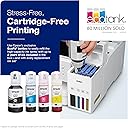
🖨️ Print smarter, save bigger — the EcoTank revolution your home office deserves!
The Epson EcoTank ET-3850 is a wireless all-in-one inkjet printer designed for home offices, featuring a cartridge-free refillable ink tank system that drastically reduces ink costs. It delivers fast printing speeds of up to 15.5 ppm in black and 8.5 ppm in color, with high-resolution output up to 4800 x 1200 dpi. Equipped with an Auto Document Feeder, automatic duplex printing, and versatile mobile connectivity options, it combines efficiency, quality, and convenience in a compact footprint.


| ASIN | B096N7TXR1 |
| Additional Printer Functions | Copy, Scan |
| B&W Pages per Minute | 15.5 |
| Best Sellers Rank | #19,626 in Office Products ( See Top 100 in Office Products ) #30 in Ink Tank Printers |
| Brand | Epson |
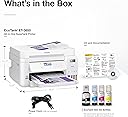
| Built-In Media | EcoTank ET-3850 all-in-one, manual, CD-ROM for product setup, power cord, 1 bottle of 502 Black (127 mL) and 1 bottle each of 502 Cyan, Magenta, Yellow (70 mL) (2) |
| Color | White |
| Color Depth | 24 bits_per_pixel |
| Color Pages per Minute | 8.5 ppm |
| Connectivity Technology | USB, Wi-Fi |
| Control Method | Voice |
| Controller Type | Android |
| Customer Reviews | 4.1 out of 5 stars 1,706 Reviews |
| Dual-sided printing | Yes |
| Duplex | Automatic |
| EU Spare Part Availability Duration | 2 Years |
| Hardware Interface | Ethernet |
| Ink Color | White |
| Item Dimensions D x W x H | 14.8"D x 19.8"W x 7.4"H |
| Item Type Name | Inkjet Printer |
| Item Weight | 19.1 Pounds |
| Manufacturer | Epson |
| Maximum Copy Resolution Black and White | 1200 dpi |
| Maximum Copy Resolution Color | 1200 x 2400 dpi |
| Maximum Copy Speed Black and White | 15.5 ppm |
| Maximum Media Size | 8.5 x 14 inch |
| Maximum Print Resolution Black and White | 1200 x 2400 dpi |
| Maximum Sheet Capacity | 250 |
| Maximum print Resolution Color | 4800 x 1200 dpi |
| Model Name | EcoTank ET-3850 |
| Model Number | ET-3850 White |
| Model Series | EcoTank |
| Number of Trays | 1 |
| Other Special Features of the Product | Auto 2-sided Printing, Auto Document Feeder, Mobile Printing Capability, Refillable Ink Tank |
| Output sheet capacity | 250 |
| Paper Size | 3.5" x 5", 4" x 6", 5" x 7", 8" x 10",8.5" x 11", 8.5" x 14", A4, A6, half letter, executive, user definable |
| Print media | Envelopes, Glossy photo paper, Paper (plain) |
| Printer Connectivity Type | USB, Wi-Fi |
| Printer Output Type | Color |
| Printer Type | Inkjet |
| Printing Technology | Inkjet |
| Processor Count | 1 |
| Resolution | 4800 x 1200 |
| Scanner Type | Flatbed |
| Series Number | 3850 |
| Special Feature | Auto 2-sided Printing, Auto Document Feeder, Mobile Printing Capability, Refillable Ink Tank |
| Specific Uses For Product | home office |
| Total USB 2.0 Ports | 1 |
| Total Usb Ports | 1 |
| UPC | 010343957855 |
| Unit Count | 1.0 Count |
| Warranty Description | 1-year limited warranty |
| Warranty Type | limited warranty |
G**N
Wow - super impressed
After 5 years, my HP home printer died. It had a good run, so I tried the similar level of HP. What a piece of junk that was! The HP didn’t work right from the get go and all the parts were so cheaply made. I returned that and decided to spend a little more to get the Epson ET-3850 after reading the reviews. I liked the idea of not having to pay a gazillion dollars every time you turn around on ink. The HP I had purchased because I liked the instant ink program I was on. It had its pros/cons.. Yes, I paid more for this printer, (I think it was $399) but it has a lot of ink that will last me for a while vs. paying a monthly instant ink membership of 5.99 - 9.99 a month. The Et-3850 was SOOOOO easy to set up. Super intuitive app that worked so easily with the printer. I set it up using my tablet and eventually added the printer to my husband’s phone, his tablet, and my phone. All easy peasy. I’m very impressed with the quality of the printer itself. The hardware of it seems well made; far better than the junk I got with the HP. The HP drawers were so rickety and always said they were open… (It was brand new and no, it wasn’t opened). I love the smaller footprint of it so it doesn’t take up valuable desk space. It allows me space to use my label printer too. I wanted one with the top multiple paper feeder; so again the ET-3850 fit the bill. I use that rarely to scan multiple pages (perhaps to a legal or financial professional) so I did still want that vs. raising and lowering the platten multiple times to copy each page. So far, I’m really impressed. I’m hoping this printer serves me well for at least another five years. I DO highly recommend it.
S**Y
Best printer I've ever owned.
Best printer I've ever owned. It worked flawlessly from the moment I had it set up. Acquired access to my wireless easily. Was printing in 20 minutes after opening the box. The massive amount of ink has been amazing. I would have had to change cartridges 3 times by now as I've printed over 400 pages already! Never had an issue with it yet. Easily updates it's own firmware. All I do, is use it. Doesn't get any better than this. It's not the fastest printer I've ever owned, but it is the best!
W**R
SLOWEST & WORST - Page Feed NEVER Worked
I bought this because in the past Epson provided phenomenal customer support and my last Epson lasted for many years without problem (although the way it died was annoying: one day it reported it could not read an ink cartridge, without specifying which cartridge - so I replaced each in order of 1st the cartridge I'd just replaced, then by low level... When all were replaced (costing me the whole box of all colors), it still wouldn't "read" an ink cartridge). I bought this because of the idea of the lower ink cost, bought this one on Amazon because our local (remote town) Walmart had no Epson printer with the automatic page feeder that I wanted for scanning. Set up was a pain with their automated set up not being user friendly. Unfortunately, the page feed did not work for more than 1 page when I tested it, but it was the middle of my business's busy season and I forgot to follow up and the warranty is quite short. Months later, I tried the feed again and now it won't even run 1 page, but keeps reporting "paper jam" when there is no paper to be found since it's never been used beyond that 1st test when the paper remained intact. I just wasted over 2 hrs, having to download Epson onto my computer again to make the scan work. SLOWEST PRINTER EVER EXPERIENCED. SCANNING IS EVEN SLOWER, especially when having to lay each page on the bed, then cover (otherwise you get dark edges on the saved scan image), then lift cover to start over with 2nd page - while having a 50 pg document to scan. I opted to instead eat up memory on my phone to more quickly use TurboScan app. EPSON HAS BECOME A SOURCE OF INSANITY AND WASTE OF MONEY & PRECIOUS TIME.
J**T
Epson EcoTank ET-3850 Wireless Color Printer
I received this Epson EcoTank ET-3850 printer in excellent shape and in record time. This one was purchased for my church. I already had the same model at home and have been quite pleased with it. This purchase was no different. I like not having to purchase expensive ink cartridges frequently. This printer also does two-sided printing which saves on paper. The print quality is pretty good too. There is a document feeder in the top, And the shipper included two extra bottles of the black ink! I did not get any extra ink when I purchased the one for my home from a local store. We are really enjoying this printer! So, great product, fast shipping, great service. Thank you so much!
J**E
Cost efficient and for low to medium volume use
This printer is satisfactory in performance but great in savings. I bought this in August 2024 and it’s now December 2025. 1. Huge problems with remote printing/WiFi connectivity. My WiFi router is located in my living room with this printer in the room directly 1 floor below it and it’s a constant issue with connectivity. I had to purchase a WiFi router which helped a bit but even then I will randomly have connection issues. This is the #1 most frustrating thing about this printer that I have experienced. 2. Scanning Feature: works great…. when there’s no issues with WiFi connection. 3. Copy Feature: work fine… just slow when printing which leads to #4… 4. It’s slow printing both black & white/color documents. It’s even slower when printing pictures on photo paper - BUT it does print both documents and photos on photo paper very decently. Quality is great, just be prepared to give it some time. 5. I haven’t bought new ink since I’ve bought it which was over 1 year ago. I wfh & use it occasionally & my family also uses it when they need for school/work - we print sometime everyday. Not having to buy ink all the time is probably most important for me because it has save me so much on expense. Overall: It works very well for low-medium volume personal/household use. I do not recommend this for busy offices with higher print volume or when printing speed and connectivity is crucial. But for the average household use or if you wfh and need to print “sometimes” - it’s great and very cost efficient.
C**N
Easy Setup and Use
I bought this All-In-One printer to replace an old HP All-in-one printer that failed after 12 years of expensive use. The setup, including filling ink wells and adjusting the print heads (automated process) took 15 minutes after unpacking the printer. Setup uses a walkthrough automated process that is easy for non-technical users, but you must collect the printer serial number and your wifi network name and network password for this process. Print quality is much improved and I use the 2-sided print often and was happy to see how the page sizing is automatically calculated and looks great. Could not be happier. I should note that I chose this. printer after going to Consumerreports.org and reading over 30 reviews and talking to firends. The Brother All-in-One printer was a very close 2nd choice and $10 cheaper. This printer prefers Alexa over Seri for voice controls, but these aren’t needed for Apple users like myself. There is an Espon app you can download from the Apple that I added to my phones and iPads. Nothing needed for my Mac.
K**L
quality item and fast delivery
saved money on ink bottles , printer setup was easy
L**N
Long Ink Life, But That's About It
I bought this printer a couple years ago and have had mixed results since then. On the up side, it can print a TON before you need to refill the tank, and it's nice to not have to deal with cartridges. But the print quality is so-so, scanning is flakey, sometimes it just stops responding, and the auto feeder at the top jams a lot. It's gotten worse, to the point where now the feeder is almost unusable. For a premium-priced product, I expected it to work better and last longer.
Trustpilot
2 weeks ago
2 months ago