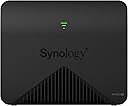


Dedicated Tri band 2.13 Gbps 400 867 867 Mbps bandwidth optimized for performance and reliability Easy setup and remote management from web client or mobile app Comprehensive parental management and easy to use inter face with Safe Access


| Antenna Location | Home |
| Asin | B07HPSQZKN |
| Brand Name | Synology |
| Compatible Devices | Laptop |
| Connectivity Protocol | Wi-Fi |
| Connectivity Technology | Wi-Fi |
| Control Method | App |
| Customer Reviews | 4.5 4.5 out of 5 stars (943) 4.5 out of 5 stars |
| Data Transfer Rate | 1 Gigabits Per Second |
| Frequency | 2.4 GHz |
| Frequency Band Class | Tri-Band |
| Global Trade Identification Number | 00846504003211 |
| Has Internet Connectivity | Yes |
| Has Security Updates | Yes |
| Is Electric | Yes |
| Manufacturer | synergy digital |
| Manufacturer Part Number | MR2200ac |
| Model Name | MR2200ac |
| Model Number | MR2200ac (US) |
| Number Of Ports | 4 |
| Operating System | RouterOS |
| Other Special Features Of The Product | Remote Access |
| Router Network Type | hybrid |
| Upc | 846504003013 846504003211 |
| Voltage | 240 Volts |
| Wi Fi Generation | Wi-Fi 5 |
| Wireless Compability | 802.11ac |
User
Good, BUT beware the wifi region restrictions!
Careful if you buy internationally. The unit we ordered via Amazon India is in effect the US version. This is locked down to regional (US) wifi compliance settings. You are not able to change or unlock this; hence this has an effect on your entire wifi mesh setup:A) all synology models in the mesh must comply with the same region.B) thus if you are set up with international versions and set to a region other than the US, the US version of the router will not be accepted into the mesh.C) thus you need to switch the entire mesh over to the US regionD) which may limit your ranges and signal strength, as well as you may then violate local regulationsJust bear this in mind before you buy. The power supply also comes as a US version. Other than that, this is a rock solid piece of kit. 3 stars only because the latter constraint was not listed in the product description at time of purchase, and the fact that synology does not allow to set the region on their US models in oppose to the international version.
User
Great HW/SW - Easy to use, fast, and satisfactory for complex home networks; i.e., BSD users
The MR2000AC HW has a nice design with no pointy antennae, and has 4 cores. The setup/configuration process was fairly straightforward and is not so smart that you can actually have an advanced network downstream of the device. The LAN and WAN ports are clearly marked and usable - no forced magic in trying to determine the router interface, though it can do that. Initially during setup the MR2000AC unit wants to be "the router" and communicate directly with the modem, but this step can be skipped. Ultimately, I want the pair (I bought two of the same for a mesh) to be just an AP (access point) - I already have a openbsd firewall gateway for my network. I was able to setup the wifi address range and carve out the high end of class C for DHCP, using the same class C ip range as my old netgear unit, but only allowing the synology the high end of the IP range - made for an easy migration. I was also able to connect/direct the synology wifi MR2000AC to talk to my local router, and then it all just started working! It took less than an hour to setup and adding the sub unit was a snap. Confusingly, I had difficulty with the manual in setting up the sub AP - that extends the mesh - I could not find the area in the manual to do it. But, after walking through the software - it looks like a virtual desktop in a web browser - I was quickly able to connect the 2nd MR2000AC via the "Wi-Fi Connect" applet. It's so cool that the MR2000AC uses a 5GHz back channel to talk to the main unit; that's how mesh works I guess . The software has a nice javascript overlay box with the status on each of the MR2000AC units, and you can observe and inspect bandwidth, mac, and frequency of each device connected. I notice it has support for SNMP, SMB, and can likely act as a sort of low redundancy NAS. I 'saw' the SMB endpoint on the network in my roku or firestick when trying to scan for screen mirroring. The software is extensive, and easy to use. I was able to upgrade the firmware easily and it's smart about it - staging the download before you install. A very polished product. It's only been a week, but I love the HW/SW. Our old netgear was getting crushed physically by the covid19 zooming, etc, and migrating to the MR2000AC pair resolved streaming problems. I placed the mesh units physically separate as to enable the 1300 sqft as best as possibly with minimal effort. The entire house is now covered, onto the deck, and into the backyard, and upstairs as well in the furthest room - still has sufficient connectivity. I put the MR2000AC synologyrouter in the basement connected to the gigabit switch, and the 2nd MR2000AC is on the first floor on the other side of the house - say 20 ft from the synologyrouter. It seems like clients reconnect to the other units with no disconnections. It's awesome.
User
Great router
This is a great piece of kit. Performance has been good and the price is very decent for what you get. The only gripe i have is the boot time is a little bit slow. Other than that this is a good purchase.
User
Very bad, unstable connection, keep disconnecting
User
Great product!
Received it on time.My main router (RT2600ac) is in the basement.I use this MR2200ac as WiFi Point. its plug and play, great Signal, no lag, no disconnect.
User
Excelente producto para ampliar wifi
Es un producto con la garantía SynologyA la fecha lo utilizo para ampliar una red inalámbrica con un RT2600ac, la configuración aunque no es del todo sencilla una vez realizada la sincronización y la creación de la red mesh la velocidad es increíble y una estabilidad excelente.El único inconveniente que veo es que me hubiera gustado que el diseño fuera mas agradable o la opción de ponerlo acostado ya que no puede colocarse en la pared y tiene que ir en posición vertical.El modulo de administración para la red inalámbrica funciona de maravilla sobre todo las actualizaciones, donde no tiene competencia.
Trustpilot
2 weeks ago
2 months ago