Buy anything from 5,000+ international stores. One checkout price. No surprise fees. Join 2M+ shoppers on Desertcart.
Desertcart purchases this item on your behalf and handles shipping, customs, and support to Spain.
๐ฎ Own your game with precision and style โ the ultimate mini keypad for pros on the move!
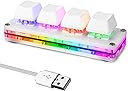
The Ecarke Mini 4-Key OSU Keypad is a compact mechanical gaming keyboard featuring dual USB-C and Micro USB ports for versatile orientation, customizable RGB LED backlighting, and Cherry MX Red switches for smooth, responsive keystrokes. It supports self-programmable macros with onboard storage, ensuring your custom settings stay intact across devices. Compatible with multiple operating systems including Windows, Mac, Linux, Android, and Raspberry Pi, this plug-and-play keypad is designed for gamers and professionals seeking ergonomic efficiency and personalized control in a sleek, portable form factor.


| ASIN | B093WJ38D9 |
| Additional Features | Split Keyset Design |
| Best Sellers Rank | #4,851 in Video Games ( See Top 100 in Video Games ) #376 in PC Gaming Keyboards |
| Brand | Ecarke |
| Built-In Media | USB Cable |
| Button Quantity | 4 |
| Color | 4-key |
| Compatible Devices | PC |
| Compatible Operating System Family | Linux, MacOS, Windows |
| Compatible Tablet Computer Models | Samsung Galaxy Tab S7 FE 12.4" |
| Connectivity Technology | Mini USB |
| Customer Reviews | 4.2 4.2 out of 5 stars (746) |
| Enclosure Material | Acrylonitrile Butadiene Styrene |
| Hand Orientation | Ambidextrous |
| Item Dimensions L x W x H | 5"L x 4"W x 2"H |
| Keyboard Backlighting Color Support | RGB |
| Keyboard Description | Gaming |
| Keyboard Layout | QWERTY |
| Manufacturer | Ecarke |
| Mfr Part Number | SKU06343-A |
| Model Name | Mini 4-Key Keypad Mechanical Gaming Keyboard |
| Model Number | 4-key |
| Number of Keys | 3 |
| Number of Sections | 1 |
| Power Source | Corded Electric |
| Switch Type | Cherry MX |
| Theme | gaming |
| Unit Count | 1.0 Count |
| Warranty Description | 1 |
S**N
If you have a mechanical numeric keypad it might conflict with the software, unplug it
When I first started to try to use this I was having what was most likely a software issue. I had no save option in the software, could not figure out why. I read over all the reviews of this product type and watched a few youtubes, someone had mentioned someplace along the line that his other keyboard was likely somehow interfering with the programming of this keyboard. I use an 88 keyboard and an additional numeric keypad, after I unplugged the mechanical numeric keypad all the problems with the software disappeared and it started working properly. I am using the version of the software that runs under chrome browser, you can also download it if you prefer. From the sounds of several things I read you can use this in a Mac environment but it might be a bit more difficult to deal with the software. In short, if you run the software and it detects more than one keyboard, you probably have a conflict. I had never heard of sayobot before but it appears they might make quite a few keyboard type products, thus the possibility of conflicts. This unit has two different usb c ports on it so you could orient it vertically or horizontally. What you basically get is the hardware to hold four three pin keyboard switches (the switches are removable) and a usb c to A cable. It comes with squishy red switches, I prefer clicky switches so I bought myself some clicky blue water resistant switches that I'll probably swap into it when they arrive. This uses standard keycaps so if you have an old keyboard laying around that doesn't work you could steal the keycaps off it and install them on this. You can also buy stick on labels or even use a sharpie to mark the keycaps if you wish. I have a bad disk in my back but I like to play my mmo games, I use this keyboard and program common keys to make it easier to run my game. For instance I have Tab to change targets, B to choose closest target, and E for attack button and the fourth button I currently have programmed for interactions F this is a lot easier on my left hand since I don't have to stretch across the keyboard to reach the keys during combat etc. The lights also work well, I like to use Breathing with random colors. I tend to play in a somewhat darkened room so I like the lighted keys. This tiny keyboard has some nice rubber feet on it so it does not slide around on my desk. I just ordered another product like this with more keys not sure what I want to do with that one yet but I could probably program attack powers for my Bard in Ashes of Creation or something along those lines. What's important to note is that you can plug in as many of these as you want and they will not fight with each other or your main keyboard. I think this just might be the best idea I ever had for dealing with my nerve issues in my left hand. The software at least under windows is pretty obvious. Plug in the keyboard, open chrome browser and click on the web link, it will give a detect button which should see the keyboard no problem and may offer you a firmware update option I updated the firmware but don't know if I really needed to do that or not. From there, there are a bunch of options, if you look around the web and on youtube there are some basic videos and instructions for setting up stuff like passwords programmed into a key. A lot of that stuff is a bit more difficult to learn and not what I wanted this for but heck have at it, it's nice to know the function is there even if I'm not using it. I'm simply using default which then opens up a keyboard graphic and you click on the button you want it to be, then you should get a Save button bottom left of the screen if you don't get the save button you may have a hardware conflict with another keyboard like I had. Lights are set similarly but you do it from the main screen there are quite a few choices of lighting type and colors, I just picked breathing and random color for a nice choice. When you change something don't forget to hit save or it won't be programmed into the keyboard. Now you can put this keyboard on any machine and it will keep the programming. I hope at some point they might upgrade their instruction sheet to mention the possibility of a conflict with another keyboard, that one had me cursing some bad words until I figured it out. I have three of these products now this one, a 8 key and I just ordered a 24 that's coming from china, this is the only one that has the two usb c ports that is a great feature that I wish they all had because it makes easier to use the keyboard vertically instead of horizontally if the cable plugs into the top/bottom instead of the side when oriented vertically. I prefer clicky blue switches to the squishy reds they give you with this one but they're very easy to change and not expensive so change away if you want to. You can buy different types of keycaps or even ones with a top that opens so you can put your own slip of paper inside to mark the key function. There are also sets of stick on key cap letters on amazon and other places or you could just go low tech and use a paint pen. Working great, easy to use. Note/Update: You may have difficulty using usb A to C cables other than the one that came with it. I've tried half a dozen shorter cables because I don't need such a long one and none of them transmit the key presses, the keyboard lights up but keys do not respond and the software can't see it when the keyboard is plugged in. So be aware there may be something non standard about the cables that come with these, mark them accordingly so you can locate them. If I find out what the difference is I'll post.
K**L
Excellent!
I purchased this for gaming, specifically for additional cockpit buttons for my flight simulator. OVERVIEW: This is a well-made, solid, little keypad with a quality feel to it. The blank white keycaps can be easily replaced if you so desire. I just used some label tape to label mine. Switches are a bit on the soft side, as compared to my Cherry MX Browns in my regular keyboard, but that's not a deal breaker for me. They are just not real "clicky," if you're expecting that. I particularly liked the horizontal layout; it is perfect for my intended purpose. The face is glossy white with a clear base. There are 4 non-skip rubber pads on the bottom. There are no lights. The unit measures about 4" x 1" x 1" approximately. The data cable attaches to the long side, which by default is on the top right. I turned mine upside down so the USB cable came out the bottom left, then took off the keycaps and turned those upside down as well. The included 1.5 meter cable is long enough to reach most desks to PCs. It's a flat ribbon, not round cable. It's USB to micro-USB. PROGRAMMING: Download the programming software from: https://osu.sayobot.cn/download/ Tip: If you want, you can run this site thru "Google Translate" to see the English version of the page, or just click the big green button to download. The program itself can be switched to English in the menu. The programming software is visually intuitive and easy to use. You can make your 5 keys do anything you like, including single keystrokes and keystroke combinations (macros). Note: When I first attempted to use this programming software, it told me "Device not connected" even though I could type "1 2 3 4 5" in Notepad as the default keys. This was because my existing 104-key macro keyboard was interfering. So I plugged it into my laptop (which does not have a programmable keyboard) to program it. Macros/programmed keys are saved right on the unit, so once done, I re-plugged it back into my desktop. There is NO CONFLICT once programmed; I can use it and my regular keyboard at the same time. However, I will need to disconnect it and use my laptop again, if I ever want to change my macros/programmed keys. CONCLUSION: This quality little 5-key keypad adds 5 macro functions and/or personalized keys to any computer. It may have its programming quirks (as noted in this review), but if you are in need of something like this, I highly recommend it.
A**T
Great little gizmo!
Really nice little keypad. Great feeling keys, beautiful base, feels and looks great. The dual USB ports for different orientations is a thoughtful touch. The utility to program the thing is a bit odd, but it works well enough. Maybe I just wasn't expecting much after reading all the reviews but it seems fine if a bit quirky to me. It shows up in Windows and Linux as a regular HID keyboard, so it should work with any device that works with multimedia keyboards, no drivers required. Two criticisms: - would be nice to be able to save profiles so we can program the keypad for one task and then load a different profile for some other task. That seems pretty obvious and is glaringly missing, so minus 1 star for that, will update the review if they add the feature. - would be nice to be able to turn off the LEDs entirely. This might be possible playing with the various LED configs, but would be nice to have an "off" option for each LED on the "lighting" tab next to each LED's "mode". Again seems pretty obvious. Fantastic little gizmo though and I'd definitely buy it again.
A**C
Die Verarbeitung ist gut, wie schon von anderen Rezensenten erwรคhnt ist die Konfiguration unnรถtig kompliziert. Speziell fรผr Mac User daher der folgende Tipp: 1.) das Setup Tool von dl.sayoboy.cn nach Anleitung runterladen 2.) das Programm (Sayo_CLI_Mac_X86 oder Sayo_CLI_Mac_M1) am Terminal mit chmod 755 ausfรผhrbar machen 3.) per Doppelklick starten, das Programm startet einen lokalen Server und die Konfiguration erfolgt รผber den Browser (127.0.0.1) 4.) nach der Tastatur suchen, auswรคhlen => einzelne Tasten mit gewรผnschter Funktion belegen Speichern nicht vergessen.
W**O
Works great for Osu. Passing 6 and 7 star maps no problem, streams and hard single-tapping and the thing doesn't move at all. The anti-slip pads that are on it are great but it probably depends on your table somewhat as I've seen some people say otherwise in reviews. I have like a sort of laminate/melamine table and it never moves even on 200+bpm deathstreams. If you had problems I'd just buy some cheap sticky tack/blue tack and experiment with that. The software at first seems really sketchy and poorly translated from Chinese -> English. it's also accessed through a program you download but it opens the software editor in your browser... Despite confusing labels and mistranslations and overall sketchy look, it's obviously safe, and its pretty easy to figure out. You can do a lot of stuff with the RGB colors and the functionality of buttons. Some reviewers saying that it's "useless" as it only does the numbers 1, 2, and 3 but these are probably boomers because the mapping for the buttons is the literal first thing you see when opening the software. I have mine on "z" "x" and "c". You can also assign button combinations too, such as Ctrl + C. Great product edit: months later, still going strong. my only complaint is the switches aren't hotswappable so you can't just pop them out. I wanted to lube them, you can probably do so by removing the screws that hold the whole device together but I haven't tried yet. Also the software seems to have gotten a little better? You can go to google and search "OSU Sayo keypad" and click the links that people provide in reddit (https(colon)//osu(dot)sayobot(dot)cn/download/) and the software now opens its own thing in file explorer and not via chrome, and furthermore seems to have been cleaned up and polished a bit (but translations still a bit funny)
D**S
I duel boot my Intel based Mac Mini which require I press the Option key while the PC is booting, to select the boot drive. I use a wireless keyboard which is not active during boot so I need a usb keyboard just during boot time. The Ecarke was easy to configure using Chrome and using the online configuration tool. All done without problems in the Mac environment. Now I don't need to drag out my full size usb keyboard just to boot into Windows to play games.
A**N
I received a defective product, randomly disconnected, hard to use. It's easily moved, even with the bottom padding, on a desk mat/mouse pad (perhaps if there were some kind of extra weight this could be avoided?). The shafts are a bit "loose" to hold the keycaps, so there is some wobble (maybe this is intentional?). This had high potential, but the product quality is EXTREMELY DISAPPOINTING, especially since these 4 keys costed about 25% of my hot-swap tri-mode TKL. Still usable, but definitely considering a return. (In case you're worried, the software is NOT spyware/malware.)
M**N
There is not a second USB Port and there are no LEDs to control. The software you need to customize it not user friendly at all and some functions just don't work.
Trustpilot
1 month ago
2 weeks ago