🎮 Level up your desk game with lightning-fast precision and dazzling RGB vibes!
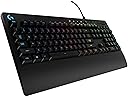
The Logitech G213 Prodigy is a wired gaming keyboard designed for millennial professionals and gamers seeking high performance without breaking the bank. Featuring 16.8 million customizable RGB lighting colors across 5 zones, ultra-responsive keys up to 4x faster than standard keyboards, dedicated media controls, and a spill-resistant durable build, it blends style, speed, and resilience. Perfect for multitasking and immersive gaming, it offers programmable function keys and anti-ghosting technology to keep you ahead in every session.


| ASIN | B01K48R5V4 |
| Additional Features | Backlit |
| Antenna Location | Gaming |
| Best Sellers Rank | #3,477 in Computer Keyboards |
| Brand | Logitech G |
| Built-In Media | keyboard, quick start user guide |
| Button Quantity | 104 |
| Color | Black |
| Compatible Devices | Gaming Console |
| Connectivity Technology | USB 2.0 |
| Customer Reviews | 4.6 out of 5 stars 6,505 Reviews |
| Enclosure Material | Plastic |
| Global Trade Identification Number | 10097855123036 |
| Hand Orientation | Ambidextrous |
| Item Dimensions L x W x H | 1.3"L x 17.8"W x 8.58"H |
| Item Height | 21.8 centimeters |
| Item Type Name | Logitech G213 Prodigy Gaming Keyboard with 16.8 Million Lighting Colors (920-008083) |
| Item Weight | 2.4 Pounds |
| Keyboard Backlighting Color Support | RGB |
| Keyboard Description | AWERTY |
| Keyboard Layout | QWERTY |
| Language | English |
| Manufacturer | Logitech |
| Mechanical Keyboard Switch Model | GX Blue Clicky |
| Model Name | LOGITECH INC. |
| Model Number | 920-008083 |
| Number of Keys | 5 |
| Power Source | Corded Electric |
| Processor Count | 2 |
| Recommended Uses For Product | Gaming |
| Series Number | 920008083 |
| Special Feature | Backlit |
| Style Name | Keyboard Only |
| Switch Type | Tactile |
| UPC | 097855123053 097855123039 |
| Unit Count | 1 Count |
| Warranty Description | 1 - year limited warranty |
C**R
Amazing Keyboard for Low-Budget Gamers!
My last keyboard, which was a old, boring HP board, was dying on me and I needed a new keyboard fast. The only problem was I hardly had any money to spend, barley being able to pay bills and all. I wanted a good quality gaming keyboard on the cheap, which I knew was asking for a lot. So I did some research and found this one. I already liked Logitech G as a gaming brand so I was curious as to how this would be when I actually got it. Well, I was very surprised! I've had this for a while now and I love it so much. Having the back-lit keys is very nice when working or gaming the dark, and being able to customize the colors and lighting effects is a nice added bonus. I love that the keyboard has multiple profiles so you can customize it for games or programs. The keys have a smooth, almost velvety feel to them, and the entire keyboard is a aesthetically pleasing matte black. I love the small details, like the braided USB cable. The size was a little smaller than my last one, but it takes up less space on my desk. It took a little getting used too because the keys are taller (they are not mechanical keys, but have the same look, feel, and sound as one) and closer together than I was used too. The only real issue I have with it so far is the media keys don't seem to work with Spotify. It's not a big deal, and definitely not a deal breaker as I've never had media keys on a keyboard before, but it would be nice if it worked. My conclusion would be that if you want a good quality, well built gaming keyboard, or just a keyboard in general, but don't have a lot of money to spend, get this. You'll be glad you did.
O**H
... in case they are buying this for a young loved one. ] Pros
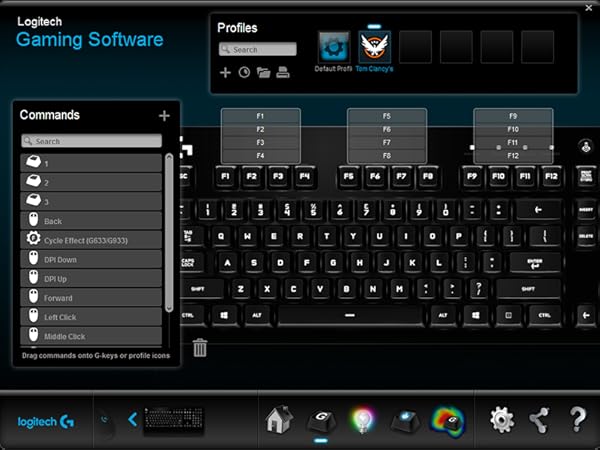
[I will be writing this in a form that parents who aren't "with" technology can understand in case they are buying this for a young loved one.] Pros: -Small compact and perfect for casual/almost all video game use (Games such as League of Legends/Lol, and World of Warcraft/WoW could use those extra side keys, which are called macro keys, for the large amount of skills that are used in the game.) -It's not very loud because the keys are the custom Logitech G keys rather than the Razer Green keys (To put it simple for parents who are not sure what the difference between keys are is that the different color keys, which is under the caps that you type with, are built different for different purposes. They will have a different resistance to your clicks and different ones will pop back up quicker,slower, or harder creating different click sounds and most importantly creating better gaming performance. But most people who play video games are gonna want Cherry Red or Blue switches, but both Logitech and Razer have their own brand that are about the same to Red/Blue.) -It is RGB which means you can control the colors via the Logitech Gaming Software. (The clear letters/numbers/etc. can change color or can be set to rainbow.) -Overall it's perfect for gaming, it has better ghosting than a Razer BlackWidow in my honest opinion, it feels better to use, it's quieter, and it's pretty much the perfect keyboard for me and I don't think I'm ever gonna upgrade or switch back to Razer ever again. Cons: -Custom Logitech keys (In case you are someone who REALLY wants Cherry/Blue switches, but to be honest both Razer and Logitech have their own custom keys as far as I'm concerned. I know their BlackWidow actually has their Razer Green Keys and that is the most famous keyboard with lots of gamers.) -Small and compact and so it is missing the side keys, for anyone that plays MMORPG's that require lots of macro keys in order to be the best, it can be seen as a downfall unless you own a Razer Orbweaver (Which is like a small handheld extension to a keyboard so one can remove the need of macro keys on your keyboard and get that instead.) -The Logitech Gaming Software is needed to run in the background in order for the keyboard to stay the custom color you have set it to, unless someone else can find a method to keep the color, that is the only way I've found for the keyboard to keep the custom color. The mouse on the other hand (once it's been synced with the keyboard to match colors) will stay that color regardless of the program being up or not.
H**.
Great keyboard all around, even if not on a budget.
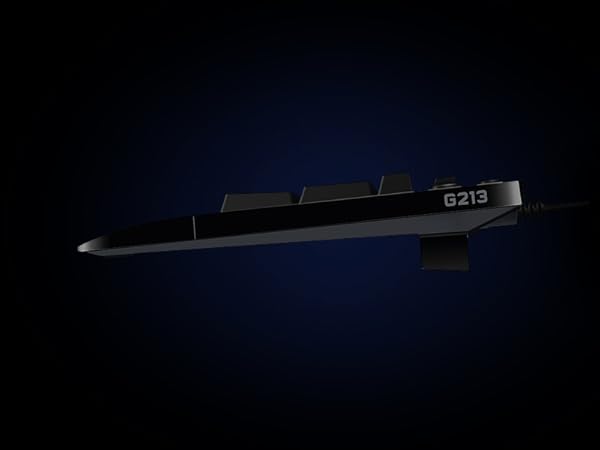
Was going to give it 4 stars overall, however, that was only because the "O" key was not inserted all the way when the board came in the mail. As such, that key wasn't working correctly. Pushed it down a bit harder, heard a definitive "click", and the key worked perfectly after that. Hardly enough of an issue to bump down the rating. It's a nice size, not too big or too small. I have medium-large hands, and it fits well in those. I think if you had gargantuan hands, you might have a bit of trouble. But that all comes down to preference. Try one of these out in a store first if you're worried. There are a lot of great reviews already, so I'll go over the things that the other reviews don't point out as much, but are still nice features. - The colors are really rich on the keyboard and highly customizable. No issue with colors "bleeding over" like some people reported. - Install was easy and pretty fast, you do have to download a 123MB program off the internet to customize the keys. - Gaming presets can be changed per game, and Logitech provides their own. That's a nice feature for those who don't want to spend a lot of time changing keybinds a lot. - Nice wrist wrest on the bottom, especially good for those who don't have room to put their wrists on a cluttered desk. - The app has a WPM counter! Pretty cool at the very least. Overall, very satisfied. I'd recommend this keyboard to people who aren't even constrained on a budget. Will update this review as I find more things to recommend, or if any problems arise.
R**.
Great Budget/Starter Gaming Keyboard if you WANT Logitech!
The short review: The Logitech G213 (membrane) Keyboard looks great, feels good, and has a lot of features in combination that are very hard to find in one keyboard, especially an affordable one. Price, RGB, Media Keys & the “G” logo to match my mouse were my reasons for buying. I expect they’ll be yours too. If you want a decent quality, affordable, RGB, Gaming membrane keyboard, compare this one and the Corsair K55. Buy one. Push buttons and save up for that high end work horse you really want. Longer Review: Pros: Very attractive. The G213 looks the part. It looks like a much more costly gaming keyboard. If you want your desk setup to look like a higher end, RGB gaming setup, the Logitech G213 is the king. If you need a full size keyboard w/ rest, that is... I’ll explain- what this budget board has that no other board does is: RGB backlighting and through lighting on the keys Dedicated media keys Braided, tangle-free cable Sleek fit & finish that will match other products in it’s own ecosystem That “G” logo... If that is something that you like... Cons: Mine arrived with a defective key. I had to exchange it. While this is a budget keyboard, it still costs more than some competing budget boards, and the fitment of keys and such should be better than they are. That said, I don’t know that there is a keyboard in this class that is any better, and “lemons” are a very real thing. I’m just glad that I CAN return stuff. There is one exception to this which I will mention below. The retail, non-sale price is steep. I got mine for about $47 on sale here on Amazon. That’s a more than fair price for an RGB, ten-key keyboard that is stylized to match other gaming gear. It “lists” for like $69. Don’t pay more than $50 for this keyboard brand new. Logitech has keyboards in it’s own line up that are far higher quality for about that much money. The competition that you should be looking at is the Corsair K55. It is in my opinion, a higher quality budget board for about the same price. It has everything this keyboard does, albeit, the overall esthetic is not quite as good. The Corsair K55 is a gloss black plastic and it doesn’t exactly resonate with a “premium” appearance. By contrast, the Logitech G213 looks nicer than it is. It does not have braided, tangle-free cables either. In fact, I don’t think any of Corsair’s cheaper gear does, so if that bothers you like it does me, that’ll be a problem. On the other hand, the K55 has 6 “G” macro keys on the left hand side. A nice feature! The key actuation is smoother and quieter than the Logitech G213, in general, it feels better. Although, the Logitech “mech-dome” does a better job of emulating the mechanical experience. I’d say it feels a bit like their own Romer-G Tactile switches. But just a bit... I own both of these keyboards and speak from experience. I also own a Logitech G613 and have used pretty extensively a Corsair K70 Rapidfire. That’s about as far as my expertise goes. I do a wild combination of gaming, typing, photo/video editing and ACAD designing.
J**O
Wow! Blown away by the value.
This thing is great! For $40, WOW! I am a gaming nerd and I have all sorts of gamery gear at home, but I wanted something a bit more simple and less flashy to take to work to replace the god awful brick of a bluetooth keyboard they had there. First off, it LOOKS stunning. I am pleasantly surprised that this keyboard looks great. My only complaint is that fingerprints and skin grease kind of show on the keys and is hard to wipe off without a cleaning wipe. Otherwise, the LEDs are perfectly subtle and have just enough customization without the program. You can just press the Light button and 1-5 to switch the LED mode, and then Light and + or - to change the effect speed. Perfect for work, plug and play, no program needed for customization (though one is still available if you want it). The build quality is excellent, the keys don't wobble and it's a nice sturdy plastic. I like the wrist rest as I'm used to having one at home, but it's not removable so if it's a deal breaker for you then you'll want to pass on this. I would recommend giving it a try regardless, though. It is height adjustable and it has dedicated media keys that work perfectly. Keypresses feel phenomenal for a membrane keyboard. Theyre quiet while feeling rather linear and tactile. For work, they're 100% what I was looking for. Very, very happy with this keyboard. I never bought from Logitech before, so this is a huge surprise for me.
A**T
Good quality keyboard, worth the money
Had this for about 3-4 months now and it's a good keyboard. Nice to type with, good quality construction and of course it has that "chroma" effect. It isn't as nice as the new Razer Ornata, but it's close. The definition of the key letters is a little blurry when you look at it from any angle except straight down - so you lose some of it's "wow" factor. The other slight downgrade from the Razer product is you can't program the lighting effect for each individual key, there a few pre-defined lighting options to light up banks of keys with different colors, but not many. It has multiple color wave type effects, which you can slow down or speed up as desired. Cosmetically it's 4/5 compared to a Razer Chroma effect. The colors are bright and easily visible in daylight. Overall it's a very good product and worth the money. It had media controls, a game switch to disable a few keys that could take you to the Windows desktop accidentally while playing and the response time of the keys is good. This is no mechanical keyboard, but it feels nearly as good as one. Typing takes a week or two to get used to, but once you do it's natural and feels solid. The response time for keys is good, again not mechanical, but far better than a $20-$30 keyboard. It's also spill proof - accidentally tested with a full cup of coffee - which is a definite plus. TLDR 5/5 build quality, 4/5 cosmetic (chroma), 4/5 features and 5/5 value for money. The only thing it's really missing is a USB port for the mouse.
B**N
Great product
Easily programmable macros, lighted keyboard
L**H
In love
My Logitech Wave served me well for 8 years until it met its end with a cup of tea. Pros * Logitech has always been a great brand for me with mice and keyboards * Programmable F keys. This feature is so understated, and is easily one of my favorite features of the keyboard. More below. * Media keys don't add any additional bulk to the keyboard * Wired, so no more batteries. It's also a braided cord, nice touch. * Keys feel nice (to me at least), I enjoy typing on it, has some tactile feedback but isn't a loud clanking keyboard. It's not silent though. * Rainbow colored lights! And a button to turn off the lights if needed. Cons: * Giant bright G above the escape key and no way to turn off just that light. * Caps lock, etc. indicator lights are rather large and bright. * Wrist rest doesn't come off. Not a deal breaker for me, but it'd be nice to have the option. * LEDs aren't super customizable like other keyboards I looked at, but this one is cheaper. You get what you pay for. Okay, so about these programmable F keys. You can have your default profile (I have one set to put my computer to sleep). And then you can have a profile for any application. That's right. I do a lot with office products, that have really dumb keyboard "shortcuts" (like alt, j, p, h. how am I to remember that?). I now have the F keys available to do something useful. I haven't yet found a use for them in my gaming (mostly using wasd and the mouse) but I can see the amazing potential here. A little sad that you can't remap useless keys like insert, scroll lock or pause/break
Trustpilot
2 weeks ago
3 weeks ago