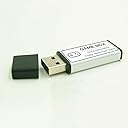
for PS1 game expansion stick 3rd generation 128G Built-in games:15000 Interface: USB 2.0 Support memory card: usb 2.0 Product standard configuration: game stick x1, packaging x1 Product weight: 25g Product size: 6*2.4*1.3cm Instructions for use: plug in the boot, the first boot, you need to wait for about 1 minute to load the game time. Enter the main interface to select the game. By default, pressing the O button on the PS controller is to confirm, and the X button is to return.START calls out the main menu. To exit the game, you can press the select + triangle button to exit or select other functions, such as restarting the game, saving and changing the simulation core. note: 1. Do not pull out the game extension stick during the game. 2. Normally, it is shut down by calling out the menu. 3.98 Percent of the games can run normally, if a few games can not run, it is normal. 4. Unplug the power directly when it is unable to shut down.
| Asin | B094V5PFB7 |
| Brand | HERXGOVA |
| Color | Blue |
| Compatible Devices | Playstation PS1 |
| Customer Reviews | 3.7 3.7 out of 5 stars (124) 3.7 out of 5 stars |
| Flash Memory Type | USB |
| Hardware Connectivity | USB |
| Item Dimensions L X W | 2.36"L x 0.94"W |
| Manufacturer | HERXGOVA |
| Media Speed | 10 MB/s |
| Memory Storage Capacity | 128 GB |
| Model Name | 0719986911452 |
| Model Number | 0719986911452 |
| Secure Digital Association Speed Class | Class 10 |
| Upc | 719986911452 |
User
Must have retro accessory for PS classic system
Slow scrolling and short screen freezes, probably from the sheer number of games(15323 of them), but it has everything I wanted and more! The 4-slot USB adapter was very handy. Only downside is the ps1 version is the only version of RE2. It only contains disc 1 Leon scenario A. Bummer for RE fans.....update on disc swapping for re2. You have to leave emulation station and "load content" which is below "load core"...after loading content you choose which console/game system you want..resident evil 2 is under PSX... after you click the game it shows a few different versions (version in parentheses like this) one version loads in and says "disk 1" which is Leon's story.. another says "disk 2" or nothing at all...this is Claire's story.. another way to check is to click the pause button and press triangle(on psx style controller) this pulls up a screen of settings and one of the options is to swap disk/eject disk...when you try swap/eject during a game that's loaded it freezes and you have to reset the system...BUT it does allow you to see which disk is running 1 or 2 which lets you know which story you are on. As far as game saves, for resident evil 2 the saves for Leon appear on the disk for Claire which is important if you would line to play B scenarios of RE2..hope this is helpful....5 stars now!
User
More like 10,000 playable games but HEY that is 10,000 games
You plug it into your PS mini (while unplugged) and then you get access to a dozen emulators and tens of thousands of ROMS. The cartridge based systems are emulated the best and CD emulated systems are less reliable or don't play at all. I suppose because of this I should have given it a lower score. However if you think about it- the retail price of these games would have cost you half a million dollars to buy in the 80's and 90's.... So how in the world can I complain at all when 2/3 of them work perfectly for $25
User
Absolute garbage
This thing worked with extremely long load times for a few minutes. Then I couldn’t get it to work and it seemed to corrupt the games that were originally on the system. Recently I gave the system which seems to now be messed up to my coworker for free and he couldn’t get it to work either. I ordered a True Blue stick for him but I’m concerned that the Game Box may have corrupted the operating system on the PS1 mini so the True Blue might not work when I finally get it. I was too confused by the product to demand a refund and it may have bricked my system basically by the time I realized I would’ve wanted my money back so I didn’t go that route, although I should’ve maybe. I assume going with the True Blue ones and treating the Game Box alternative like the bubonic plague is the only way to go, but time will tell. Helps if you want to turn your system into garbage.👎👎
User
Lots of ROMS.
The premise is easy: just stick the USB into the second port of your PS Classic and that's that. Well, it's not that easy. Once the initial automatic setup is done, and I saw some cool graphics while doing so, I ended looking at a menu that, if you are not familiar with emulator software, you'd be completely lost. Fortunately, I am familiar with the RetroArch interface, and I made myself familiar with the options and content.As far as ROMs are concerned, I am pleased with the quantity and the titles found in there. There are also plenty of cores or emulators available so that you'd be sure to find the best one to use. There are many systems available, including Atari, Commodore, GB, GBA, GBC, Genesis, GG, SCD, PSX, etc. Again, if you are not familiar with emulation, then you'd be somewhat disappointed that not every title runs as it should, and some require some tinkering.One cool thing is that my 8BitDo N30Pro controller worked perfectly, which is better than the original classic controller.Although I was disappointed that there is no easy-to-navigate menu, I found a lot of value for the price. I will recommend getting acquainted with RetroArch menus to make the best out of the item.
User
Loaded with games
Pretty cool to have all those games
User
OMG🏆
This is by far the best game box for your mini. The only downside is waiting for it to load but let me assure that it’s worth every minute. The nostalgia is deeply refreshing. Get this ASAP if you’re looking to go back in time💯
User
Not a luxurious interface.
From a few review photos I was hoping this was a usable interface that was simple enough to just choose what console and game.It's sadly not. Tons of dead links, hard to use interface, in my two hours of frustration I found maybe 10 games that worked but would freeze and lag bad.Hopefully the seller chimes in or someone posts a useful video showing how to get an interface someone that will actually enjoy these old games can play. Genuinely dissapointed.
User
As advertised, but you need directions
OK, luckily I watched the YouTube video's on how these things work. Came with no instructions. You must insert the USB Stick in the PlayStation Classic with it unplugged...not off. UNPLUGGED. The one I received has bunches of stuff on there, but hard to navigate as you have to figure out where to go. I would like to go thru all the settings in the emulation station but cannot get to it as I don;t know how. Push all buttons and so far only allows me to pay and once that is done I have to reset as I don;t know how to get back to where i need to be. Need to try on another TV to see if my screen was the issue. This is ALL Minor and My issues...not the products or the sellers. Just want people to be aware it's not just plug N Play. You need to know what you're doing or you could brink this USB Stick and then cannot use ever. Play Safe! Nice Product.
Trustpilot
2 weeks ago
5 days ago