Buy anything from 5,000+ international stores. One checkout price. No surprise fees. Join 2M+ shoppers on Desertcart.
Desertcart purchases this item on your behalf and handles shipping, customs, and support to Spain.
๐ Double your screens, double your hustle โ stay ahead in the productivity game!
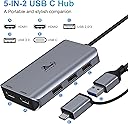
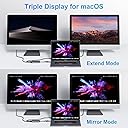
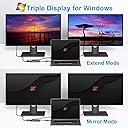
The LIONWEI USB 3.0 to Dual HDMI Docking Station transforms a single USB-C or USB 3.0 port into a powerful 5-in-1 hub featuring dual HDMI outputs (4K@30Hz + 1080P@60Hz) and three USB 2.0 ports. Compatible with MacBook Air/Pro (M1/M2 & Intel), Windows laptops, and more, it supports both mirror and extended display modes. Certified safe and backed by an 18-month warranty, this docking station is designed to elevate your multi-monitor setup and streamline connectivity for professional and creative workflows.


| ASIN | B08PV132WJ |
| Best Sellers Rank | #7,679 in Electronics ( See Top 100 in Electronics ) #125 in Laptop Docking Stations |
| Brand | LIONWEI |
| Color | Space Gray |
| Compatible Devices | Dell Latitude, HP EliteBook, Laptops, MacBook Air, MacBook Pro |
| Customer Reviews | 4.0 out of 5 stars 1,215 Reviews |
| Hardware Interface | HDMI , USB |
| Item Dimensions L x W x H | 3.9"L x 2.24"W x 0.7"H |
| Item Weight | 0.21 Pounds |
| Manufacturer | LIONWEI |
| Mfr Part Number | UC0228 |
| Minimum Required Operating System Version | Windows 7 |
| Model Number | LIUC0228 |
| Number of Ports | 5 |
| Product Dimensions | 3.9"L x 2.24"W x 0.7"H |
| Total Number of HDMI Ports | 2 |
| Total USB Ports | 3 |
| Total Usb Ports | 3 |
| UPC | 779139580355 |
| Warranty Description | 30 days to try out and 18 month's warranty |
M**R
A great laptop hub and fantastic seller
This hub was very reasonably priced and packed with all the features I needed. I do video editing with a laptop and wireless keyboard and mouse using 2 monitors. Using this hub I am able to hook up the laptop to 2 thirty-two inch monitors and still use the laptop screen as a third monitor. I also use the USB-C port to run a high-speed SSD array, editing my project on those drives. The hub automatically installed the driver in Windows 11 and I was up and running in no time. Unexpectedly I received several e-mails from the seller over a few days after I began using the hub offering help with any issues and instructions if needed on installing drivers. The seller is very attentive to his buyers and wants them to be happy. I am very appreciative for this type of service above and beyond what is expected. I wish more sellers had half the integrity that this one does. The product works flawlessly and when I need something else of this nature I will order from this seller again and again!
D**N
Worked exactly as I'd hoped!
I got a new laptop but didn't realize the USB-C was not Thunderbolt. It was just a regular "data" USB-C. I wanted to run dual monitors (extended) but only had an HDMI (which only supports mirroring, not extended). I thought that I was out of luck until I found this adapter. I was skeptical because from what I'd read about USB-C ports, it has to be a certain type to support display. I took a chance, got this adapter overnight, and it works perfectly connected to my "regular" USB-C port! There is a download required, but you just unzip it and run the installer. Once it's installed and you've plugged into the USB, you use the regular Display settings on your computer (mine is a Windows PC) to set things up. There isn't a separate interface...just the driver. I installed the downloaded driver on both my personal laptop and my work laptop so now I can just connect the adapter to one or the other to run Dual Monitors. This solved my problem and hopefully, it will solve yours if you're trying to run dual monitors and don't have enough USB ports (or not the right type of USB-C port). It also works with USB A (regular USB), although I haven't tried it since I don't have a spare one available.
A**L
Gets HOT quickly & Loses connection
When you plug it in your PC or Mac for the first time, you have to install a driver on the computer. It allows display extension and mirroring. 2 minor annoyances. One is that it gets very hot, so make sure you check on it from time to time if you have a hidden cable management. Good thing that it's not made of plastic. The second thing is that the USB male that plugs in to the computer doesn't go all the way in (no pun intended). It may just be my laptop's faulty design, but because it is loose, every time I touch the hub, my monitors lose connection to my laptop and turn off.
S**A
No sound, Overheated easily
The first thing I noticed is that it gets extremely overheated. I was logged on for about 5-7 minutes and it was HOT! I have 2 external monitors. I bought this particular one bc this had 2 HDMI. So I used HDMI to HDMI for both monitors and there was no sound. The last thing I noticed was that you had to download a software for it to even work. I prefer not to download anything. It should automatically connect. I had another connector, so I went back to my previous set-up. Now I'm using 1 HDMI to UBC-C and then the other VGA to USB. Sound is fine, no overheating, and no software download needed. I'm returning this item. Update: the downloaded software is will not go away. I think it is a virus. SMI instant view - do NOT download even if prompted. I will never buy again
S**E
I have 3 screens now
After downloading the drive that was needed equipment worked as should
T**S
If you are assuming this is dual 4k you will be wrong
I like that this is small and affordable. I have 2 2k monitors I need to run. But with this device, one runs at 2k the other is 1080p. The description here is very deceptive and misleading. However, if you were to pull up the product spec sheet it clearly states only 1 4k channel and the other is 1080p MAX. Now I would normally be pissed off about this but I only needed one extra 4k HDMI because my laptop already has one and I have 2 portable screens for trading. The 1080p port is not wasted in my case because I also bought a cheap Rybozen HDMI capture box so I can stream my trading session. Now I'm not going to lie. The box does get a little warm to the touch. It could probably also be used as a coffee cup warmer. As for the other USB ports on this device, they are USB2.0 only. That's ok for things like external keyboards and mice because they don't require USB3.x and it wouldn't make sense to tie up those ports on your computer when you don't have to in the first place. A couple of reviewers stated here that the mouse will get glitchy sometimes. I expect this is due to the large amount of heat coming. I may break it down and see if I can put some heatsinks on it. Also keep in mind that this driver may cause other USB hubs to fail if they are used at the same time.
F**H
Works Great!!
I needed this to quickly connect and disconnect my old HP Envy from 2016 to hdmi monitors and ergonomic keyboard. Install was maybe 2 minutes to get and install the driver. Used it for a couple of hours today and so far so good! This device is especially helpful to me as my laptop doesn't have a USB-C connection so I'm glad it was out there for me to find. Device did get a little warm but not enough for me to worry.
J**I
Works as advertised on M1 Macbook Air 2020!
I had trouble finding an adapter that works with my 2020 MacBook Air M1. Plugged the adapter into my laptop, and a disk image mounted on the desktop. The software that came with the adapter (that automatically mounts a disk image when first plugged in) was damaged and my computer would not open the driver. Fortunately, the disk image also has a direct link to the download page for the drivers. Downloaded the drivers, installed per the instructions, connected the two 24" monitors, and they immediately connected as extended desktop displays (there is also an option so "Mirror"). Overall, great value when I had almost given up finding a workable solution.
Z**Y
USB C hub for Macbook M2 that really works for dual screen
I was really apprehensive buying this USB hub for my Macbook M2. All the USB hub I from online shopping websites that are capable of running 2 monitors via displaylink costs at least $160. But this one really works. It will automatically install the apps needed to work. Then when I did pull out the USB from my macbook, it prompted me to install the upgraded software. I hope people who are searching for a hub for their macbook with dual monitors will find this product and try it. It really works. Check the attached photo. I'm happy with my purchase.
S**S
Perfect, but you need to install the driver!
Exactly what I needed. For home office to be able to switch between private laptop and work laptop and extend both on a second screen. A third screen seems to be possible as well (via HDMI only) Bluetooth mouse and keyboard could picked up straight away. The second screen did need the installation of the driver. Fairly straight forward. Work laptop has USB-C connection and private only USB, therefore this was the perfect solution for me that didn't cost an arm and a leg.
K**N
Dual Monitor connection
I have an Acer Nitro pc and I connected two monitors via usb. Works great. Software did not auto install but found the drivers via their website. Easy.
I**Y
It worked, which is all I needed it to do
I will note that you need to download a driver from their website to get this to work, but once that was installed the monitors sprung to life and it has done exactly what it said it would do. I could continue typing how it changed my life or some nonsense but all you really want to know is if it is worth purchasing right? Yes, it does the job it says it will do and it was fairly simple to get the driver and install it. So yes, itโs worth purchasing.
C**L
Faulty wire
This unit wouldbe amazing but there is a faulty wire in the main cord and everytime the laptop or desk is bumped or moved it shorts out and the monitors stop working. Then the USB is not recognized.
Trustpilot
1 week ago
3 days ago