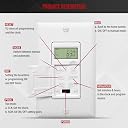
Needed this to replace a switch that controls outlets that feed the Christmas lights along the eaves. The timer fits in the same space as a Decora switch. It's white where my house switch color is light almond, but the switch is in the garage and not noticed, so no problem. There are four wires on the switch: black (power), white (neutral) green (ground) and red (the load/lights). I determined the hot side of the switch with a voltage sensor before throwing the breaker. That hot wire goes to the black wire on the timer. The other wire in the original switch is the load and goes to the timer's red wire. Ground goes to the ground. The white wire has to be connected to a neutral white wire. With houses wired using Romex, there are usually a bundle of white wires in the junction box. I undid the wirenut and added the timer's white wire, then replaced the wirenut. Programming the timer is slightly tricky. First thing is to set the internal clock and tell the timer what day it is. There is an internal battery backup so it retains time, day and program should there be a power failure. There's also a Reset button if you want to clear it out and start over. Now that time of day and day of week are set, you can program separate on and off times for up to 18 events. You can program for single days of the week or just Monday through Friday or just the weekends. All I wanted was one event: turn on at 5 PM and off at 11 PM every day. I read the directions carefully and for Event 1, set it for on at 5 PM. You then have to set which days it will happen. You press "PROG" over and over until you cycle through all the days of the week, then M-F, then Sa-Su, then, finally, all the days are displayed. Next I set the "Off" time for 11 PM. Great. Finished. I set the "Mode" to Auto and closed the little door. Right on time, the lights turn on at 5 PM. Success! Except in the morning, the lights are still on. Turns out you have to set the days of the week the "OFF" command will happen, just like you have to set the timer for the days it will turn "ON." Sneaky. Re-read the instructions and went back into Program until the OFF time of 11 PM was displayed. I punched the PROG button until all the days of the weeks were displayed. NOW it works. Turns on at 5, off at 11, every day. With programming flexibility comes many options and many ways to foul up. But it works fine now. Excellent price. There's also a master ON/OFF slider switch under the door so when it's not Christmas season and there's no need to energize the outlets, they will remain off. You can manually turn the lights on or off by simply pressing on the little door. It's designed to punch the "MAN" buttons beneath the door so you don't have to open the little door to turn the lights on or off manually.