Buy anything from 5,000+ international stores. One checkout price. No surprise fees. Join 2M+ shoppers on Desertcart.
Desertcart purchases this item on your behalf and handles shipping, customs, and support to Spain.
โก Stay charged, stay ahead โ power your play like a pro!
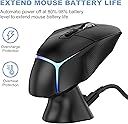
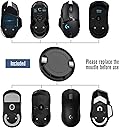
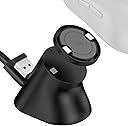
The Soarking Charging Dock is a compact, magnetic USB-C charging station designed exclusively for Logitech gaming mice including G Pro X Superlight, G502 series, G703, G903, and more. It delivers a steady 0.1A current with smart charging technology that caps at 80% to preserve battery health. Its non-slip base and strong magnetic hold ensure your mouse stays securely docked without residue, making it the perfect home or travel companion for millennial pros who demand readiness and style.


| ASIN | B08JFXFSJ2 |
| Additional Features | Lightweight Design, Magnetic, Short Circuit Protection |
| Amperage | 0.1 Amps |
| Best Sellers Rank | #2,122 in Video Games ( See Top 100 in Video Games ) #117 in PC Gaming Mice |
| Brand | Soarking |
| Built-In Media | Charging dock,Cable |
| Color | black |
| Compatible Devices | For logitech computer mice G Pro X Superlight 2/1,G502/G502X/G502X Plus Lightspeed,G703,G903 |
| Compatible Phone Models | Compatible with logitech computer mouse g pro x supterlight 2/1/g502/g502x//g502 x plus/g703/g903/g pro Compatible Phone Models Compatible with logitech computer mouse g pro x supterlight 2/1/g502/g502x//g502 x plus/g703/g903/g pro See more |
| Connectivity Technology | USB |
| Connector Type | USB |
| Customer Package Type | FFP |
| Customer Reviews | 4.2 out of 5 stars 2,219 Reviews |
| Enclosure Material | Plastic |
| Included Components | Charging dock,Cable |
| Input Voltage | 5 Volts |
| Item Type Name | Fashion |
| Item Weight | 0.02 Pounds |
| Main Power Connector Type | USB Type C |
| Manufacturer | Soarking |
| Mfr Part Number | USSKLGTMSSB |
| Model Name | LGM1 |
| Model Number | USSKLGTMSSB |
| Mounting Type | Tabletop Mount |
| Number of Items | 1 |
| Output Current | 0.1 Amps |
| Output Voltage | 5 Volts |
| Portable | Yes |
| Power Plug | No Plug |
| Power Source | Corded Electric |
| Special Feature | Lightweight Design, Magnetic, Short Circuit Protection |
| Total Usb Ports | 1 |
| UPC | 616859794061 |
| Unit Count | 1.0 Count |
| Warranty Description | 1 Year |
| Wattage | 1.00 |
J**E
Fantastic Charging Dock for Logitech G Pro X Superlight!
I recently purchased the Soarking Charging Dock for my Logitech G Pro X Superlight gaming mouse, and I couldn't be more pleased with its performance. As an avid gamer, having a reliable charging solution for my mouse is crucial, and Soarking has genuinely delivered. Firstly, the dock's design is sleek and modern, seamlessly complementing the aesthetics of my gaming setup. The impressive build quality provides a stable and secure base for my mouse to rest on while charging. Attention to detail was a priority in the design process. Its intelligent charging capability is one standout feature that sets this charging dock apart. I appreciate the fact that it charges my Logitech G Pro X Superlight up to 80% and then stops, preserving the battery life over the long term. This ensures that my mouse is always ready for action and extends the battery's overall lifespan. It's a thoughtful feature that demonstrates Soarking's commitment to enhancing the user experience. The installation process was a breeze, and the dock is conveniently powered by USB, eliminating the need for additional outlets. The LED indicator on the dock provides a clear visual cue of the charging status, making it easy to monitor. Overall, the Soarking Charging Dock for Logitech G Pro X Superlight is a fantastic investment for any gamer who values convenience and wants to extend the life of their mouse battery. I highly recommend this product to fellow Logitech G Pro X Superlight users โ it's a game-changer!
S**E
Convenient charging dock for Logitech mouse
Works well and makes charging the mouse much more convenient. The mouse sits securely on the dock and it looks cleaner on the desk compared to plugging in a cable every time. Simple accessory but very useful if you use the mouse daily.
L**.
Have gpro wireless/superlight? Get this now!!!!
I LOVE THIS THING Pros: suuuper convenient Inexpensive Extremely easy to setup Saves me a usb port Uses a usb c cord like my gpro wireless Adheres to the desk Looks clean and round like the mouse Cheaper than logitech charge pad Doesn't overcharge (stops around 85ish) 10 gram weight can be popped out easily Cons: Has a 10 gram weight in it(??????????????) Adhesive isn't suuuper strong so it's not firm but won't tear apart on removal or damage your surface. If bumped hard can temporarily disconnect (never happened while not getting messed with) No rgb/white version Let me start by hating logitech for using a micro usb cable... Yes its "small" but usb-c would've been solo nice (hell even their headphones use it) Now that that's out of the way, I love this thing, no more mouse running out of battery and having to use a rubbery cable while working or gaming, presents my mouse beautifully on my desk, convenient and NOT EXPENSIVE!? Plus it works with the new superlight!! (Whenever those start existing again haha) I was jealous of the Razer viper wireless for having this feature but now that I can get it aswell I wouldn't think twice about it. Only complaint is the charging adapter has a 10 gram weight..... Why? This is for a lightweight mouse and you want to add 10 grams??? Haha out that went (really easy to fix, used a flathead screw driver and it popped right out with 0 damage to the plastic). Oh and an extra adhesive patch/ stronger adhesive would be appreciated :) Got a logitech mouse and 20-25 bucks? Get this!!!!!
A**R
A great alternative to plugging the mouse in or using the Powerplay mat to charge...
I've been a happy owner of the Powerplay mat, using it with a G Pro and G Pro Superlight. I wanted to try some different mouse mats though, but wanted to be able to wirelessly charge as well. So I purchased this dock, and so far, so good! You replace the puck on the bottom of the mouse, with the one provided with this dock. There is a 10g weight in the puck but it can easily removed. Plug your mouse dongle into the dock, plug the dock in and your good to go. Shows up fine in GHUB, along with it's charge status and battery level. There is a small LED on the back of the dock, showing status...Blue, on and working and orange when a mouse is on it, and charging. Because this LED is on the back, you can't see it directly though. The magnetic connection between mouse and dock is strong. Getting the mouse near the dock, it will snap into place. The magnetic connection is so strong, that if you pull the mouse directly up, and off the dock, the puck in the mouse will stay stuck to the dock, and not the mouse. The trick to keeping the puck in the mouse is, simply give the mouse a small twist and then pull up, or rock the mouse to one side a little, then pull up. As others have mentioned, this charges the same way the Powerplay mat charges...which means slowly. Plus, just like the Powerplay mat, your mouse will never charge up to 100%. This is done to save life the battery over extended time. I was used to all this from having the Powerplay mat, so nothing surprising here with how it charges. For me, and just like with the Powerplay mat, it will charge up to somewhere between 88 and 95% on average... All in all, this is a nice dock. If your fine charging via a cable, then nothing to see here. But if you want the convivence of wireless charging but don't want to pay for the Powerplay mat, this is a good alternative.
๏ฟฝ**๏ฟฝ
Good budget charger
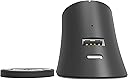
Works decent. The magnet is a bit odd. It can be so strongly attached to your charger that it sticks to the charger when pulling your mouse away. I like the fact there is a port for the mouses bluetooth adapter. Comes in handy. Mouse used : Logitech PRO X2
M**Y
Poor design plays on poor design
So, the powerplay puck design for logitech mice is just bad. Full stop. The magnets, the way the puck is released - it's asking for problems, and problems it got. But this dock manages to implement an equally bad design that seems intended to exacerbate the issues inherent to the puck. First, the dock is very light, it is all but mandatory that it be adhered to a surface, otherwise the absurdly powerful magnets will just lift the dock up when you try to remove the mouse. A heavier dock, or slightly less powerful magnets would go a long way to making this more user friendly. Second, the puck is heavy. I don't know how it compares to pucks from other manufacturers, but as others said, it definitely changes the weight of the mouse. Third - and most egregiously - the size and shape of the mounting point of the dock is the perfect size to enter the powerplay slot on the mouse. If they had forgone the puck entirely and just allowed the mouse to slot on top of the stand, that would have been AWESOME! Unfortunately, the reality is that it's the perfect size and shape to press into the release slot on the powerplay puck and remove it from the mouse when undocking it, unless you lift the mouse straight up, which is very awkward given the way the face of the dock is angled. If the dock were heavier, if the magnets were weaker, if the dock replaced the puck, or if the face of the dock was literally any other size or shape - this would surely work great. The people who designed this dock wanted aesthetics and did not do any testing for function. If you want a logitech mouse with powerplay, you basically need the mousepad, these third party docks just don't cut it.
D**S
Great product, when it works
I own two of these charging docks. One of them is great. The light turns red while charging, then blue when charged. The other one only works sometimes. The light is always blue, so I can't tell if it is charging or not. About 75% of the time is does charge my mouse battery. When it doesn't, it actually drains the battery. I bought the blue light only dock first, so I had no idea that it was suppose to cycle from red to blue. My bad. I contacted customer service and they said to clean the contacts and remove the circular cover from the bottom of the mouse before putting the mouse on the dock. I told them that I clean the contacts regularly and that I always remove the circular cover before placing the mouse on the dock. I did not receive a follow up response. So I contacted them two more times and have yet to receive a reply. If you buy this product and the light does not turn red while charging, send it back immediately and get another one. Their customer service is pretty much non-existent. If they had both worked correctly, I would have given five stars
B**L
Worth the money
I tried another, cheaper, alternative recently and was disappointed at how the charging insert did not sit flush with the mouse and would drag while in use. I finally bit the bullet and purchased this one and I absolutely do not regret it. The puck that goes on the mouse feels almost like the original. It also comes with an included weight, which I removed, leaving it as light as I originally had my G502. No drag, no issues. It snaps on with magnets that feel like the original. Setup is super easy. You stick the charging base wherever you want it, connect the USB C to the back and then the USB A to a power source. The bottom of the charger has a reusable sticky pad so you don't need to worry about repositioning or leaving residue on your desk. The battery charging, from what I understand, is normal to only charge to 80%. If you're charging this every time that you stop using it, then this won't be a problem. The only thing to note is that the base magnet is pretty strong so you'll have to kind of rotate the mouse off of the base rather than lifting it straight off. That being said, since it's so strong, it holds the mouse just fine when docked. I only tried one other one so I can't speak for the rest of the wireless chargers for the G502, but you won't regret buying this one.
M**O
Dejo de funcionar
Ya no cargaโฆ funcionรณ por varios meses y ya no funciona
R**7
Does the job well [2 year update] + [4 year update] Edited November 2025
November 2025 Update: its the end of the road guys, the dock no longer charges my G502 Lightspeed. HOWEVER, I will investigate whether this is an issue with the Soarking dock, or my mouse itself, as my mouse is getting quite old now. I still feel this product is 5 star-worthy because of its performance record.] [Update after 4 years: yes, it's still working great, no issues!] [Update after 2 years: still going strong, no issues at all.] Had this for over 8 months now, has faithfully charged my G502 lightspeed mouse. The included charge puck (necessary for charging the mouse) fits exact and is well made, doesn't snag on my mousepad. The dock has some decent weight to it, but the magnets are quite strong, and usually requires 2 hands to remove the mouse from it. [If you pull the mouse down and off, you can take it off with 1 hand and the puck will stay in the mouse.] Many people miss this detail: the dock charges the mouse to 80-90% only!!! This is a battery protection feature from Logitech. The charging pins on the bottom of the mouse were designed for their expensive Powerplay mat, so it will never charge the mouse to 100%, because keeping the mouse at 100% always would harm the battery eventually. If you want to charge to 100%, you'll have to plug in the mouse directly to charge. [Update: I've let my mouse hit 0% multiple times now, and 30 seconds on the charger dock nets about 5-7 minutes of use, and 2 minutes of charging gets me well over 15 minutes! Using a G502 Lightspeed. The Soarking dock is plugged into a POWERED USB hub, so mine charges fast, yours may charge slower if connected directly to motherboard USB.] Overall, 80/80
H**I
ูุฒุงุน
ู ููุชุฌ ุฌู ูู ููุงุฏูู ุจุดูู ุฎูุฑุงูู ุงูุตุญูู ุจู ๐
A**A
Hace lo que promete pero no es facil de usar
la base cumple lo prometido, carga el mouse pero quitarlo y ponerlo tiene su truco y hacerlo mal hace que la tapadera se quede sobre la base, aparte que el adesivo que trae la base es muy potente, cuidado donde lo pongan, lo puse sobre escritorio de madera, y cuando quise moverlo se trajo la madera consigo.
D**S
Charges your Lightspeed mouse!
A handy charging dock with a magnetic puck that goes on your mouse. Easy to use. Comes with an extra USB-A slot to keep the 2.4GHz dongle closer. Although the last bit is odd - this means the dock has to be connected to the PC. But then you can't charge your mouse when your PC is off, which is counter to its purpose.
Trustpilot
1 month ago
2 weeks ago