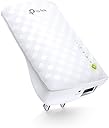
![AC750 Dual Band Wi-Fi Range Booster Extender Expand RE200 2.4GHz 5GHz [duplus]](https://m.media-amazon.com/images/I/41S+JM6tuAL._AC_SL3840_.jpg)
Buy anything from 5,000+ international stores. One checkout price. No surprise fees. Join 2M+ shoppers on Desertcart.
Desertcart purchases this item on your behalf and handles shipping, customs, and support to Spain.
🚀 Boost Your Wi-Fi, Boost Your Life — Never Miss a Beat!
The TP-Link AC750 RE200 Wi-Fi Range Extender leverages dual-band Wireless AC technology to deliver speeds up to 750Mbps, eliminating dead zones in your home. Featuring a smart signal indicator for effortless setup, flexible plug-and-play placement, and an Ethernet port for wired device connectivity, it’s compatible with any router and all major smart home devices. Ideal for HD streaming, gaming, and seamless smart home integration, backed by 24/7 support and a 1-year warranty.


| ASIN | B00NR2VMNC |
| Best Sellers Rank | #4,616 in Computers ( See Top 100 in Computers ) #35 in Network Repeaters |
| Brand | TP-Link |
| Built-In Media | Owner's Manual, Resource Cd, Rj-45 Ethernet Cable, Wireless Ac750 Wall Plug Universal Wi-Fi Range Extender |
| Color | WiFi Extender - Ac750 |
| Colour | WiFi Extender - Ac750 |
| Compatible Devices | Smartphones, Tablets, Laptops, Smart Home Devices, Alexa-Enabled Devices |
| Connector Type | RJ45 |
| Customer Reviews | 4.3 out of 5 stars 21,016 Reviews |
| Data Transfer Rate | 750 Megabits Per Second |
| Data transfer rate | 750 Megabits Per Second |
| Frequency Band Class | Dual-Band |
| Frequency Bands Supported | 2.4 GHz, 5 GHz |
| Frequency band class | Dual-Band |
| Global Trade Identification Number | 00845973071875 |
| Item Dimensions D x W x H | 5.5D x 6.6W x 11H centimeters |
| Item Weight | 91 Grams |
| Manufacturer | TP-LINK USA |
| Mfr Part Number | RE200 |
| Model Number | RE200 |
| Range | 1.0 |
| Smart Home Compatibility | Smart Home Compatible |
| Special Features | Smart signal indicator, Easy setup and flexible placement |
| Special features | Smart signal indicator, Easy setup and flexible placement |
| UPC | 845973071875 |
| Warranty Description | 1 Year Warranty |
| Wireless Compability | 802.11a/b/g/n/ac |
| Wireless communication standard | 802.11a/b/g/n/ac |
A**R
Must buy
After 1year it's not working
A**R
Works fine!
Gets the job done as expected. Never an issue. Easy to install.
P**K
Good buy
Reco
R**N
Highly recommended
Great product and works perfectly !
H**S
Absolutely top class!!
I was able to set it up quite easily through the mobile app within a matter of minutes. Very light weight device and easy to manage. The signal strength is strong and my blank or weak signal areas at my home are now covered. I already had a signal extender but always thought it was not doing enough. This device has given the much needed coverage area.
P**I
Longevity is just 1year
The range extender worked fine till 1year. I suppose that there is a 2year warranty, however device stopped working.
J**C
Easy to use
Very convenient..Plug n Play !! Easy to connect to home router..!!
I**V
this is not a "WiFi extender" if you don't have TP-Link OneMesh router
this thing just creates new WiFi network (with _Ext in the name). So, this is not Mesh WiFi extender as it is advertised and printed on the box if you are using any other WiFi router than TP-Link. Your smartphone will not connect to this _Ext network until main network signal will be lost completely. so, if you want true mesh WiFi extender and don't have TP-Link OneMesh router, don't buy this.
T**V
"Quick Setup" problems overcome, this is a great product. BEWARE 'VINE PRODUCT FREE REVIEWS'
Pro: Does what it says it does. My cable router/modem is upstairs; my downstairs Roku could rarely get a good enough signal from it to be useful. I've positioned the RE200 Extender in probably an even worse spot (near the Roku but on the floor so I can plug the Roku into the RE200 via ethernet cable) and it handles the signal from the upstairs router extremely well. The RE200 also now behaves as a wifi hotspot (which is the main point of the product), allowing our cellphones and other gear to connect downstairs much better than they have ever done. HOWEVER, and this leads to my Con: The initial setup was difficult. The push-button WPS method did not work for me, so I had to set it up via the browser-based utility. Nothing cosmic about that--when it works. It took several tries before I succeeded. Things to remember: 1. During Setup, it's important to re-name the network (in other words, don't accept the 'Copy from Main Router/AP' choice). Otherwise, it's far more difficult to troubleshoot where a connection problem lies. I suppose after you get everything figured out and have it working, you can go back and copy your router's name, but I'm going to keep them separate for troubleshooting purposes down the road. 2. If, during 'Quick Setup,' at the final step (rebooting), you don't get a message that says "Completed!", **it did not complete!** You will have what looks like a new wifi network, but nothing will be able to connect to it. If you did not get your "Completed!" message, you can manually reboot the RE200 by going to 'System Tools' --> 'Reboot', then press Reboot. You should get your "Completed!" confirmation after that. 3. If you're having problems during setup with even getting a simple connection to the RE200 browser page (http://tplinkextender.net/), try setting it up using the ethernet cable as a connection first. Also, if you somehow balled up the 'Quick Setup' and need to do everything again, use the ethernet cable. After you eventually get that sweet "Completed!" message, you can put the Extender wherever you really want it. 4. The RE200 comes in 2 flavors as of now (April '15): RE200(US) and RE200(EU). The US version has no firmware updates. The EU version is on its 2nd update. I have no idea how well or not well getting the update for the other region's RE200 would work, but given how much of a point Tplink makes that mismatching firmware and hardware can damage the unit, I wouldn't try it. I was tempted to try the EU firmware, but in the end I got my unit to work just by rebooting from the System Tools menu. 5. This replaced a HooToo brand repeater (the Nano) I was using that died after 2 weeks. I'll revisit this review if something goes wrong, but so far so good. And it seems about a 1000 times more solid than the HooToo. 6. Finally, I have to reiterate how well this thing works, when you finally get it to work. No deadspots anywhere in the house anymore, and our Roku's now streaming its little heart out the way it's supposed to. If this thing is still working fine in a month, I'll come back and give it that 5th star. EDIT:months later, this thing is still going strong. 5 stars! Last point: the 'Vine Recommendations' are from people who got the product early and for free. After the product has been out for awhile, you should *completely disregard* these early reviews. A review of a free product will almost always be more lenient than from someone who actually shelled money out for the thing.
C**O
Excelente producto, recomendado al 100!
Me gustó por lo fácil de instalar y configurar. Solo con el botón de WPS en menos de 5 minutos ya lo tenía conectado y funcionando. Chulada! Se conecta a ambas bandas 2.4 y 5 GHz, con esto ya me llega el Internet en la planta alta (el módem está en planta baja). Para conectarse usas la misma contraseña que con tu módem, y sale solo una conexión en el extensor donde junta ambos nombres: TelmexModem_2.4_5 el mismo extensor decide cual banda usar dependiendo de la intensidad de la señal. No se ve feo conectado. En uso apenas tiene poco tiempo, si falla o algo ya actualizaré después este post. Un fallo que vi, fue que por alguna razón se desconectó de una banda, no se si fue la 2.4 o la 5GHz, pero solo uno de los foquitos parpadeaba el otro estaba apagado. Lo solucionas desconectándolo y volviéndolo a conectar 5 segundos después.
M**A
TP LINK DUEL BAND WIFI RANGE EXTENDER
Very easy to install. Covers dark areas well. Excellent performance.
G**L
Funciona
No me llegaba suficiente velocidad a una habitacion en el piso de arriba, y enchufando esto a mitad de camino mas o menos, tengo la velocidad en esa habitacion. Funciona.
A**R
موصل جيد
ماشاءالله قوي ورائع كانه عندي وجنبي مع انه بدور والجهاز بدور ثاني
Trustpilot
1 month ago
4 days ago