📡 Elevate your home network to pro-level speed and security—because buffering is so last decade.
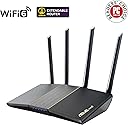
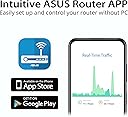
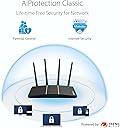
The ASUS RT-AX57 is a dual-band WiFi 6 router delivering up to 3000 Mbps combined speed with advanced 1024-QAM modulation. It features subscription-free AiProtection security powered by Trend Micro, built-in VPN via Instant Guard, and supports MU-MIMO and OFDMA for efficient multi-device connectivity. Fully compatible with AiMesh for easy network expansion, it also offers advanced parental controls and smart home integration, making it ideal for gaming, streaming, and secure remote access.


| ASIN | B0BZJFQ4ZC |
| Antenna Location | Home Networking, Home Office, Small Business Networking |
| Best Sellers Rank | #2,042 in Computers ( See Top 100 in Computers ) #168 in Routers |
| Brand | ASUS |
| Built-In Media | ASUS RT-AX57 (AX3000) Dual Band WiFi 6 Extendable Router |
| Color | Black |
| Compatible Devices | Gaming Console |
| Connectivity Protocol | Wi-Fi |
| Connectivity Technology | Wi-Fi (802.11ax), Ethernet |
| Control Method | App |
| Coverage | Standard home/office network size |
| Customer Reviews | 4.2 4.2 out of 5 stars (88) |
| Data Transfer Rate | 3000 Megabits Per Second |
| Frequency | 5 GHz |
| Frequency Band Class | Dual-Band |
| Is Modem Compatible | No |
| Item Weight | 374 Grams |
| LAN Port Bandwidth | 1000 Mbps |
| Manufacturer | AsusTek Computer Inc |
| Maximum Upstream Data Transfer Rate | 1500 Megabits Per Second |
| Mfr Part Number | RT-AX57 |
| Model Name | RT-AX57 |
| Model Number | RT-AX57 |
| Number of Ports | 5 |
| Operating System | ASUSWRT |
| Other Special Features of the Product | Remote Access |
| Security Protocol | WPA2 |
| Warranty Description | 3 Years Manufacturer Warranty |
| Wi-Fi Generation | Wi-Fi 6 |
| Wireless Compability | 802.11ax |
B**E
Quick and easy to setup
Works almost straight out of the box. Easy to setup wifi. For its price tag. It’s a fantastic piece of kit to have at home.
J**L
Asus router all the way.
Asus router has more features and you can change many settings compared to other routers i have tried like zte and tp link.
T**S
ASUS never disappoints
All good
M**H
Not able to work with Etisalat ethernet
I couldn’t get internet signal through the wall Ethernet somehow it doesn’t properly setup I tried each different setup option it doesn’t work Ancient apple airport capsule just plug in and it works
R**N
جاني بتغليف المصنع ، التعليمات الي تجي معه واضحة و سهلة ، بالتعليمات بيطلب منك تنزل تطبيق حق اسوس و تضبط الإعدادات و كلمة المرور ، مع العلم انه لن يبدأ يأخذ نت من و يوزعه من المودم إلا بعد الانتهاء من الإعدادات ، برنامجهم بطل و تقدر تسوي كل شي من الجوال، الي مالقيته حتى في الموقع ان البورتات كلها تعم ١ قيقا سرعة نقل.
E**E
I am a PC-VR user and read that the crown of optimisation was getting a Wifi 6 router to significantly increase the amount of bandwidth you could get for remote VR systems via Wifi. This speciifc router is recommended by the VirtualDesktop community (at the time of purchasing, at least) and it has lived up to expectations. I am very tech savvy so the setup was pretty easy. I have a VirginMedia hub router that you have to jump through some minor hoops with. If you're good with tech, it'll take maybe half an hour to set up. If not, put aside at least 2 hours to configure everything. The router config via the Asus portal is super easy and it gives you access to all of the advanced features that I cared about like router level VPN, custom DNS, and per-band level device configuration. The wifi speed is just insane. I am pulling NVME up/down speeds via wifi. It is now faster for me to set up a temporary shared network in my house file transfer an album from my PC to my phone via wifi than it is to plug my phone into my PC and transfer via a cable. The stability and consistency of connection is also as advertised. I have no more dead zones in my house and elevated all of my personal devices to the fastest wifi band. Even with thick walls, I'm getting solid wifi connections that I would normally have to set up a mesh network for with multiple devices - instead I can just use this and get stupid fast speeds that are now only limited by the speed of my ISP. Look, aftermarket routers are almost always overkill but the way I think about it is that it removes another bottleneck for really good quality home networks. Your ISP may change, but using a custom router it's always the same. Set the ISP router to bridge mode and your custom router settings are always there, with advanced features that most ISPs limit or don't want you to have direct access to. Pricey? Sure. Worth it? Absolutely.
L**S
La confezione è arrivata senza la sua scatola originale, avvolto nella plastica dentro una scatola qualunque... ovviamente (dentro) nemmeno il solito contenuto... solo il router, cavo ethernet ed un trasformatore (non originale) che non aveva nemmeno le spine per le prese italiane... 4 stelle. Pazzesco! comunque l'ho provato e funziona perfettamente! Per il router 5 stelle!
O**R
It’s WiFi connection speed is excellent with reasonable coverage. Built in Security features have allowed me to control my child’s online time and restrict malicious content. Highly Recommended.
L**E
I bought the ASUS RT-AX57 specifically to use as a Wi-Fi repeater, and I’m impressed so far. It performs exactly as needed, repeating an existing wireless signal without requiring a physical Ethernet connection to the main router, which was essential in my case, as I don’t have easy access to the primary router. It accepts mixed 2.4 GHz / 5 GHz signal and rebroadcasts both bands separately as new SSIDs. Performance has been stable and I get much better coverage. Tips: Use a browser, not the ASUS app, for the initial setup when configuring as a repeater. • The default router IP is 192.168.1.1. • Update the firmware right away as the 5 GHz band didn’t work correctly until I installed the latest update. • After switching to Repeater Mode, the router will receive a new IP address from your main router. At this point, you should have full internet access via the new Wi-Fi signal. • To find the new IP and access the config portal later, just use the ASUS Router app — it works well once the repeater is active.
Trustpilot
1 day ago
2 weeks ago