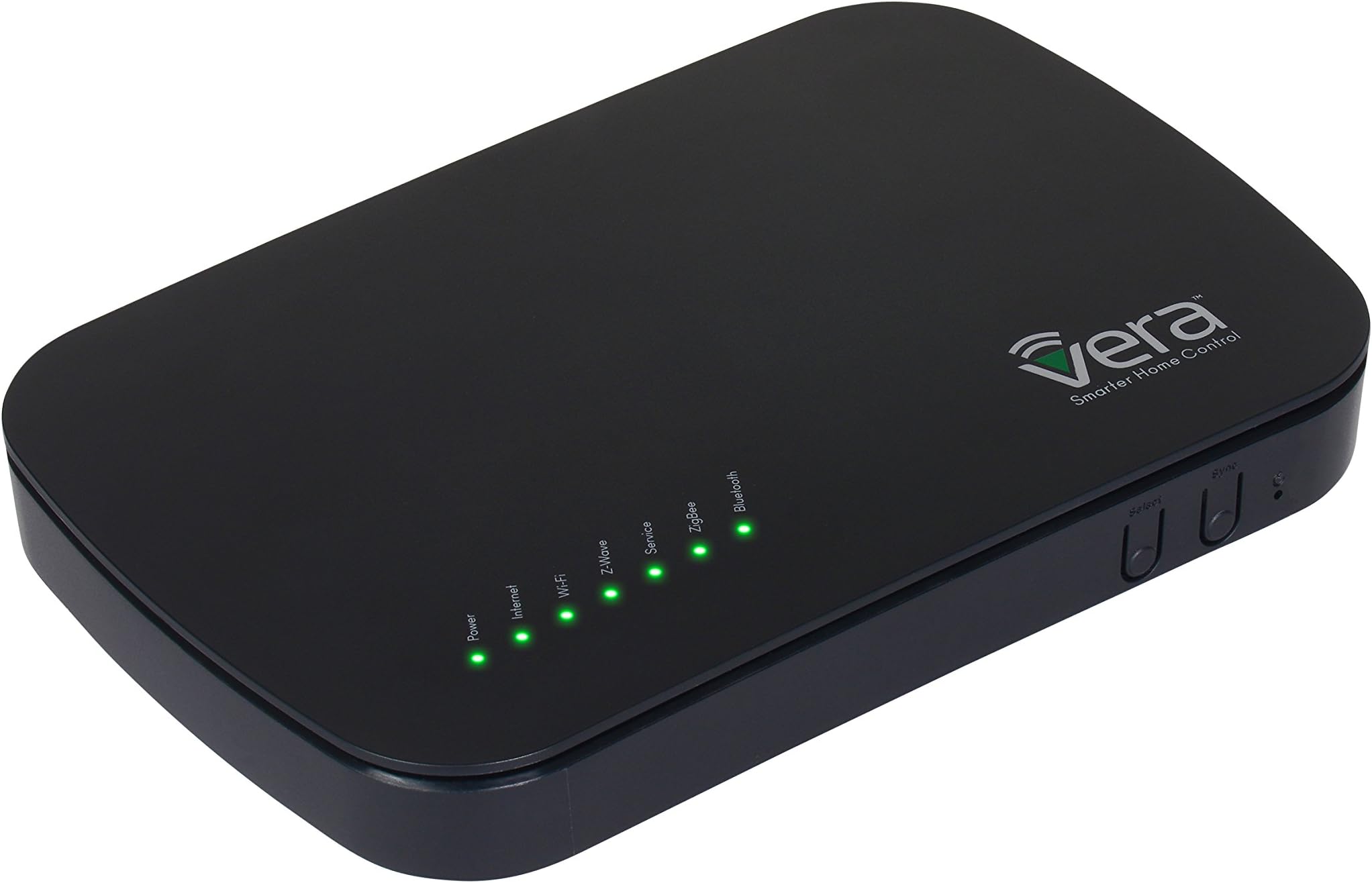
Vera Control VeraPlus-US Smart Home Controller Hub, 7.71" x 5.0" x 1.33", Black
Product ID: 24166327
📱Remote control via app
🔗Supports 200+ devices & protocols
🧠Central smart home brain
Buy anything from 5,000+ international stores. One checkout price. No surprise fees. Join 2M+ shoppers on Desertcart.
Desertcart purchases this item on your behalf and handles shipping, customs, and support to Spain.
🧠 VeraPlus: The smart home hub that thinks for you.
The VeraPlus-US Smart Home Controller Hub is a powerful, versatile central unit designed to unify and automate your smart home devices. Measuring 7.71" x 5.0" x 1.33", it supports over 200 sensors, locks, lights, and cameras from top brands like Nest, Schlage, and Yale. With no monthly fees and easy remote control via app, it offers professional-grade home security, energy efficiency, and convenience—all backed by robust tech support and a passionate global community.


| ASIN | B01BX9P89Y |
| Batteries Included? | No |
| Batteries Required? | No |
| Best Sellers Rank | #2,168,858 in Tools & Home Improvement ( See Top 100 in Tools & Home Improvement ) #1,372 in Home Automation Hubs & Controllers |
| Color | Black |
| Customer Reviews | 3.8 3.8 out of 5 stars (559) |
| Date First Available | February 18, 2016 |
| Display Style | LED buttons |
| Finish | Satin |
| Included Components | 1 Quick Start Guide, 1 VeraPlus Controller, 1 power adapter |
| Is Discontinued By Manufacturer | No |
| Item Package Quantity | 1 |
| Item Weight | 1.4 pounds |
| Item model number | VeraPlus-US |
| Manufacturer | MiOS |
| Material | Plastic |
| Number Of Pieces | 1 |
| Part Number | VeraPlus-US |
| Power Source | AC/DC |
| Product Dimensions | 7.7 x 5 x 1.3 inches |
| Shape | Rectangular |
| Size | 7.71" x 5.0" x 1.33" |
| Style | Contemporary, modern |
| Usage | Amateur, Inside |
| Voltage | 12 Volts |
| Warranty Description | Vera Control, Ltd strives to build the very best products possible. Should your Vera Smart Home Controller fail within the first 12 months of ownership, we will repair or replace your unit, free of charge. |
A**.
which set up great but did not have the functionality of the Vera ...
I bought this controller to replace a Vera 2 unit that had been in service since 2011. There were numerous opportunities to upgrade with trade ins, but this unit was rock solid for me, and after it was upgraded to UI5 it rarely would give trouble. For years I was able to control via PC or my Android phone, but this past December my Android phone died, but the Vera 2 unit kept going. I was given a hand me down IPhone to which I had an adjustment period to deal with. One of the problems was that the apps for Vera 2 on IOS did not function correctly as they did on Android. I felt that I should upgrade so I can use the home automation with the slightly used phone I was given. I went out and bought a Wink hub 2, which set up great but did not have the functionality of the Vera 2, but I lived with the quirks until I noticed the nodes started to fall off the network. I would in-pair and then re-pair at least several times a week which got old quick. I knew I had made a mistake going to the Wink, so I unpaired everything from it and put the Vera 2 back in service. I used it with my PC for a few weeks, and then decided to purchase the newest Vera which IOS had an app that worked with it. I bought the Vera plus, knowing it had the latest user interface UI7, and being Vera it had to be similar to the Vera 2 unit. After I received my new unit I plugged it in and set up all the nodes, next I set up scenes like I had on my Vera 2 unit and to my surprise it was a snap. Having worked with Vera before it was very familiar to me, and I was used to where and when things needed to be tweeked. All my existing nodes paired, including a Remotec repeater that I could not ever get to work correctly, except after it paired with the new unit. As other reviewers have commented, this unit is for people who take home automation as a hobby, and want to expand and learn it, but if you want something simple and just want basic security for locking and unlocking doors, turning on and off lights, then try Samsung Smart things or the Wink hub 2. I can honestly say that I know I will have many years of performance with this unit, since it is built off the older units platform. One drawback to Vera is that their documentation is not the greatest, but they were only a phonecall away for some tech assistance.
M**A
Not actually working as advertized on the box, or in the description! (but you have to read the fine print)
Dear support, Please help me not return my Vera Plus and buy a Smart Things hub, or a Wink, or an Iris, or anything else that seems to work based on what I’ve read on the GetVera forums. I purchased a Vera Plus with the hopes of replacing a 315MHz proprietary wireless home alarm system that I had installed a while back. I needed something that would allow me to utilize the least expensive components, whatever standard they may be. I also needed something that had a battery backup option, and could use my cellular USB adaptor for communicating when the internet was down. I have 13 windows and doors that only need simple magnetic contact sensors although I do have other “smart” components the contact sensors and the ability to alert me of a potential break-in are my primary focus. After purchasing the Vera Plus I got excited about integrating with my MyQ garage door, and my Nest Thermostat, and the Amazon Echo’s I have, however those are all secondary functionalities. I have run into problems out of the gate with the system however, firstly I cannot navigate directly to the static IP address of the Vera Plus and log in without having to connect to the internet to authenticate. I was wanting to place the Vera Plus on an isolated VLAN with specific firewall ports opened on my static public IPs based on what was needed, however that does not seem possible. I purchased the Vera Plus with 13 Iris 3320-L window/door contact sensors, they are ZigBee HA 1.2 compliant, and include the ability to report open/close, temperature, and battery level. However connecting these to the Vera Plus only provided me with state-change, and battery level. So I have no way of knowing if a door is opened or closed, and of course temperature is completely missing. That’s actually annoying, but still better than the old system that would not even tell me the battery level. So I went about deciding the Vera can be mounted centrally in my home, and installed two of the 13 sensors. They were a bit finicky to pair, but once they were paired it seemed to work okay. I did notice that sometimes on the contact sensor it would show a red signal indicator, and sometimes it was gray, but there was never any explanation as to what that all means, so I ignored it. Then today (having had the sensors online for less than 24-hours) one of the sensors stopped communicating! And then six hours later, it reconnected just fine. It’s weird because the sensor that remained connected is in the same room, but further away from the base. I was under the impression that ZigBee created a mesh network, if one device has signal they all should have signal. Anyway no worries because the device came back online, I figure maybe its atmospheric interference or something random like that. However although the device is “online” and when I pull the battery and place it back in I get a tamper alert, the device no longer shows up under my “devices” page. I tried rebooting the Vera, resetting the ZigBee network, and doing a factory restore on the sensor. It still connect, however I cannot see the device in the list, and I know it’s connected because I get alerts if I pull the battery on the sensor and plug it back in. I’m debating on giving up on the Iris sensors and instead going to Z-Wave specifically I’m looking at buying the following: Ecolink door window sensor they are $6 more expensive than the Iris and I’ll lose the thermometer but that was fluff anyways. Based on the specifications listed on the manufacturer’s website it should report open and closed status, so if I have any doors or windows opened it “should” let the Vera Plus know… or will it, I was expecting that from the Iris’ but that did not happen… I also have a Chamberlain MyQ garage and gateway here at my house, and I was hoping to connect it to the Vera Plus. I’m happy to report the “community plugin” for MyQ works, and I can see my garage door, but it’s treated like a door lock, with a locked and unlocked state, um, the door is opened or closed, also from as far as I can tell from the manual when I hit the “unlock all” button in shortcuts it opens all locks and doors, so if I hit that button on the home screen, it will open my garage door… it would be nice to exclude that door from that list, and change the phrasing and symbol. Seems counter intuitive, and I suspect that the other z-wave openers act in a similar fashion. So for now I’ll keep control out of Vera and use the MyQ app, because then I can see when it’s open, or closed, or halfway opened… Lastly I have a minor gripe, but since it’s made so abundantly clear on the Vera website the Nest Thermostat control… or should I say lack of control, the only reason I bought my nest is so I could turn the AC fan on or off without having to walk to the actual thermostat in my hallway. Again I was excited to see a single app solution to integrate everything into so I decided to give it a go, however I cannot change the temperature of the Nest, nor the mode, nor the fan, I can see the temp… that’s it. Seems kind of silly if you think about it. A whole lot less functionality than using the official nest app. So I’m not really sure why it’s even listed on the website as compatible. Allow me to recap my issues: 1: Iris ZigBee device can connect to the Vera Plus and reports only state change and battery, no open/close and no thermometer 2: Iris ZigBee devices loose connectivity randomly, and then re-connect 3: Iris ZigBee devices connect, but are mysteriously missing from the devices view 4: Z-Wave sensors lack temperature metrics, and I have as yet to see a “door/window” open status 5: MyQ integration does not show the door as a garage door, instead acts like a door lock, and these things are not actually the same you know 6: Nest Thermostat “integration” is useless, it only shows the temperature. So there you have it, I really would like to keep the setup I have, I would like it all to work, you know like how it all says it’s supposed to work on the outside of the box… I’m not sure if Vera is going to be truly right for me, it seems I might be better served with a traditional alarm service, and skipping the “smart” stuff for now. Or maybe I move to Smart Things and come up with a clever home router that can use cellular as a backup connection. I know Smart Things works with the Iris sensors completely, open/close, temp and battery. Why would I want a smart home sensor that only gave me state-change, that’s exactly what I had before? I need to know that the door or window is opened or closed, and if its open don’t let me arm the system, tell me the window is open… In closing, am I using it all wrong? Should I expect it to act like a home alarm? Or is the Vera Plus for automation only? For lights, and “scenes” or whatever those things are…
N**M
Great unit, best customer service around.
I have used their controllers for about 5 years now, and have installed 3 separate systems. My personal system has around 90 individual nodes from multiple manufactures and about 98% of the time the controller works as promised. Updates usually do come out with added third party equipment that is able to run on their system, and once every few months I power cycle the unit to keep it's memory clear and it keeps working well. Their service is hands down some of the best I've dealt with. I had a problem after a firmware upgrade and had to call their service line. Turns out, I needed a specialist for my situation. Within an hour or so a tech called me and after some typical "restart the unit" conversations it was clear that something more was going on with the unit because he was unable to access it remotely from his station in their offices. Nor was I able to do anything from my personal computer using the regular GUI I had become so accustomed with. I allowed the tech to remotely access my computer at home where he was able to log into the unit, determine the problem and fix it all while I watched. Turns out, since I had upgraded from an older unit to a new one, and then updated the firmware a number of times that somewhere in there whole blocks and sections of code that controlled the unit had gone missing. It probably happened when I lost power during a firmware upgrade... Nevertheless, I was on the phone with the tech and watched him upgrade, repair and manually type in lines of code into my unit for about 90 minutes and all the while he was friendly and helpful, and explained what he was doing and why while I watched. It turned into a little education session and it was clear the tech knew more than just the standard GUI user interface. The unit works great now, and after 5 years of experience I would recommend their products to friends and family, and commend their customer service.
G**N
Runs locally without internet, but has issues
I decided to move from Smartthings to Vera Plus. I used Smarthings for several years and liked the ease of use, features and products supported. But, our internet is not the best in a rural area, and when the internet does not work, Smartthings does not work, AT ALL. But Vera has the ability to run "offline". This means if the internet goes down, or we shut it off, the security system in Vera, plus all controls work. Setting up Vera is not as easy as Smarthings, but they have very good email AND telephone support. You can actually talk to a PERSON when you have issues. After a couple weekends, I had all my zwave units removed from Smarthings and added to Vera. Most of my routines are now running, and I can attest to the fact that Vera runs offline like a champ. But, there are some issues and disappointments as well. Smartthings has presence sensors, and the system worked perfectly. If all key fobs are out, the alarm armed itself. When anyone arrived home, the system disarmed. Worked like clockwork. The fobs are zigbee units. It was disappointing to find out Vera does not support the fobs. And in general, is not very Zigbee friendly. The only option with Vera to replicate the presence sensing, is to use geofencing. And it sucks. Very unreliable. We have very bad cellphone service, so automatic arming/disarming only worked 50% of the time. So we can't use it. The other Zigbee issue, was with a Sylvania Lightify LED color strip. It could pair to Vera, but it completely bogged down Vera and it was pretty much useless. Vera was almost unusable. Something about the pairing to that Zigbee light strip consumed Vera. It was not normal until I unpaired the light. Then all was well. I had to buy a Philips Hue strip to use with Vera. And there is Sonos intergration. Not very good. With Smartthings, when I got home from work, the alarm would disarm, the lights come on, and Sonos would announce with TTS, that Dad was home (or whoever arrived). Sonos TTS is a nightmare to setup with Vera. It is not supported and you have to be a computer programmer to get it to work. Also disappointing. And finally the app. It is ok, but does not run on older ipads. So the ipads I have built into the walls (a few years ago) can't run the app. I had to buy an app that would and learn how to program it in order to use the ipads. Unbelievable. But otherwise I like Vera. All the controlled items work much faster since the program runs locally and not on the "cloud". Almost instant. And more importantly, works without the internet. Much more practical.
R**R
I would have rated this higher
This review is a combination is of Amazon Support(including Supervisor), third party support and Vera.. Let's start with Amazon: This was advertised as "Like New",Referb basically. Which meant it should be new and ready for customer use..Well mine wasn't and was having issues connecting due to being assigned to another customers account and freezing up. I spoke with the CSR..She tried her best to fix the situation however the lead got on the phone and lied saying the vendor listed the device as having issues..After much arguing, I hung up the phone.. Vendor(Photo-Zone): I explained the issue to them and not only was they quick to respond, they were kind enough to work through trying to get the issue resolved.. Manufacturer: I explained the issue to them and not only was they quick to respond, they were kind enough to work through trying to get the resolved..Turned out the device had "bricked" during an update. The tech support team was amazing! It felt you had your own personal tech team(seriously), lol..He didn't rush at all. He worked really hard to get the device working. After quite a bit of time, deemed it not working". Vera alerted me that there was a warranty on it and will do what they could to help me..They replaced it, and now I am enjoying my device..Thank you so much to the both the Vera Support team, and Photo Zone. Because of them I am definitely recommending them! Watch out for those updates!
J**Y
Unfortunately, very capable but troublesomely unreliable
Very unreliable product. [Connecting to Z-Wave Devices] Con: Need to bring device super close to get it to detect. Otherwise, it has some trouble connecting if more than 5 feet away. Took multiple tries. [Communication] Pro: Capable of both ZWave and Zigbee. Con: Very noticeable lag in communicating and passing the information along from my ZWave devices to my Hass.io system. Samsung SmartThings passed along the information noticeably faster to Hass.io. [Interface] Pro: Web interface is better than average in terms of functionality. Con: Interface was definitely slow and glitchy. [Stability] Con: Have had multiple issues if power is turned off then on. 1) Lost configuration after power off-on. Had to redo entire configuration. 2) Hang after power off-on Had to force-reset the device to redo the entire configuration. 3) Crashed. At this point, it won't work anymore, period. I cannot revive it even if I force a reset. [Overall] It was good while it lasted. But, with prolonged use, it put my entire Smart Home out of commission on all of the motion sensors etc. whenever power was turned off then on. It is both capable and unreliable at the same time. It's very annoying. I decided to give up on this product and, instead, add a Z-Wave USB to my Raspberry PI's Hass.io setup. This has been working for several months now and is faster, more configurable, and significantly more reliable. Unfortunately, after all the trouble I have been through, I cannot recommend anyone to buy this for long-term use. It might be good for experimentation, but it's quite costly.
D**Z
Long time Vera customer. Since 2008.
Starting in 2008 I purchased a Vera2 and not too long after that I upgraded to the Vera3 and subsequently to Vera Edge. It has been a long haul and there have been many challenges over the years. Fast forward to today. I am using the Vera Plus. The Vera Plus is extremely fast compared to it's predecessors. The system is very responsive and has no latency issues. Some of my older devices occasionally need re paired but overall this system is awesomely reliable. I control the HW heater, swimming pool, locks, thermostats, sensors, alarms, indoor lighting. landscape and outdoor lighting. I do everything with scenes and plugins. in the ten years I have had Vera, I have not written any code to program them. Also I have never paid any money for monitoring services. The use of MiOS servers for self monitoring is included in the price. If you want a paid monitoring service, purchase the Vera Secure model. Z-wave is a mesh network, and the more devices you have the better. If you only have locks and no other devices, you are probably going to have problems. Secure devices like locks and thermostats don't act as repeaters so a hacker won't be able to intercept those signals. The least favorite feature is security camera integration. I recently built a Blue Iris Server and use it to view and control the cameras but I am still able to view the cameras in Vera. The combination is awesome as Blue Iris is probably the best software on the market for mixing camera brands and types. In summary, with any home automation system, be prepared to read, study and tinker around until you get it right.
L**.
New VeraPlus unit is unreliable, loses contact to integrated zWave devices
It was time to upgrade my trusted old Vera3, which worked flawlessly over the years... (remember that I said: Flawlessly) but the old UI5 was slow and cumbersome. What can I say: the VeraPlusu is a HUGE step backwards in reliability. Initially the migration worked very smooth, everything in the house integrated and migrated over with the exception of one controller. Oh well, one loss. However, since then, the Vera has a tendency to "lose" units. A light controller here, a remote motion sensor there, another two water-sensor a week later, and so on. And for the life of me, I can NOT re-intergrate them back in. Trolling forums, you'll find countless users having the EXACT same issues: the new UI7 based VeraPlus has a tendency to forget units. A dutch website seemed to have figured it out (if correct) that Vera in their infinite wisdom implemented a 30-min checkin counter, and any unit in the house that does not check-in four consecutive times, is being marked as "lost contact". Problem is, you can NOT re-integrate them. One would think that a unite checking eventually back in, is now being remembered again? No. They are lost forever. Perhaps you can manually unlink and re-link them again? Worked for one 110v switch, did NOT work for various other sensors. Coverage is no factor, it happened to a sensor being mere 6 feet from the unit. I am currently looking for another -reliable!- zWave controller. At this point, I can no longer recommend Vera. They managed to kill off a wonderful reliable Vera(3) controller by upgrading to VeraPlus. Should any Vera tack happen to read this, please DO respond how one can de-activate the 30min checkin counter issue. Thanks +++ update, Nov. 12 I was pleasantly suprised that Vera indeed contacted me, inquiring about the problem. Apparently past upgrades from Vera3 to VeraPlus were initiated through backup/restore process and Vera since changed this as it apparently introduced problems. Perhaps mine. Since everything is working again at this point after much frustration, I asked to contact Vera-team if the problem re-occures (they suggested to remote-in to the unit). Upgrading this to 3 stars to recognize the effort. Thanks...
Trustpilot
4 days ago
1 month ago