Buy anything from 5,000+ international stores. One checkout price. No surprise fees. Join 2M+ shoppers on Desertcart.
Desertcart purchases this item on your behalf and handles shipping, customs, and support to Spain.
โก Upgrade your home network without rewiringโspeed, stability, and simplicity in one kit!
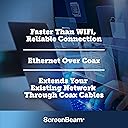
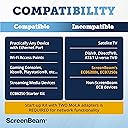
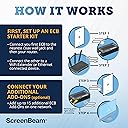
The MoCA 2.5 Network Adapter Starter Kit (ECB6250K02) transforms your home's existing coaxial wiring into a high-speed Ethernet network delivering up to 2.5 Gbps. Ideal for professionals craving reliable 4K streaming, gaming, and remote work, it supports up to 16 devices and enhances Wi-Fi by connecting remote access points. The kit includes two adapters, cables, splitters, and power supplies for quick, hassle-free setupโno new wiring required. Compatible with most routers except certain satellite and AT&T networks, itโs the smart solution to future-proof your home internet.


| ASIN | B088KV2YYL |
| Best Sellers Rank | #11,913 in Electronics ( See Top 100 in Electronics ) #575 in Computer Networking (Electronics) |
| Brand | ScreenBeam |
| Built-In Media | 2 Coax Cables, 2 ECB6250 Adapters, 2 Ethernet Cables, 2 Power Adapters, quick start guide |
| Color | Black |
| Compatible Devices | MoCA/Ethernet/Wireless Extenders/coax |
| Customer Reviews | 4.4 out of 5 stars 4,155 Reviews |
| Data Link Protocol | Ethernet |
| Data Transfer Rate | 2.5 Gigabits Per Second |
| Hardware Interface | Ethernet |
| Item Dimensions L x W x H | 4.5"L x 2.2"W x 1.1"H |
| Item Type Name | MoCA 2.5 Network Adapter for Higher Speed Internet, Ethernet Over Coax - Starter Kit |
| Item Weight | 0.65 Pounds |
| Manufacturer | ScreenBeam |
| Mfr Part Number | ECB6250K02 |
| Model Number | ECB6250K02 |
| Product Dimensions | 4.5"L x 2.2"W x 1.1"H |
| UPC | 789286809469 |
| Unit Count | 2.0 Count |
| Warranty Description | 1 Year Parts and Labor |
J**S
Works great for extending both your ethernet and Wifi Connections !!!
As all IT pros know the best way to extend WIFI is to have your house wired with ethernet cables, but how many people have that? Answer: not many. However, almost everyone has coax running in their house for cable TV and that is where MoCA (Multimedia over Coax Alliance) comes in. A MoCA adapter allows additional routers to receive an internet signal directly from your modem through the existing coax cable in your walls. You just plug the coax from your wall into an adapter and then plug the included ethernet cord from the adapter to an additional router, and now you have a super-strong WIFI signal as if the main router and additional router were connected by an ethernet cable. This is amazing for home network, easy to install and it works flawlessly I live in a condo with no way to run ethernet cable to the living room so this is great solution to this problem I went from 55mbps on my pc to 914mbps with this, I never could get any better speed than that due to there being a thick wall and furniture between our X1 Modem and my PC but because of these MoCA adapters I now have found my solution. It also has helped improve the download speeds on my Xbox as well I went from having 60.55 mbps to having 865mbps download speeds. This is the setup that I am using I connected the Moca adapter to my Router using Cat5e, then connected Coax to the other end of the MoCA adapter that leads from the coax coming from the wall. For the 2nd MoCA adapter I connected the Coax from the wall to one end of the splitter, and another Coax cable to my cable box and another to the MoCA adapter that connected to my Xbox Series X. Everything worked great, now I can get high speeds in a room that didn't have a ethernet lan cable. Getting speeds of 1G and fast downloads of 900Mbps on the xbox! Ok, now for the Pro-Life Tips. 1. THIS WILL NOT WORK FOR SATELLITE TV! CABLE ONLY! Sorry, but you're SOL w/ DirecTV and Dish 2. You do not need a MoCA adapter at your modem if your modem is already MoCA enabled. You will need to hook up one of the adapters to the modem if it is not MoCA enabled. A lot of people rent a combination modem/router from their cable provider. The newer ones are already MoCA enabled and if it's not, your cable provider will trade your old modem/router for an updated one for free. 3. Speaking of renting a modem/router combo...don't. Buy a separate ARRIS SURFboard Modem and whatever router you want and it will pay for itself in about a year. Don't give your hard-earned shekels to the corp bastards. 4. You need a MoCA 2 way splitter if you're running your additional router off a coax that is also providing a cable signal to a TV. The instructions and diagram that come with the adapters aren't clear about this. The adapter set comes with one 2 way splitter, but you will need a 2nd one if you're going to set up two adapters and two additional routers. You can buy a 2-way splitter at Lowe's or Home Depot for $6. Just make sure it is MoCA compliable. Also, the box comes with two short coax cables, but you will need two more if you're connecting them with two TVs. You can buy 3 ft. coax for cheap if you don't have extras laying around. 5. The MoCA adapter does not send out a WIFI signal by itself! You must use an additional router for each adapter. Any old router will do, so you don't need to blow your brains out on the latest and the greatest. However, you still need your original "Home Base" router that you have already been using. 6. Instructions. How to set up in a room where you already have a TV and your modem is MoCA enabled: Unscrew the coax from the cable box and screw it into the "cable in" port on the splitter. Now screw in another coax to the "cable out" port of the splitter and run it back into the cable box. Cable TV is now all set. Screw another coax to the other "cable out" port of the splitter and screw the other end into the "cable in" port on the adapter. Then plug the provided ethernet cable into the adapter and plug the other end into the WAN port of your router. Plug adapter and router into the wall or outlet strip and enjoy that sweet, sweet rock hard WIFI signal. 7. Please know the difference between "your" and "you're". Your is possessive, ie: your new MoCA adapter. You're is a contraction of you are, ie: you're going to love your new MoCA adapter. (See what I did there?) 8. Enjoy your strong WIFI signal and please be safe and please be nice to each other. We're all in this trying time together and a little kindness goes a long way. Cheers.
C**S
Spectrum Internet working with DOCSIS 3.1 modem and VOIP Telephone. Extremely faster than Powerline!
Just recently learned about MOCA despite it being out for over 10 years. WIFI was good for reaching the second floor, but for millisecond speed, I had gone with TPLINK Powerline but only maxed out with 90mb/s instead of the 1gb I should have gotten. It took me awhile to figure out how to wire up all of the components so I could get my VOIP telephone and Spectrum Internet working. I tried to use the components provided in the box, but it wasn't enough to get the Spectrum internet properly working via the Screenbeam ECB7250. I needed to buy another 3 way splitter (Amphenol ABS313H) and (TWO) PPC MOCA POE filters. In order to properly wire up the house with existing coaxial, you have to start at the junction box outside where Spectrum comes into the house where the internet is split 2 way to coaxials leading to the VOIP telephone and the internet in an office. STEP 1 in ScreenBeam's Quick Start Guide is basically correct. It just didn't account for the VOIP telephone-the telephone stopped working. The original Spectrum connection was going into their 2 way splitter which went to the VOIP telephone and the internet modem. To get the Screenbeam SCB7250 to work with the telephone and the internet, I connected Spectrum's ISP coaxial to the IN of one of Screenbeam's 2 way splitter (one OUT to the VOIP telephone; the other OUT to coaxial to the Spectrum modem in the room.) I had to install one POE filter before the coaxial split into a 3 way splitter which was going OUT to the modem room (the first MOCA connection) and to the other room I needed hardwired internet (the second MOCA connection). (I plan to add another ECB7250 to another room that's why there's a terminator on one of the OUTs.) In the first room, I connected the coaxial into the second Screenbeam 2 way splitter: one OUT to the Spectrum DOCSIS 3.1 modem where I directly installed the SECOND POE filter and the other OUT to the 1st SCREENBEAM ECB7250. After awhile, both greenlights on the ECB7250 lit up. I went up to the second room and it too lit up green. SUCCESS! Speed is what I expected and everything works now. Hope this helps people with their Spectrum setup. This is a fantastic device that makes the most of your internet!
A**C
Saved my pre-wired coaxial setup and network integrity/speed going to Verizon FiOS
Some background. My house is prewired with coaxial. The coaxial comes from the outside and into my house. When I was using Optimum the setup was simple. Optimum just connects the cable from the pole to my existing cable outside my home and the signal is brought inside to my house on the 1st floor. There, I plug in my cable modem and my router (Netgear Orbi RBK53S and later an Orbi RBK753S). My setup was perfect. The Orbi has a "good" status for the backhaul and all my devices had as advertised WIFI speeds and solid connections. So why do I need this MoCA adapter? Optimum did not want to keep me as a customer, so I switched over to Verizon FiOS, who offered me more for less $. I already had FiOS before, and the ONT was in my walk-in. When I had FiOS years ago, they were still using coaxial so the same setup applied as with Optimum. The installer just had to install the ONT and then connect the coaxial from the ONT to my outside coaxial cable and the rest would be in my house (quantum gateway/router). Flash forward to present time, to my surprise, the installer told me that over 100MBPS, it is no longer coaxial, and they have to run things through ethernet. I don't have prewired ethernet, and I don't want him to redo the ONT install in my house and run wiring all over. So I told the guy to keep everything the way it was, I'll move the Orbi downstairs since its a mesh router and it should be fine. But it was not. The Orbi positioning was out of whack now. Sometimes a satellite would go out of sync, and another would just show poor. Most of my devices were showing poor performance overall. Before you ask did this guy try resetting the setup for the Orbi. Yes, I initially plugged and played, however I ended up doing a full factory reset setup on the Orbi. So with my frustration, I looked for ways to potentially convert coaxial to ethernet so that I can reuse my pre-existing coaxial setup and position the Orbi router/satellites back to where they were. Which brings us to this Actiontec MoCA adapter. Prior to my recent Verizon install, I had purchased a G1100 router refurbed for less than $40 as I did not know VZ had gone to the ethernet route and I can use any router; not just their routers. Anyways, this purchase turned out to be vital to my setup. My current setup is this and it works perfect for me: Pre-existing ONT in the walk-in. G1100 connected to the ONT next to each other via ethernet WAN. A coaxial cable is plugged into the G1100 router (which switches the coaxial to LAN). This coaxial cable from the G1100 is then connected to my pre-existing coaxial cable that was outside and then brought the signals into my house. From there, I plugged in this Actiontec MoCA adapter via coaxial. The ethernet from the MoCA adapter is then plugged into my Orbi router. I rearranged my Orbi router/satellites back to how they were originally. I switched the Orbi to AP mode as my Qnap NAS had trouble recognizing the dual router setup when I had the Orbi set as router mode with the G1100. Now my network is back to peak performance. Advertised speeds, and stable internet. I'm glad I found this adapter as if this did not work, I would have had to drill a hole through the floor and run ethernet to where I keep all the networking equipment. This adapter saved me from all that hassle.
S**I
Bad Tech Support, Conflicts with DocSis 3.1, But I Got it to Work!
These devices have issues when using with a DocSis 3.1 router. Also be warned that their India based technical support is horrendous. That said, here are the steps their tech support didn't know and how I got the adapters working with a DocSis 3.1 router. I first installed a Point of Entry (POE) filter (not included) where the service connection enters my home, and their included 2-way splitter at my cable router. The adapters will work fine without a POE filter, but you risk sharing your internet with a nearby neighbor if they also use MoCA. The ECB7250-K02 adapters worked great out of the box yielding nearly identical 1 Gbps router speeds, but by default did not have the MPS security enabled and had a default password. The combo box included two 2.5 GB adapters, two splitters, two power supplies, two short coax cables, and two Cat 5e Ethernet cables which was annoying since Cat 5e only provides 1 Gbps and the devices stream 2.5 Gbps. I tossed their substandard cables and got Cat 6 cables which flow 10 Gbps. There was also no manual explaining how to access the adapter and setup MPS security. To access the device, go to the Windows Control Panel โ Network and Internet โ Network and Sharing Center โ Change Adapter Settings. Select the Ethernet connection, right click on it to select Properties, and select Internet Protocol Version 4 and Properties. The Obtain an IP address automatically should already be checked, but needs to be changed to โUse the following IP address.โ with these settings: IP address: 192.168.144.1 Subnet mask should auto populate (if not just click on it) Default gateway: 192.168.144.5 Save, close the properties box, and go to a web browser and type 192.168.144.200 to access the adapterโs MoCA Setup using ID: admin, Password: screenbeam Reset the admin password in the Security settings tab, and to enable encrypted MPS security, check the D-Ext box. The tech support guy incorrectly said to disconnect the coax cable (unnecessary), unplug the adapter for 15 seconds (unnecessary/MoCA Setup has a reboot option), and to restart my PC (also unnecessary). After doing these and reconnecting everything, the devices no longer worked and had no internet connection. When I called back, I was told to reset both adapters which did not work, then my POE and external cable provider filters were bad, and after I replaced them, they then said the MoCA adapters were damaged by using DocSis 3.1. Again, this tech support team is clueless. The adapters work great without MPS enabled, but once you turn it on and manually set a static IP address (to access the device), you lose internet. To get them working, with a DocSis 3.1 router while using MPS encryption, you will need to uncheck the Data External (D-Ext) and Data Low (D-Low), and change the LOF: from 1150 to 1400. Save and Reboot. Then to re-enable internet, go back to the Control Panel โ Network and Internet โ Network and Sharing Center โ Change Adapter Settings and reset the Select the Ethernet connectionโs static IP by right clicking on Properties, Select Internet Protocol Version 4 and Properties, and select the Obtain an IP address automatically. Now my MoCA network is encrypted, and operates near 1 Gbps speeds. The major issue is you will need to set and reset the adapterโs static IP every time you want to access the device settings such as updating firmware, etc. - and their tech support team can't help you. All this aside, these adapters are working great so far. I just hope I never need to call them again. UPDATE: I installed an Amphenol 9-port Inifity Premise MoCA Unity Cable TV Amplifier, part # IPA2008DSL2-RSVFA which works great with Xfinity Comcast. This provides lossless signals to every room and because the amp is MoCA compliant, I was able to reconfigure my MoCA Adapter settings to back to the original checked Data External (D-Ext) and Data Low (D-Low), and LOF: 1150. The addition of the amp and these settings boosted my speeds an additional 100 Mbps.
I**N
Works, does not achieve advertised speeds
What's good: - Easy to install. Plug in coax, plug in ethernet, plug in power, you're set. - Solid, sustained connection. What could be better: - Why would a 2.5gbps device come with a cat 5e patch cable that can't go beyond 1gps? What I expected: I have 2gbps fiber to the house. I speed test at the gateway and get 2gbps up and down. I connect the gateway to the ScreenBeam device using a 5gps out ethernet port from the gateway. The ScreenBeam device is connected to a coax that runs about 50' and connects directly to another SCreenBeam 2.5gbps device which connects to a 2.5gbps input port on the router. No splitters in between. Gateway ->ScreenBeam -> Coax ->ScreenBeam -> Router. I made the connections via cat 6a I have. At best I was able to attain 600 up/down using speed tests in the router's UI across multiple tests. I was expecting much closer to 2000. Somewhat dissapointing but will still use it for other areas of the house, probably a backhaul on a mesh network.
D**K
Great improvement to home networking
Given the minimal discussion of this topic, I found it pretty difficult to figure out how to set up my MOCA network when I set everything up as instructed and nothing worked. I literally had three separate Comcast technicians look at my new house to troubleshoot issues, and all three told me that MOCA is BS, makes no sense conceptually, and is just a marketing gimmick to sell devices like this. They were all 100% wrong, and as I write this, I have a functional MOCA throughout my house. But I hit some a few frustrating speed bumps along the way before I got my system up and running. In short, MOCA is a plug-and-play solution for using coaxial cable outlets in a room to provide a hardline ethernet internet connection. You can plug it directly into computers/TVs in those rooms in the same manner that you'd plug them directly into your router with a hardline connection, or can alternatively use it for WiFi extenders to expand coverage throughout the house. MOCA is significantly (think 2-3x) faster and more reliable than WiFi. If you're happy with your WiFi, no need to bother with this setup, but I'm glad that I did. In my experience, these adapters themselves are trivial to set up. You plug in the power, connect the coaxial cable from the wall to the adapter, and run an ethernet cable from the adapter to whatever you want to put on the Internet. That's it. The hard part is finding and eliminating the network bottlenecks in the system. My biggest issue was finding all of the cable splitters in my new house and installing the correct replacements, since the right kind of splitter for MOCA (i.e., splitters allowing high enough frequencies in the MOCA range such as up to 2300 MHz) are not standard equipment provided by ISPs like Comcast and need to be purchased separately. This will not work otherwise. Long story short, I had a couple different splitters hidden in different locations in my new house, and until I found them all, the MOCA system was entirely nonfunctional. I'll also note that I'm using an Xfinity XB-7 gateway (modem/router combo) with built-in MOCA support, which means I didn't need to use one of these adapters with my router. If you're in a similar boat and have a MOCA-capable router, make sure you actually enable MOCA mode on the router. You can look up how to do that online (e.g., search for how to change the settings on your Xfinity router). All of the above is, of course, just talking about my experience with MOCA generally. I'm not in a position to compare different adapters, but this product does exactly what it says it will do and provides high-speed internet all over the house via the coaxial outlets. That's a 5/5 in my book.
T**E
WARNING: Device Failures and Refusal to Honor Warranty
Basic back ground. I am an IT professional, 24 years. The installation and configuration on a technical scale is childs play for me. I purchased 8 of these devices from November 2002 - April 2023 to install in my home network, despite having a robust WiFi mesh delivering 800+ link speeds to Ax devices. There are cases however, where I need to have physical connectivity since the 50+ endpoints in my network are not all Ax rated and the airspace is crowded. All Screenbeam MOCA devices initially worked as expected. As of June 2023, 5 of the devices now have defective Ethernet ports. Ethernet ports are a common failure point on routers, switches, and media conversion devices (like these). Bonding occurs as expected; however, Ethernet link activity and addressable network is non existent. Thatโs 5 failed devices out of 8. I requested an RMA under warranty through customer service. The response has been slow, but worse, the company customer service rep (unknowledgeable about IT networking 101) has asked for troubleshooting steps that are inconsistent with the issue. Also, have been instructed to perform time consuming phone calls with no clear understanding of the purpose other than to extend the support case. While understanding that I am allowing the company to proceed through their case management process to get an RMA (I get it, process), I performed the basic troubleshooting steps requested. Supplying results, I was told the devices were working as expected and asked to call customer service. This is a deliberate attempt to prevent or slow replacement - I know because I ran a consumer electronics call center long ago in my career (also the reason I left that job 15 years ago). This is ridiculous and a continued attempt not to issue the RMA and replace the devices under warranty. You can simple swap in a defective device to the topology, bonding occurs, and network traffic is non existent - no link activity on the port, no addressable network layer. Swap again with a good device and no issues. These devices have a 1 yr warranty. I share this experience so you can make your own judgements, but I cannot recommend these devices with high failure rates and when the company does not honor the warranty/RMA process. This is contractual. While most buyers/reviewers may purchase and never have an issue - providing 5 star reviews about the excitement that these devices โmagically workโ, I say proceed at your own risk. If these devices were $20-30 like a common desktop network switch, or 1-2 failed devices, I would just eat it and move on. But they are not. At $70 a pop, 5/8 device failures, we are venturing into material expense for a majority of people. I fundamentally do not accept this performance. I am moving on to competitor devices. Buyers be warned. Lastly - if Screenbeam customer service responds to this comment that they would like to โhelp meโ - by directing me to call customer service, I say no thanks. Spare us the perception that your company is trying to resolve the issue when I already gave you that opportunity. Save me the intellectual dishonesty. The resolution is RMA. Period. The resolution is not to stay on the phone wasting my time teaching your low level techs basic networking and your continued assertion that the devices are working and the issue is my โother equipmentโ, WAN provider, or a coax splitter that isnโt present in the network topology. Comical.
D**A
If you have a poor WiFi signal you're dealing with. YOU NEED THIS SYSTEM!
This MoCA 2.5 system is the bomb! My job is remote, and I work for a company in Massachusetts while living in Arizona. I work with CAD modeling software and the models get pretty big with 1000's of parts. Previously, I was using WiFi which was provided by COX and their modem with panoramic WiFi didn't cut it, download speeds were horrible. If I was near the router I would get 325-330 Mbps. In the room where my computer system is which is a straight run down a hallway, I was getting 10-20 Mbps. I installed a net extender and the best I could get with it was about 30-40 Mbps. It would take 30 minutes to upload the model I was working on and that would sometimes result in a communication error. After installing a ScreenBeam MoCA 2.5 which was so easy to install, I was downloading at 324.7 and that was through a secure VPN tunnel! Model open time was 33 seconds! These devices are amazing and will be saving me from lots of frustration and lost time! I will probably buy 2 more of these extenders for 2 more rooms. The only drawback I will say is the installation took 3 coax cables at the router and 1 in the room where it was going. The system I purchased only came with 2. Normally it wouldn't have been a big deal because over the years, I accumulated dozens of coax BUT, we moved in to our AZ home back in March and I threw out all the junk I didn't want to carry across the country and the coax cables were part of the cleanup. I got these the evening before Thanksgiving and I was fortunate enough to have my cousin stop by and bring me a coax cable and stay for Thanksgiving dinner. It was a 10 minute install and it works flawlessly! So make sure you have a spare coax cable or 2 hanging around. The image below is a picture of my laptop computer on the left and my desktop computer on the right. The left is running the MoCA 2.5 system and the right is using Cox WiFi at 2.5 GHZ with a net extender halfway between the modem and my desktop. Total length between modem and computer room is about 55-60 feet.
C**S
Easy way to super fast network access
I have used many Ethernet over Powerline adapters over the years and even though they worked, speeds were never even close to the advertised ones. This week I decided to get one of these Ethernet over Coaxial cable adapters (it plugs where you normally plugin a TV box that uses the coaxial cable) to test it in a room where I get some spotty WiFi coverage (even though I do have three access points - all Ubiquiti gear). Not sure if it is just because I no longer use Cable TV services (what means I have nothing plugged in to the coaxial ports at home any longer) but Jesus Lord, this thing solved ALL the performance issues. It is maxing out the Gigabit card on my son's PC so now when I try to copy large files from my network storage devices (a QNAP and a Synology) I am hitting 112 Mbytes per second (what is 996 MBits), the maximum speed on the switch where I plugged this in (and also the maximum speed on my son's PC Ethernet port). Massive improvement and took me like five minutes to install. Again, I am not sure if it is working great for me due to not using the coaxial cables in the house any longer for anything. Also I am not sure yet if performance degrades with multiple adapters but I would expect it to be the case as a single adapter goes to the switch so if I have multiple adapters on the other end (i.e., the PCs in the rooms) all of these adapters will got to the switch through that single adapter in the switch room. Regardless, still massive improvement as I am sure not all machines will be on at the SAME time AND doing massive transfers at the same time either. Fantastic product.
R**D
Worked well in a log house
This was simple and effective for hardwired backhaul connections for Wi-Fi mesh points in a log house using the coaxial cables installed many years ago. It was essentially plug and play.
M**E
Solution to stuck Coax
Coax cable was stuck in conduits for a 20 year old brickwork house in Portugal and I needed to get WiFi upstairs. I originally wanted to pull through Ethernet cable but was stuck with the coax. Researched the screenbeam moca and installed with no problems, hooking up to second access point. Working great now have WiFi working on both floors
A**R
Does what it says on the tin.
I bought a pair of these to cure my network issues in a 17yo double storey house. I was concerned I might have to find and replace incompatible splitters in my roof, etc. but no - it was plug and play, gigabit network 30 seconds after plugging them both in. No interference to aerial TV reception. Saved me a lot of nuisance and expense vs. having to get ethernet installed. Time will tell how reliable they prove to be. Australians retrofitting these to older homes will likely have PAL-type female sockets at the wall. You will need to buy an additional PAL male to F-type male cable to connect each of these units - Amazon sells them. If you will be connecting a TV at the same socket, you will need two of them in addition to the included F-type to F-type cable and splitter. The included power supplies (at least the ones I received) will accept 220V but have US pins, so you will also need two US>AU travel plug adaptors (or replacement Australian power supplies).
G**M
Good quality product giving a reliable and stable connection
This is a good, well made, quality product. Its easy to install and gives a robust and reliable network connection with no connection issues - totally reliable and stable connection up to 1000 Mbps
Trustpilot
2 months ago
1 month ago