


🎮 Dominate every click with the fastest, most precise wireless gaming mouse.
The Razer Basilisk Ultimate HyperSpeed is a cutting-edge wireless gaming mouse featuring Razer's fastest HyperSpeed wireless technology for 25% lower latency, a 20,000 DPI optical sensor for pinpoint accuracy, and optical switches that register clicks 3x faster than traditional mechanical switches. With 11 programmable buttons, 5 onboard memory profiles, and an impressive 100-hour battery life, it offers unparalleled customization and endurance. Designed for pro-level gamers seeking seamless wired or wireless play, it comes with a Speedflex cable and a 2-year warranty.






| ASIN | B08564NLZG |
| Additional Features | Wireless |
| Antenna Location | Gaming |
| Battery Average Life | 100 hours |
| Best Sellers Rank | #28,309 in Video Games ( See Top 100 in Video Games ) #978 in PC Gaming Mice |
| Brand | Razer |
| Button Quantity | 11 |
| Color | black |
| Compatible Devices | Personal Computer |
| Connectivity Technology | Razer HyperSpeed Wireless |
| Customer Reviews | 4.5 out of 5 stars 3,487 Reviews |
| Enclosure Material | Plastic |
| Finish | Classic Black |
| Hand Orientation | Right |
| Hardware Platform | PC |
| Included Components | Mouse, 1.8m Speedflex cable, 2.4GHz wireless dongle |
| Item Dimensions L x W | 5.11"L x 2.96"W |
| Item Weight | 3.84 ounces |
| Manufacturer | Razer |
| Mfr Part Number | RZ01-03170200-R3U1 |
| Model Name | Basilisk Ultimate |
| Model Number | RZ01-03170200-R3U1 |
| Mouse Maximum Sensitivity | 20000 dots_per_inch |
| Movement Detection | Optical |
| Movement Detection Technology | Optical |
| Number of Batteries | 1 Lithium Ion batteries required. (included) |
| Number of Buttons | 11 |
| Operating System | Windows |
| Pattern | Mouse |
| Power Source | Battery Powered |
| Range | 10.0 meters |
| Special Feature | Wireless |
| Style Name | Basilisk Ultimate - Wireless |
| UPC | 811659035844 |
| Unit Count | 1 Count |
| Warranty Description | 2 year manufacturer |
R**H
Great Modern Mouse
I have been switching between mice for a while now, and steered clear of wireless mice since my last experience with an older Logitech mouse back in 2014. I was quite happy when I found Mionix, and favoured the Naos 7000 as my daily driver for years until the cable broke. I saw the Castor, and figured that would be a sidestep. It lacked the ergonomics, but had the build quality I loved. At the time, I thought that Mionix with its "perfect sensor" and premium feeling rubberized coating was as high-end as you can get, all without the fancy gamer stuff thrown in. When it came to Razer, I never really thought I would buy another one of their products. I had terrible experiences in the past, with my Tiamat headphones quite literally falling apart from standard use with both the cable fraying and the control box splitting open and exposing the delicate wires inside. Whenever I tested their keyboards during my early mech days around 2015, I thought they lacked the build quality of even cheaper mechs on the market. Many reviews online supported my thoughts that Razer had terrible quality assurance, so I resolved never to buy another of their products ever again. Apparently, that all changed in the past few years. In comes the Razer Basilisk, a very premium feeling wireless mouse that lives up to its claims. Whether I am using it in wireless or wired mode, there is absolutely no input lag and the movements feel silky smooth. If I had any complaint at all, it would be that the 100 hour claim feels a bit overstated. Yes, it will last you all day and the charging time itself is quick. However, after only 6 hours of use from 100% I did notice in Synapse the mouse was already around 74% operating at around 7000DPI with standard polling rates. Beyond that however, the mouse itself feels spectacular. I had previously been using a gel pad for my wrist with the Mionix mice, but it feels entirely unnecessary with the Basilisk. It feels extremely good in the hand, and while a similarly priced Logitech may feel like light plastic, the Basilisk manages to replicate the feeling I got from the Naos or the Castor without the heavy application of rubber. The scroll wheel adjustment is a fantastic feature, and though I wish there were infinite scroll I still enjoy the ability to set the tactility of the clicks or to have no tactile feedback at all. Overall, very amazing mouse.
T**0
Not a gamer, and I still love it
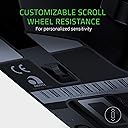
So I am not a gamer, but I absolutely love this mouse. I really like the ergonomically of this device. I love a mouse with a thumb wrist. A lot of the ones you see that have the thumb rest area have tons of buttons on the side and while for some games and some people this is great this one has only a few buttons which serve my purposes perfect. The lighting is nice. It is subtle and it can be somewhat controlled via the mouse, but can definitely be customize with their software. The wireless connectivity works very well. It charges quickly and if you wanted to use it wired the cable that it comes with is extremely nice and looks good plugged up. The buttons feel nice and tactile. The adjustable clutch/tension on the scroll wheel is very nice and easy to adjust on the floor. The adjustable dpi buttons are very nice even for someone who is not gaming as it gives you a little bit more control over the sensitivity of the mouse. I said above my favorite feature is the side buttons negatively I will leave them alone to what they are designed to do. It helps having one that is a back button for Internet browsing. There is a third button that a little rubber cover can be popped off towards the very front of the thumb area And a small metal bar installed to act as a third switch. I use this to toggle a hot key for Ctrl plus alt in order to help me use the Magnifier set up as I am visually impaired. This helps me not have to use keys on the keyboard and we’re just scrolling the Internet. I can zoom in and out while using this macro key and the scroll wheel , it is definitely made life a lot easier and more enjoyable to use my computer.
K**R
Very Responsive and accurate!
This mouse feels great, its responsive, accurate and has that RGB flare. I've gone through a few mouses over a year and a half and this one by far feels the best. My previous mouse was a Redragon m801 sniper pro and I thought that was good at the time, but when I switched to the Basilisk Ultimate the sensor felt almost weirdly responsive in a good way. This is my first Razer product and the presentation is spot on. Once I dialed in my dpi lighting and binding, I was off to play Apex legends. Starting with the ergonomics, it feels great after a couple weeks of adjustment. My ring and pinky felt most of the discomfort at the time since the previous mouse was so wide, but after the first two weeks i feel no discomfort with this mouse. The plastic body is very smooth, almost slippery at the top (Solve that with mouse grips). The optional paddle is nice and has a satisfying click. Speaking of clicking, what I'm used to is a solid click from the mouse 1 and 2, this one is a little soft than most mice I've used, but it's less loud too. The scroll wheel has some cool features with tilt and resistance adjustment. I also appreciate the preinstalled side grips, they work for me. My hand measurements are: 3 3/4in from thumb across and 7 1/2in from the middle and ring to my wrist. Battery Life is great, you can make it through a whole day no problem with the RGB on. I usually have it at 50% brightness so your millage may vary. Its a shame though that its NOT USB-C and still uses Micro B for the cable. The cable on the other hand is very light and you could use the mouse with cable without even noticing. It has a compartment for the wireless receiver and connection is flawless. No Bluetooth thought. The Lighting is another luxury of this mouse that Razer proves well. Some game have implemented lighting with the software, for example: Anything you interact with in Apex Legends gets a colored response on the mouse (The video showcases taking damage and a Phoenix Kit being used). The customization is expansive with the Razer software, you can change multiple areas of the mouse individually with effects. The only problem is without the software, the mouse saves everything but the lighting profile. Last, the build quality is mostly plastic. It's smooth and minimal and has appealing curves. The feet glide smoothly and has that premium material. Overall, it's one of the best in wireless mice out there with a premium price tag. Great if you can get it on sale. Would like to see a new version with USB-C thought. :/
N**H
Daily Driver for over 2 Years
I've been using this mouse for 40 or more hours a week for about 2 and half years now. It is a great mouse, the most comfortable I've ever used. It is very responsive and I've never had issues with it functioning. I am using it with linux, and it is great for working, precision is nice, but also good for gaming. All of the buttons still work. Here are my issues that prevent me from giving it a full 5-stars: -The battery life. It doesn't seem to do standby very well. It usually lasts about 1.5 days, because I typically don't turn if off when I'm done working, it starts to flash mid work day the next day. I have charging cable at my desk that I also use to charge my headset and sometimes I just leave it on there when busy, defeating the purpose of it being wireless. But I suppose if I turn it off and on only when needed I could squeeze about 3 days out of it. -The scroll wheel. You can click it in as another button. By default this performs a paste. After about 6 months or so, this click would occur while spinning the scroll wheel - even when I was applying virtually no pressure. I had to turn the sensitivity down to get this issue to stop, sacrificing scroll speed. -The grippy material on the left and right sides. This definitely helps with comfort, but where my thumb rests has slowly been wearing away. I can also see wear on where my pinky rests on the other side. Currently, it feels gritty, and the material starts crumbling off if apply friction to it. I tried smoothing it out by it just makes the area bigger. This is what years of oils and pressure do I suppose. The material does not hold up for long term use, and I imagine it's the same kind that will start melting if it were sitting on shelf for years. Maybe I'm old, but I don't think a good mouse should be so expensive. For the price I paid for this, I expected even better. That said, I know the positives wouldn't come close to this with most of the cheaper mice on the market.
R**N
battery life!
22 buttons with the use a "hypershift" which i myself programmed as media player buttons and volume rockers etc ! 3 days battery if you set the light settings right (which is "off" unless you click a button (mines set to 1 second i do believe... i tried to upload a review within a weeks time of owning this mouse and i didnt realize it was denied, to which ive had this mouse since October 2020 ?!?!?! (no CLUE i have had this thing for close to two years...well a year and a half) its been thrown by my wife, dropped, (pretty sure shes spilled water on it too) and it still works like new #does not look like new as you can tell by the dirt in my pics i work on cars, do construction, so i get dirty hands from time to time. which now i drive for amazon and LOVE THE JOB ILL ADD!! this mouse was on a sale when i got it, but it seems its still 80 bucks so the price has came down. its worth it considering how accurate it is, it works on solid hard surfaces without a mouse pad, works on "furry blankets", blue jeans, and near anything else you can think of. pretty sure i tried it out on a mirror too? you can adjust near anything to your liking. i have it set to "auto detect" the sensor level so if i go from my desk, to the bed with it itll still work. if you have the budget and came from a corsair m65 pro this razor mouse feels pretty close and well feel at home in your hand.. while being wireless and lighter. also love the way the scroll wheel is adjustable in feedback. for sure recommend this mouse! i dont have the doc, and one thing i dont like is the "dedicated cable" because if you lose or break it then you must get another, unsure the cost of the cable. just dont lose it, or break it....
J**1
Mouse is good, mandatory bloatware and account registration is horrible.
This is my second Razer Deathadder (the first was a Deathadder 2013, this one is the Deathadder Elite) and overall both were a great mouse out of the box. Ergonomic, simple, it worked and did what a mouse does. Nothing more, nothing less. However, both eventually developed the same issue. When you left-click once, it is registered as a double-click. This occurs at random by the simplest shift in pressure when clicking, holding and dragging something that you've selected. I reviewed the comments for this same listing and found this to be a consistent issue. It is 100% hardware related, due to a 'fix' in firmware that was released by Razer for the issue on the Deathadder 2013. This firmware 'fix' resolved the double-click issue for the Deathadder 2013 version but is not available for newer Razer mice. Speaking to their support, and some online Razer forum research I found that this is due to a poorly designed mechanism in the newer mice themselves which do degrade over time. They confirmed that when this issue occurs on the Deathadder Elite/Chroma, etc. and is related to hardware. Maybe I lost the 'mouse lottery' when purchasing the product, but for it to happen twice? Idk. I won't be purchasing any other Razer products and cannot recommend this mouse due to the re-occurring experience.
D**R
This mouse rocks
I have tried many many many different mice both wireless and wired and the only other mouse that I really liked was the Razer Deathadder Chroma. This one knocks that one out of the park (of course, differing specs and gimmicks aside). The Basilisk's wireless has such low latency, I don't notice it. The problem with previous wireless mice I've had were with the wireless technology. Sadly, the technology was bad just a few years ago and my wireless mice were getting missed clicks and stuttering even with the receiver 2 feet away. The Basilisk boasts a constantly scanning wireless technology that changes channels on the WiFi band every millisecond to make sure the mouse and receiver aren't being "jammed" by other devices like your WiFi router or your neighbor's WiFi router. Take those claims with a grain of salt, but so far I've had no dropouts and no missed clicks. If anything, my clicks are FASTER than before. I play some Escape from Tarkov on the side, and if you know, you know: I can make an SKS and ADAR feel like a full auto weapon with this mouse (granted, it's a convoluted grip, my pointer and middle finger on the left mouse button and my ring finger on the right mouse button and doesn't allow for very accurate shots passed 20 meters in game). Conclusion? Get it. Don't skimp out on the wired version. If you really want the wired version, of course get it, but I can't say enough about the wireless in this thing and I've been playing with both wires and no wires for years.
E**C
Finally found my mouse! Also, buyers guide between this and viper
My first flagship mouse was the razer mamba, which had a peeling rubber grip (likely due to arizona heat and not necessarily razer's fault, glue was actually peeling from my Chevy Sonic too) and eventually double click issues from mechanical switches after about a year of use. Switched to a g703 which was a fantastic mouse, no rubber grips to peel, but developed double clicks after about 6 months of use. I have decided I was sick of mechanical switches and went for optical. Razer is the only reliable optical switch on the market so far. So I got a viper, which is a fantastic fingertip grip mouse when I'm gaming, but it cannot palm grip. I'm more of an artist and editor than a gamer, so I needed a reliable mouse that can palm grip, my long fingers on the super thin viper was making my wrist hurt. If you're trying to decide between the viper and the basilisk there's a few things to keep in mind. The basilisk seems to have newer optical switches than the viper. I ended up with a gen 1 viper and gen 2 vipers cannot be guaranteed, even from razer, let alone a refurbisher that deals with a lot of returns. It's actually why I bought this mouse from razer this time instead of a refurbisher, but there doesn't seem to be any complains online about spongey clicks with this mouse like there were about the viper. The basilisk does have an issue with wobbly clickers, didn't happen on my model, this is a defect that is replaceable unlike the gen 1 switch issue if it does happen. Despite the look of the basilisk, gamers will probably prefer the viper. The viper is not comfortable to me. And I think it's because all my life, even if it was a cheap office mouse, I've been using ergonomic mice. This mouse is heavy. It can be fingertip gripped but if you can fingertip and you play fps you would prefer the viper. I might not return my viper because I actually do like how lightweight it is for games, but I definitely prefer the ergonomics on the basilisk. I cannot palm grip my viper. I prefer the basilisk, fingertip and claw grippers probably won't. I'm a special case, I cannot palm the viper
A**N
Extremely Comfortable and Precise – Great for Long Hours
I’ve been using this mouse daily and I’m genuinely impressed. It’s incredibly comfortable to hold—even after hours of work, my hand doesn’t feel tired or strained at all. The ergonomic design makes a big difference. The clicks feel satisfying and responsive, and the side function buttons are very practical, making multitasking much smoother and quicker. But what really sets this mouse apart is its precision—whether I’m doing detailed work or just browsing, it tracks movements perfectly. Highly recommended for anyone who spends long hours on the computer and needs both comfort and performance
Y**S
hızlı kargo için tşk.
ürün çok hızlı ulaştı 2 hafta ön görülen teslim süresi 4 günde geldi. ürün güzel paketlenmiş ve sağlam ulaştı. orj ürün kaliteli tavsiye ederim.
C**A
Excelente mouse
La iluminación y el software som excelentes características, solo recomendaría tener el firmware actualizado. Y en cuanto a la rueda, encuentro más cómoda la opción de alternar entre modos de scroll como en los mouse Logitech, que modificarlo volteando el mouse. (Preferencia personal) Pero aún así la capacidad de alterar la resistencia del scroll es bienvenida y de buen uso. Muy cómodo y excelente diseño ergonómico.
ع**ف
الماوس حلو بس مشكلته حساس
جبار
T**R
Great mouse (Both Ultimate and X Hyperspeed)
In depth usage review from a gamer: I've used the Basilisk Ultimate and the Basilisk X Hyperspeed for many months now, so here is a brief (but in depth review) of everything you'll want to know. They recently fixed the Ultimate. Previously the lights would come on and kill the battery as soon as you shut down your computer. Now one profile is saved to the mouse, so you can set the lights to black (effectively turning the lights off) and now the battery actually lasts a reasonable length. HUGE quality of life improvement. The ultimate uses a semi-proprietary micro cable. However, you could theoretically cut out the grooves on the mouse (that make it semi-propreitary) after which any reasonably thin micro cable will work to charge it. The software is extremely finnicky on both mice. Sometimes it only recognizes your mouse (in the software) if it's plugged in, sometimes if it's on 2.4. Sometimes if it's bluetooth (for the X Hyperspeed). The software is definitely not my favourite. But after it's configured it just doesn't matter that much. The X Hyperspeed is MUCH better bang for your buck. And would come unanimously recommended by me. At this price point, it's too good to pass up if you like this form factor (and don't need too many buttons). Both the software and windows bluetooth menu are unreliable for battery remaining though. And bluetooth isn't going to be good enough especially for FPS gaming. For more relaxed gaming it's fine. Update: the unreliability of the battery indicator is because most rechargeable batteries are 1.2v and regular batteries are 1.5v. So it shows as already being mostly discharged (due to low voltage) even when it’s fully charged. But then lasts a long time anyways. If you use proper 1.5v batteries it will be much more accurate. If you need the best of the best (or more buttons), get the ultimate. But aside from more buttons, nothing else is a noticeable improvement IMO. Thus I prefer the X Hyperspeed, just be somewhat cautious about letting the battery completely die without a backup on hand). The texture is also more satisfying on the X (has a rougher finish whereas the Ultimate is entirely smooth). CUSTOMER SUPPORT: My X Hyperspeed eventually stopped connecting over 2.4Ghz. I posted on reddit looking for help, and Razer support responded VERY quickly. Kept responding to help out and follow up, and eventually I did have to RMA it and they sent me a replacement. But the prompt responses from Razer support was incredible! I strongly recommend these mouses. Bang for buck, (and mobile versatility of Bluetooth / 2.4) you CAN'T go wrong with the X Hyperspeed. Trust me.
Trustpilot
1 month ago
2 weeks ago