We remain fully operational. Our teams are working around the clock to ensure your deliveries continue safely.

DOWNLOAD THE APP


Copyright © 2025 Desertcart Holdings Limited
DOWNLOAD THE APP


Buy anything from 5,000+ international stores. One checkout price. No surprise fees. Join 2M+ shoppers on Desertcart.
Desertcart purchases this item on your behalf and handles shipping, customs, and support to Spain.
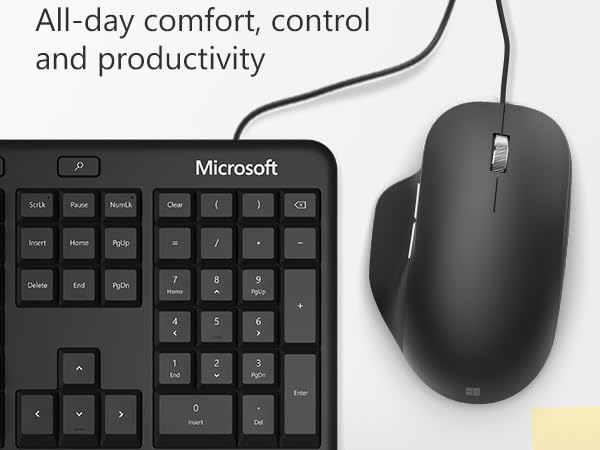
🖱️ Elevate your workday with precision and comfort — because your hands deserve the best.
The Microsoft Ergonomic Mouse in sleek black combines advanced laser tracking with an ergonomic design to reduce fatigue and enhance productivity. Featuring two programmable buttons and a precise scroll wheel, this wired mouse delivers reliable, lag-free performance on multiple surfaces, making it an essential tool for professionals who demand comfort and accuracy all day long.


| ASIN | B07YGQJ9XN |
| Antenna Location | Office |
| Are Batteries Included? | No |
| Are Batteries Required | Yes |
| Best Sellers Rank | 20,221 in Computers & Accessories ( See Top 100 in Computers & Accessories ) 484 in Mice |
| Box Contents | Contents: 1 item |
| Brand | Microsoft |
| Brand Name | Microsoft |
| Button Quantity | 2 |
| Colour | Black |
| Compatible Devices | Laptop, Personal Computer |
| Connectivity technology | Wired |
| Customer Reviews | 4.5 out of 5 stars 351 Reviews |
| Embellishment Feature | LED |
| Enclosure Material | Plastic |
| Global Trade Identification Number | 00889842531329 |
| Hand Orientation | Ambidextrous |
| Hardware Platform | PC |
| Item Dimensions L x W | 11.8L x 7.6W centimetres |
| Item Type Name | Mouse |
| Item Weight | 104 Grams |
| Manufacturer | Microsoft |
| Manufacturer Part Number | RJG-00002 |
| Minimum Required Operating System Version | Windows 10 |
| Model Name | RJG-00002 |
| Model Number | RJG-00002 |
| Movement Detection | Laser |
| Movement detection technology | Laser |
| Network Connectivity Technology | Wired |
| Number of Batteries | 1 A batteries required. |
| Number of buttons | 2 |
| Operating System | Linux, Windows 7, Windows XP |
| Pattern | Smooth |
| Power Source | Corded Electric |
| Product Features | LED Lights |
| Product Finish Type | Smooth |
| Product Warranty | 1 Year |
| Special feature | LED Lights |
| Style Name | Mouse |
| Theme | Office |
| UPC | 889842531329 |
| Unit Count | 1.0 count |
J**P
Love this mouse
I probably have an obsession with finding the perfect mouse. This comes close. I really like the way the thumb rests on the mouse, and it has really help with hand/wrist pain. The weight of the mouse is just right, and it is nice and accurate I don't use the side buttons, either my thumb is too small or the buttons too high and small for me to easily press them
D**G
Ideal for Programmers - Never a dfissapointment.
If you are using a mouse all day long this is perfect. The thumb rest works well the Forward/Backwards nav buttons by the thumb are a god send (both in Office or Visual Studio/VSCode or Chrome). The mouse wheel is very precise, it clicks so eachclick movement can be calibrated. There is loads of Cable, so is you are moving around the PC, or to reach the Workstation no problem. Nothing to install, plug in the USB and go. The laser works on any surface (no so good on a glass table? I use a Gamers Lazer mouse mat as I like the precision. It being wired there is no lag as you might find with BlueTooth ones. Sixty quid seems a lot for a mouse, but you will never need to buy another, and the cost of mistakes is more.
M**T
Mac users: you can buy and use this, too!
My Microsoft Intellimouse (c2003) still technically works, but the scrolling ball was getting squeaky and I didn't want to open it up. The beige plastic was also discoloured. It has served me well, but time for a replacement. I use both a Mac and a PC. This one is really comfortable and light. It fits really well in the hand, and the scroll wheel is smooth and silent. It is good for games as well as office tasks. The left and right clicks have a good action, and I'm delighted so far. It seems great value, but not quite as bombproof as my previous Intellimouse. Mac users: this works instantly as soon as you plug it in. But there's a trick up its sleeve. There are two side buttons on the mouse. On a PC, you can configure these in Windows, but on macOS there is no special options in System Preferences, and Microsoft don't make the mouse software extensions for macOS. But wait! You can still configure them: - Open System Preferences - Click on Mission Control - You can assign actions to the mouse scroll button ('Mouse Button 3'), and the two side buttons ('Mouse Button 4' and 'Mouse Button 5'). This way, you can show the desktop, do Mission Control, or just see the windows for one application purely through these buttons (see screenshot). If you're into more configurability, there's a little paid app called Steer Mouse, with a 30-day free trial.
B**S
Slight Difference Makes A Difference.
Decided to invest in an ergonomic mouse to go with my keyboard and to buy them separately as I wasn’t sure if I would keep them both, just one or neither - I was a bit sceptical to if they would work or make a difference. Visually I could not see much of a differ between this mouse and a normal one until I bought it. It slightly moulded to the right which I like as it is still easy to manage, I thought getting a vertical one might be too much. Another benefit for me is that it is wired; many ergonomic mice are wireless. I have found I do use my wrist supports less but I think its not just due to the mouse but all the ergonomic items I have purchased to make life a bit easier.
C**.
Best Mouse I have ever used.
Very comfortable and easy to use. Plug in and use!!
C**R
Great Mouse
Got this for £23 pound great value wired had many wireless ones all Microsoft all good but you soon realise wired is better more responsive and quiker. Give this 10/10 well made light does a great job,would recommend.
A**R
Comfortable
No nonsense mouse, just does the job
A**R
Overall a good mouse
Overall it’s a pretty good mouse, One thing that it could do better would be to track slightly faster. It’s also priced a little bit high.
Trustpilot
1 month ago
2 weeks ago