🎮 Level up your game with precision and comfort—wired for winners!
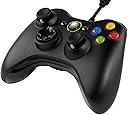
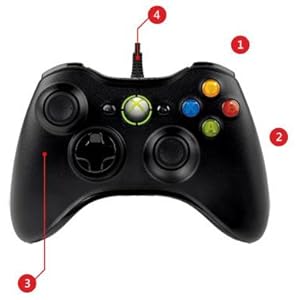
The Microsoft Xbox 360 Wired Controller is a high-quality, ergonomic gamepad designed for both PC and Xbox 360. Featuring 14 responsive buttons, precise thumbsticks, pressure-sensitive triggers, and an 8-way D-pad, it ensures superior control. Its 9-foot flexible USB cable provides a reliable, lag-free connection with the convenience of plug-and-play compatibility across Windows versions, making it a top choice for gamers seeking comfort, precision, and hassle-free setup.


| ASIN | B004QRKWLA |
| Additional Features | Ergonomic, Rumble, Wireless |
| Best Sellers Rank | #9,845 in Video Games ( See Top 100 in Video Games ) #19 in Xbox 360 Gamepads & Standard Controllers #174 in PC Gamepads & Standard Controllers |
| Brand | Microsoft |
| Brand Name | Microsoft |
| Button Quantity | 14 |
| Color | Black |
| Compatible Devices | PC, Windows |
| Compatible Video Game Console Models | Microsoft Xbox 360, Microsoft Xbox 360 E |
| Connectivity Technology | USB |
| Controller Type | Gamepad |
| Customer Reviews | 4.4 out of 5 stars 7,130 Reviews |
| Global Trade Identification Number | 00885370145717, 00885370239393 |
| Hardware Platform | PC |
| Included Components | 90-Day Limited Warranty, Microsoft Xbox 360 Wired Controller |
| Item Dimensions | 7.91 x 5.51 x 2.56 inches |
| Item Dimensions D x W x H | 7.91"D x 5.51"W x 2.56"H |
| Item Weight | 353 Grams |
| Manufacturer | Microsoft |
| Manufacturer Part Number | 52A-00004 |
| Model Name | MICROSOFT CORP/LICENSING |
| Model Number | 52A-00004 |
| Package Quantity | 1 |
| Power Source | Corded Electric |
| UPC | 102930551079 885370145717 132017645766 885370239393 627813034499 |
S**N
Perfect in Windows 7, 8, and 10 with no driver hassle. Quality multipurpose controller for PC and Rasberry Pi RetroPie
I already use the standard wireless 360 controllers with the official MS wireless USB receiver. Which also works great with Windows 7, 8.1, and 10. As well as android devices and Linux such as the Rasberry Pi Distros and the RetroPie 3.x project. So I wanted to get my kids controllers as well but didn't want to have to buy 2 USB receivers AND 2 more wireless controllers dedicated to them as that would drive up the cost a lot. So I bought 2 of these for their individual Windows 10 laptops. Works great. Also tested them with my Raspberry Pi 2 using RetroPie 3.0. Tested with Windows 7 and 8.1 on other desktops and laptops that I have before upgrading them to Windows 10. Just works great. Pros: - Excellent quality controller that console players will be at home with. I prefer the PS3 Dual Shock over the Xbox 360/One and PS4. But the PS3 and PS4 controllers are not excellent plug and play like these. No messing with drivers for Windows. - Wired keeps the cost down without having to purchase a USB receiver. - USB cable has a quick break-away section that can potentially save your USB port from getting damaged if the cord is pulled during gaming. I may test that on an old system one day. Cons: - Wired. But if that is a deal breaker, the wireless setup is also excellent! Just cost more in total. - USB plug, the hard plastic portion, is really long. Which can lead to a lot of stress on the USB port as the weight of the cable is further out from the port. I don't see this as a huge issue. But just keep it in your mind if you plan to leave it plugged in all the time. i am able to adapt just fine between the Playstation and Xbox style of controllers, and just about any controller. So it more important for me to get a controller for my non-consoles that has excellent compatibility. And automatic support in Windows. I also like how many PC games recognize the 360 controller and have the controller overlays in the game. So if the game shows buttons to press, it actually matches the 360 controller.
H**G
So perfect it's hard to write a review of it!
The controller and the included Windows software to enable it arrived in retail packaging which was, for a change, easy to open and deal with! I followed the clear and conspicuous instructions to install the software before plugging in the controller, then plugged it in. There were no additional steps required, although I waited a minute or two to see if I would get "Restart required" or any other prompts, but I didn't. (Note- I'm running Windows 7 64-bit on this PC. You may or may not get different prompts with XP or Windows 8.) I launched a game (Tomb Raider 2013), and was pleased to see that the game instantly recognized this controller. All of the in-game prompts that had previously said "Press E" or other keys had now changed to indicate the controller's buttons and triggers in place of the previous keyboard prompts. The button prompts were even color-coded to match the color of the buttons on the controller (blue for X, yellow for Y, etc.) I just don't see how there could be any tighter integration of the controller into a game. It was, simply, perfect in every way. The joysticks and D-pad work smoothly and predictably, as is typical of the genuine Microsoft Xbox 360 controllers. No, I'm not a Microsoft fanboy, but there is no denying the quality and performance of all the Xbox 360 controllers I have used over the past 5 years or so. I also used 2 controllers from other manufacturers with my Xbox 360, and they both failed within a year or two... while all of my genuine MS controllers, all over 4 years old and including two wireless ones, still work to this day. TLDR: Top quality construction and performance, software included, straight-forward and trouble-free installation, perfect in-game results. I would give it 6 stars if that were possible.
D**A
Perfect for my Windows 7 laptop! Plug-&-play, works great!
I bought this controller because I needed something that was truely plug and play. It works flawlessly on my Windows 7 Professional 64 bit laptop. I chose the "For Windows" version of the XBOX 360 controller simply because I didn't want to take a chance with other controllers not being recognized or working incorrectly. I don't have an XBOX 360 and wanted this specifically for my Windows computer. It is a perfect match! This controller is recognized immediately by Windows which installs the drivers automatically. If you want you can also go to the Microsoft website and download the latest software/drivers too. The controller itself works as described with no problems whatsoever. I am using this controller along with another XBOX 360 controller to play multiplayer games on a Nintendo 64 emulator (Project 64) on my PC. Assigning the buttons is easy, but the rumble does not work without installing a plugin (not the controllers fault, just letting you know). I don't mind not having rumble at the moment as it does not affect game play and will install the necessary rumble plugin some day. This controller also works with many other PC games. I highly recommend a Microsoft controller over a third-party controller! The quality is worth the money. I also recommend going with this USB wired controller over a wireless version so you don't have to bother with batteries or charging. Its simply plug and play and I can't really ask for more than that. Great controller for Windows computers, buy this one!
J**J
Great controller with some flaws, but probably the least expensive and easiest to use for PC.
Controller works great and is pretty much plug and play with most games on Steam that have controller support. Exactly what I was looking for. No weird additional software and configurations to be made for those looking for a no nonsense gaming experience. I skimmed through some reviews on here and noticed one that stated it wasn't as high quality as an actual Xbox 360 controller... And totally agree. The seams don't line up evenly and the plastic shell seems to be a cheaper build. My controller's right trigger and right analog stick make 'squeaky' noises, as if the springs aren't lubed. I would open the controller myself and drop some oil in there, but was advised by Microsoft support that I may void the warranty. Amazon wouldn't accept a return, but was given a partial credit for the defects. I also saw another review talking about MS support... I contacted MS support via online chat to see what my options were as far as the defects and they couldn't seem to grasp the fact that this controller was being used primarily for PC gaming and not Xbox. They kept asking me about my Xbox (I own one and have used Xbox live, but let my subscription expire over a year ago). I was then referred to talk to Amazon support as the controller was purchased through here.
R**A
I can't take a star off
Because this thing works effortlessly. It worked in my Win 7 system and it works just as well in my Win 8 system. The only issue is mapping buttons for some games, and that's not the fault of the Controller. Some won't be able to work with the triggers and you can't do much with the X button in the center because you're probably not playing on an XBox. The price was also excellent. You're buying a regular 360 controller with the proprietary xbox-to-usb extension on it. The total cable length is longer than I expected and its a real plus when I switch the output on my PC to the Plasma TV and play for a while. It's not really about Keyboard and Mouse vs Controller. It's about using the right tool for the right job. I found it much easier to play Tomb Raider in general using the Controller vs the Mouse/Keyboard combo. Aiming was far easier and more intuitive using the combo but the rest of the game is easier to control using the Controller. I suspect that part of that comes from the development side of the equation. A port is designed to work best with a given set of controls, and if you're playing a port on PC with an Xbox or PS controller than you're most likely playing it in a way that the devs were really able to optimize it for. There really is a degree of fine control you get with an analog stick that a keyboard can't approximate. Sure it gets that much harder to really fine tune your aiming but the nuances of movement and the ease of using gradual changes in pressure to change things like walk speed to all out running easily takes the place of stretching another finger towards that shift or capslock key.
D**K
What Can You Say That Hasn't Been Said
'. OK, here's my two cents. I've used many different controllers. I can easily say that the classic Xbox360 is the best all around game controller I've ever used. No other controller fits your hands so perfectly. The placement of the sticks and buttons and triggers are excellent. When you've got to make fast moves everything seems to be right where you need it to be. The action on the sticks is precise and tight. The pressure needed to actuate every button, stick, and trigger is just right, not too mushy and not too stiff. One of the best characteristics of the Xbox 360 controller is how well it's made. The durability is as good as controller gets. They take a lot of punishment and keep working like new. If I'm playing a game that requires precise control I like using the wired controller. Any fraction of a second lag when using a wireless controller can mean instant death at crucial moments. It's great using the 360 controller to play many PC games. It's compatible with quite a few app games, too. You can even use it with an android tablet if the tablet has OTG support by using an adapter cable that reduces the standard USB connection down to a mini or micro USB port. Not the cheapest controller on the market....but as always, you get what you pay for.
K**D
I think I got about what I expected...
I bought this specifically to try out on Dungeons and Dragons Online (DDO). The reason is that I get into DDO for a few hours at a time, and it has been making my mousing hand sore in the wrist and fingers (particularly, the right mouse button). And, sometimes I get aches in the right arm too. So I thought a different interface might be nice, as it would use different muscles and tendons. And, that aspect is an improvement. But, DDO is an old game, and while it allows you to use this device in conjunction with the mouse/keyboard, it's not built to really play the game in this way without having to go in and make many manual changes in the key mapping set up. That's not a pleasant experience. But, I also planned on buying Dragon Age Inquisitions (DAI) too eventually. Then I read a review that said DAI was designed specifically to play with a gaming controller and that it would work seamlessly on a PC. Wanting to test out this way of playing (as I've never owned a gaming console of any kind - tried a Sony PlayStation once a long time ago, and thought the controller was horrid and very limited). So I was not expecting a miracle, however I found that it indeed does work on DAI. All you have to do is go into the key mapping and the first choice you have is Mouse/Keyboard or Game Controller. When I enabled to to do Controller, the mouse and keyboard became disabled. It's a little strange using a controller, but I am going to try it a few times and see how it goes. It seemed adequate when in a town/camp where you can interact conversationally with others. However, I suspect that the rapid interaction required in battle may make it unpleasant... at least, until I get used to it. More to come.
M**B
Very worth the cash
Let's start with the cons: Microsoft has obviously put much effort into making sure that many games support this product, and in most cases, only this product. I personally find it rather annoying that a very comparable gamepad like the rumblepad 2 has little to no support despite having the same number of buttons and sticks. This bias toward the Xbox 360 controller is especially present on any "Games for Windows Live", which is a feature on many games. I don't like having limited choices, and I especially don't like being forced to buy Microsoft hardware by the game development community...however if it means that one gamepad will work almost universally with nearly all games..then I guess that's the price you have to pay. Now the pros: All resentment aside, this is a very sturdy product. Well built and I'm guessing fairly durable, though I haven't thrown it at anything yet. The cord is surprisingly long, about 15 feet. The cord has ferrite beads at each end to block RF and there is also a "breakaway" connection that could potentially save expensive hardware or people from injury due to tripping on a cord or running off with controller in hand. Two of the "trigger" buttons are analog, which makes them sell suited for acceleration in driving games, or any other situation that benefits from more than just binary on/off buttons. If you've tried a driving game with a keyboard before, you know how annoying it is trying to control a car around a turn by tapping buttons at various intervals. With this you actually have control. This has some sort of accessory connection on it for a mic/headset and what not. There is a device driver included, and I had to use it to get it working under XP, however its not a complicated profile configuration thing..just a driver and a diagnostic utility basically. Most games that support this well actually display the buttons as they appear on the device, a red "B" and a green "A" for example. Other buttons are usually called RB (right button), RT (right trigger), RS (right stick), etc. Force feedback works great, and is supported with many games, though quality of the implementation can vary from game to game. Other comments: If you find the need to use this on a Xbox, you can do that. Also for those who are already accustom to playing on a Xbox will waste no time getting used to this. If you're used to playing "First person" games with a mouse, this can be a challenge. However, if the game relies more on tactics than dexterity and aiming skills, then its not bad. For scrolling games or driving games it's much easier then a keyboard/mouse. There is a wireless option as well, but I didn't want to risk having to deal with battery life, charging, range, interference, lag, disconnects, or losing the thing entirely. Remember the 15 foot breakaway cord! So to sum it up: if you're considering a gamepad for your PC..this is the one. Don't waste your money on anything else.
A**R
Reliable
I switched from XBox360 over to PC gaming a while back and took the controller with me. After many years of (ab)use, it was time to replace it. I checked out a few options, all of which gave me problems of one kind or another, and settled for going back to basics with one of these. It came with a driver disc, which is always appreciated, and everything works like it should. No problems, no hassle, and it's lets me get back to what's important - brain surgery from 200 feet.
G**H
Original Microsoft product with great performance
A fantastic and original Microsoft product. Check for Amazon Fulfilled to ensure that you get the original one. The installation process is very easy. Just run the software CD you get with the box first. Then, after it's installed, restart the PC. Now, connect the controller with your USB port and you are set to use it. If you are using Windows 10, that's it; plug and play. If you aren't using Windows 10 then you would have to make some changes in your device manager in order for the system to detect your controller (there are sites and videos in the internet to help you with that). The product itself is great and fantastic to play games with.
K**.
Probablemente compre otro en un futuro
Compré este producto para uso con mi Alienware Alpha (Windows 8.1), estuve considerando la compra de uno inalámbrico ya que ya cuento con uno y es bastante cómodo, pero al final me decante por este por que tiene un precio más competitivo y no requiere uso de baterías, lo cual es un ahorro extra a mediano plazo. No podría estar más felíz con mi compra, el producto llegó en el plazo estimado de entrega mediante el envío gratis (por compra de $600 o más), llegó dentro de su caja completamente sellada (la cual venía dentro de la caja de Amazon a su vez) con su manual y disco de instalación para Windows, no fue requerido el uso en mi caso de este último, únicamente conecté el control a uno de los puertos USB de mi computadora y comencé a jugar. El diseño de esta versión (en comparación con la versión inalámbrica) me agradó más, ya que al no tener que utilizar baterías se ahorra el espacio otorgado a estas en la parte posterior del control, lo cual, en mi opinión, logra una mejor apariencia estética así como una mayor comodidad de uso. Otro aspecto que me agradó del producto es el largo del cable, el cual, si no me equivoco es de 3 mts. lo que a mi parecer es más que suficiente para la mayoría de las situaciones potenciales de uso. El control cuenta también con un 'mecanismo de liberación' como se le refiere en el manual de uso, el cual tiene como fin evitar una posible caída de la consola o PC a la cual se encuentre conectado el control en caso de un jalón de fuerza desmedida. TLDR: Excelente producto, gran precio y la entrega sin ningún percance.
A**T
Great controller, holds up to the standards of other gaming controllers
I bought this controller to play my Steam games with in big picture mode, the controller is really rugged and built just as well if not better than Microsoft's wireless 360 controllers. the wire is thick and tough, the buttons and shell all feel well made and have the perfect tactile feedback I expected, I've been using this controller heavily for almost a week now and I have not run into any issues, no smelly plastic, no cheapness, nothing some of the other reviews seem to state, but as this is an official Microsoft controller I am skeptical of the bad quality claims others have made. as for the software side of things, the controller came with a CD for drivers and such, but I decided to not use it, just opened the package and plugged it in and went straight into game, the PC sensed it immediately and my games all work flawlessly without having to enable controller modes or change settings. I have tried it on over 30 different games so far and some of those games don't have controller support but the controller works with them just as well as the games who do have support for controllers. I can safely say I am VERY pleased with my purchase and the controller has exceeded my expectations, I highly recommend it if you like to use emulators or would like to give your keyboard a break from gaming.
L**N
Attention à la contrefaçon
Attention, le modèle que j'ai reçu est une contrefaçon même si l'image laisse croire autrement. Fonctionne correctement, même si les boutons sont moins agréables au toucher et les sticks analogiques ainsi que le D-pad sont de bien moins bonne qualité... À éviter.
Trustpilot
2 days ago
1 month ago