


Buy anything from 5,000+ international stores. One checkout price. No surprise fees. Join 2M+ shoppers on Desertcart.
Desertcart purchases this item on your behalf and handles shipping, customs, and support to Spain.
🚀 Elevate your AV setup—never lose sync, never lose style.
The EVanlak HDMI EDID Emulator 3rd Generation is a compact, high-performance adapter designed to maintain stable display connections by emulating EDID signals bi-directionally. Supporting true 4K UHD resolution at 60Hz and multiple pixel formats, it prevents desktop rearrangement and sync loss in multi-monitor or remote management setups. Compatible with Mac Thunderbolt to HDMI devices, AV receivers, switches, and extenders, this 3-pack ensures seamless, plug-and-play operation for professional multimedia environments.


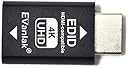
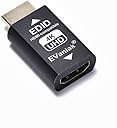


| ASIN | B07YMNDZT8 |
| Best Sellers Rank | #263 in HDMI Cables |
| Customer Reviews | 4.2 4.2 out of 5 stars (1,930) |
| Date First Available | October 14, 2019 |
| Item Weight | 1.76 ounces |
| Item model number | 3ª Generrtion |
| Manufacturer | Evanlak |
| Product Dimensions | 1.6 x 0.8 x 0.5 inches |
P**5
Fixed my Windows issue!
These EDID emulators are exactly what I needed. I run a SFF with 4 outputs going into an HDMI switch with PiP. After upgrading to a 75" Samsung TV, Windows was constantly rearranging the PiP windows when I shut the TV off, something that did not happen with my older 65" Samsung. These EDID emulators do exactly what they're meant to do, and make Windows think that the monitors are always there. No more rearranging when I turn the TV back on!
K**N
This is a Godsend
I have several monitors, and I never shut my PC off. So when I'm done with it, I just shut the LCDs off. Problem is, any open windows get all messed up because when you turn a monitor off the EDID information is lost and Windows freaks out and changes res. REALLY annoying. I put these on each monitor and now absolutely nothing happens when I power down the monitors. Sooooo nice! Windows stay right where they were when I shut them off. They are SO worth the money. Speaking of money, these were cheap. I kept seeing EDID emulators running ~$80 so when I saw these as a three pack for thirty bucks cheaper I was, to put it mildly, wary. However they feel like quality parts and perform the job admirably. No problem either with my one monitor I run at 2160p/60hz. So these are simply a good deal :)
R**L
Works exactly as expected
Solved several problems. When using a KVM to switch between a Linux and Windows desktop, it stopped the screen settings from reconfiguring every time the KVM switched. Also, Linux wouldn't recognize all of the resolution options that the monitor was capable of. This fixed that and I was able to set the monitor resolution properly.
L**N
Adequate, with notable caveats
These worked on Windows 11 out of the box. On KDE Neon, it initially failed me for no obvious reason. I connected a second display so I see what I was doing and could fiddle with the display settings. I discovered that it did work, but only if I dropped my color resolution to 8 bits per color. I also lost the ability to set my refresh rate to my monitor's maximum of 144 Hz; I'm now limited to 120. Not terrible, but an irritation for sure. While my display is now compromised in both refresh rate and color resolution, it's more important to me that my computers think they're not losing a display when I switch them with my HDMI switch box. That said, I'll eventually want something that performs better.
T**D
Failed in under a year
We had several of these installed in a museum setting. Eventually all of them needed to be pulled because they were blocking the HDMI signal.
G**G
4K 60hz with GT660
This EDID passThrough gets different results with different hardware. My desktop GeForce 660 can get 4K 60hz. My laptop ASUS G533 HDMI output can only go to 1920x1080 60Hz, if use displayport output converted to HDMI (using DP - HDMI converter) and then connect this passThrough, can go up to 2560x1440 60Hz, but 4K only 30Hz. My desktop can use this one fine, my laptop use another one which can get me 4K 60Hz (a larger gray color HDMI passThrough, name starting with "p")
J**2
Works As Expected
They are a metal Construction which is great. They work as expected even though a display port to hdmi. However it seems that my notebook doesn't like them caused weird behavior. It seemed to case a fps drop on windows and mouse with a wite haze on screen going through the pass through. It could be my notebook it has been acting really weird lately so im not going to fault the product because it works perfectly fine on my desktop with zero issues im just putting my experience so far in case it helps someone. My notebook is a Alienware 17 r4 by the way and I really think its the notebook causing the issues I described do to possible hardware failure of some sort so take my negative with a grain of salt. So because of that reason im not going to take any stars away.
D**N
This product not work for me
I need a solution to connect 2 computer with 2 extended monitors. I use 'CKL' Dual HDMI 2 port KVM Switch. My monitors are samsung CF390 Curved and when I switch between the computer the monitor stay in black mode without the option to turn them on. I found this product and connect 2 EVanlak pieces to nvidia RTX on one computer and 2 EVanlak pieces to the second computer and this emulator pass through didn't solve the problem. still the monitors stay in black.
F**N
Perfekt für 1440p und mehr
Vielleicht kennt ihr das ja (warscheinlich aber nicht) ihr habt ne HDMI Matrix; Switcher; Split. Mit eigener EDID. Die meisten Videokomponenten gehen von 1080 (FHD) über 1200 (WUXGA) direkt zu 2160 (UHD) d.h. obwohl 1440 (QHD) technisch kein problem darstellt lässt Windows einen die Auflösung nicht auswählen weil die EDID sagt "QHD? Kann ich nicht". Und da kommen diese kleinen Helferlein ins Spiel. Entgegen der meisten EDID Emulatoren sind mehr Auflösungen unterstützt und der 1440p Monitor kann endlich wieder auch mit voller Auflösung laufen. Man sollte halt nur grob wissen was man tut. Wählt man eine Auflösung die höher ist als der monitor oder von dessen scaler nicht unterstützt wird gibt's auch kein Bild.
H**S
me sorprendio lo que hace facil
execelentes
G**W
Awesome
They work like a charm so far.
N**Y
正しく映らない場合は、きちんと奥まで刺さっているか、確認して挿しなおすことで直る場合がある
HDMI切り替え機で入力切替を行う際、PC側がモニターの接続断扱いになって、いちいち表示が乱れるのを防ぐために導入。 基本的には目的通りの動作をしているので問題ないように見える。 向きは関係ないようなので、切替器部分に接続して使用している。 最初、2560x1440@60Hzで表示されなく困っていたが、よく見ると、このアダプタのオス側が少し浮いていた。 これを奥まで押し込んだら、きちんと表示できるようになった。 欠点としては、これをつけていると対応していない解像度設定も表示されること。
C**N
KVM側にかませるとケーブル発熱
以下のように、KVM側にかませるとケーブル自体が発熱します、触って温かいくらいなので40度くらい?暑いとまでは行かないですが、長時間使用した場合や、夏場不安になる温度です。PC側にかませると発熱しません。オスメス両用と説明にありましたが、あまり良くない使い方なのでしょうか? ✕(発熱) KVM↔EDIDエミュ↔ケーブル↔PC ◯ KVM↔ケーブル↔EDIDエミュ↔PC PC側だと少し出っ張ってしまい、物理破壊が不安になります。マシン側に変な電圧負荷がかかって破壊されても困るので、PC側に使用していますが…。問い合わせてみて、不具合でしたらまた追記いたします。
Trustpilot
1 month ago
2 months ago