Buy anything from 5,000+ international stores. One checkout price. No surprise fees. Join 2M+ shoppers on Desertcart.
Desertcart purchases this item on your behalf and handles shipping, customs, and support to Spain.
🚀 Elevate Your Connectivity Experience!
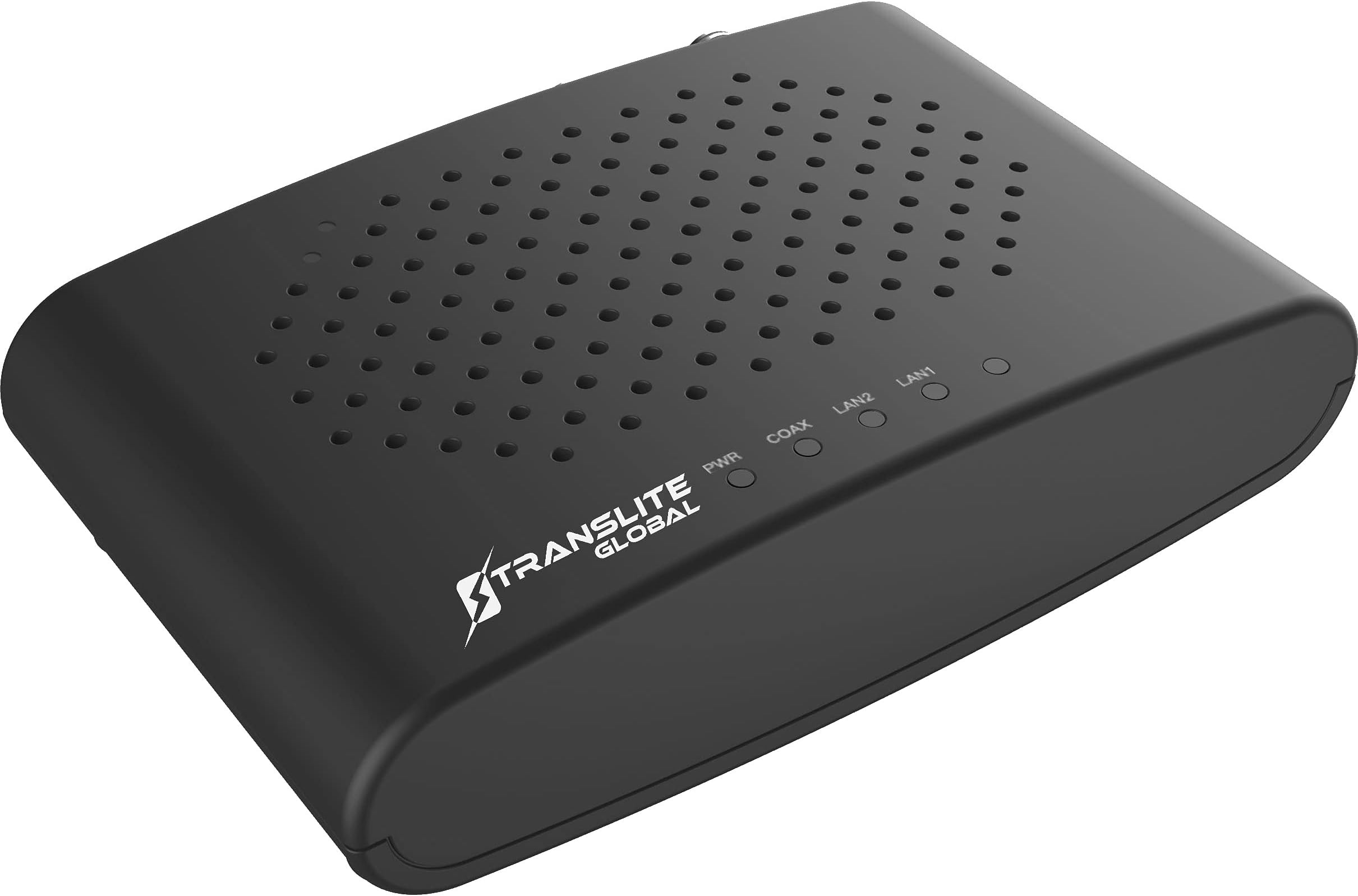
The MoCA 2.5 Ethernet Over Coaxial Adapter (2 Pack) by Translite Global delivers exceptional data transfer rates of up to 2.5 Gbit/s, ensuring a reliable and high-speed internet connection. With two Gigabit Ethernet ports, backward compatibility with previous MoCA versions, and advanced security features, this adapter is designed for modern homes and offices seeking robust and flexible networking solutions.


| ASIN | B07Z3SB1HH |
| Best Sellers Rank | #106 in Powerline Network Adapters |
| Brand | Translite Global |
| Color | 1 GBPS -Single Unit |
| Compatible Devices | Desktop, Smart TV, Smartphone |
| Customer Reviews | 4.1 out of 5 stars 369 Reviews |
| Data Link Protocol | Ethernet |
| Data Transfer Rate | 3 Gigabits Per Second |
| Hardware Interface | Ethernet |
| Item Dimensions L x W x H | 5"L x 3.25"W x 1.25"H |
| Item Weight | 16 ounces |
| Manufacturer | Translite Global LLC |
| Mfr Part Number | 1 |
| Model Number | 1 |
| Product Dimensions | 5"L x 3.25"W x 1.25"H |
| UPC | 860004300700 |
| Unit Count | 2.0 Count |
M**H
Easy install and clear directions, with results that are immediately noticeable!
I wish I had done this sooner! MOCA converts Ethernet signals to operate over the preexisting coaxial cable in your home allowing you to directly connect any devices to your router without having to add additional Ethernet cable. The directions are incredibly easy to understand and result in an easy way to extend your home networt. Once you have to MOCA adapters on the same coaxial network, they should start communicating within seconds. Here's how my network looks now. Bare in mind I bought the 2 pack plus one more to connect three rooms. (1) Master bedroom (first floor): Modem, Google Mesh Router, Apple TV, TV, and MOCA adapter are all directly connected to one another and the MOCA adapter connects to the coaxial wall connector. (2) Family Room (first floor): PlayStation 5 and Apple TV are direct directly connected to the MOCA adapter which is connected to the coaxial wall connector. I'll probably add an Ethernet splitter soon to connect the TV as well. (3) Office (second floor): Google Mesh Access Point is directly connected to the MOCA adapter which is connected to the coaxial wall connector. I have my TV connected to the Google Mesh and PlayStation 4 connected to the MOCA adapter. Benefits: Significantly fewer wireless devices, so less wireless interference. Our outdoor cameras and doorbell and cell phones aren't fighting for bandwidth with our stationary entertainment devices! Game consoles, TVs, and Apple TVs get full speed from the Modem and Router, so less buffering and shorter download times! Google Mesh Router and Access Point being directly connected means you have what's called a back haul network which means you get the full speed of your wireless devices both when your wireless devices connected to the Router and the Access Point. Cons: Some extra wires I'll have to hide somehow. The wife doesn't like visible wires! Also, I wish the adapters had more Ethernet ports. Two is definitely better than the one that most provide, but I still need an Ethernet switch for some connections.
G**P
Outstanding Unit, Watch out for your OLD Coax in House
Hope all this detail is helpful to others who my be considering a purchase or installing this product. I purchased to connect an upper level bedroom with Ethernet-speed connection without running Ethernet cable which would likely be either costly or impossible. Connect is between this Bedroom PC (currently connecting wirelessly) and a basement location where all the TV cables are "junctioned" and main cable from Spectrum (provides Internet & Cable TV) enters the house. Not using for any TV's, just using the RG-6 TV cable to get from the basement to the bedroom but might use that function later. Basement location is perfect for my "attempt" as there is an Ethernet switch near this basement location to which I could connect primary adapter to my "hardwired" Ethernet home system. As there are many MOCA type adapters out there, I "studied up" on the technology before the purchase and settled on these largely because they contain an internal "switch" and give you (2) 1GB ports at each unit. As the capacity of the MOCA connection between adapters is 2.5Gb this means that both 1Gb ports can run at full speed. I did not need a 2.5Gb Ethernet port which a couple of upper level units of another brand offer. At this price point, doesn't make any sense to consider MOCA 2.0 units at all. Also read a lot of reviews and found these Translite Global units rated well against Motorola (no 2.5 MOCA here), Actiontec, and Go Coax (was my 2nd choice). User manual was very well written and easily negotiated for me, as always the diagrams and illustrations are a plus and there were many. Directions regarding accessing adapters internal web setup software, changing adapter passwords, changing IP addresses to fit my home network were well explained. Sadly, a user unfamiliar with web based adapter & router setups, IP addresses, etc. would probably find some of this a challenge. Probably, tech support could help but by email only it seems. On the other hand, it was clear that I could have used the adapters "as is" without the customization and I'm sure they would have worked just fine. Upon initially connecting everything carefully, was getting speeds of only 150mbps on Bedroom PC. Using SpeedTest from Ookla for testing. Normal speed on my Ethernet for any one PC is more like 385mbps, as it's a 400mbps feed from Spectrum (typically running about 447mbps), but switches and routers knock it down a bit at each PC. Bedroom PC had been connected wireless as noted earlier herin to an Access Point (connected at 887mbps @ 5ghz) and getting a SpeedTest of about 285mbps, so, needless to say, I was really disappointed as the speed was 1/2 the wireless speed let alone faster. Decided to disconnect the Bedroom adapter assembly and take it to the basement location. Re-connected with a short (5ft) RG-6 Coax cable to the Master MOCA adapter. Speed jumped to near 400mbps. WOW. Culprit had to be my old Coax wiring running to the bedroom. Next, I took the Bedroom adapter assembly up to a 2nd bedroom upstairs and re-connected everything at that TV tap, obviously changing the basement connect to that wiring as well. WOW. Again speed jumped back up to the 385 level. Conclusion-although a continuity tester showed the wiring to the first bedroom was OK, something was obviously deficient in that wiring. Who knows! Wiring to 2nd Bedroom produced expected speeds. Anyone not getting speeds expected needs to look at their house COAX as probable culprit. Have read where older COAX splitters are a problem as well. Sadly, the 1st Bedroom will remain wirelessly connected (still has good speed) but the good news is that the 2nd Bedroom is hot-as-hell and hardwire reliable. I love these units and they perform up to specs for me. Did not use either the Coax cable or Ethernet cables supplied, as unhappily they were unmarked (no RG-6, CAT markings or anything). It's OK, I have all CAT6, 7, and 8 in my house and had spare connectors as well as short RG-6 cables to use. Love the power adapters with USB cable as they will be easy to replace if I have a failure in the future. On balance, I would highly recommend this product and will buy again as needed (probably testing my Coax house wiring first). Next task is to email tech support in case there is a firmware upgrade.
T**O
good performance, lousy power connector
I have had two of these break off the power plug inside the unit - they are VERY fragile and break off just by normally plugging the power cord in and out. This would get 4 stars for performance, it's too bad they cheaped out on the connectors. And they usually break after the warranty is gone.
R**E
That coax still is a great way to connect devices
The set up was so ex pz it surprised me, I didn't have to change my existing cable modem router combo and even though my ISP cable provider doesn't allow their channels to be viewed without their decoding, the Moca devices definitely improved my lan network performance and linked up devices I had in my bedroom with the Ethernet. My smart TV went from lagging and sluggish to snapping and crisp, excellent.
J**I
Simply to set up, works great!
I've been needing to run ethernet cables to my TV's but didn't bother with the hassle. Instead I looked into establishing a Moca network which appeared simple so thought to give it a try. I needed 4 boxes and the benefit of each box having 2 ethernet ports is key! It was all very simple to set up, first box connected at my internet modem (not router). I ran the incoming wall coax to the Moca port on the box, then the in/out back to my modem. Next, ethernet from the Moca box to the modem and first set up complete! IMPORTANT - on the outside of my home, I installed a Moca filter then a Moca compatible splitter. Both are critical for it all to work indoors! The remaining boxes I installed behind one of our TV's, wall coax to Moca on the box, in/out coax back to the TV and then ethernet from Moca box to TV. All connected, all communicating properly first go, could not have been easier! Be sure to turn off wifi on the TV and select LAN connection. If successful then your Moca network is installed and working as it should. If LAN connection fails, unplug the Moca box then replug it back and it should be detected! These boxes are great, again having 2 ethernet ports serve me better than having just one. Great find, great boxes!
T**Y
Fast MoCA 2.5 Adapter at a great price
I have been searching for a way to replace my slow and erratic powerline adapters without running all new cable and spending a fortune. My home is lathe and plaster, in other words, a Faraday cage so Wi-Fi is limited. I began researching MoCA and it seemed like a logical choice since it is high speed and I have multiple coax connectors close to any spot I would want an ethernet drop. Since MoCA 2.5 has been out for some time, I decided to try to go with 2.5 versus 2.0. Unfortunately, 2.5 adapters are difficult to find. I settled on goCoax but they are continually out of stock. I found Translite by accident and tracked them back to Amazon and decided to give them a try. Performance It is best to get this out of the way as soon as possible. The MoCA adapters performed as fast as a standard ethernet 5e cable. My machines maxed out at their standard 940Mbps. I used four machines to copy two 11GB files and both sets of machines were able to stay above 940Mbps during the copy so there is more bandwidth than a single Cat 5e cable run would provide. The package arrived much sooner than expected based on the Amazon estimate. I ordered it late on 30-Jan and received the package on 3-Feb. The box is non-descript. Other than a small barcode with Translite on the label, you would have no idea what is in the box. It is not an Apple Watch unboxing experience and I am glad for that. I would rather have the lower price than fancy packaging. The package includes: Two TL-MC84 MoCA adapters Two Cat 5e cables Two coax cables Two USB power adapters (.5A) Two micro-USB cables for power One really bad user manual Not included Point of entry (POE) adapter. Translite states the built-in security circumvents the need for the POE filter. The user manual is the only disappointment. It is almost impossible to read and some of the graphics appear to be copies of copies. They were impossible to read. I could not find an online version of the manual so I had to scan it into Acrobat before I could really read the instructions. The manual has multiple mistakes and refers to the adapter as a DaulGig-2 adapter. Be sure to look on the bottom of the adapter so you don’t “Avoid” your warranty. What I liked Setup is very easy. It may get tedious changing the IP address if you are deploying more than 3 -4 adapters The adapters appear to be well made There are two RJ45 ports on each adapter. It is great to have multiple ports to avoid placing a hub for my application Micro USB power. This may be a con for some, but I love having a generic power adapter and cable I do not have to worry about losing or going bad. It is not USB C, but I still have multiple micro USB cables The form factor is decent. The goCoax may be a little more streamlined and look nicer but it only has one ethernet port What could be improved The user manual and instructions. An online version would be great Additional explanation regarding some of the settings would be helpful I would prefer a stand to use the adapters vertically but that is a personal choice Overall this is a great choice if there are no issues with the MoCA adapters. They are the same price or cheaper than equivalent MoCA 2.0 adapters. Translite does not have a company the size of Motorola behind them but this is a great product at a great price that actually works as advertised.
S**E
Great MOCA Adapter
Needed a replacement for a five year old Translite Global | Model: TL-MC85 with power port issues. The Translite Global | Model: TL-MC84 worked great AND it has an improved power connector. And connected well with our existing five year old ones. Ethernet back up and running in the TV room - way better than wifi!
M**X
Hair-pulling setup, disappointing payoff
UPDATE: Unreliable, do not expect to expand your network ever. After having an ok time with two of these, I needed to add a third (and maybe a fourth) so buying another two pack seemed like a good idea. But they literally don't make them like they used to. These new boxes added to my network are incredibly flaky and soft-lock often, where no traffic gets routed through them but the link light stays up. So I have a worst-case scenario where entire legs of my network get dropped and isolated and there is no indication whatsoever. Backup jobs start failing, emails don't go out (because they are now isolated), and it's a use mess to go around and reset things. Out of the box I could not get these things to work in the slightest. I'm open to the idea that my network setup is to blame, but it was a lot of hassle that I don't think needed to happen. I hooked them up to the wall, powered them up, unplugged my switches from my terrible Powerline ethernet and attached to the MoCA LAN. No go. One room was fine because it is the one with the gateway, but it couldn't see the other room. The other room was even worse, network was "unrecognized". That's fine, the manual said I had to manually set an IP address and log in to the admin panel. But that didn't work either. Ping to 192.168.144.200 had "unreachable host" per 192.168.144.100. I knew I set up my computer correctly. Taking a walk, I came back and decided to disconnect each room's switch and instead connected a laptop to the most disconnected room. Set up an IP address and, again, "unreachable host". I was pretty upset on the count of scraping my knuckles replacing my existing house cable distribution switch with one that will do MoCA so the idea that this whole network upgrade is a bust got me pretty furious. After a walk, here's the solution. The FIRST box gets 192.168.144.200. The SECOND box gets who knows what. The manual won't say. I just so happened to turn on the remote room's adapter last so that partially explains it. And trying to connect to a different box via the network and not through the LAN ports isn't allowed. I still wasn't able to get the bridge working until I set up both adapters to use some statically assigned 192.168.1.x addresses matching on my network, and setting the gateway to use the one everything else uses. While I can appreciate not wanting to collide with existing addresses, 192.168.144.x is a pretty weird one, especially if I was going to have to bring them in local anyway. That behavior about the first / second box makes sense (can't have two devices on the same IP) but the manual really should have had a "getting started" that explicitly calls out doing it one at a time. Now that it's all running, I was expecting my full gigabit speeds since, while these are 3 gigabit adapters, my switches are only 1 gigabit and, well, only got 0.64 gigabit. It's better than the 71 megabit I was getting with Powerline, sure, but I had higher hopes especially since I had just upgraded my splitter and my home's cable is relatively recent. I'm kind of married in to MoCA now, so I've got more rooms to buy adapters and hook up. Will update review if speeds collapse on a network of more than two adapters.
O**R
Much faster than my power line system
Bought it to take advantage of an upgrade to full fibre broadband as my 300mbps power line network had become a bottleneck. My house already had an old obsolete cable coax in a couple of rooms. I connected, it ran, no setups or fiddling. Now get I get the full benefit of a 1000mbps broadband. Apparently this thing runs faster than that, but nothing else on my network does so can’t comment on its full speed.
S**D
Parents’ house has been future-proofed
UK review - the negatives No UK Stock, had to be imported from the US and needed a adaptor to be used for UK Mains supply The positives My parents’ home does not have any ethernet ports besides the router. Parents do not like messy ethernet cables being laid, this was a good solution as Virgin had installed coaxial cable from where the router stands to my mum and dad’s room. They are no longer with Virgin so this cable was unused. Managed to utilise this and worked with a charm. Could create an access point to strengthen wi-fi signal. Speedtest was 141mb/150mb which is really good and that was a test on my phone.
R**S
Tschüss PowerLAN, Hallo MoCa
Top! Leider nur aus den USA verfügbar, aber mit einer Frequenz von 1400 MHz erreiche ich nun 2000Mbit. Ist alles nicht ganz einfach einzurichten, aber mir KI dann wieder doch. ;-) Ich muss dazu sagen, dass bei mir das Sat-Signal auf DVB-C umgesetzt wird und damit alles ab 900 MHz frei für MoCa ist, wenn man nur Sat hat, sollte man ggf. G.hn Standard über Coax nutzen, die Adapter gibt es auch in Deutschland. Entgegen PowerLAN, was ich zuvor nutzte, aber viel stabiler und um Faktor 10 höherer Durchsatz, zudem wesentlicher geringere Latenz als bei PowerLAN.
S**M
Working as expected
Moca was good for replacement of coaxial over ethernet
C**2
Amazing Technology!
Documentation is poor, skeletal at best, but the product does work really well. The network speed, measured from PC to router, is multiplied by 15 compared with the older solution: a pair of Ethernet over powerline adapters. In my case, I installed it as shown on the image. The 4-Port Distribution Amplifier for Cable and Antenna Signal is a Channel Master CM-3414 available on Amazon too. Note that, logically, the TV signal is slightly weakened as shown by the number of channels available on each of the 3 TV sets (two are identical, the third one is different so in one case at least the quality of the tuner should be considered too..)
Trustpilot
4 days ago
1 month ago