Desertcart purchases this item on your behalf and handles shipping, customs, and support to Spain.
🎬 Your pocket-sized 4K cinema — anywhere, anytime!
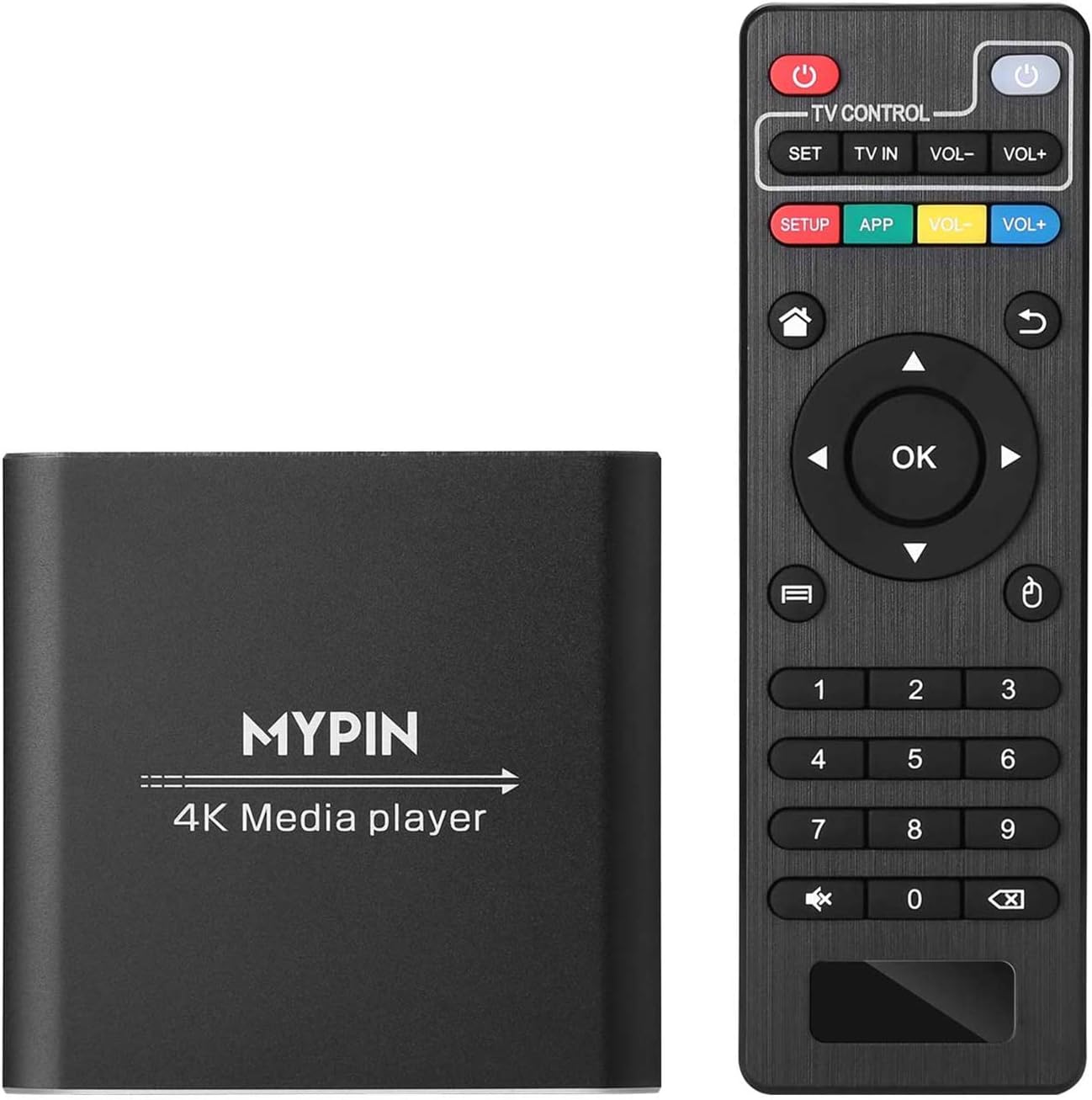
The MYPIN 4K Media Player delivers stunning 4K@30Hz video playback with support for multiple formats including MKV, MP4, AVI, and H.265 decoding. Compatible with USB drives up to 8TB and TF cards up to 128GB, it offers versatile connectivity options including HDMI with 7.1 surround sound, AV, and optical outputs. Designed for effortless plug-and-play use, it supports USB mouse/keyboard control and can display PPT files, making it a compact powerhouse for professional and entertainment needs without requiring internet or subscriptions.


| ASIN | B07WPY8VKL |
| Best Sellers Rank | #33,860 in Electronics ( See Top 100 in Electronics ) #160 in Streaming Media Players |
| Brand | MYPIN |
| Color | Black |
| Compatible Devices | Television |
| Connectivity Technology | HDMI, USB |
| Connector Type | Micro USB |
| Controller Type | Remote Control |
| Customer Reviews | 4.1 out of 5 stars 1,593 Reviews |
| Form Factor | TV Box |
| Item Weight | 0.32 Kilograms |
| Manufacturer | MYPIN |
| Memory Storage Capacity | 8 GB |
| Mfr Part Number | HA0284-NCUSF |
| Model Name | digital media player |
| Model Number | HA0284-NCUSF |
| Other Special Features of the Product | H.265 Decoding |
| RAM Memory Installed | 8 GB |
| Resolution | 4k |
| Smart Home Compatibility | Not Smart Home Compatible |
| Special Feature | H.265 Decoding |
| Supported Internet Services | HDMI,AV,Optical Out and USB Mouse,Keyboard-HDMI up to 7.1 Surround Sound |
| Unit Count | 1.0 Count |
| Video Codec | H.265 |
| Video Output Resolution | 1920x1080 Pixels |
T**H
Top Notch Media Player
TLDR add a 128GB micro sd card or usb flash drive key chain for under $20 fill up with all your favorite titles, and you can take all your favorite videos, music, audio books and play it via hdmi anywhere on the planet you have power. it's a 100+ DVD disc/VHS player that fits in your back pocket for $70 or less all in no need for internet, subscriptions, accounts and doesnt stalk you.... $50 plugged it in, plugged in usb drive, plays back everything pretty much flawless, a child could use and the senior crowd can too without any internet stalking, set ups, accounts, updates, tinkering. For the most part it just works plug & play. Was an OG Xbox hacker running XBMC almost 20 years ago, used the entire wdtv line, dabbled with the pis and I tend to always have an old notebook around which is easy enough to connect via hdmi so I skipped a few generations of streamers. and I have zero desire for streaming but for a stand alone box this is it. 5 stars for the price, size, and doing what it's supposed to do. If I could make changes. Power on would check sd card and boot from that. So those who like a little more customization or updates could just set up a microsd card pop it in and enjoy. If no sd card then it just boots like it normally does. An internet search for "mypin firmware" brings up a page easy enough with a file from 2020 around 500mb. Played around with it before updating worked fine before and after. Verision 16 of kodi think their on 19 by now. Didnt spend to much time on it, wish it was a little easier to update and add apps, I'm sure I could get into it but not worth the time these days just want it to work and it did. Was easy enough to just add to root of usb drive, but really didnt give any indication it was doing anything, I'm familiar to just let it be for a while, checked the status and it did change. But there was no reason to update. Maybe a system setting to load update file but 99% of people wont bother. Turned on clicking video/music didnt show any files no biggy clicked app and kodi, vlc, and an office app popped up. Thought I'd try vlc it saw files but no sound thought oh boy, clicked app again selected kodi and it played back everything fine. I use a projector. Theres options to have it automatically start playing that are easy enough. Some might complain about some of the apps not working but it 3 button pushes its playing fine, scrolls thru titles fast, app and back button tend to get a user where the need so I'd be comfotable gifting to older relatives or kids. Small footprint microsd cards and usb drives are less than 20 bucks, load em up, store away and go. The Blue Laser Beam is like the luxor in vegas and i'll never understand why pretty much all electronics need to light up a room when powered off but that's what black nail polish is for, covered up the light and other spots it leaks and remote still works. Doesn't come with hdmi or batteries, but I have plenty I use a small 1ft one for this. It came with an extension for ir remote, some old school red and yellow cables and a basic remote. Would and will buy again. Great travel companion, for hotels, projectors, super portable, user froendly, and if it gets lost or stolen no biggy it so cheap. Would love physical buttons on these type of products nothing fancy but redundency for a lost or broke remote, a power button and a way to scroll or select. Maybe another micro sd card slot, it has 2 usb slots, and a file manager so it could double dose as a micro sdcard /usb drive cloner All 1%er requests but a few tweaks could make this a killer product. Old wdtv is a good comparison expcept this box scrolls thru titles a lot faster. I havent tried with my big drives, I like to use those for serious back up, keep a few usb drives / sd cards loaded and you can carry hundreds of movies/ thousands of albums ready to plug and play anywhere you go TLDR add a 128GB micro sd card or usb flash drive key chain for under $20 fill up with all your favorite titles, and you can take all your favorite videos, music, audio books and play it via hdmi anywhere on the planet you have power. it's a 100+ DVD disc/VHS player that fits in your back pocket for $70 or less all in no need for internet, subscriptions, accounts and doesnt stalk you....
V**N
Best Digital Media Player I Have Used
Overall, this player is a great player. Pros: Very Stable Operation. Not one frozen video or system lockup, So Far. Very intuitive-simple, bare bones interface. Minimal amount of Menus and Sub Menus. Excellent Fast Forward/Rewind Interface. Great Video and Sound Quality. Soft Blue On/Off light that won't blind you. Best Remote I used in terms of range and spread - very forgiving. Best Minimal Heat Signature, So Far. Best Player I have used, So Far. Plays everything I have tried, including h265 with ease. Cons: A Little more expensive than the competition. As with most it has a poor manual. The ONLY annoying flaw I have found: IMPORTANT It appears that the MyPin remote on/off button only powers off the Player, it does not turn off power (internally disconnect) to the drive you are using, Another reviewer on Amazon has pointed this out. So, before you unplug your drive to add media... Turn off the power to the unit its self.... Then unplug your drive and add your media. In my experience, if you don't do this, you may get a drive error message from your PC and your files may not write/copy properly. This mainly happens with SS Drives. It doesn't seem to bother my 4 gig Desktop Seagate Drives. Technically, I don't understand what the problem is but MyPin should address the issue what ever it is.
A**R
Great option for easily playing video from hard drives on a TV.
I have 5TB hard drives containing MP4 formatted home videos. There are over 500 directories and 1000 video files on the hard drive. I normally play the videos from a Windows or Chromebook laptop connected to a TV. I had to provide a Chromebook to family members to play the videos on their TV but it is rather difficult for them since they are non-technical users. I started researching other options and found that most media players and Blu-Ray players can handle a small number of files but cannot handle large drives, a large number of files, or a variety of video formats. This media player gives you the ability to easily play a large number of various video files from large hard drives without a laptop. By simply connecting the player to the TV and connecting the hard drive to the player, I was able to play almost all the video files. Using the interface, it takes a few seconds to open the root directory since it contains over 500 sub-directories but that is not unreasonable. All the directories appear and it is easy to use the remote to navigate to any directory and subsequent sub-directories. As a few reviewers have mentioned, using the File Manager instead of the Video application gives you the ability to back out to the previous directory at all levels. The remote works well enough for controlling the playback of each video. I don’t have a problem with FF, REW, etc. The MP4 video files range in size from 2GB to 20GB. All files up to 15GB play great but I have a problem playing video files larger than 15GB. The video doesn’t play after approximately two and a half hours (02:28). The documentation indicates the player should play files this large. Mypin support was initially responsive but did not provide a solution for the problem. I experienced one other problem. After disconnecting my hard drive from the media player and reconnecting it to my Windows 10 laptop, the following Windows error message appears: ‘There is a problem with this drive. Scan the drive now and fix it’. Whether I choose to ‘continue without scanning’ or ‘Scan the drive now and fix it’, all the files on the drive were available and playable. This message has been more of a nuisance rather than the drive actually being corrupted and requiring a re-format. The media player created three directories on the hard drive – Android, BUDA, and LOST.DIR. I assume since Windows didn’t create these directories it may be flagging that there is a problem with the drive. When I reported the problem to Mypin support they responded that it is a known bug but there wasn’t a solution (as of DEC 2022). They also responded that it should not damage the hard drive or USB flash drive. Summary: This media player is a great option for playing videos from large external hard drives. You can play the videos on any TV at home or any other location without worrying about using a laptop. It is especially useful for non-technical users. My extended family members love it. I really wanted to rate it with five stars but dropped to four stars because of the two problems I described. Overall, it is a great product.
A**N
Wonderful, easy to connect and use. AND is supports subtitles
I bought this to be able to easily work with my digital video collection on a large portable HDD most media players don't like large storage devices but this one had no problem with mine. The user interface is easy to use and intuitive, the picture quality is really good. My only initial criticism was i couldn't select a subtitle file to play with my videos, even if the file was in the directory with the video the player wouldn't give me the option to use it. I finally figured it out though (I wish this was in their product documentation) to get your player to use your srt files the video and CC file MUST have the EXACT same name. I changed that one thing and WHAMO suddenly I could use them. It would be nice if the player would allow you to select a specific CC file manually from within the player but at least for now this works REALLY well.
D**E
Useless Product that Lacks Basic Features
I only used this for an hour before deciding to return it, so the review is no a complete. I bought it because it can use 8TB drives and many players are limited to 2 TB. That is the only Pro. Cons: - No random play feature. That alone was reason enough to return it. If you have thousands of photos or videos, this is an essential feature. - Unusable remote. They seem to have bought into the minimal buttons philosophy of remotes so things that should be a button click now require fiddling around with their clumsy user interface. - Clumsy user interface. Instead of a simple list of attached drives, directories and files, it is some bizarre difficult to comprehend menu system. They don't even say how many files are in a directory. If you hit next on the remote, and then exit play mode, it does not even show the current file you are playing. Just shoddy work all around. - The home button on the remote does not do anything. - They use a case sensitive sort for the files. I could go on and on. Hardware wise it works ok. If you just have a small set of files you want to watch, it might be ok. It's a shame they did not implement some basic common sense features in the user interface and remote that could have made it a great product.
G**G
Easy to use.
This media player is fantastic. The interface is easy to use. If you owned any remote you can navigate this one. I've adjusted the sound, closed captains and aspect ratio easily on my first try.
P**T
Very happy with this player! Recommended from a a long time media player user.
Will update in terms of longevity, but happy with it out of the box! Plugged in and worked beautifully with 5tb hard drive and played any file I can throw at it and better than my Micca 4K ever did. Outperforms Micca in sound and video quality and compatibility with hard drives, remote response, etc. Recommended if you are looking for a no frills media player that just works.
M**Y
Did not work as promised
I've owned several similar MP4 players. I generally understand and accept certain limitations. I bought this one because it was relatively highly rated. The good: I really like having a dual USB drive. I want to plug in multiple drives at once and like having this option. The ads said it would support and HDD up to 8TB, which is something my other players could not do. I also found it very easy to set up the remote to work with my TV, and very much liked that I could program the buttons on the remote very easily. The bad: I was disappointed that the remote could only advance or go back in 30 second increments. It's not a huge deal, but I'd like this shorter or to customize the length of the advance. Also, when playing a show and stopping, I could not return to the same point in the show easily (something I'd gotten used to doing with my other devices). While it could play some H265 compression shows (something older players will not do) it did have some issues with some of my other videos - not showing video at all (meaning it did not have the right CODEC). The Ugly: None of the issues I listed under my "bad" section were a big deal. I generally liked the device - IF IT HAD WORKED PROPERLY. The deal breaker for me was that fact that my hard drives with my videos would be recognized by this player at all. When I plugged them in, the drive would spin up. Sometimes I get some sort of "please wait" message, but in the end it would not mount the drive and let me see, let alone play, any of my videos. I tried various size drives (4TB, 2TB, 1TB) as well as exFAT and NTFS file allocation. I also tried putting files in less subfolders, or more. None of that seemed to make a difference. I emailed support. After getting an initial email asking what model I had purchased (information I included in my initial email) and responding, I never heard back again. Given the higher ratings of this device, I'm guessing mine was just defective. I did manage to mount a flash drive that was much smaller, and which used FAT32. This is how I tested the rest of it. But the fact that none of my drives loaded (even though they loaded fine on my two other MP4 players from different manufacturers) meant this player was useless. I'm in the process of making a return and ordering a different player from a different company.
N**H
Don't ever buy it
Third class and fraud don't buy it
R**R
Just what I was looking for!
I was a little leary after reading some of the reviews, but since I just received this and tried it out, I was compelled to write a review. The box is a lot smaller than I expected, and is smaller than my 4TB hard drive. Plugged it in, and plugged in my hard drive (which does NOT have an external power supply) and it was picked up immediately by the player. I have 3.6TB of movies/shows (from mp4 to mkv) and they all (tried various ones) played flawlessly. Seen some complaints about both the interface and the remote, and I can tell you they are both super easy to use. With the remote, to pause, fast forward etc, simply push the middle OK button and it will pause. Push the right arrow and it will fast forward (quickly it slowly, depending how you fast you want to go) or left to rewind. Super easy and familiar for anyone who's used any modern digital cable box. While I haven't found any "shuffle" feature yet, there is a setting where you can autoplay your next file, which is a game breaker when you're watching a TV series. All in all very pleased, especially with the fact it will play my hard drive flawlessly (some media players require the hard drives to have their own power source, this one does not). As well, super easy to use interface and very compact. Overall this was exactly what I was looking for!
N**D
Good quality and easy to use
good quality and easy to use
I**O
Entra en la palma de tu mano
Excelente, cumple. Por la medidas que da el vendedor me lo imaginaba más grande pero no, te entra en la palma de la mano pero no por ser pequeño deja a deber. Al contrario. Lo bueno! Lo he probado con películas en 720p, 1080p y 1080p 60FPS las cuales han corrido de maravilla y sin problema. Cuenta con ajunte de pantalla, zoom, canales de audio mono, stereo y tipo surround, también si el archivo de vídeo cuenta con subtítulos, estos los puedes desactivar, activar, cambiarlos a forzados o completos. Así como los canales de audio estos los puedes cambiar en caso de contar con doblaje y/o voces originales. El pequeño equipo al tacto se siente de buena calidad, sus cables accesorios se sienten de buena calidad cuenta con auxiliar 3.5 para conectar a bocinas externas, salida de audio óptico, una extrada para extensor de las ondas para el control, un adaptador para memoria SD, dos entradas USB de las cuales si soporta memorias externas tanto menores a 5tb cómo mayores (tengo una de 6tb y la leyó sin problema). En los ajustes puedes cambiar el idioma a español o inglés, cuenta con otros idiomas. La resolución puedes adaptarla de 430p hasta 4K. Lo malo! Los botones del control no están bien programados, un botón puede hacer 2 cosas al mismo tiempo, pero cuando lo entiendes deja de ser un problema (necesitas un poco de paciencia para llegar a eso). La interfaz está Ok, hasta presenta miniaturas del archivo pero hay un problema en el menú principal que cuando quieres desplazarte de manera horizontal se pone en azul por unos milisegundos al principio no pasaba pero inicio posterior a un rato de usarlo de hecho igual cuando quieres adelantar usando el botón de desplazamiento igual pasa. De forma vertical todo funciona bien. En cuanto a los subtítulos externos, si tú archivo de vídeo los trae por separado ahí hay un detalle porque no puedes agregarlos desde el reproductor. Este apartado aún no lo he encontrado pero hasta el momento no he podido ajustar la corrección de color o la nitidez desde la fuente, eso tienes que configurarlo desde tu pantalla o proyector (puede ser un problema para algunos). Conclusión Funciona excelente y cumple con su propósito Buena calidad de imagen Buena calidad de sonido El problema es el control La interfaz tiene detalles al desplazamiento horizontal Agregado después de 2 años de uso. El detalle de la pantalla azul era una interferencia con otro equipo, al separar los dispositivos dejó de pasar. El equipo sigue funcionando sin problemas.
D**U
Doesn't work
completely Useless, wasn't working when received. and took too long to deliver
Trustpilot
2 months ago
2 weeks ago