Buy anything from 5,000+ international stores. One checkout price. No surprise fees. Join 2M+ shoppers on Desertcart.
Desertcart purchases this item on your behalf and handles shipping, customs, and support to Spain.
🖨️ Print like a pro, share like a millennial!
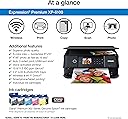
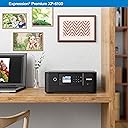
The Epson Expression Premium XP-6100 is a sleek, wireless inkjet printer designed for professionals and creatives who demand superior photo quality and fast output. Featuring 5-color Claria Premium inks, it delivers vibrant prints up to 8"x10" with sharp text, supports auto duplex printing, and offers hands-free voice activation. Compatible with iOS and Android devices via Wi-Fi Direct, it combines convenience with professional-grade performance in a compact design.


| ASIN | B07PDNS5CZ |
| Additional Printer Functions | Copy, Scan |
| B&W Pages per Minute | 15.8 ppm |
| Best Sellers Rank | #12,661 in Office Products ( See Top 100 in Office Products ) #7 in Desktop Photo Printers |
| Brand | Epson |
| Built-In Media | Expression Premium XP-6100 color inkjet printer, setup and instruction manuals, CD-ROM containing software and drivers (Windows and Mac (7)), power cord, 5 Claria Premium Ink cartridges: 1 302 Black ink cartridge; 3 302 color ink cartridges: Cyan, Magenta and Yellow; 1 302 Photo Black ink cartridge |
| Color | Black |
| Color Depth | 24 bpp |
| Color Pages per Minute | 11.3 ppm |
| Compatible Devices | Camera, PC, Smartphones, Tablets |
| Connectivity Technology | Wi-Fi |
| Control Method | Voice |
| Controller Type | Amazon Alexa, Vera |
| Customer Reviews | 4.0 out of 5 stars 1,628 Reviews |
| Display Type | LCD |
| Dual-sided printing | Yes |
| Duplex | Automatic |
| Global Trade Identification Number | 00010343944169 |
| Hardware Interface | USB |
| Ink Color | Black |
| Item Dimensions D x W x H | 19.1"D x 16.3"W x 8.2"H |
| Item Type Name | Inkjet Printer |
| Item Weight | 14.6 Pounds |
| Manufacturer | EPSON PRINT |
| Maximum Copy Resolution Black and White | 5760 dpi |
| Maximum Copy Resolution Color | 5760 x 1440 dpi |
| Maximum Copy Speed Black and White | 15.8 ppm |
| Maximum Media Size | 8.5 x 11 inch |
| Maximum Print Resolution Black and White | 5760 x 1440 dpi |
| Maximum Sheet Capacity | 100 |
| Maximum print Resolution Color | 5760 x 1440 dpi |
| Model Name | Expression Premium XP-6100 |
| Model Number | XP-6100 |
| Model Series | Expression Premium |
| Number of Trays | 2 |
| Other Special Features of the Product | Voice-Activation |
| Output sheet capacity | 100 |
| Paper Size | 3.5" x 5", 4" x 6", 5" x 7", 8" x 10", 8.5" x 11", A4, B5, A5, A6, half letter, executive |
| Power Consumption | 13 Watts |
| Print media | Paper (plain) |
| Printer Connectivity Type | Wi-Fi |
| Printer Output Type | Color |
| Printer Type | Inkjet |
| Printing Technology | Inkjet |
| Resolution | 600 x 600 |
| Scanner Type | Photo |
| Series Number | 6100 |
| Special Feature | Voice-Activation |
| Specific Uses For Product | High-quality photo printing, Professional-looking CDs/DVDs |
| Total Usb Ports | 1 |
| UPC | 010343944169 010343924536 |
| Unit Count | 1.0 Count |
| Warranty Description | 1-year limited in the U.S. and Canada |
| Warranty Type | Limited |
| Wattage | 13 watts |
E**O
Good equipment for value
An excellent product for personal use and small projects. The color printing quality is very good. However, I have noticed that the mechanism needs to be adjusted regularly to ensure proper printing. The price of the machine is very reasonable, but the ink is quite expensive.
H**E
Excellent Photos for Photography Classroom!
As a photography teacher, I purchased the Epson Expression Premium XP-6100 to replace a Canon Selphy that was constantly wasting ink and paper with blotches and streaks. What a difference! This printer has been absolutely amazing. The photo quality is sharp, vibrant, and consistent — no more ruined packs of paper or unpredictable results. Another huge plus is flexibility. The XP-6100 can print not only 4x6 photos but also larger sizes (up to 8.5x11), plus regular documents for my classroom. It’s compact, wireless, and easy to set up. If you want a printer that delivers reliable, lab-quality prints and also handles everyday classroom or home needs, this is the one. It has saved me time, frustration, and money in the long run. Highly recommended!
D**E
XP6100 is fine for low volume work
My daughter needed a printer for college that could handle low volume color work. The Epson XP6100 fits the bill for those needs. Let me begin by mentioning what we don’t use it for. We haven’t tried the scanner feature or printing photos. I know that many buyers are interested in those features, but I have no advice to give there. To begin, we needed a wireless, small, color printer. The Epson hits all those marks. It has a small enough footprint to fit on a dorm desk without taking up too much space and weight is certainly not an issue. Print quality is fine for what she needs. Colors are sharp and printing is readable. I’ll always be a laser fan, but I don’t go blind trying to read output from this. Setup was very easy; ink cartridges snap into place effortlessly. These days you need a printer to which you can send jobs from various devices and we’ve had no problem with that with or without wireless. At home the printer connected to our network easily (with the exception of having to enter the password on the small screen input panel). But, since her dormitory does not allow wireless access for printers, we were glad that Epson’s wireless direct allows any phone, iPad, or computer to send a print job directly and it works wonderfully. There are a few negatives with the Epson as well. The input screen is not a touch screen, so you have to navigate with buttons (that’s why it’s so hard to type in a password). In creating a small footprint, Epson had to tuck away the paper trays. The front panel is comprised of two hinged sections. To load paper (separate trays for standard size and photo size) you fold down the bottom of the panel, pull out the paper tray, load and push in. When printing, you fold up the top of the panel, pull out the output tray and then print. This tray system works fine - it just struck me as strange having never seen it before. It also will take only Epson print cartridges, so I’m not looking forward to the first time it runs out of ink. I wish the documentation had been a little more thorough, but there are online guides and I’ve found a couple of You Tube videos that help with setup and features. The wireless and print direct features seemed fairly intuitive, but I’ve had quite a bit of experience with printers. I could see how a person might struggle with setup if this was his/her first printer ever so those online resources could come in handy. Overall the Epson XP6100 fits my daughter’s needs perfectly. For the price, I’d recommend it.
D**B
Not even okay
It's okay. Considering I am using it for occasional photo prints and cards, it's okay. Not great, okay. I ruined 4 pages before I finally figured out how to set up the page correctly. NOT intuitive at all. But at least I can set up the page from an application and not fool around with the tiny printer window. Air print works well. That's something. My recommendation would be to have photos printed at a lab and use this printer for occasional needs. I have noticed that 11 prints have taken A LOT of ink already. I'm glad I waited until it was on sale. If I had paid full price, I'd probably return it. 5/9/26 UPDATE: Save your money and spend it on another device. This printer has been sooooo frustrating. It is useless as a scanner. Printing is ALWAYS an ordeal. I'm not doing anything complex. I'm also a techie so it's not user error. Prints are at best okay. Connecting by bluetooth is impossible. I may not even buy ink when this lot runs out.
D**S
A good cartridge printer - ideal for lower volume printing.
Good cartridge printer. Had a tank style for a while - the ink dries up in the lines and it was a major hassle. I don't print enough to maintain those type printers. So - back to a cartridge printer - great image quality and much easier to take care of.
I**L
Great quality photo printer
So far this has been an easy printer to install just took a little while to figure out how to print … it has multiple areas … not very easy to figure out gif me but the quality of my photo was great
C**L
Not quite as good
I am somewhat disappointed with this printer. It’s a bit Clunky in that there are several gyrations you have to do in order to get it to print. Open the bottom cover. open the control panel for the controls. pull out the correct recovery tray. Wouldn’t print. After a bit of time, as I checked the paperinfeed tray, I had all the paper to what I thought was correct. BTW, don’t count on the directions. Nope, the paper does not stack nicely to the sides and the nd of the tray as most do. The paper has to be slid forward where they are not stacked in order. You notice the paper indeed needs the paper to be pushed forward so the paper at the from to the tray has the “stair” look to it. It’s not aligned to the edges of the tray. Kind of stupid in my opinion. Once you get all this straight, then you have to find the right app to simply print. What? Where? all the apps pertain to everything else other than print. Might be since I have a Mac. But it says it’s fully compatible. So, you have to your the operating system file to print. Once you go through all this, it prints a paper. The third time printing, it tried to pull ALL the paper through and jammed. Finally, it says remote printing the cloud and printer. Unless you leave with the printer set up properly and on, it works. God forbid on of the slide out drawers aren’t perfectly aligned or forget. Wait till ups get home!
J**Y
Epson Expression Premium XP-6100...
I bought this mainly for the sale price & reviews, $99 amazon. I ordered on April 21st & received it on April 26 th by UPS in excellent condition. --This will replace a Canon MX922 with error code 1403 that I can't resolve, which brings me to Epson XP6100, I have used this printer a few days now doing photos & duplex printing, & various other printing. Setting up the printer with the disk that came with it went pretty good, printer its self went good, the problem came for me was connecting my computer wireless to my router, which did not show on my internet scan, I took the easy way out & connected the printer & computer with a usb connection, all working good now, anyway back to the printer, I think in my opinion the is a good printer, does everything my old canon printer was used for, especially the duplex printing, photos came out excellent, as well as all other print jobs -- a few comments were made on ink consumption, I checked the ink levels on the printer, & they all registered full, even after initial set up & my photo & printing, so we'll see after a bit more use how that turns out, right now I think for the money it was a pretty good buy ---- Ink is another story, I ordered a full replacement of ink to have on hand just in case. $79.99 Genuine Epson Ink. which is recommended.
M**S
La meilleure imprimante de tous les temps!
La meilleure imprimante. Très facile et ne tombe jamais en panne. Je l utilise plusieurs fois par jour et elle marche sans soucis. Bravo Epson!
J**I
No es fácil de encontrar los cartuchos
No me gustó que los cartuchos no son fáciles de encontrar, además de que no tuvieron mucha duración los que traía
J**H
on-time, in perfect condition
I bought an Epson XP6100 printer on-line from NES Online through Amazon. The item arrived promptly on the first day of the expected delivery window. It was brand new in its manufacturers packaging and has worked like a dream. It seems quieter than previous Epson printers I have owned, and the scanning function operates quicker and at better resolution than previous scanners, probably due to improved software.
D**Y
Great Printer
Great little printer and awesome service to get it here. Live in country town so always impressed when delivery is prompt.
N**Y
Excellent quality and easy to use
I purchased this printer to replace the Epson Ecotank I returned. All in one, very easy to set up and use. Highly recommended.
Trustpilot
1 month ago
1 month ago