Buy anything from 5,000+ international stores. One checkout price. No surprise fees. Join 2M+ shoppers on Desertcart.
Desertcart purchases this item on your behalf and handles shipping, customs, and support to Spain.
๐จ๏ธ Print smart, live stylish โ your all-in-one creative hub!
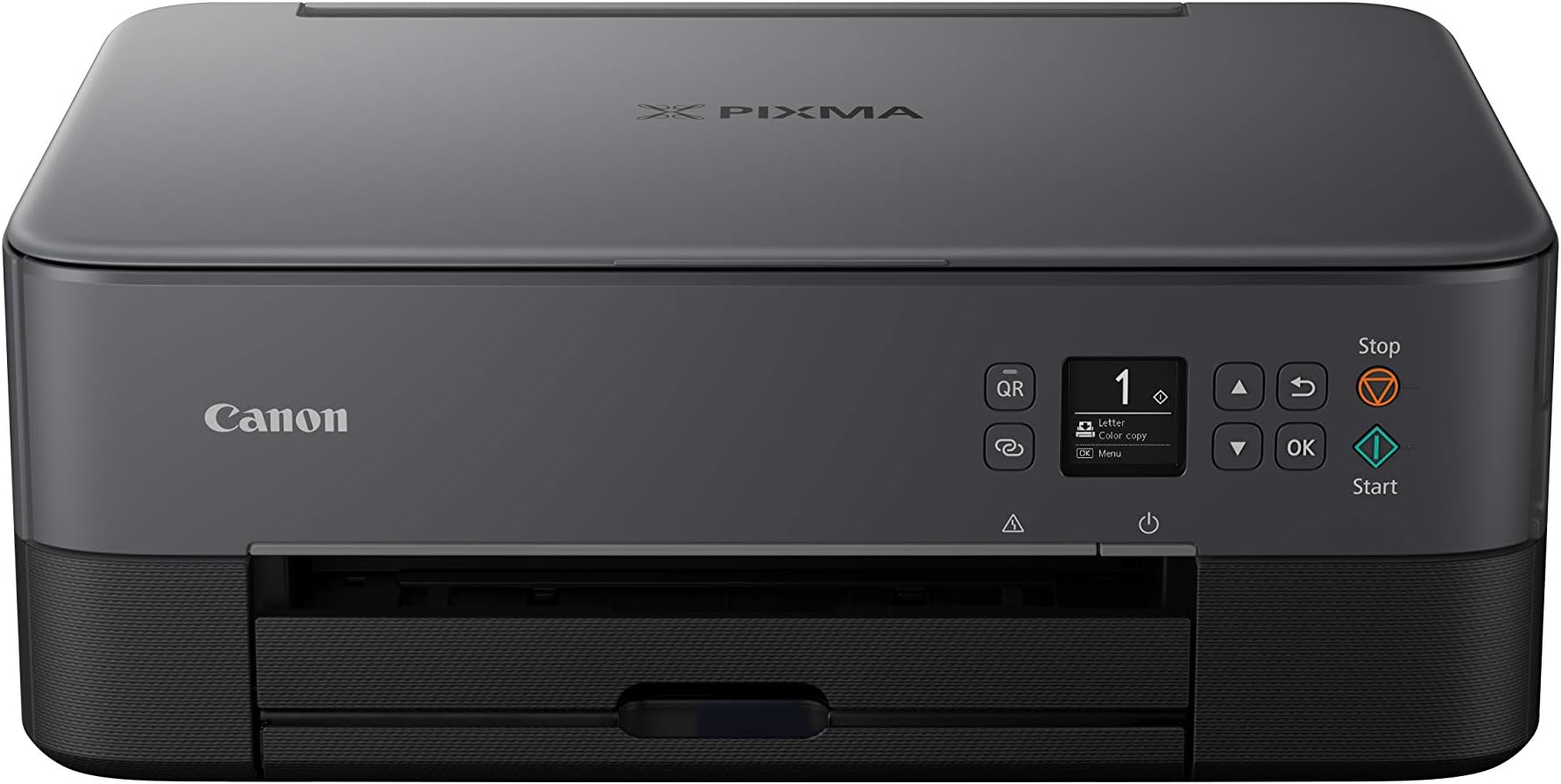
The Canon PIXMA TS5350 is a compact, stylish all-in-one Wi-Fi printer designed for professionals who demand high-resolution photo printing (up to 4800 x 1200 dpi), seamless cloud connectivity, and smartphone control. Its minimalist 2-tone design and LED status bar make it a sleek addition to any desk, while advanced features like double-sided printing and versatile media support empower creative projects and social media-ready prints.


| ASIN | B07WP5X1WY |
| Additional Printer Functions | All In One |
| B&W Pages per Minute | 13 |
| Best Sellers Rank | 27,040 in Computers & Accessories ( See Top 100 in Computers & Accessories ) 77 in All-In-One Printers |
| Box Contents | All-in-one printer โ PIXMA TS5350 Series, FINE cartridges, Power cord, Set-up CD-ROM, Manuals |
| Brand Name | Canon |
| Color Depth | 24 bpp |
| Color Pages per Minute | 6.8 |
| Colour | Black |
| Compatible Devices | Smartphones |
| Control Method | App |
| Controller Type | Android, iOS |
| Customer Reviews | 4.2 4.2 out of 5 stars (722) |
| Display Type | OLED |
| Dual-sided printing | Yes |
| Duplex | Automatic |
| Hardware Interface | PictBridge, USB |
| Ink Colour | Black |
| Item Dimensions D x W x H | 12.4D x 15.9W x 5.8H centimetres |
| Item Type Name | Multifunction Printer |
| Item Weight | 5 Kilograms |
| Manufacturer | Canon (UK) Ltd |
| Maximum Copy Resolution Black and White | 1200 dpi |
| Maximum Copy Resolution Color | 4800 x 1200 dpi |
| Maximum Print Resolution Black and White | 1200 dpi |
| Maximum Sheet Capacity | 2 |
| Maximum Supported Paper Size | 12.7 x 12.7 cm |
| Maximum print Resolution Color | 4800 x 1200 dpi |
| Model Name | TS5350 |
| Model Number | 3773C008AA |
| Model Series | PIXMA |
| Network Connectivity Technology | Bluetooth, Wi-Fi |
| Number of Trays | 1 |
| Other Special Features of the Product | Auto-Duplex |
| Output sheet capacity | 2 |
| Paper Size | Rear Tray: A4/A5/B5/LTR/LGL/20x25cm/13x18cm/10x15cm/13x13cm/8.9x8.9cm, Envelopes(DL,COM10) [Custom size] width 55mm - 215.9 mm, length 89mm - 676mm |
| Power Consumption Size | 19 Watts |
| Print media | Glossy photo paper |
| Printer Output Type | Colour |
| Printer Type | Inkjet |
| Product Warranty | 1 Year |
| Resolution | 4800 x 1200 |
| Scanner Type | Photo |
| Specific Uses For Product | Creative and craft projects, photos, multi-function tasks |
| Total USB Ports | 1 |
A**R
Good price, smashing printer
I bought this to replace my trusty Canon Pixma, a good old workhorse which suddenly threw in the towel. When it arrived I did think it looked a bit flimsy compared to the solid Pixma, especially the paper filling tray, but at least itโs lighter and more compact. Set-up: a doddle. You could use the quick set-up booklet provided, but I found the video instructions clearer. At each stage of the set-up a QR code appears on the small screen and takes you to the next video. Every little step is clearly shown, and you canโt go wrong. Even cack-handed dummies like me. Once initial set-up was done, I used the on-line manual to complete the Air Print and scanning stages, bit of a faff, but before long I was Airprinting and scanning from iPad and laptop with merry abandon. The printer/scanner/copier functions are fast and responsive and so far the print quality seems good. The action is generally quicker and smoother than my old Pixma. You can do double-sided printing, and all the usual options are available. The two ink cartridges consist of a large black and a large colour one. I preferred the small individual colour cartridges on the Pixma but it was not to be. Thereโs a rear feeding tray for photo paper and a USB port in the back. All in all itโs simple enough to operate, does what it says on the tin - and very efficiently too - and a great price. You really donโt need a more expensive one, this does it all.
F**A
Good printer for its price point!
First time having my own printer, and I wanted a cheaper one to print my notes and a few images here and there. This printer is a good price and works well. Prints with good detail and sharpness, colour is accurate and good and no issues with alignment. The set up was extremely easy, follow a few steps on the booklet and youโre ready to go! Itโs also very easy to connect to your phone and laptop took about 5 mins to download the software and thatโs it. Print speed is quite fast however when printing bigger pictures (like the two I have attached) when printing it with my phone it was very speedy but on laptop it took a minute I donโt know why. The only fault I have seen so far is that the images print with lines throughout the page, most printers do this so itโs not an issue for me but Iโll still include it. Overall great printer for a good price!
I**L
great inkjet printer very easy to install with Windows 10
Despite some of the reviews of this product, I found it very east to install by following the instructions. This is in a home Windows 10 environment. The downloaded install program finds the printer and attaches it to your home wifi network, installs all the printer drivers and printer management and scan utilities, and you're ready to print. Tales less than half an hour from opening the box to first print. Only slight complication is for the second and subsequent PCs. Don't follow the same install process as on the first PC or you will effectively re-install the printer and the first PC will no longer have access to the printer. On the second and subsequent PCs let Windows find the already networked printer and make sure you have the TS printer drivers available then all is well. I had a Canon MG series printer for 5 years or more which was the predecessor to the TS range and I was very pleased with that. Unfortunately the TS uses different printer cartridges as I had just bought new ones for the MG. Compared to the MG, the TS is much better at duplex (double sided) printing, and I much prefer the removeable paper cassette on the TS to the paper feed on the MG.
J**E
Great bit of kit
After a long succesion of cheap printers, i decided to go for a more upmarket one, as i do a lot of photography and want to display some of my photo's. Looked at a lot of different printers, and not liking the way HP supply thier ink, decided on this one.Well it arrived, on time and was left in the safe place as requested, thank you Amazon, unpacked it made a cup of tea and READ THE INTRUCTIONS.... Some of the reviews said it was a nightmare to set up, no it is not, simply loaded the disk, plugged printer in pressed the WPS button on the router and let the machine do it's thing. Then simply paired it to my laptop and, after the printer does the head initializing bit was ready to rock and roll. Pairing to smart phone is just as easy, get the app, and follow the intructions, simples. Noise .... we it sits bout 3 feet away from me, and if i have tv on or music playing, i have to check it's still working, so no issues there. Scanning is also really easy, and does both sides too, did'nt know that at time of ordering, so bonus there.As for ink usage, seems to be fairly reasonable so far, have done a lot of printing, photo's and documents and the ink is still going strong. All in all, am really pleased with it, it does what it says on the tin, and if you go for one, read the instuctions, thats what thier there for, take your time and let the machine do it's thing. Thanks for reading this JC
M**J
Gone bad to worse
Please do not buy this printer. Very slow and repeatedly goes starting mode and doesnโt print until u switch off and on every time. Cartridges cost half the printer price . Not worth the money. Canon gone bad to worse.
L**S
Good quality printing, inks seem economical, setup easier than before
I haven't had the printer very long, but I have used all the basic three-in-one functions (printing, scanning, photocopying) and I am impressed by the print quality. Although I got the 'low ink' warning quite early on, the printer has continued to work with the original cartridges for at least 100 pages since then, which is pleasing. This is the first Canon printer I've used where the coloured inks are all in a single cartridge, which bothered me a bit, but it appears to work well. The setup (essentially connecting it to my existing wifi) was easier than in previous Canon printers I've owned and works very reliably. Another interesting new feature (to me) was that the printer goes quiet after a time (no lights on etc so it looks off) but wakes on being instructed to print. I like this. It's early days but so far I'm very pleased. I've no idea what the category "warmth" means so I can't comment on that.
Trustpilot
3 days ago
4 days ago