💡 Unlock your embroidery potential with effortless design control!
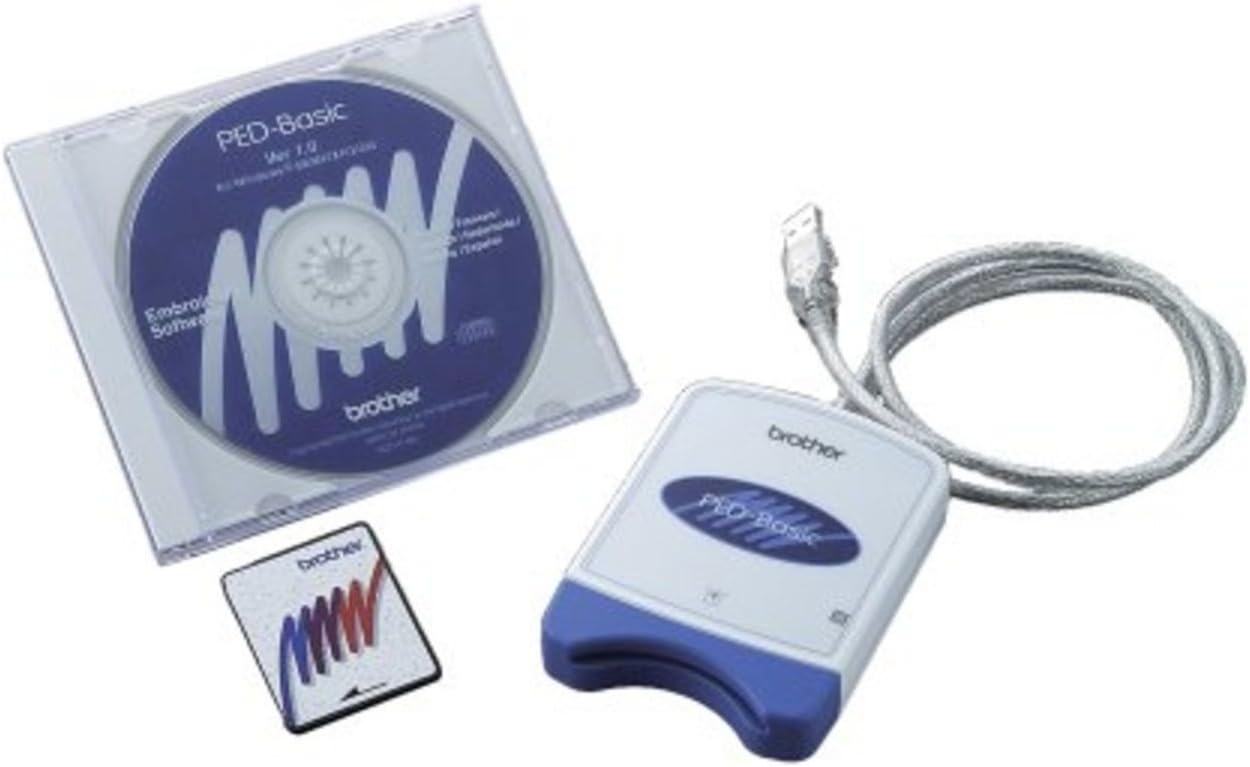
The Brother PED-Basic Embroidery Card Writer is a compact, USB-connected device that enables professional and hobbyist embroiderers to transfer and save embroidery designs onto a 4MB Brother memory card. Compatible with multiple hoop sizes and a wide range of Brother embroidery machines, it offers seamless integration with Windows PCs (98 to 7). Its durable build and user-friendly software streamline design management, making it an essential tool for efficient, cost-effective embroidery workflows.

| ASIN | B000GTNEEO |
| Best Sellers Rank | #782,859 in Arts, Crafts & Sewing ( See Top 100 in Arts, Crafts & Sewing ) #130 in Embroidery Machines |
| Brand | Brother |
| Brand Name | Brother |
| Color | blue,white |
| Customer Reviews | 4.2 out of 5 stars 1,091 Reviews |
| Global Trade Identification Number | 00012502602187 |
| Is Electric | Yes |
| Item Weight | 1.4 Pounds |
| Manufacturer | Brother International Corporation |
| Material | Paper |
| Model Number | PED-Basic |
| Part Number | PED-Basic |
| Power Source | Corded Electric |
| UPC | 884544087815 012502672289 721802488062 599039297760 012502602187 |
| Unit Count | 1.0 Count |
| Warranty Description | 5 year limited warranty, 90 days labor. |
D**5
Must-have accessory for your Brother machine
I was delighted to pick up a refurbished Brother 350 sewing and embroidery machine to add to my collection. This is my first true embroidery machine, so I really had no clue about downloading additional embroidery patterns to my machine. The machine came with 64 "built-in" embroidery patterns. I quickly realized that in order to expand this library, I would need an interface of some kind. Enter PED Basic. Once I realized what I needed and what it would do, I searched online for the best price and found it at Amazon. The PED Basic is really basic. It allows you to download designs from the internet and write them to a memory card that can then be inserted into the embroidery machine. These memory cards are unique, and many of the sewing machine brands have ones that only their brand can read and use. With so many nice internet sites where designs are free or a few dollars, it is really tempting to want more and more. The drawback of PED Basic is that whenever you want to write new designs to your memory card, it deletes all the previous data. A way to get around this is to keep all your designs in the same "folder" on your computer and re-write them all to the card every time you get new ones. Or you could just add new ones and keep back-ups on your computer for designs you might want to use again. All in all, PED Basic does what it says it will do, is easy to install and easy to use because it is so basic. On the negative side, it is overpriced for what it is, but since all the sewing machine manufacturers want to have their own systems, demand is probably low for any given brand's device and they can charge you whatever they want and you will pay it.
A**R
WORKS ON WINDOWS 7
I love this!!I have a brother ULT2003D that has a memory card slot and a Floppy Disk slot. Wanting the newer designs for it I purchased an USB External Floppy Disk Drive and it works perfectly for downloading designs from the CD embroidery designs that you buy and also for downloading designs from online. However, my machine has recently started giving me fits so I purchased a very nice, but older embroidery machine for a back up. It only has an memory card slot so I purchased the Brother PED-Basic Software for Downloading my current designs and problem solved. I watched a video on youtube "Machine Embroidery - How to download and save a pattern" which helped by showing me how to make a new file in "Documents" and name it EMBROIDERY DESIGNS and how to put my embroidery designs in this file. Once I did this the book was simple enough to figure out from there, very easy and quick to do. I was surprised how many designs I was able to put on the card - 18 4x4 designs. The designs you select to put on the card can be changed any time you want to use different designs, which is less expensive than buying more memory cards. When you get the Brother PED-Basic software for Downloading it will have a sheet of paper with it that reads, "Important Read Before Use" For WINDOWS 2000/XP/VISTA/7 users. Which is 4 simple steps for set up with the CD-ROM. After that you plug the card writer (PED_Basic) into your USB and your ready to go.
D**T
Excellent Card Reader/Writer
I've been doing machine embroidery for about 5 years, and just purchased my first Brother machine (which I absolutely adore). Before that, I have 2 other machines, and I used card readers/writers by Amazing Box. My first one broke. The second one still works. But, these Amazing Box products are amazingly flimsy, light and cheap. The software barely works with any operating system, and trying to used the things was always on a hope and a prayer. Then, because I want everything to be just perfect with my new and expensive Brother machine, I bought the PED Basic box with blank card media. I plugged it into my USB, loaded the software, and transferred a design from my computer to the card without having to even look at any instructions. The card then went into my machine, the machine picked out the design, and everything stitched flawlessly. The PED Basic card reader/writer is small and compact, but has a good amount of weight to it. It feels sturdy and of high quality. It is fast and simple to use. So, even if I didn't have 2 inferior products to compare this to, I'd still have to give this box 5 stars. And, you definitely can't beat the price at Amazon! Now, I just have to find an additional blank card, since I like to have 2 or 3 of them "just in case".
J**E
Works well,but definitely basic
Very pleased with results of designs downloaded so far. I live in UK and had to order from USA, as it does not appear to be available here. As a matter of interest for prospective UK customers the total cost with postage import fees etc came to just over £80 I have a Brother PE150 and this works really well. There are loads of great web sites offering free designs (again mainly USA) Only minus point is there is no real advice as to how the download is best achieved, so for someone not used to downloading information this could be a bit of a problem. Programme also seems to be easier to install on older Windows operating systems. I installed mine initially on . Windows 7, but had more success on my old desk top which has Windows XP. Overall worth the outlay if you want to expand your embroidery experience. Give it a go.
B**T
Easy to Use, Saved the Day
I purchased a gently used Brother embroidery machine to have a second or a backup for my monogramming business. Well, wasn't I surprised when the machine arrived and it had no USB drive but instead an embroidery card slot! All of my design files are purchased, stored, and edited on my desktop computer. Not being able to access them was not an option. I did a little research and came across this Card Writer/Reader. I already have excellent editing software, so I can't speak to the PED Basic programming features, but if you want to use PES files purchased from the internet on your older machine then this product is worth every single penny. I literally used it 4 minutes after opening the box. I plugged it in, installed the driver, moved over an edited file, wrote it to the memory card and was ready to embroider. It takes me longer to hoop the shirt than to get my files ready. It will pay for itself by the end of the week in additional work I'm able to do. The price on Amazon is half of what it is through my Brother dealer and it is the genuine Brother product. I'm completely thrilled with this purchase.
E**E
Can't get it to work and Brother won't help
All seems so simple, except it simply won't work. At first the issue was that it wouldn't save the designs on the card from my computer and it kept crashing. I had to reload the software several times from the Brother site. (And that tooks hours and hours because it continued to crash and reloading software means deleting it, restarting, downloading, uploading, restarting....) Finally it works from the computer end for the most part- crashes sometimes but not always. And now? No matter what I do, the sewing machine won't recognize the card. I've gone back to the brother site and followed all their directions. I've emailed Brother several times. Their solution? Follow directions on the website and don't bother us. Nothing we can do. What a total waste of money and worse- a total waste of a LOT of time. What I'm going through is not an isolated issue- I've seen tons of reviews and questions on the web asking what can be done to fix this issue.
F**6
Love it! One issue - with a work around.
Well this is rather frustrating. I bought the PED-Basic (package). I am running win 8.1. Downloaded from Brother website. I have had to hack into the program itself and add .pes files to the Samples folder in order to get the program to recognize my .pes files. I have a SE270D (yep, it is an oldie, but a goody) and if I mini-hack into the actual Samples folder all is well. I don't know if I am the only person on the planet that has run into the issue, but aside from it being a little laborious it works fine. If there are any others out there having this issue and have a different work around, I would love to hear comments. Since my machine doesn't have any other means of transferring the pattern except with a card, I am happy that it gives me the option of having so much variety, even if it isn't all that easy to use. UPDATE: This is really an odd issue. I have 2 computers, both Win 8.1 - One is a Dell, the other is an HP laptop. The program works perfectly on my HP Laptop, but I have had several issues with my Dell. I have no idea why. My laptop will also run other programs that my desktop won't. Just thought it was worth noting. I may be the only person using this software that has had a problem. I wish I had an explanation. If anyone has had this happen and has tip or trick, I would love to hear about it. Thanks.
D**R
This is easy to use and allows me to view designs that ...
This is easy to use and allows me to view designs that I have loaded onto my laptop-from CD's or the internet- in color on my computer screen. I can then enlarge or decrease the frame size on the computer and load it onto a card that I then put into my PE770. I can also print from my computer the exact size of the design and the thread colors it takes and the stitch count. I have my PED folder on my laptop home page for easy availability. I like that I can see the colors in detail verses a black shape on the PE770. That is a disappointment in the design of the PE770 that the screen on the machine is not in color. What was Brother thinking? In the step up from the 400 model, they should have given customers a colored screen on the PE 770! Anyway, this PED program makes viewing and sizing your designs a breeze. Simple to use once you load everything to your computer. I will someday purchase one that does more, but for a newbie like me, this a great program, simplifies things a bit, and I am very satisfied.
D**E
Exelente producto funcional al 100
Exelente producto justo para lo que necesitaba recomendado al 100
N**N
Brother ped-basic logiciel
très satisfaite tout était dans la boite et fonctionne comme un neuf. Délai de livraison 2 jours. Excellent merci
D**A
Good product!
This was a surprise gift for my sister and she loved it. It came in a reasonable time. My sister is using Basic Embroidery often and she says it is everything she expected.
W**A
You can make this Windows 10 compatible !!!
On the Brother website either Canada or USA, there are windows 10 compatible downloads. I did this and now loving this transfer system compatibility with my Brother Innovis 1000 which operated on the memory card system Be sure to follow the instructions Brother gives you for making this program Windows 10 comparability.
K**S
Five Stars
thank you reaceved with thanks again .I did leave a reavew befour wen it came thank you
Trustpilot
3 days ago
1 month ago