Buy anything from 5,000+ international stores. One checkout price. No surprise fees. Join 2M+ shoppers on Desertcart.
Desertcart purchases this item on your behalf and handles shipping, customs, and support to Spain.
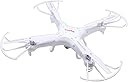
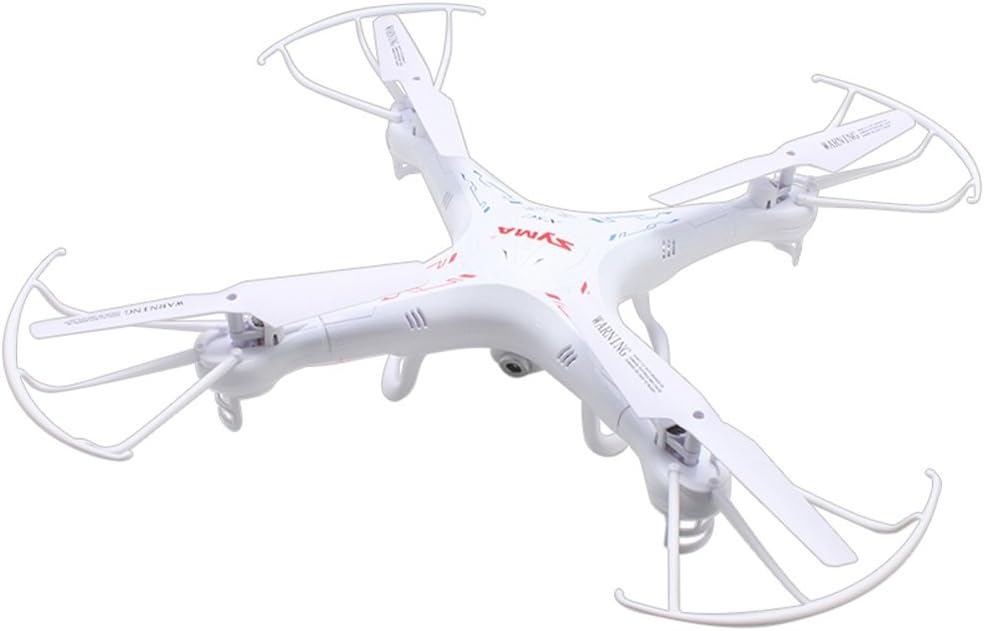
🚁 Elevate your weekend vibes with the Syma X5C — fly, flip, and film like a pro!
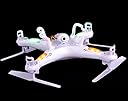
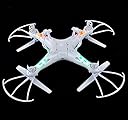
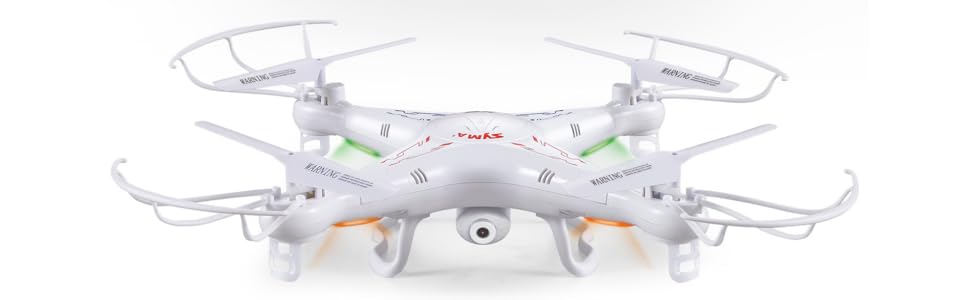
The Syma X5C is a beginner-friendly 4-channel quadcopter featuring a 6-axis gyro stabilization system for stable flight, a 2MP HD camera for aerial video capture, and a 50-meter control range. Its modular design allows easy assembly and maintenance, while 360-degree flips add fun stunt capabilities. Lightweight yet durable, it offers about 7 minutes of flight time per charge and comes with essential accessories including a remote controller and USB charger, making it an ideal entry-level drone for casual flyers and aspiring aerial photographers.


| ASIN | B00MNG37C2 |
| Age Range (Description) | Adult |
| Age Range Description | Adult |
| Are batteries included? | Yes |
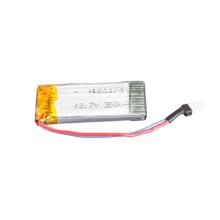
| Battery Capacity | 500 Milliamp Hours |
| Battery Cell Composition | Lithium Polymer |
| Best Sellers Rank | #286,630 in Toys & Games ( See Top 100 in Toys & Games ) #1,136 in Hobby RC Quadcopters & Multirotors |
| Brand | Syma |
| Brand Name | Syma |
| Color | White |
| Connectivity Technology | Wi-Fi |
| Control Type | Remote Control |
| Customer Reviews | 4.0 out of 5 stars 6,601 Reviews |
| Effective Still Resolution | 2 MP |
| Global Trade Identification Number | 08600123451073 |
| Included Components | SYMA-X5C |
| Includes Rechargeable Battery | No |
| Includes Remote? | Yes |
| Item Dimensions L x W x H | 16.5"L x 12.2"W x 3.8"H |
| Item Type Name | Quad Copter w/ Camera |
| Item Weight | 1.6 Pounds |
| Manufacturer | Syma |
| Material | copter |
| Maximum Range | 50 Meters |
| Model Name | 4 Channel 2.4GHz RC Explorers |
| Model Number | SYSX5C |
| Part Number | X5C |
| Remote Control Technology | RC |
| Skill Level | Beginner |
| Smart Home Compatibility | Not Smart Home Compatible |
| Special Feature | 6-axis gyro stabilization system, HD camera, 360 degree eversion, wind resistance, colorful flashing lights, blade protector Special Feature 6-axis gyro stabilization system, HD camera, 360 degree eversion, wind resistance, colorful flashing lights, blade protector See more |
| Special Features | 6-axis gyro stabilization system, HD camera, 360 degree eversion, wind resistance, colorful flashing lights, blade protector |
| UPC | 844949021678 |
| Unit Count | 1.0 Count |
| Video Capture Format | MP4 |
| Warranty Description | No Warranty |
| Wireless Communication Technology | Wi Fi |
J**.
Great quad with 500 ft+ range!
I've owned this quad for about 7 months and flown it for a total of maybe 50 hours or so. Overall, this is a great value and will provide hours of enjoyment. Some people have mentioned how the wind affects it, and in a 15-mph wind you'll likely have great difficulty controlling it. But I've found that moderate wind makes it more fun in some ways. For its weight, there is a LOT of body. The downside of that is how affected it is by the wind. But the upside of that is that if it ends up in a free-fall for any reason (battery dies, pilot error, hit by EMP wave, etc.) it will likely survive the fall if it lands on grass, trees, etc. It is super easy to fly on "normal" mode... give yourself about 4-5 flights to get the hang of it. On "high" mode it reacts much more drastically and will lean so much it may hit the ground if you're not careful. Camera quality: Rather than simply give my opinion, I'd suggest doing a search for "X5C videos" and evaluate the video quality for yourself. Flight duration: On average, about 7 minutes. And that's using the video camera about half the time. Maximum range: A friend of mine and I tested this on his 500-ft long driveway. I was at the end of the driveway and the quad was still getting a signal back at the house. And no, I haven't done any of the range-boosting modifications. Depending on where you live you *might* pick up some interference from other signals. I've taken it straight up at maximum speed on a calm day for 60 seconds before it lost connection. At that height you can barely see this tiny quad so be careful! =) Speed and Rate-of-climb: I would estimate around 20 mph and about 10 ft/sec. (you'll need to be on "high" mode - top left button toggles that function). Durability: I took this quad about 500 feet high and let it free fall - it landed in the grass completely undamaged. One time my friend crashed it into my house at full throttle and that incident bent one of the propeller blades - I bent it back into place and it's been flying fine. Worst accident I had was when the wind caught it and it hit a neighbor's roof, then fell 2 stories down onto the pavement. That time it cracked a motor housing. I put some glue & tape on it and its performance hasn't been affected. Tips: Once you get the hang of it, take off the propeller guards. And definitely buy at least 4 batteries with a 4-battery charger. As an added bonus, get a USB portable charger (around $15 on Amazon) to charge your batteries while you're in the field flying. Who wants to have to walk back inside to charge batteries? Fly safe!
J**A
Still the best introductory quad for beginners and a lot of fun too!
This light little quadcopter is the perfect introduction to quad flying for beginners and is an excellent quad for intermediate and expert flyers as well. It has a lot going for it because of the light weight, incredibly cheap batteries which give the owner 5 to 9 minutes of flight per battery and are easily swapped out to have an afternoon of fun flying the quad. The motors, props and spare parts are plentiful and it is incredibly easy to repair this quad. I keep a spare handy so that if I have problems, I can simply swap out the bad one and keep flying until I have time to repair the one needing to be fixed. Back to batteries: I keep a USB charger battery with me and charge batteries in the field to rotate them out (after letting them cool) so I can keep flying. It is a good idea to let the motors on the quad cool before taking the quad up again. For that first flight, it is a good idea to just run the motors in a low-spin for 5 minutes to break in the motors. And it pays to clean the props and check the gears and drive train to insure there are no rocks or dust in them before flight. Do NOT take off from dusty and rocky ground. Find a clean surface to take off from and to land on. Clean and inspect your quad before and after every flight and your motors and drive trains will last a lot longer. Compressed air is the best way to clean the drive train and do avoid using lubricants since the plastic gears really do not do well with sticky or even dry lubricants. Just keep the parts clean. Open the quad every ten flights of so to do a deep cleaning and inspect everything. And DO buy a crash pack with spare motors, drive trains and other parts. Trust me, you'll be glad to have one or two on hand. The only down side is that the camera is of extremely low quality and it makes sense to just put it away and use a 808 #16 camera as a camera to get decent video from the quad. I use a Velcro strap to secure mine to the base of the quad. The video will be a bit shaky but this is a perfect introduction to aerial video on the cheap. For those really wanting to explore aerial video without breaking the bank, get the Syma X8C that can lift some pretty hefty cameras and fly for a long time. The X5C can produce pretty good video as well for under $100. Just don't expect cinema quality. I'm exploring camera mounts to try to minimize jello on the videos and also to try balancing the props to insure as stable a flight as possible with the craft which means better video in the long run. I regularly fly my X5Cs without the landing legs since these weigh down the craft and waste battery. I have never used the prop guards. Truly battery wasting weight and of practically no use, except for indoor flight which I never do. I also remove the battery door as it is really not all that useful and it saves weight to have it off the quad. The batteries stay in just fine without the door. And the quad has better ventilation for the battery as a result (a good thing). The X5Cs are so light I've had them hit me and they cause no injury or damage. It still pays to fly safely, but these craft are extremely low-risk and are wonderful park flyers. I've had them fall from up to 50 feet up and land on grass with absolutely no damage. They are truly tough and resilient flyers. The X5Cs have been around for quite awhile and this single aircraft had many manufacturers rush to copy it. It's a classic and is still a very relevant and useful quad for teaching and casual flight in parks and the great outdoors. A lot of quad channels on Youtube featured it and some of my favorite videos of it are from a guy called Quadcopter 101. His videos on the X5C are excellent. There are fewer videos featuring the X5C these days, but make no mistake, this is a very good and well regarded quadcopter and is perfect for flight training and all around fun. I have two of them and they are still real favorites of mine that sit next to my two Phantoms and my heavy duty Hubsans on every trip out to the field. That should say something.
B**E
Neat little drone.
I am new to the world of RC drones. I read and did my homework on them and a lot of stuff I read and saw in reviews said for the newbie who is (as Pink Floyd says in a song) Learning To Fly, this was the best drone to learn with due to its cost and durability. My brother got an X5C for Christmas and he brought his in so I could see it in person. He did an indoor demo flight so I could see it in action and I was impressed. I decided to buy one of my own. When it arrived I hadn't read the sellers description closely where it stated "note: does not include a micro sad card" and was not pleased. I had even reboxed it and started a return then saw those cards are very inexpensive and I wasn't really buying this for the cam. This is to play with and learn to pilot so I can eventually move up to a good FPV equipped drone. I decided I'd go ahead and keep it because I can always get that card anytime. Amazon was very helpful when I called to cancel the return. Once I unboxrd it and read through the poorly written broken English instruction manual it was time to charge the batteries and get this bird in flight. Binding the copter with the controller is easy. Power on the controller, set the copter on a level surface and turn on the power on the copter and when the lights go from a rapid pulse to a slower blink move the left stick up til you hear a beep then all the way down. The controller beeps again and the lights on the copter burn steady. The copter will now respond to the controller commands. I've flown.....and wrecked a few of those 20 dollar Costco sphere type copters which really were hard to control for a newbie. Those spheres use an infrared type control so you need to keep the controller pointed at the aircraft at all times or it loses control and goes amuck and 9 times out of ten results in its demise. The controls for this drone have a totally different feel. You have a lot more precise control over the aircraft since I was indoors I was trying out hovering and simple movements. My suggestion for the beginner is find a large indoor area to get used to the drone's movements and controls. All in all I like this drone. If you are looking for a good quality and durable drone this is perfect learning quad for the cost. I took off a star for the ad card not being included but that's nothing big. I'm happy with it. Can't wait to try outdoor flying.
B**R
Disappointing Syma Motors and Quality Control
I have been a long time fan of Syma products with around seven different helis etc. I bought this on a one-day special (arrived Dec 9th) and it was great fun, stable and easy to fly with High and Low speed options for novices. This thing can be fast and get away far enough it is hard to see which direction it is heading. So, I have spent quite a lot of time in the scrub looking for the downed quad. All but TWO times that was my fault for losing a clear sight of it. Now to the two missing stars for this review. The first time I lost it, it headed off and would not respond to controls even though it was still well within radio range. It dipped on one corner and sadly, that dipped corner was away from me so off it went. I pulled off power but it ignored any and all control input. My guess is the flight controller software was trying to get it back up level before managing another command so the drop to ground was queqed and thus ignored. Syma has built into the flight controller for it to quickly go to ground about three seconds after it loses radio contact so that probably saved me an even longer walk when it over-rode the command queue. On recovery, one CCW motor was running at about half-speed and that was the dropped-corner that dictated the fly-away direction at that time. I figured it would be quicker and easier to just buy some motors so got a four-pack, 2 x CW and 2 x CCW for about 9-bucks (arrived about Dec 9th) . I am a retired Engineer so being anal about things, I used a sharpie to write numbers on the top and bottom of frame halves, the propellers and also indicators inside for the orientation of all four sets of motor wires so I wouldn't get it wrong soldering the new motor back in. It took about an hour to get it apart, install the motor and get it flying again, but it was perfect and good to have it back flying. Two days later another fly away. On retrieval the same issue, one motor barely turning. When I pulled it apart it was the other CCW motor running at about half speed. I will solder the replacement in today. I have to say I am REALLY disappointed with Syma as I now have used the two CCW motors I bought and have no spares, so I guess I have to shell out another 9-bucks so that I have two CCW spares in case I crash it. One motor going out is understandable, but not TWO in such a short time and NOT BOTH CCW motors. Obviously a quality control thing, I am guessing. This is annoying as I was so happy with the X5C I intended to buy an X8C, but now not so sure of Syma products.
B**C
Excellent for the price!
I got my son one of these for Christmas and ended up with one myself. I've been practicing with mine and have gotten better at flying it (it does take practice). My son hasn't flown his nearly as much and yesterday saw me flying mine up high and he decided to try and see how high he could fly his. Before I could stop him it drifted into the tallest nearby tree-about 40 feet up. The only thing I could get that high was to try and knock it out with a pellet gun. Several unsuccessful shots through the body later we tag teamed and he hit the throttle and I shot- our first try together we got it falling out of the tree, hitting lots of branches on its way down. All of that to say this-despite the holes shot through it and despite falling out of the tree and crashing down this copter still flies. I have crashed mine in some pretty ridiculous ways, too, and it just keeps on flying. It is good to note that the controllers sync to a copter so you can fly multiple copters at one in the same area. A more technical evaluation: The copter is light, and flying it outdoors is a challenge even with minimal wind. The stabilization is pretty good but it doesn't auto hover or anything fancy so don't expect it to fly itself. That's also a good thing in a way-you are more in control, kind of like driving a manual instead of an automatic. The flight time was what I saw in other reviews at about 7-8 minutes. I very soon after bought a set of 700mAh batteries that are more responsive and fly longer. In my case I bought a five pack with a five port charger so I can usually fly as long as my free time to fly lasts (or longer and I have to go without getting to use all the batteries). Today I finally tried out the 360 roll feature and it worked very well. It loses a lot of altitude so you need to make sure you are high enough to execute it or maybe I need to just be harder on the throttle (it could certainly be user error). There is a huge difference between the two performance modes and now that I'm somewhat more comfortable with flying it I really enjoy the faster controls. The photos and videos aren't fantastic but are acceptable. I had no idea the video had sound, too, but it's kind of pointless because it how much prop noise the mic picks up. Only cons (at this price point) would be the difficulty to fly outdoors and that it can need some fiddling with the on center adjustments to keep it flying true so that it responds to controls predictably. I have also ordered some three blade props to see if they make it even more responsive and handle even better. For the price it seems like it would be hard to find anything better-it is an accurate, EXTREMELY durable quad copter that is fun, agile and with it's two power profiles it is good for beginners and to grow with. It certainly isn't anything super fancy needing virtual reality goggles to pilot or anything but for what it is I am very, very pleased.
M**K
HAVING PROBLEMS OFF THE BAT!
UPDATE: I guess I just confirmed that the copter is defective. I really hate that customers have to wait for a replacement. First I need to send it back then I have to wait for the replacement. Well, guess what AMAZON, this gift will not make it on time for xmas. I just got this product just 2 days ago and like what others said about it.. IT'S A GREAT STARTER DRONE FOR ANYBODY. If you an enthusiast like me, I would highly recommend this as your starter drone. FLY, CRASH, REPAIR then FLY again! Till it cant fly anymore! PROs: 1) PRICE - The price was perfect! At the time I purchased this, it was $38.99. Spare parts are also cheap (which I highly recommend buying)! 2) Ease Of Use - Great for beginners! Easy to control. 3) Looks Great - It's not too small yet it's not really that big. Kids will sure love this as a gift. For enthusiast like me, you might say it's OK for the size. CONs: 1) Battery Life - Horrible! I know it was already stated so many time how long the flight time would be, BUT it sure feels way TOO SHORT. They should've included an extra battery. To fix this you would need to purchase extra batteries. I would recommend something like the BTG 3.7V 680mAh Battery 6PCS & 6 In 1 Battery Charger for Syma X5C X5SW X5C-1 X5SC X5SC-1 . DO NOT BUY BATTERIES THINKING THEY WOULD FIT!!! PLEASE DOUBLE CHECK TO SEE IF IT WILL FIT IN YOUR X5c. 2) CAMERA IS NOT THAT GOOD - I marked this as a CON because the did declare that has an HD Cam but the resolution is HORRIBLE! So if you are buying this because your thinking of doing great home areal movie shots, you might want to re-think that thought. NOW WHY IS IT JUST 2 STARS?? - As soon as I got this product, I was soo excited. I charged the battery and read the manual. As soon as the batteries were done charging, I did all the things the manual said... PLUS I also did a few extras like check the blades and make sure it wasn't broken, make sure the polarity on my batteries are right and so on...No WIND! NICE! Turned on the remote, turn on the copter, paired the two... tested the throttle... All great! She flew UP then she went down! After this happend 5 times and broke one of the blade protectors (I HIGHLY RECOMMEND CONNECTING THEM), I noticed that the copter seems to be dropping it pair with the remote. I do not know is this is a defect or if I missed something. I do hope somebody can help me. If it's a defect, the 2 stars stays, otherwise rating will go up.
D**K
Awesome Drone/Quadcopter For The Money
I am not really sure what some of the reviewers here expect from a $60 quadcopter, but this thing is really one of the best deals out there. Remember, you are buying a $60 TOY, not a professional/commercial grade drone that delivers super clear, super stable HD video designed for your 50" TV. That being said, I feel that it delivers more than $60 worth of features. This is my first "drone", so that is my point of view. I did own one of those small helicopters though. The quadcopter handles 10 times better than that though. Most notably, the little copters seem to be nearly unflyable if there is even the slightest breeze. The X5C, on the other hand, seems to fly relatively well, even if there is a small breeze. Obviously you need to compensate for the wind, but it still can be used. You definitely should be careful though if you fly it high and there is some wind. It can get caught in a gust and start getting away from you. Furthermore, when it is that high up, you can lose track of its orientation and this can make it difficult to correct its course. Someone mentioned putting your phone number on it in case it does get away from you. I will be doing that before my next flight...just in case. One of the CONS of the X5C is the lack of a RETURN or HOME button that brings the copter back if it starts getting away. That being said, only a couple times has mine gotten further away than I was comfortable with. Both times I immediately cut power and just let it fall to the ground. Once it landed safely in a neighbors yard. Once in a tree. I had to get the football out and knock it free. The copter is light enough that even when it free falls, it doesn't pick up a ton of speed. This allows for safer "crash" landings. That brings me to the next point. While the blade protectors do a good job protecting the blades and absorbing some of the impact from crashing, they will also get caught in branches a lot easier. And please note that you (or your kid or dad or your buddy) WILL get this caught in a tree at least once, if you are flying anywhere near them. So bear that in mind when selecting a flight area. Until you become really adept at controlling the X5C, I would recommend an open field of some sort. I would also keep it within 20 feet of the ground until you get the hang of it. If you are near trees, make sure you have a football or similar object you can use to dislodge the copter if it becomes stuck in a tree. Alternately, a trained monkey can be used to retrieve your copter from a tree (if you have access to one). I am actually quite impressed by the durability of this little thing. It has been crashed by myself and other operators dozens and dozens of times. The only damage has been one of the blade protectors has cracked. I am ordering spares now, before it completely breaks off. I highly recommend spending the $7 to order the spare part set on line. You will likely need them somewhere along the line. $7 is cheap insurance and allows you the piece of mind that you already have the spare parts if something does break, and you don't have to end your fun on that day. I would also suggest spare batteries and a charger. 7 minutes of flight goes pretty quick, and the recharge is NOT quick. I bought a 6 pack of batteries and a 6-way charger. This gives me and any companions an hour of flight time, perhaps more if the first battery has recharged by the time the last goes dead. Another reviewer mentioned marking the "front" of the quad so you can identify it from the ground. This is an excellent idea. I spray painted the front two blade protectors red. It definitely helps me to know which way the quad is oriented. And that is key to successfully flying the X5C. I do like the two different optional controller modes. I prefer to have "rotate" on the same stick as my "forward/reverse", rather than having "strafe right/left" on the "forward/reverse" stick. This controller has the option for either setup. Perhaps if I was videoing a moving object it may be more usable in the opposite mode? Furthermore, the controller also has two different speed modes. The standard mode is definitely responsive and quick, but there is also an expert mode for even more responsiveness and speed. I haven't really found the need for the expert mode yet. As for the camera, this is a $60 drone. How much of that do you think goes into the camera? For $60 you shouldn't set your expectations too high. You will get relatively clear video and photos, just don't expect it to look like something you would see on TV. TV shows spend A LOT more on their drones. With this quad, you will get a nice look at your neighborhood and all of your neighbors backyards. You will get a nice video of yourself flying the quad or videos of people you are flying the X5C into. Please be aware though that the camera is fixed and it points pretty much to the front. It does have some downward projection, but it is more forwards than down. When videoing anything you will pick up the sound of the quad buzzing more than anything. The sound is all but useless. The video will likely be a little shaky as when you rock the X5C when controlling it, you will also be rocking the camera. When you fly forwards you will get more of a downward shot, but when you "brake" or fly backwards you will get the sky. When you flip (using the flip button on the controller), you will not be able to make out much of anything. It is nice that you can snap pics and turn the video ON/Off from your controller. All in all, this is an awesome $60 drone! It is a great investment for hours of fun. I am really curious as to what would make the UDI 818A selling for double the price worth the extra dough. From what I can tell, the only missing feature (other than the HOME button) would be the HEADLESS MODE / Intelligent Orientation Control (IOC) System which allows for simpler navigation (orientation of copter doesn't matter). I am not sure that feature is worth another $60. With a little practice, this thing is easy enough to fly without that feature. Furthermore, from the reviews I read, there seems to be more complaints about the UDI 818A being affected by wind than the X5C. If you are thinking about a quadcopter in the $50-$150 range, I highly recommend this one! Note: The X5C is light enough that it does not require registration with the FAA. I attached a video I took with it shortly after learning to fly it. It gives a good example of the video you will get. Not sure how much Amazon distorts the video.
N**E
Just found a new hobby...
If you are looking at your first mini-quad, as I was when I purchased this, then your looking at the right product. Let me start off by saying that I have had zero experience with quads before this and after about 2 weeks I have mastered my orientation and am having a blast each time I take this thing out. I was immediately hooked when I first went outside with it, but a tip is to stay low to the ground and use the prop guards and landing gear for a good amount of time until you can handle this mini-quad. Parts are plentiful and really cheap as well, so don't forget to get some extra parts kits for those beginners' crashes because we all have them! Here are the things I really love about this quad. *Totally modular *Very stable *Very nimble when flying without prop guards and camera, almost too nimble, master orientation before giving this a shot. *The camera I received was indeed HD to an extent, but I received the X5C-1 version by luck which also included a 4gb micro sd card. *This quad is perfect for the beginner until you can move up to a 350 size quad. *A very popular bang for your buck quad that can amaze your friends and family. Here are a few of the cons to my personally, but I did not retract a star for them. *Stock battery at 500 mAh is paltry, buy the Tennitor 4 pack of 600 mAh with a 4 in one charger for extra fun. *Li-Po batteries can be dangerous and requires extra money to be spent for good balance chargers also please pick up a Li-Po charging bag! Your house will thank you for that. *All the extra parts and batteries need a case, which go for around 35 bucks, again it is costing more money, but it makes it easy to take to the park. *The stock range is crap on this quad, grab a 2.4 ghz wifi router antennae and solder it in the remote receiver. Doing this simple and cheap mod will double, if not close to triple the range. I tried to cover everything I have learned in the past 2 weeks, it has been a wonderful ride so far. I just finished the range boost today for my quad and the new X5C-1's have a different setup for soldering an antennae than what was shown on some vids I watched. Leave a comment if you have a question regarding this or anything else. If my comment was helpful to you, please give me a yes for helpful comment and thanks for taking the time to read my review.
E**O
Excelente!
Excelente servicio,la entrega fue en tiempo y llegó sin problemas, la caja un poco golpeada pero el dron como si nada, excelente!! El dron resiste caídas, la batería dura aproximadamente 6 minutos, muy bueno para aprender a volar un dron.
J**N
Drone of a problem
Worked for a day or so then didn’t
R**.
Excellent Quad - Very Stable and Very Durable
I am a huge fan of Syma quads and own this model, the Syma X11 and, the camera version X11C. The Syma X5C (X5C-1 is newer model # from mid 2015) is an amazing beginners/learners quad and even experts love their X5C's. Many quad fliers still give kudo's to their Syma X5C's long after owning other models and sizes. Check-out YouTube: Flyin' Ryan RC or Quadcopter 101. I had some experience with the smaller Syma X11 and am mature in age and although there is a learning curve I was able to become a pretty proficient flyer very quickly. It is very light in weight but it is extremely stable and very durable - it has survived multiple crashes with barely a scratch. Because of the light weight you need to be careful of losing the quad in heavier winds or by flying out of range or too high. The Syma X5C-1 can easily be carried away by the wind so be aware of your surroundings and keep it within sight. The transmitter is bigger, more sensitive and, has better range than the X11 and interestingly can be used to fly your X11 as well. It has a 2MP 720P HD camera that takes pictures or videos. It is not very good quality as should be expected at $60 - this is not a professional videography style quad like a Phantom that costs $500 - many $$thousands!! It comes with a rechargeable 500mAh LiPo battery (fly time approx. 7 minutes/charge time approx. 75 minutes). Like all quadcopters (or multirotors) you need to get multiple batteries. There's nothing worse than having great fun for 7 minutes and then waiting 75+ minutes to charge a battery and then fly again. Multiple batteries are a MUST. On the topic of batteries: many people will get a bigger battery (680mAh +/-) to increase flying time but it is not recommended by the Manufacturer - so do your research online in this regard. You will really enjoy this quad and I highly recommend it.
R**Z
Gracias!!
Fue una excelente compra, cumplió las expectativas y para mi factura me contacté directamente con el proveedor y a la semana me envió amablemente el documento.
A**X
Great starter quadcopter
I finally got around to playing with this after I bought it. I think it is quite good for the price. It is a good starter quadcopter. I really only plan on using this to get used to flying quadcopters properly before I buy anything expensive. I think the controls are not the best, but again, for the price, I am not that picky. The remote control unit has trim settings for leveling out the copter, but it does not seem to do that as there always seems to be skewing in one direction -- and I'm flying this inside the house with no wind or gusts of air. In any case, the battery lasts for just about 10 minutes, so it may be good to buy some extra batteries if you want to play for longer. This unit is quite good for taking the hits. I have crashed it numerous times as I got used to the controls...ceilings, walls, tables and chairs, floors...it's all good. The plastic body and blades are all soft enough to absorb those hits instead of breaking. Note that I did not try ramming something at full speed, so far every hit was the accident type of hit. Still...a good unit to get started with before crashing those $1,000+ models.
Trustpilot
3 weeks ago
1 week ago