![Hallmark Card Studio 2019 [PC Download]](https://m.media-amazon.com/images/I/812ufw6GVZL._AC_SL3840_.jpg)

Hallmark Card Studio 2019 [PC Download]
Product ID: 131085733
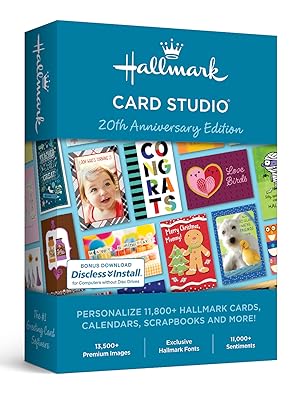
🎨11,800+ cards
✉️600+ new designs
🖼️13,500+ images
Buy anything from 5,000+ international stores. One checkout price. No surprise fees. Join 2M+ shoppers on Desertcart.
Desertcart purchases this item on your behalf and handles shipping, customs, and support to Spain.
🎉 Create, Celebrate, Connect! Unleash your inner artist with Hallmark Card Studio!
Hallmark Card Studio's new version offers an extensive library of over 11,800 cards and creative projects, including 600+ new designs, 11,000+ sentiments, and 13,500+ premium images, making it the ultimate tool for personalized card creation and celebration.



D**S
This worst software I have ever used. They need to provide customer support for this garbage.
Glad you did not post it. Reached out to Hallmark and got an immediate response. Was able to provide me with a support line contact.
R**N
DO NOT BUY - Full of bugs
I made the mistake of purchasing this item because I thought it would be faster than my usual methods of creating and printing my annual Christmas card. Boy was I ever wrong! This product is so clunky and full of bugs. If you consider your time valuable, please use other programs. There are some high quality AND FREE ones out there. Don't make the nonrefundable mistake I did.
C**Y
Pretty
An excellent program. Very easy to work with also.
S**G
Love this software!
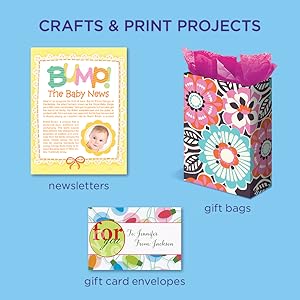
This software is really awesome. You can make alot more things than cards. If you want to make a card when you are finished you have the option to do a matching envelope! Makes a birthday card really special. I love how you can change the fonts, the text, put in clip art and also use your photos. You can personalize every card you do with the person's name on it and write on the card a special note pertaining just to them. I bought card stock paper and envelopes to use with this. When I print the card, I fold it and then use a pencil or pen to smooth the fold, and you have a perfect looking card! They look like a card you would go out and buy. Not cheap looking at all - colors are bright and they have alot of different types to choose from! Fun for birthdays! Nice for "miss you" cards or get well - thank you - all types of cards, and if you need something different you can make your own! You can do labels, business cards and all sorts of projects. Love this software! Well worth the money!
J**U
Almost a five star
I really could not give it a five star since it is not as easy to use as my old Greetings 2000, but alas, that program cannot be used anymore if I want Windows 10 or higher. I like the graphics and text options very much. It actually does too much for me. haha. In my 2000 program I searched the web for just the right pictures to put on my cards and now it is made up so nice already. I'm sure I will get to the point where I delete it's pictures and use more of my own. I was unable to use the "email" the card feature because it does not work with web based email programs, as it calls it. Most everyone uses web based (like gmail and yahoo) so is this just a ploy to get us to buy a microsoft email proram? All in all, for $29 buckeroos it is a mighty fine program. I have not used all the features yet. When you figure it costs $4.99 on up for cards these days, the program pays for itself immediately. The only problem is the money for the envelopes.
C**.
Bad vendor
program is old and it will not connect to the internet. I have called the phone number repeatedly for 3 months and requested a refund twice but get no response. Do not deal with this vendor!
W**J
You can't go wrong with Hallmark!
I don't know why I didn't get the program before. I had recently downloaded a competitor (total waste of money!) and it still did not work the way I wanted it to. With this downloaded software (which I bought last night), I was able to print out SIX Mother's Day cards, which were mailed out today, just in time for them to receive them. If you have cards that you always like to refer to, you can save them as a favorite. AND, you can customize e-cards to send electronically (takes you to Hallmark e-card web site). You can also print address labels, business cards and special projects. It also comes with an Event Planner, which shows the holidays on the calendar, which of course can be customized. There's something for almost every occasion. I wish I had explored this program sooner, I would have saved a lot of money, as this program has a much better selection. I will be getting the expansion soon.
D**A
Fun to create with!
It's ok for basic use. However, the features are not as described. You can't email your greeting card nor create a .gif to post online. At least, I couldn't, and I am tech savvy on a Windows 10 PC. If you just want to make cute cards And save a little over time, this is fine. Otherwise, go for the updated version.
Trustpilot
2 weeks ago
1 month ago