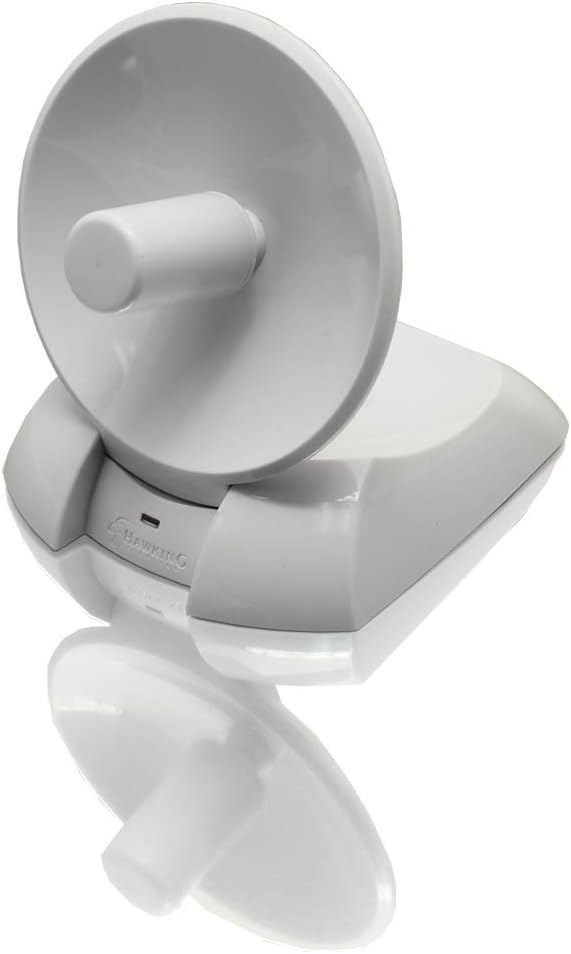
Hi-Gain Wireless-150N USB Network Dish Adapter (HWDN2)
Product ID: 12515446
🎯6dBi directional dish antenna
📶150Mbps max wireless speed
🔒WEP/WPA/WPA2 encryption support
🚀 Unlock Wi-Fi Superpowers & Never Miss a Connection Again!
The Hawking HWDN2 Hi-Gain Wireless-150N USB Network Dish Adapter delivers up to 150Mbps wireless speeds with a powerful 6dBi directional dish antenna that extends your Wi-Fi range up to 5 times farther than typical adapters. Supporting advanced security protocols (WEP, WPA, WPA2), it ensures safe connections while offering easy USB plug-and-play setup compatible with Windows and Mac OS. Ideal for professionals and students needing reliable, high-performance wireless connectivity beyond standard range.
| ASIN | B001B033DY |
| Customer Reviews | 3.9 3.9 out of 5 stars (81) |
| Date First Available | October 6, 2017 |
| Is Discontinued By Manufacturer | No |
| Item Weight | 6.7 ounces |
| Item model number | HWDN2 |
| Language | English |
| Manufacturer | Hawking Technology |
| Product Dimensions | 4.17 x 4.9 x 5.14 inches |
A**S
Perfect for when you are just out of range on campus, at home, etc.
THE NEED I am a student on a tight budget. My new apartment is adjacent to campus – one building over from an official university building. However, the campus Wi-Fi network lies just out of reach. Leaving the apartment building, even right in front of it, I am able to connect to the web with strong signal. However, within my apartment itself, there is not any campus Wi-Fi signal. Even holding my laptop computer (MacBook Air 2013) inside an open window, the campus Wi-Fi only occasionally appears as available, and then the signal is still too weak to connect. After doing some thinking about how to legally and ethically connect to the internet without having to pay for a pricey internet plan, I realized that it was likely possible to connect to the campus Wi-Fi network via an extra strong antenna or adapter of some kind. I started reading a variety of reviews online (mostly Amazon), and after determining the exact compatibility that I needed (the campus Wi-Fi is Wireless N, Hawking Tech has updated Mac OS X drivers available on the company website, etc.) as well as the most cost effective option with real potential to work (this device was only about $16 with an E-coupon, plus Prime shipping), I decided upon this model. I have not been disappointed with my decision. By placing the dish at just the right angle next to a slightly open window (the same position that I tried with my laptop itself), I am able to connect to the campus Wi-Fi stably with an average of about 80% signal strength (varying between about 65% and 95%). I have also been able to stably forward the internet connection to another device using Mac OS X's Bluetooth internet sharing feature, creating a free in-house Wi-Fi alternative. PROS •This product greatly extends Wi-Fi range. •Hawking Tech has good driver support for Macintosh OS X, although you should check on the website to see if your exact operating system is supported (currently, the drivers are officially supported for "Revision E," the model that you will likely receive, through OS X 10.10 and Windows 7 – no official Linux support). •Internet connections made with this device are stable. •Internet connections made with this device can be shared with other devices via Bluetooth, etc. CONS •Since orienting this dish adapter at a specific location and angle is so important, the cable that comes with it is too short (about 5 feet). USB extension cables will NOT work (I tried 2 different kinds). However, a longer (10 feet) USB 2.0 A Male to Mini-B 5pin Male cable has worked perfectly. •Using the (minimalist and efficient – don't worry about bloatware!) Hawking Tech connection software (called "Wireless Network Utility"), I could NOT find a way to login to the campus WPA2 Enterprise network, which requires both a username and password. The software only allows for the entry of a password, not a username (so connecting to a standard password-protected Wi-Fi network should work). However, for me, registering the adapter with IRT via its MAC address did the trick. •As others have mentioned, the dish will not stay in place at any position other than when it is fully upright. TIPS •Try placing the dish at a variety of locations and angles until you find the "sweet spot." •Order a longer USB 2.0 A Male to Mini-B 5pin Male cable at the same time as you order the device. This is the one that I ordered: Monoprice 10-Feet USB 2.0 A Male to Mini-B 5pin Male 28/24AWG Cable with Ferrite Core (Gold Plated) (105449) •Do not try to connect to a WPA2 Enterprise network that requires both a username and password. If this is the only type of connection that you need, then you should either contact Hawking Tech before you order this product to see if they have a workaround for you or contact your IRT people to see if they do. •Use this device to establish an initial internet connection, and then share that connection with other devices. OVERALL Great product. It requires some patience and tweaking (it is only for people who are at least somewhat tech-savvy), but it works. By using this device, my campus Wi-Fi signal has skyrocketed from nothing to a stable 80%. This purchase has been well worth the $20 ($16 for the adapter and $4 for the 10-foot-long USB cable).
F**R
Finally, a Vista-compatible wireless lan product that works with Vista!
My computer is located upstairs from the wireless router in my home (Linksys 802.11 type N). The signal has to go thru a wall, up the stairs and through a door. With the USB Cisco type N adapter I was using, I got poor signal strength (2 bars or less) and corresponding video streaming. My laptop's internal Broadcom adapter had even worse reception and was basically incompatible with the Linksys router due to Vista issues--hence the purchase of a Linksys USB adapter. I ordered the Hawking HWDN2 Hi Gain dish in hopes it would improve my reception. I have burned through several routers and USB adapters that claimed to be Vista compatible. And we all know what a "wonderful" product Vista is--so easy, so universally compatible with everything! Getting back to reality, with each new router or adapter or modem or software app, I had to spend hours on the phone with customer reps trying to make each and every new product work with my marvelous Vista OS. (I will be getting Windows 7 shortly!) The Hawking is amazing--it actually worked right out of the box with Vista. No hours-long calls to 877 #'s in India or Indonesia. No $9.95 customer service charges like Cisco charged me--the penalty for buying their router and linking it to a laptop with Vista. After loading the driver software and plugging the antenna in and pointing the antenna in the general direction of my router, I was on the net with close to max signal strength. The whole process took 5 minutes and it has worked very well ever since. The antenna now sees 3 times the number of local area networks my other adapters did. Video streaming (YouTube, etc.) now works much more smoothly with almost no interruptions. The software is easy to use as well. Am very pleased with this purchase. The build quality of the antenna is good--for molded plastic. The dish rotates up 90 deg. from the base. It won't withstand being dropped 4 stories onto concrete, but for sitting on a desk, it is more than rugged enough. I most strongly recommend this product. It will fix alot of reception problems. If my Linksys router goes belly up, I will definitely buy a Hawking router the next time around.
E**F
Doesn't work with Windows 7 out of the box
I just installed the HWDN2 today, and it appears to work great. I went from 3 bars with a MyEssentials USB stick adapter to the full 5 bars with the Hawking. That is through one floor, several walls, and from one end of the 2600 ft^2 house to the other. Nice job. As another test, my neighbor's network went from 2 bars up to 4 bars with the Hawking. HOWEVER, despite the box, the online sales literature, and the inside package install guide saying that Win7 is supported, it cannot be installed on Win7 (mine is 32 bit) with the in-box CD. Two solutions: if you already have a way to connect the computer to the Internet, plug in the HWDN2 and Win7 will connect to the Internet and find the appropriate device drivers. Alternatively, I contacted Hawking support and they promptly sent me the response: "Please download the win 7 driver from: [...]" Note this still means you don't get the Hawking application software installed, just the driver to make it work. Given that some others seem to consider their SW bloatware, that doesn't bother me.
Z**.
Good range, a bit problematic.
Easy to use, decent range, very very fragile, not exactly high speed. Got it for my RV, which is about 300' grin the wap a pretty decent router, works for a stupid enough lower speed connection (about 500Kbps average at this range) The cord is pretty flimsy, as is the unit itself, dish on mine won't remain upright without assistance, and the cord has to be in the sweet spot to work, but I'm still happy with the range.
Trustpilot
1 month ago
1 month ago